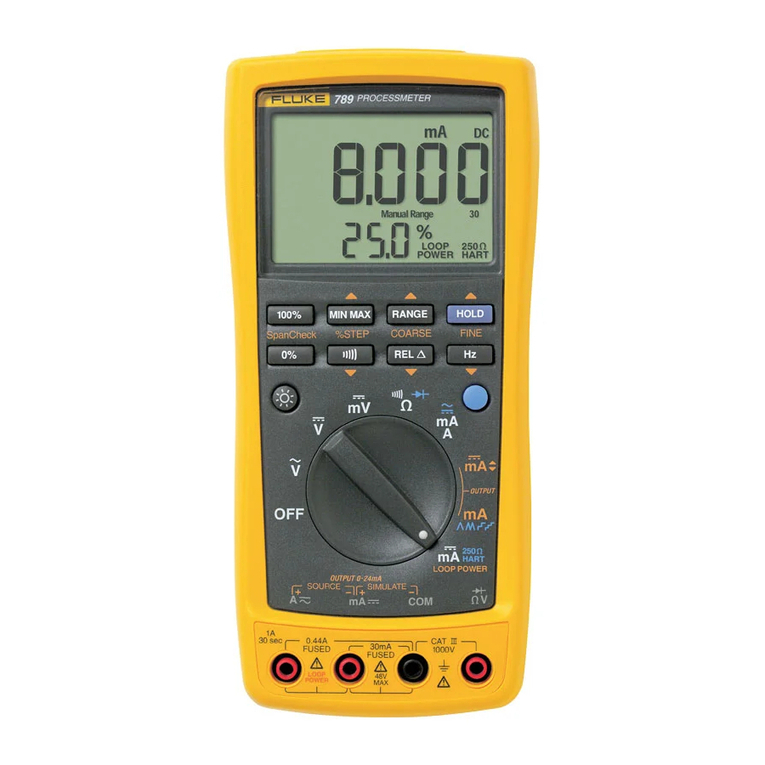
Fluke 789 Installation guide

®
789
ProcessMeter
Product Overview (E)
PN 1627890
August 2002 Rev. 2, 8/09
© 2002-2009 Fluke Corporation. All rights reserved. Printed in USA.
Specifications are subject to change without notice. All product names are
trademarks of their respective companies.

LIMITED WARRANTY AND LIMITATION OF LIABILITY
This Fluke product will be free from defects in material and workmanship for three years from the date of purchase. This war-
ranty does not cover fuses, disposable batteries, or damage from accident, neglect, misuse, alteration, contamination, or
abnormal conditions of operation or handling. Resellers are not authorized to extend any other warranty on Fluke’s behalf.
To obtain service during the warranty period, contact your nearest Fluke authorized service center to obtain return authoriza-
tion information, then send the product to that Service Center with a description of the problem.
THIS WARRANTY IS YOUR ONLY REMEDY. NO OTHER WARRANTIES, SUCH AS FITNESS FOR A PARTICULAR
PURPOSE, ARE EXPRESSED OR IMPLIED. FLUKE IS NOT LIABLE FOR ANY SPECIAL, INDIRECT, INCIDENTAL OR
CONSEQUENTIAL DAMAGES OR LOSSES, ARISING FROM ANY CAUSE OR THEORY. Since some states or countries
do not allow the exclusion or limitation of an implied warranty or of incidental or consequential damages, this limitation of
liability may not apply to you.
Fluke Corporation
P.O. Box 9090
Everett, WA 98206-9090
U.S.A.
Fluke Europe B.V.
P.O. Box 1186
5602 BD Eindhoven
The Netherlands
11/99

i
Table of Contents
Title Page
Quick Reference Information.......................................................................................... ii
Introduction .................................................................................................................... 1
Accessing the Users Manual.......................................................................................... 1
Contacting Fluke ............................................................................................................ 1
Safety Information .......................................................................................................... 2
How to Get Started......................................................................................................... 5
Getting Acquainted with the Meter ................................................................................. 6
Power-Up Options.......................................................................................................... 18
General Maintenance..................................................................................................... 19
Replacing the Batteries ............................................................................................. 19
Replacing a Fuse....................................................................................................... 21
Cleaning .................................................................................................................... 21
Replacement Parts and Accessories.............................................................................. 22
Specifications ................................................................................................................. 26

ii
Quick Reference Information Read Safety Information in the 789 Users Manual (located on CD)
Measure Buttons Output XButtons
MSelects a MIN, MAX, or AVG action % STEP Adjusts output up or down to the next 25 % step
RSelects a fixed range (hold 1 second for auto range) COARSE Adjust output up or down 0.1 mA
HToggles AutoHold FINE Adjusts output up or down 0.001 mA
GWhen in Ω, selects continuity ESets output to 0 %
rToggles relative reading (sets a relative zero point) FSets output to 100 %
hWhen in V, selects frequency counter Output mA monp Choices
J(blue) When in Ωselects diode test J(Blue) Cycles through:
J(blue) When in A, toggles ac or dc oFast repeating 0 % - 100 % - 0 % ramp
nSlow repeating 0 % - 100 % - 0 % ramp in 25% steps
pFast repeating 0 % - 100 % - 0 % ramp in 25 % steps
mSlow repeating 0 % - 100 % - 0 % ramp
Measure
Common
0 - 30 mA dc0 - 440 mA dc
(1A <30 sec.)
0 - 40 M
Continuity
(Blue)
0 - 1000 V ac
0 - 1000 V dc
V
0.5 Hz - 20 kHz
V
0 - 24 mA dc
mA
mA
mA
A
mA
A
Hz
mA
LOOP POWER
250
HART

1
ProcessMeter
Introduction
WWarning
Read “Safety Information” before using the
meter.
The Fluke 789 ProcessMeter™(referred to as “the
meter”) is a handheld, battery-operated tool for measuring
electrical parameters, supplying steady or ramping
current to test process instruments, and providing a > 24
V loop power supply. It has all the features of a digital
multimeter, plus current output capability.
If the meter is damaged or something is missing, contact
the place of purchase immediately. Contact a Fluke
distributor for information about DMM (digital multimeter)
accessories. To order replacement parts or spares, see
Table 8 near the end of this manual.
Accessing the Users Manual
The 789 Users Manual is available on the 789 CD-ROM
shipped with the ProcessMeter. If AutoRun is disabled on
your computer, from the Start menu, select Run, (CD-
Drive letter):\launch.exe <Enter>.
If the CD-ROM is damaged or you are unable to access
the product documentation from the CD-ROM, refer to the
phone numbers listed under "Contacting Fluke" or visit
www.fluke.com to obtain product documentation.
Contacting Fluke
To contact Fluke, call one of the following telephone
numbers:
•Technical Support USA: 1-800-44-FLUKE (1-800-
443-5853)
•Calibration/Repair USA: 1-888-99-FLUKE (1-888-
993-5853)
•Canada: 1-800-36-FLUKE (1-800-363-5853)
•Europe: +31 402-675-200
•Japan: +81-3-3434-0181
•Singapore: +65-738-5655
•Anywhere in the world: +1-425-446-5500

789
Product Overview
2
Or, visit Fluke's website at www.fluke.com.
To register your product, visit http://register.fluke.com.
To view, print, or download the latest manual supplement,
visit http://us.fluke.com/usen/support/manuals.
Address correspondence to:
Fluke Corporation Fluke Europe B.V.
P.O. Box 9090, P.O. Box 1186,
Everett, WA 98206-9090 5602 BD Eindhoven
U.S.A. The Netherlands
Safety Information
The Meter complies with EN61010-1:2001, ANSI/ISA
S82.01-2004, CAN/CSA C22.2 No. 1010-1:2004,
UL61010-1, Measurement Category III, 1000V, Pollution
Degree 2 and Measurement Category IV, 600V, Pollution
Degree 2.
A Warning identifies conditions and actions that pose
hazard(s) to the user; a Caution identifies conditions and
actions that may damage the meter or the equipment
under test.
International symbols used on the meter and in this
manual are explained in Table 1.
WWarning
To avoid possible electric shock or personal
injury:
•Do not use the meter if it is damaged.
Before using the meter, inspect the case.
Look for cracks or missing plastic. Pay
particular attention to the insulation
surrounding the connectors.
•Make sure the battery door is closed and
latched before operating the meter.
•Remove test leads from the meter before
opening the battery door.
•Inspect the test leads for damaged
insulation or exposed metal. Check test
lead continuity. Replace damaged test
leads before using the meter.
•Do not use the meter if it operates
abnormally. Protection may be impaired.
When in doubt, have the meter serviced.
•Do not use the Meter around explosive
gas, vapor or in damp or wet
environments.

ProcessMeter
Safety Information
3
•Use only type AA batteries, properly
installed in the meter case, to power the
meter.
•When servicing the meter, use only
specified replacement parts.
•Use caution when working above 30 V ac
rms, 42 V ac pk, or 60 V dc. Such voltages
pose a shock hazard.
•When using the probes, keep fingers
behind the finger guards on the probes.
•Connect the common test lead before
connecting the live test lead. When
disconnecting test leads, disconnect the
live test lead first.
WCaution
To avoid possible damage to meter or to
equipment under test:
•Disconnect the power and discharge all high-
voltage capacitors before testing resistance
or continuity.
•Use the proper jacks, function, and range for
the measurement or sourcing application.

789
Product Overview
4
Table 1. International Symbols
Symbol Meaning Symbol Meaning
BAlternating current JEarth ground
FDirect current IFuse
cAlternating or direct current PConforms to European Union directives
WRisk of danger. Important information. See manual. )Conforms to relevant Canadian Standards
Association directives
MBattery TDouble insulated
!
To 61010-1
2nd Edition
Meets Underwriters’ Laboratories safety
requirements ®Inspected and licensed by TÜV Product
Services
CAT III
IEC Overvoltage Category III Category III
equipment is designed to protect against transients
in equipment in fixed equipment installations, such
as distribution panels, feeders and short branch
circuits, and lighting systems in large building.
;Conforms to relevant Australian standards
CAT IV
IEC Overvoltage Category IV
CAT IV equipment is designed to protect against
transients from the primary supply level, such as an
electricity meter or an overhead or underground
utility service.
~Do not dispose of this product as unsorted
municipal waste. Go to Fluke’s website for
recycling information.

ProcessMeter
How to Get Started
5
How to Get Started
If familiar with the Fluke 80 Series DMM, read “Using the
Current Output Functions,” review the tables and figures in
“Getting Acquainted with the Meter,” and begin using the
meter.
If unfamiliar with Fluke 80 Series DMMs, or DMMs in
general, read “Measuring Electrical Parameters” in
addition to the sections referenced in the previous
paragraph.
The sections following “Using the Current Output
Functions” contain information about the power-up
options, and battery and fuse replacement instructions.
Later, use the Product Overview to refresh your memory
about the various functions and features that can be used.
mA
mA
mA
mA
mV
V
V
A
LOOP POWER
250
HART
OFF
mA
ACOM
V
Rotary
Switch
0%
RANGE HOLD
REL
MIN MAX
%STEP COARSE FINE
SpanCheck
Hz
100%
789
PROCESSMETER
Pushbuttons
Input/Output
Jacks
Display
CAT IV
600 V
anw014f.eps
Figure 1. Fluke 789 ProcessMeter

789
Product Overview
6
Getting Acquainted with the Meter
To become familiar with the features and functions of the
meter, study the following figures and tables.
•Figure 2 and Table 2 describe the input/output jacks.
•Figure 3 and Table 3 describe the input functions of
the first six rotary function switch positions.
•Figure 4 and Tables 4 and 5 describe the output
functions of the last three rotary function switch
positions.
•Figure 5 and Table 6 describe the functions of the
pushbuttons.
•Figure 6 and Table 7 explain what all the elements of
the display indicate.
13
4
2
mA
ACOM
V
CAT IV
600 V
anw001f.eps
Figure 2. Input/Output Jacks
Other manuals for 789
12
Table of contents
Other Fluke Measuring Instrument manuals

Fluke
Fluke 381 User manual

Fluke
Fluke i30s User manual

Fluke
Fluke ScopeMeter 123B User manual

Fluke
Fluke 175 User manual

Fluke
Fluke 772 Use and care manual

Fluke
Fluke CableAnalyzer DSX-5000 User manual

Fluke
Fluke DewK User manual

Fluke
Fluke 753 User manual

Fluke
Fluke 902 FC User manual

Fluke
Fluke DTX-CLT CertiFiber User manual