Operating your Electric Blanket from the APP
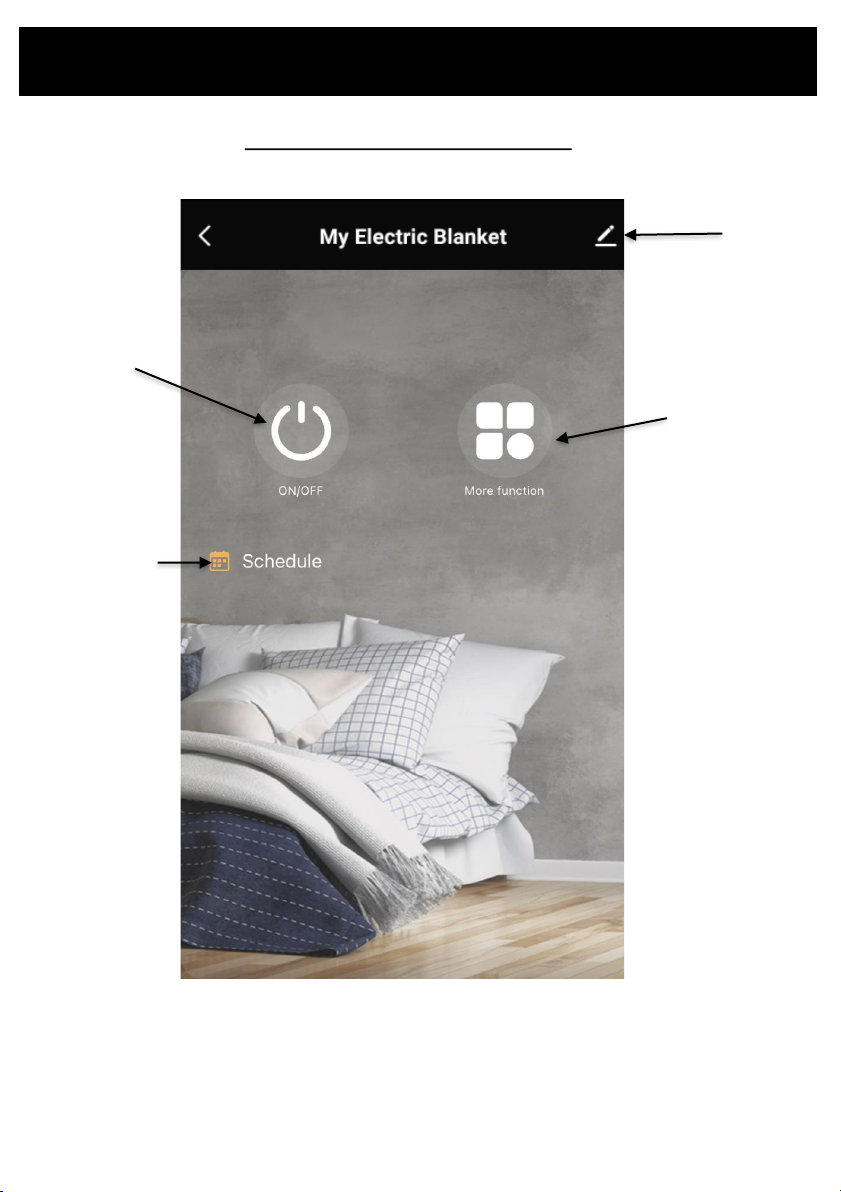
ON/OFF
•Tap to turn the blanket ON/OFF
MORE FUNCTIONS
•Tap to open the function screen
BODY TEMPERATURE SETTING
•Tap “Body” to enter the Body controls and it will turn
orange.
•Amend the heat setting function to the desired heat
setting. To turn ON, choose between 1-6. To turn off,
choose 0.
•As soon as you turn the heat setting ON, the top part of
the bed image will turn orange, indicating that the heat
is on.
COUNTDOWN TIMER
•While in Body controls, you can amend “Countdown 1”
between 1-12 hours to turn the blanket ON/OFF.
•You will see the remaining time countdown until the
timer gets to 0 and the blanket turns ON/OFF
FEET TEMPERATURE SETTING
•Tap “Feet” to enter the Feet controls and it will turn
orange.
•Amend the heat setting function to the desired heat
setting. To turn ON, choose between 1-6. To turn off,
choose 0.
•As soon as you turn the heat setting ON, the bottom
part of the bed image will turn orange, indicating that
the heat is on.
COUNTDOWN TIMER
•While in Feet controls, you can amend “Countdown 2”
between 1-12 hours to turn the blanket ON/OFF.
•You will see the remaining time countdown until the
timer gets to 0 and the blanket turns ON/OFF
Note: If you purchased a blanket with more than one controller, you will need to pair the app to both
controllors to set each side of the bed.