
GREENLINE NETcat Pro NC-500 User manual

Electronics Katrangi Trading
INSTRUCTION MANUAL
Read and understand all of the instructions and safety
information in this manual before operating or servicing this tool.
NC-500 NETcat®Pro Wiring Tester
www.ekt2.com

Description
The NETcat®Pro wiring tester is a device that verifies twisted pair and coaxial cables. It uses
TDR technology to measure distance to fault and lengths of cable. It also has a feature that
enables detection of an active network device partner (PC/HUB).
Additional features include the following:
Employs touch panel LCD with contrast adjustment and backlight.•
Tests shielded twisted pair (STP), unshielded twisted pair (UTP), and coaxial cables.•
Measures cable length using TDR technology.•
Generates four different tones for cable tracing purpose.•
Identifies active network device (PC/HUB) on 10/100/1000 BaseT networks displaying•
device capabilities.
Indicates presence of a PoE (Power over Ethernet) source device.•
Verifies wiremaps.•
Detects shorts, opens, reversed polarity, crossed pairs, and split pairs.•
Uses remote ID units for Office Identification.•
Library with typical NVP values for common cables.•
Memo Pad feature for short notes or reminders.•
Safety
Safety is essential in the use and maintenance of Greenlee tools and equipment. This instruc-
tion manual and any markings on the tool provide information for avoiding hazards and
unsafe practices related to the use of this tool. Observe all of the safety information provided.
www.ekt2.com
Electronics Katrangi Trading

NC-500 NETcat®Pro
Important Safety Information
Important Safety Information
SAFETY ALERT SYMBOL
This symbol is used to call your attention to hazards or unsafe practices which could
result in an injury or property damage. The signal word, defined below, indicates the
severity of the hazard. The message after the signal word provides information for
preventing or avoiding the hazard.
Immediate hazards which, if not avoided, WILL result in severe injury or death.
Hazards which, if not avoided, COULD result in severe injury or death.
Hazards or unsafe practices which, if not avoided, MAY result in injury or property
damage.
www.ekt2.com
Electronics Katrangi Trading

Important Safety Information
Read and understand this material before operating or servicing this
equipment. Failure to understand how to safely operate this tool could
result in an accident causing serious injury or death.
Electric shock hazard:
Do not connect this unit to AC power circuits.
Failure to observe this warning could result in severe injury or death.
www.ekt2.com
Electronics Katrangi Trading
www.ekt2.com
Electronics Katrangi Trading
NC-500 NETcat®Pro
Important Safety Information
Electric shock hazard:
Using this unit in a high frequency activated area may result in unstable or inaccurate•
readings.
Do not drop or get the unit wet as it may cause internal damage.•
Do not attempt to repair this unit. It contains no user-serviceable parts.•
Do not expose the unit to extremes in temperature or humidity. Refer to “Specifications.”•
Use this unit for the manufacturer’s intended purpose only, as described in this manual.•
Any other use can impair the protection provided by the unit.
Failure to observe these precautions may result in injury and can damage the unit.
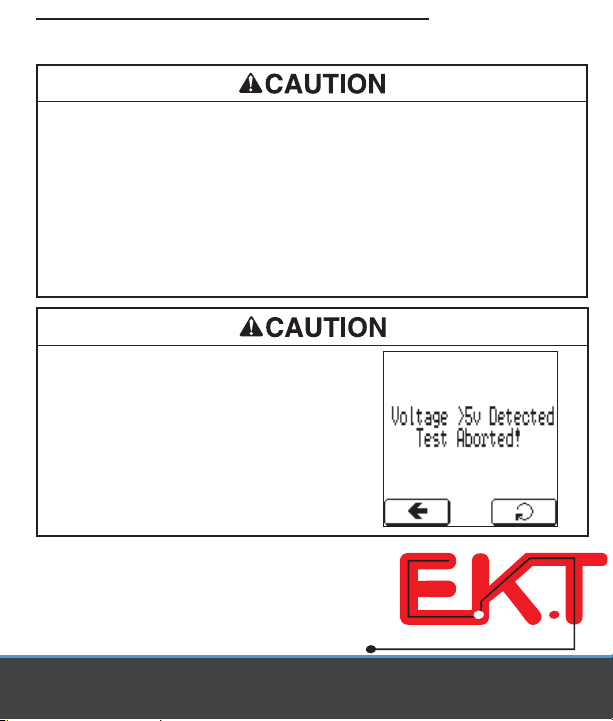
Electric shock hazard:
This unit is capable of withstanding voltage input
conditions when connected to normal telephony
equipment (i.e., 50 VDC). Testing is inhibited when
5 VDC or greater is connected across a pair with
the message shown here displayed on the screen.
Failure to observe this precaution may result in
injury and can damage the unit.

Graphical User Interface (GUI)
The unit’s interface employs a touch panel to aid ease of use. Navigation and changes can
be made in the following manner:
1.
Drag button for coarse adjustment.
2.
Fine adjustment button to decrease value.
3.
Fine adjustment button to increase value.
4.
Back button.
5.
Select/enter button.
6.
Low battery icon.*
54
32
1
6
*
The NETcat Pro requires a 9 V alkaline battery. When the battery icon is displayed, a low
battery condition exists. Using the unit with a low battery may affect the accuracy of the
test measurement.
www.ekt2.com
Electronics Katrangi Trading

NC-500 NETcat®Pro
Operation
Switch ON and OFF
To switch the NETcat Pro unit on, press the button for > 2 seconds.•
To switch the unit off, press the button for > 2 seconds.•
Factory Default Reset
To reset the unit to factory defaults, apply a long push to the button for > 5 seconds.
The reset will then initiate a touch panel calibration and zero offset calibration for all pairs.
Following this, all stored settings (i.e., NVP, language, and contrast) will be reset to factory
default settings.
Main Menu Screen
On normal power up, the unit will enter the following mode awaiting a screen selection.
www.ekt2.com
Electronics Katrangi Trading
Setup
With the SETUP MENU selected, the unit offers the following options:
Length units• can be selected by using the adjustment buttons as shown.
Auto shut off• can be adjusted from NEVER to 15 minutes duration, by using the adjust-
ment buttons as shown.
Selecting• UTP/STP allows the NVP* for the multi-pair test to be adjusted.
Selecting• Coaxial allows the NVP for the single pair/coax test to be adjusted.
Selecting• Display allows the user to change the LCD contrast level, backlight timeout, and
touch panel calibration.
Selecting• Language allows the user to change the language used within the user interface.
Selecting• Memo Pad allows the user to set a short note or reminder that is saved in
memory even when the battery is disconnected. This note is displayed each time the unit is
powered up. When the note is no longer required, it can be cleared by pressing CLR on the
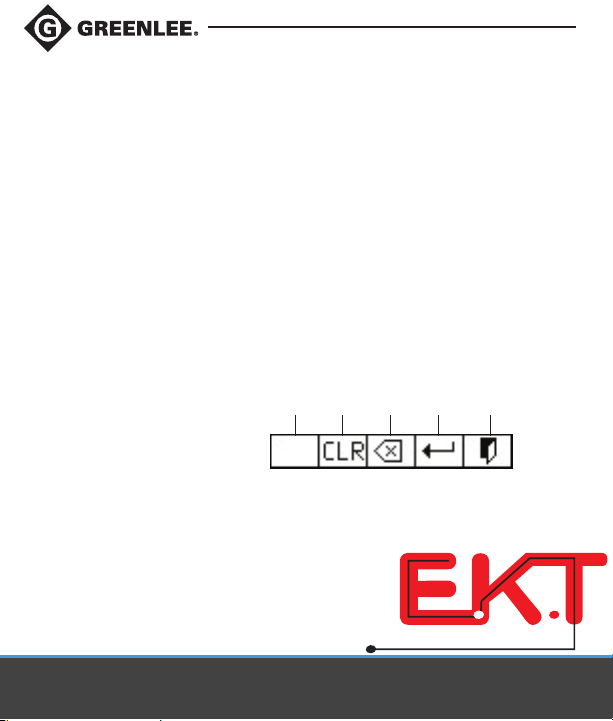
touchscreen keyboard. These characters can be added by using the touchscreen keyboard.
1.
Space
2.
Clear screen
3.
Backspace
4.
Enter/CR
5.
Exit
1 2 3 4 5
*
Nominal Velocity of Propagation (NVP) is a measure of the speed that a signal travels down
a wire with respect to the speed of light.
Operation (cont’d)
www.ekt2.com
Electronics Katrangi Trading

NC-500 NETcat®Pro
Operation (cont’d)
Calibration – NVP
In the NVP (Nominal Velocity of Propagation) calibration mode the value can be adjusted
using the adjustment bar.
Because cables have different capacitance and impedance, to get an accurate length mea-
surement, the NVP will need to be calibrated using a length of cable of the same type that
is intended for testing. Please be aware that the multi-pair test and coax test have separate
NVP values.
Retest Button
Cable NVP Lookup List: The Cable NVP library is accessed in the NVP setup screen as
shown. There are five fixed cables with typical values already stored in memory for UTP/STP
and COAX cables, respectively. The user can add to this library by pressing the + button. The
memory can hold a maximum of five user definable cables. This data is retained even when
the battery is removed.
www.ekt2.com
Electronics Katrangi Trading

Operation (cont’d)
Multi-pair test
Selecting Multi-pair test allows the user to carry out an
integrated test that checks the following attributes of a
cable:
Check for active network device.•
Check for voltages.•
Check for Office Identifiers.•
Check the wiremap.•
Length to short or open.•
A further description of the above tests is detailed in the
“Test Details” section.
One Pair/Coax Test
As above, but for one pair (i.e., coaxial cables).
www.ekt2.com
Electronics Katrangi Trading
Table of contents

















