manuals.online logo
Brands
  1. Home
  2. •
  3. Brands
  4. •
  5. GST
  6. •
  7. Smoke Alarm
  8. •
  9. GST C-9202 User manual

GST C-9202 User manual

Other GST Smoke Alarm manuals

GST I-9102 User manual

GST

GST I-9102 User manual

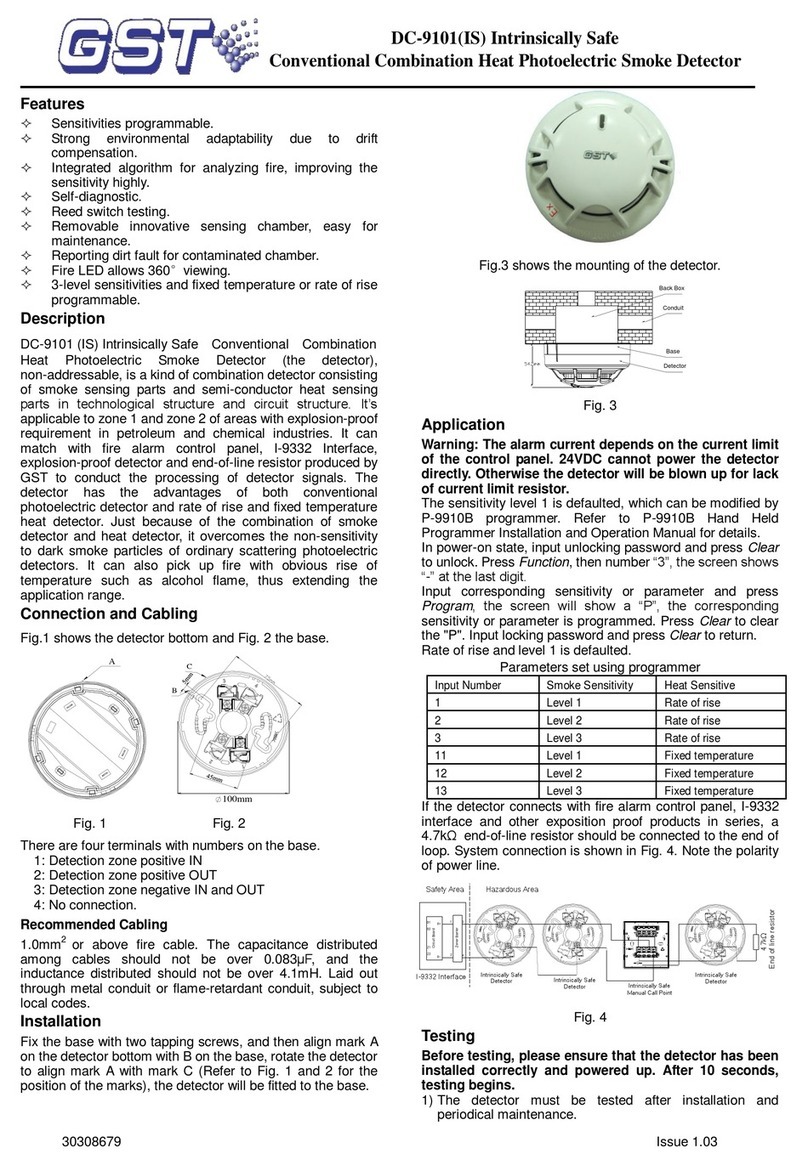
GST DC-9101 IS User manual

GST

GST DC-9101 IS User manual

GST DI-M9102 User manual

GST

GST DI-M9102 User manual

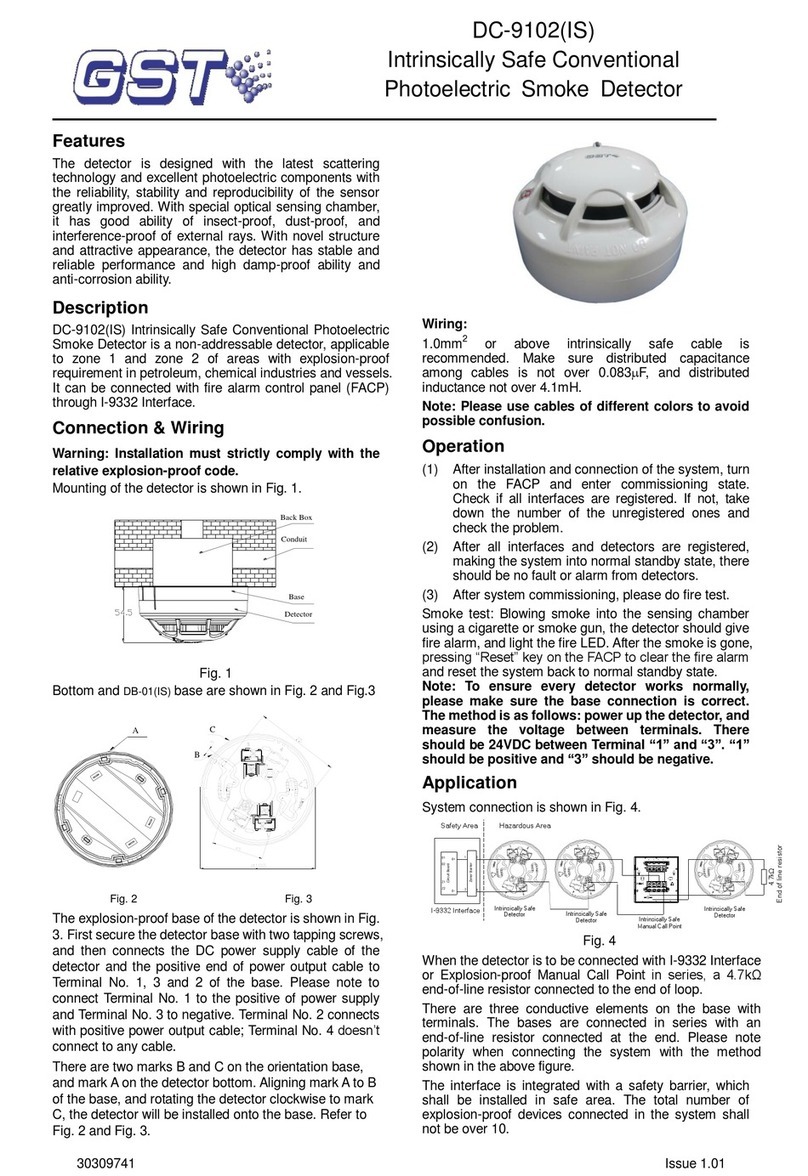
GST DC-9102 User manual

GST

GST DC-9102 User manual

GST DI-9101E User manual

GST

GST DI-9101E User manual

GST DC-9101 User manual

GST

GST DC-9101 User manual

GST S-9102R User manual

GST

GST S-9102R User manual

GST DC-9101E User manual

GST

GST DC-9101E User manual

GST DC-M9102 User manual

GST

GST DC-M9102 User manual

GST DC-9204 User manual

GST

GST DC-9204 User manual

GST C-9403 Operator's manual

GST

GST C-9403 Operator's manual

GST DI-M9101 User manual

GST

GST DI-M9101 User manual

GST C-9101 User manual

GST

GST C-9101 User manual

GST I-9102 User manual

GST

GST I-9102 User manual

GST I-9301 User manual

GST

GST I-9301 User manual

GST C-9101 User manual

GST

GST C-9101 User manual

GST I-9102 User manual

GST

GST I-9102 User manual

GST DC-M9101 User manual

GST

GST DC-M9101 User manual

GST C-9102 User manual

GST

GST C-9102 User manual

GST D Series User guide

GST

GST D Series User guide

GST DC-9101 IS User manual

GST

GST DC-9101 IS User manual

Popular Smoke Alarm manuals by other brands

Dyna-Glo DGY784BDP installation instructions

Dyna-Glo

Dyna-Glo DGY784BDP installation instructions

NOXE LUMENS Installation and user guide

NOXE

NOXE LUMENS Installation and user guide

Develco SMAZB-141 installation manual

Develco

Develco SMAZB-141 installation manual

Kidde PI2010CA user guide

Kidde

Kidde PI2010CA user guide

Honeywell 5800COMBO Installation and setup guide

Honeywell

Honeywell 5800COMBO Installation and setup guide

Gentex 7109CS installation instructions

Gentex

Gentex 7109CS installation instructions

FireAngel Thermoptek ST-622 user manual

FireAngel

FireAngel Thermoptek ST-622 user manual

teko Astra-42A user guide

teko

teko Astra-42A user guide

ELRO FS8110 instruction manual

ELRO

ELRO FS8110 instruction manual

Heiman SMOKI NS-626PHS user manual

Heiman

Heiman SMOKI NS-626PHS user manual

Siemens PE-11C installation instructions

Siemens

Siemens PE-11C installation instructions

Resolution Products RE612 CryptiX quick start guide

Resolution Products

Resolution Products RE612 CryptiX quick start guide

First Alert PC900V user manual

First Alert

First Alert PC900V user manual

Eminent EM6590 E-Domotica user manual

Eminent

Eminent EM6590 E-Domotica user manual

Ei Electronics Ei Ei168RC user manual

Ei Electronics

Ei Electronics Ei Ei168RC user manual

Carrier Kidde Quell Q301 user manual

Carrier

Carrier Kidde Quell Q301 user manual

Family Gard FG225 user manual

Family Gard

Family Gard FG225 user manual

Regin SDD-S65 instruction manual

Regin

Regin SDD-S65 instruction manual

manuals.online logo
manuals.online logoBrands
  • About & Mission
  • Contact us
  • Privacy Policy
  • Terms and Conditions

Copyright 2025 Manuals.Online. All Rights Reserved.

30302077 Issue 1.06
Features
Alarming by pressing, reset by a special key.
Providing independent normally open output
contact.
Plug-in structure.
Standard: EN 54-11.
Description
C-9202 Conventional Manual Call Point (the MCP) will
report alarm as current caused by pressing the glass,
simply connected to the loop of compatible
conventional fire alarm system from various
manufacturers. This MCP is suitable for public places.
When there is fire, pressing the glass on this MCP can
send alarm signal to compatible conventional fire
alarm control panel.
Connection and Wiring
Terminals on the MCP base are shown as Fig. 1.
O+O-
K1 K2
62
I+ I-
Fig. 1
I+, I-: Input signal, connecting with compatible control
panel or the previous MCP.
O+, O-: Output signal, connecting with the next MCP.
K1, K2: Normally open output terminals.
Recommended Wiring
0.5mm2or above fire cable, subject to local codes.
Installation
Hook the juts of the MCP body to the base, and then
press the part below the glass to combine them
completely. Finally fasten the MCP with tapping
screws (ST2.9×9.5). The mounting is shown in Fig. 2.
Note the upward arrow for the mounting direction
(Fig.1).
Fig. 2
Application
The MCP and conventional detectors can be used
together in a compatible control panel system.
The base doesn’t connect with a diode if a 4.7k
resistor is connected to the end of output loop instead
of Active End of Line Unit. The system composition is
shown in Fig. 3.
MANUAL CALL POINT
TERMINAL
RESISTOR
COMPATIBLE
CONTROL PANEL
LOOP
INITIATING +
OUTPUT
-
OUTPUT
MANUAL CALL POINT
K
2
K
1
O
-
O
+
I
-
I
+
K
2
K
1
O
-
O
+
I
-
I
+
Fig. 3
548g/01
Short Groove
Jut
Screw Hole
C-9202
Conventional Manual Call Point
30302077 Issue 1.06
The base must connect with a diode if P-9907
Active End of Line Unit is connected to the end of
output loop.
The Active End of Line Unit can be used as
the base of a conventional detector. The system
composition is shown in Fig. 4.
COMPATIBLE
CONTROL PANEL
LOOP
INITIATING
OUTPUT+
OUTPUT-
ACTIVE END OF
LINE UNIT
2
1
3
4
K
2
K
1
O
-
O
+
I
-
I
+
K
2
K
1
O
-
O
+
I
-
I
+
DIODE DIODE
MANUAL CALL POINT MANUAL CALL POINT
Fig. 4
When Active End of Line Unit is not used as
detector base, a cover should be added. The
system composition is shownin Fig. 5.
2
1
3
4
COMPATIBLE
CONTROL PANEL
LOOP
INITIATING
OUTPUT+
OUTPUT-
K
2
K
1
O
-
O
+
I
-
I
+
K
2
K
1
O
-
O
+
I
-
I
+
DIODE DIODE
MANUAL CALL POINT MANUAL CALL POINT
ACTIVE END OF
LINE UNIT
Fig. 5
Usage of the key
Vertically insert the key to the key-hole, and turn it
anticlockwise by 90, then push it with force. Turn the
key back and pull it out when the glass is rebounded,
as shown in Fig. 6.
Fig. 6
Specifications
Operating Voltage
24VDC
Standby Current
0mA
Alarm Current
≤30mA (Equivalent resistor 470/1W)
Alarm LED
Red, illuminates when alarming.
Normally Open
Output Contact
Rated value:60VDC/0.1A
Contact resistance≤100m
Type of Initiating
Part
Reusable
Initiating Mode
Pressing the glass manually
Resuming Mode
Manually resumed by a special key
Wiring
Polarity-insensitive two-wire
Ingress Protection
Rating
IP20
Environmental
Temperature
-10℃~+50℃
Relative Humidity
≤95%, non condensing
Material and Color
of Enclosure
ABS, Red (PANTONE 193C)
Dimension
(L×W×H)
97mm×100mm×45.5mm
Mounting Hole
Distance
52mm~68mm
Weight
About 144g (with base)
Limited Warranty
GST warrants that the product will be free from defects
in design, materials and workmanship during the
warranty period. This warranty shall not apply to any
product that is found to have been improperly installed
or used in any way not in accordance with the
instructions supplied with the product. Anybody,
including the agents, distributors or employees, is not
in the position to amend the contents of this warranty.
Please contact your local distributor for products not
covered by this warranty.
This Data Sheet is subject to change without notice. Please contact GST for more information or questions.
Gulf Security Technology Co., Ltd.
No. 80, Changjiang East Road, QETDZ, Qinhuangdao, Hebei, P. R. China 066004
Tel: +86 (0) 335 8502434 Fax: +86 (0) 335 8502532

service.gs[email protected]tc.com www.gst.com.cn