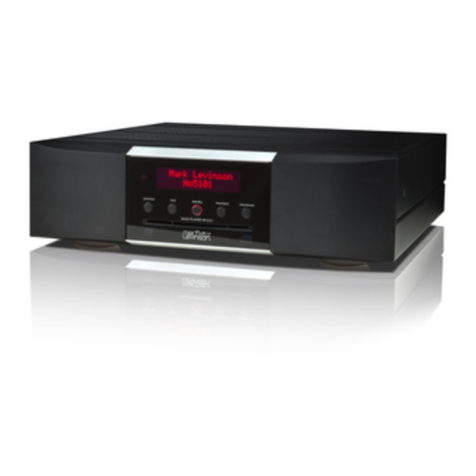
Harman JBL MP350 Classic User manual

MP350 Classic
Pg 2 – Quick Start Guide – Streaming Music Player
Pg 6 – Guide de démarrage rapide – Lecteur de Musique en Streaming
Pg 10 – Kurzanleitung – Musik-Streaming Player
Pg 14 – Snelstartgids – Streaming Muziekspeler
Pg 18 – Guida di avvio rapido – Lettore musicale con funzionalità streaming
Pg 22 – Guía de inicio rápido – Reproductor de música en tiempo real
Pg 26 –
Pg 30 –
Pg 34 –

Thank you for choosing JBL
For over 75 years, JBL has been creating best in class audio equipment for concerts, studios, theaters, and
homes around the world. JBL is the trusted choice of leading recording artists and sound engineers.
The JBL MP350 is designed to provide you with upgradable audio streaming for decades to come, all with
exceptional musicality so you get the most enjoyment from your music.
This handbook is a guide to installing and using the MP350 and includes information on its more advanced
features.
In the unlikely event of any fault, or you require technical assistance, please contact our dedicated support
teams by email using luxurysupport@harman.com, or by telephone using +44 (0) 1707 668012 or +1 888
6914 171. Or, if you simply require further information about JBL products, our network of dealers will be
happy to help you. Further information can also be found on the JBL website at JBL.com.
Package Contents
JBL MP350 Classic streaming music player
IR remote
2x AAA batteries for the remote control
Region specific power cords
Quick start guide
Safety and compliance document
Placing The Unit
Place the streamer on a level, firm surface, avoiding direct sunlight and sources of heat or damp.
Do not place the MP350 on top of an amplifier or other source of heat.
Make sure the remote-control receiver to the left of the front panel display is unobstructed, otherwise
this will impair the use of the remote-control.
Do not place your record deck on top of this unit. Record decks are very sensitive to the noise
generated by mains power supplies which will be heard as a background ‘hum’ if the record deck is
too close.
The normal function of the unit may be disturbed by strong electromagnetic interference. If this
occurs, simply reset the unit with the power button, or move the unit to another location.

Pg 3 JBL MP350 Classic QSG Multi V3
Front Panel
Rear Panel
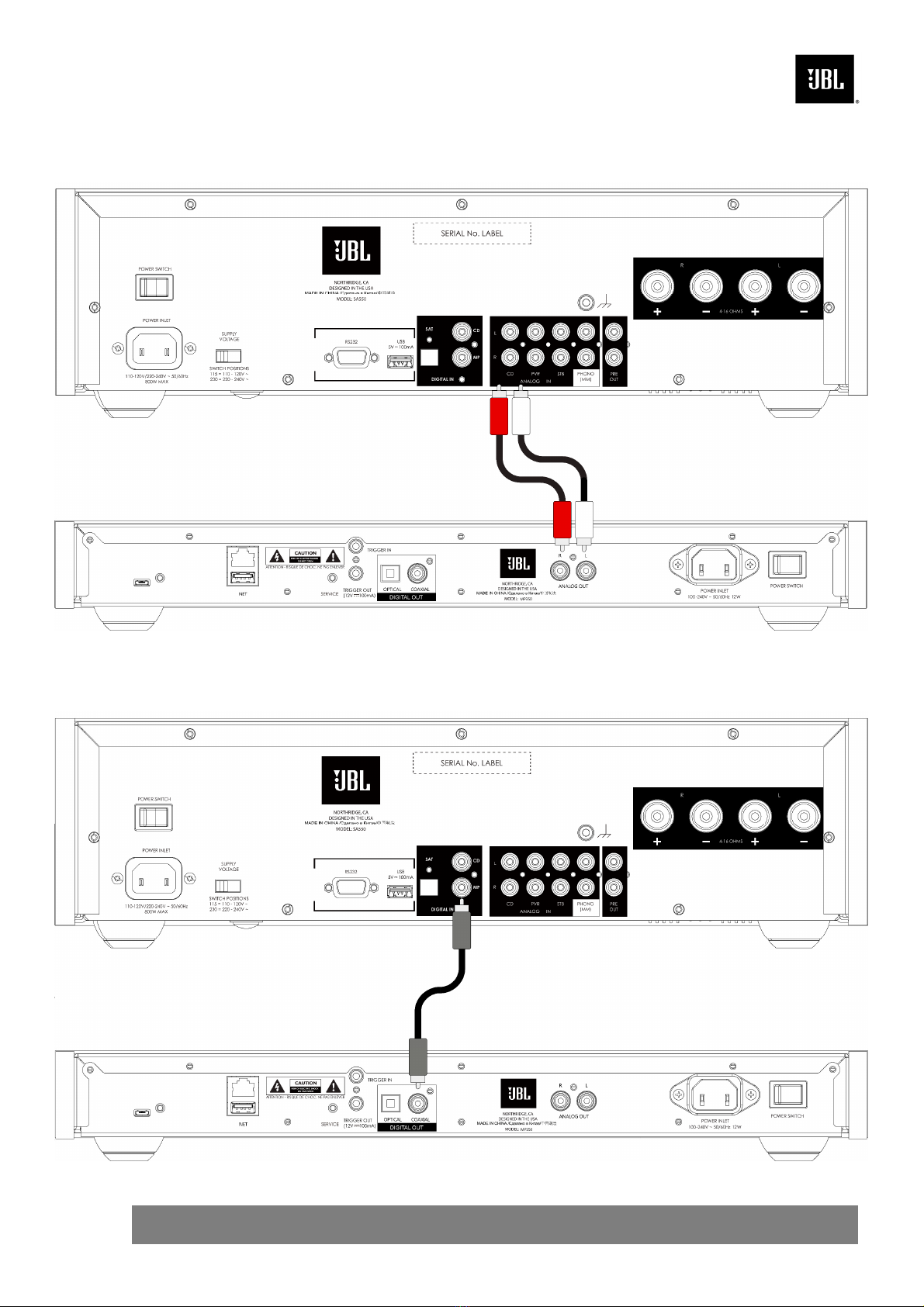
Connecting the Streamer
Network Connection
Wired Connections:
Display
Power
Input
Power Switch
Analog
Outputs
Digital
Outputs
USB Socket
Ethernet
Socket
Ethernet Socket
Connect this to your
home network using a
Cat 5e or Cat 6 cable.
Pg 4 JBL MP350 Classic QSG Multi V3
Analog Audio Connection
Digital Audio Connection
Pg 5 JBL MP350 Classic QSG Multi V3
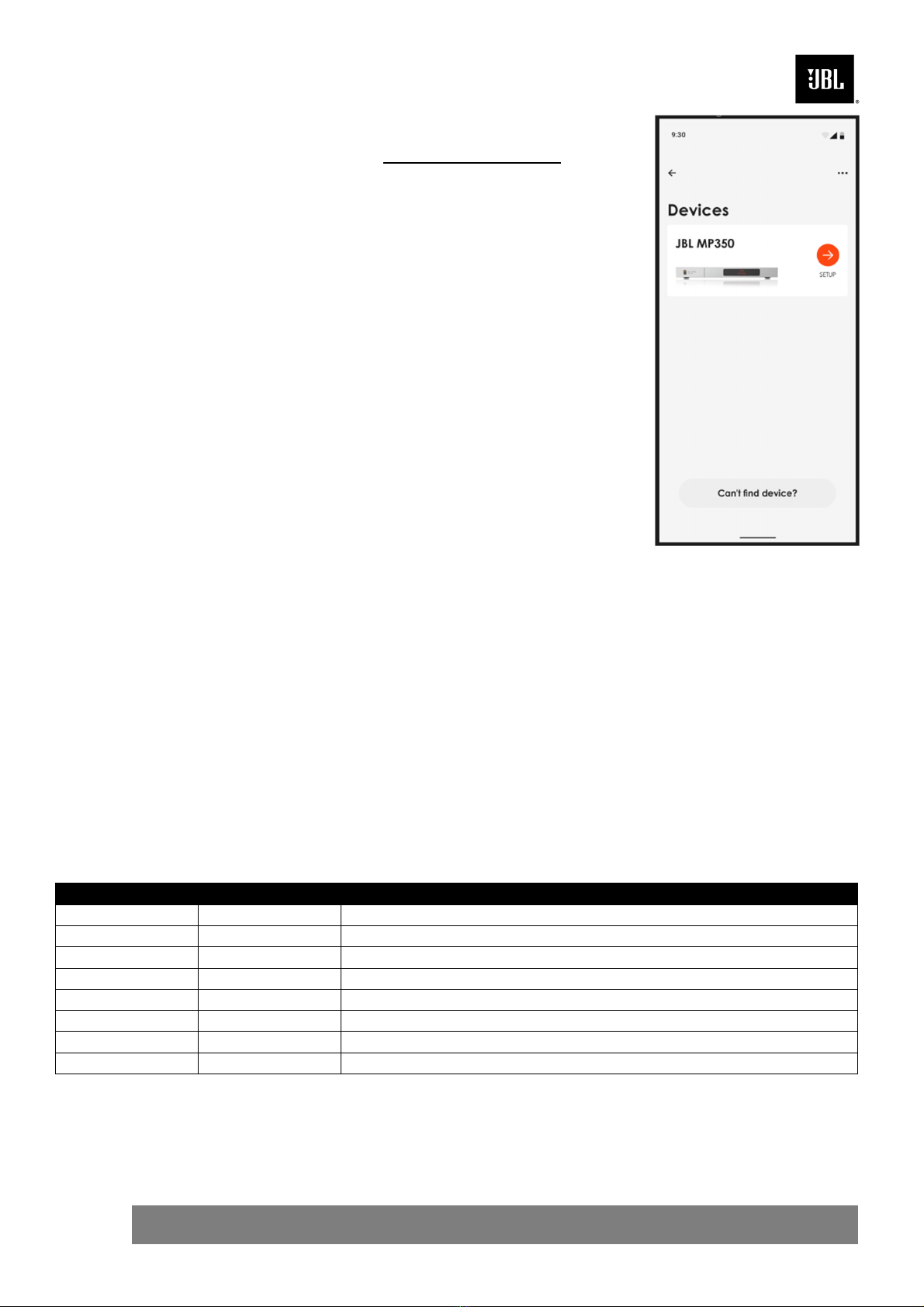
Wi-Fi Connections:
To make a Wi-Fi connection, download the
JBL Premium Audio app
to your smartphone or tablet. Links are on the front page of this manual.
Power on the JBL MP350 streamer and open the app to discover it after
the MP350 is Ready. Select it and follow the prompts to connect it to
your Wi-Fi network.
Alternatively, you can connect the JBL MP350 to your Wi-Fi network
using Apple Airplay speaker setup in the Wi-Fi settings of your Apple
device, or the Google Home app in both Android and Apple devices.
Playback
The JBL MP350 can be connected to, and play music from the following
apps and services:
Spotify Connect
Tidal Connect
Apple Airplay 2
Chromecast (requires acceptance of Google terms in the JBL
Premium App or additional setup steps in the Google Home app)
Roon (requires additional setup in Roon app)
From the JBL Premium Audio app, you can access setup favorites and
access other services including but not limited to:
Internet Radio
Podcasts
Connected USB media
Local network storage (UPnP)
Supported File Formats
File Type Bit Depths Sample Rates
AAC
16 or 24 bit
44.1, 48, 88.2 or 96 kHz
AIFF 16 or 24 bit 44.1, 48, 88.2, 96, 176.4 or 192 kHz
ALAC
16 or 24 bit
44.1, 48, 88.2, 96, 176.4 or 192 kHz
FLAC 16 or 24 bit 44.1, 48, 88.2, 96, 176.4 or 192 kHz
MP3
16 bit
44.1 or 48 kHz
OGG 16 bit 44.1 or 48 kHz
WAV
16 or 24 bit
44.1, 48, 88.2, 96, 176.4 or 192 kHz
WMA
16 bit
44.1 or 48 kHz

Merci d’avoir choisi JBL
Depuis plus de 75 ans, JBL crée le meilleur équipement audio de sa catégorie pour les concerts, les
studios, les théâtres et les foyers du monde entier. JBL est le choix de confiance des principaux artistes et
ingénieurs du son.
Le JBL MP350 est conçu pour vous fournir un streaming audio évolutif pour les décennies à venir, tout en
offrant une musicalité exceptionnelle pour que vous puissiez profiter au maximum de votre musique.
Ce manuel est un guide pour l’installation et l’utilisation du MP350 et comprend des informations sur ses
fonctionnalités les plus avancées.
Dans le cas improbable d’une panne ou si vous avez besoin d’une assistance technique, veuillez contacter
nos équipes d’assistance spécialisées par courrier électronique à l’adresse [email protected],ou
par téléphone au numéro +44 (0) 1707 668 012 ou au numéro +1 888 6914 171. Si vous souhaitez
simplement obtenir de plus amples informations sur les produits JBL, notre réseau de revendeurs se fera
un plaisir de vous aider. Vous trouverez de plus amples informations sur le site Web de JBL à l’adresse
JBL.com.
Contenu du paquet
Lecteur de musique en streaming JBL MP350 Classic
Télécommande IR
2 piles AAA pour la télécommande
Cordons d’alimentation spécifiques aux régions
Guide de démarrage rapide
Document de sécurité et de conformité
Mise en place de l’appareil
Posez le streamer sur une surface plane et ferme, en évitant de l’exposer directement aux rayons
du soleil ou à une source de chaleur ou d’humidité.
Ne posez pas le MP350 au-dessus d’un amplificateur ou de toute autre source de chaleur.
Assurez-vous que le récepteur de la télécommande sur la gauche de l’affichage de la façade n’est
pas obstrué, sinon cela peut générer l’utilisation de la télécommande.
Ne posez pas votre platine-disque sur cet appareil. Les platines sont des appareils très sensibles
aux bruits générés par l’alimentation secteur. Ces derniers peuvent s’entendre en bruit de fond si la
platine est trop proche de l’appareil.
Le fonctionnement normal de l’appareil peut être gêné par de fortes perturbations
électromagnétiques. Si cela se produit, il suffit de réinitialiser l’appareil avec le bouton
d’alimentation, ou de déplacer l’appareil dans un autre lieu.

Pg 7 JBL MP350 Classic QSG Multi V3
Façade
Panneau arrière
Connexion du streamer
Connexion réseau
Câblage:
Affichage
Entrée
d’alimentation
Bouton de
l’alimentation
Sorties
analogiques
Sorties
numériques
Prise USB
Prise
Ethernet
Prise Ethernet
Connectez-le à votre réseau
domestique à l’aide d’un
câble Cat 5e ou Cat 6

Pg 8 JBL MP350 Classic QSG Multi V3
Connexion audio analogique
Connexion audio numérique

Pg 9 JBL MP350 Classic QSG Multi V3
Connexions Wi-Fi :
Pour établir une connexion Wi-Fi, téléchargez l’application JBL
Premium Audio sur votre smartphone ou votre tablette. Les liens se
trouvent sur la première page de ce manuel.
Allumez le streamer JBL MP350 et ouvrez l’application pour la découvrir
une fois que le MP350 est prêt. Sélectionnez-le et suivez les
instructions pour le connecter à votre réseau Wi-Fi.
Vous pouvez également connecter le JBL MP350 à votre réseau Wi-Fi en
utilisant la Apple Airplay speaker setup dans les paramètres Wi-Fi de votre
appareil Apple, ou l’application Google Home sur les appareils Android et
Apple.
Lecture
Le JBL MP350 peut être connecté aux applications et services suivants
et jouer de la musique à partir de ceux-ci :
Spotify Connect
Tidal Connect
Apple Airplay 2
Chromecast (nécessite l’acceptation des conditions de Google
dans l’application JBL Premium ou des étapes de configuration
supplémentaires dans l’application Google Home)
Roon (nécessite une configuration supplémentaire dans
l’application Roon)
Dans l’application JBL Premium Audio, vous pouvez accéder aux favoris
de configuration et à d’autres services, y compris, mais sans s’y limiter :
Radio Internet
Podcasts
Support USB connecté
Stockage en réseau local (UPnP)
Formats de fichiers compatibles
Type de fichier Profondeurs binaires
Taux d’échantillonnage
AAC
16 o
u
24 bit
44.1, 48, 88.2 o
u
96 kHz
AIFF 16 ou 24 bit 44.1, 48, 88.2, 96, 176.4 ou 192 kHz
ALAC
16 o
u
24 bit
44.1, 48, 88.2, 96, 176.4 o
u
192 kHz
FLAC 16 ou 24 bit 44.1, 48, 88.2, 96, 176.4 ou 192 kHz
MP3
16 bit
44.1 o
u
48 kHz
OGG 16 bit 44.1 ou 48 kHz
WAV
16 o
u
24 bit
44.1, 48, 88.2, 96, 176.4 o
u
192 kHz
WMA 16 bit 44.1 ou 48 kHz

Danke, dass Sie sich für JBL entschieden haben
Seit über 75 Jahren stellt JBL Audiogeräte der Spitzenklasse für Konzerte, Studios, Theater und
Privathaushalte auf der ganzen Welt her. Führende Künstler und Toningenieure vertrauen auf JBL.
Der JBL MP350 wird Ihnen jahrzehntelang ein aufrüstbares Audiostreaming mit außergewöhnlicher
Musikalität bieten und sorgt dafür, dass Sie Ihre Musik auf dem höchsten Niveau genießen können.
Dieses Handbuch stellt einen Leitfaden für die Installation und Verwendung des MP350 dar und enthält
Informationen über seine erweiterten Funktionen.
Im unwahrscheinlichen Fall einer Störung oder wenn Sie technische Unterstützung benötigen, wenden Sie
sich bitte per E-Mail an luxurysuppor[email protected] oder telefonisch unter +44 (0) 1707 668012 oder +1
888 6914 171 an unser engagiertes Support-Team. Wenn Sie einfach nur weitere Informationen über JBL
Produkte benötigen, hilft Ihnen unser Händlernetz gerne weiter. Weitere Informationen finden Sie auch auf
der Website von JBL unter JBL.com.
Verpackungsinhalt
JBL MP350 Klassischer Streaming-Musik-Player
IR-Fernbedienung
2 x AAA-Batterien für die Fernbedienung
Regionalspezifische Netzkabel
Kurzanleitung
Sicherheits- und Konformitätsdokument
Gerät aufstellen
Stellen Sie den Streamer auf eine ebene, feste Unterlage und vermeiden Sie direkte
Sonneneinstrahlung sowie Wärme- oder Feuchtigkeitsquellen.
Stellen Sie den MP350 nicht auf einen Verstärker oder eine andere Wärmequelle.
Stellen Sie sicher, dass der Fernbedienungsempfänger links neben dem Display auf der Vorderseite
des Geräts nicht verdeckt wird, da dies sonst die Verwendung der Fernbedienung beeinträchtigt.
Stellen Sie keinen Plattenspieler auf dieses Gerät. Plattenspieler reagieren sehr empfindlich auf das
von Netzteilen erzeugte Rauschen, das als Hintergrundbrummen zu hören ist, wenn sich der
Plattenspieler zu dicht am Gerät befindet.
Die normale Funktion des Geräts kann durch starke elektromagnetische Interferenzen gestört
werden. Setzen Sie in diesem Fall einfach das Gerät mit der Ein-/Austaste zurück oder stellen Sie
es an einen anderen Standort auf.
Table of contents
Languages:
Other Harman Media Player manuals