1
1Product Overview
1. The information in this document is subject to change without notice. Every effort has been made
in the preparation of this document to ensure accuracy of the contents, but all statements,
information, and recommendations in this document do not constitute a warranty of any kind,
express or implied.
2. Before installing the device, read the SUN2000-(25KTL, 30KTL)-US User Manual for knowledge
of product information and safety precautions.
3. Only qualified and trained electrical technicians are allowed to operate the device. Operators
should understand the components and functioning of a grid-tied PV power system, and they
should be familiar with relevant local standards.
4. Before installing the device, check that deliverables are intact and complete against the packing
list. If any damage is found or any component is missing, contact the dealer.
5. Use insulated tools when installing the device. For personal safety, wear insulation gloves and
protective shoes.
6. When installing devices or connecting cables, use appropriate tools and take necessary
protective measures to avoid damaging devices during operation.
7. Huawei shall not be liable for any consequence caused by violation of the storage, transportation,
installation, and operation regulations specified in this document and the user manual.
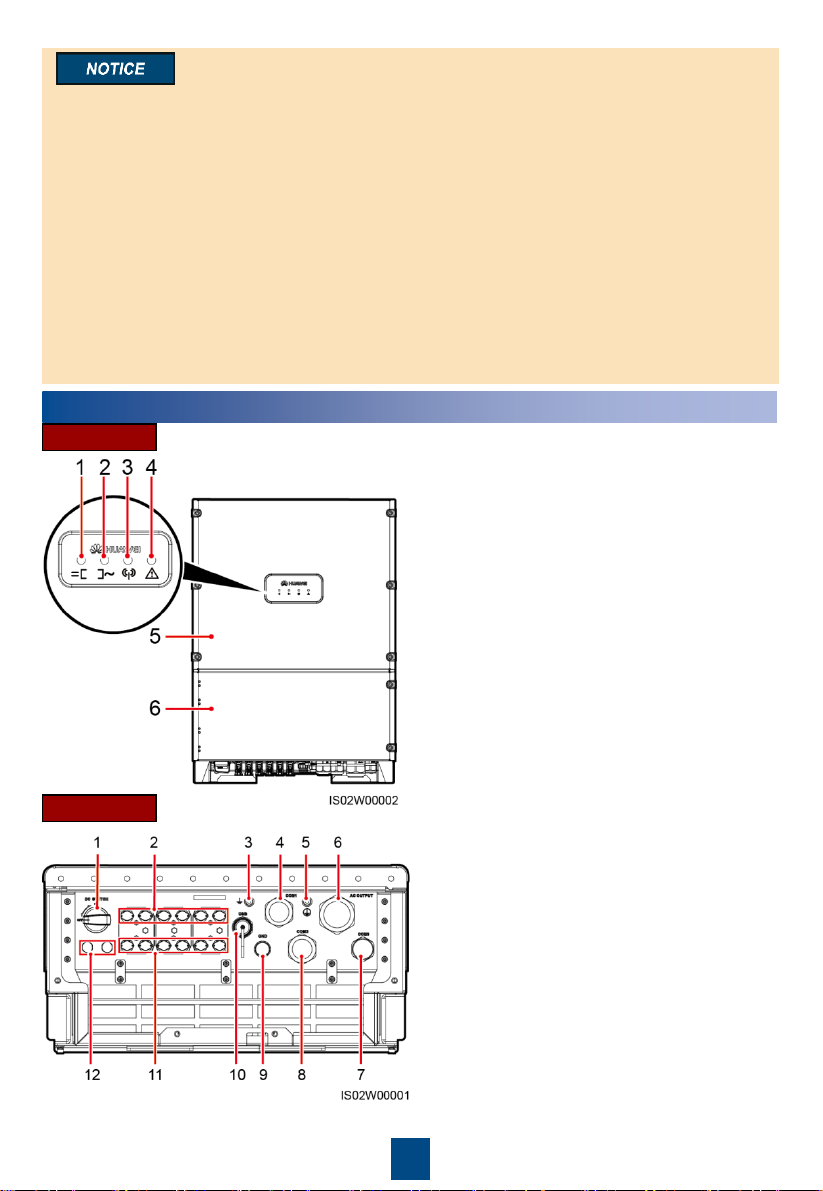
FrontView
(1) PV connection indicator
(3) Communications indicator
(4) Alarm/Maintenance indicator
(6) Maintenance compartment door
(5) Host panel
(2) Grid-tied indicator
Ports (1) DC switch (DC SWITCH)
(3) Functional ground point
(4) Waterproof cable connector (COM1)
(6) Waterproof cable connector (AC OUTPUT)
(5) Protective ground point
(7) Waterproof cable connector (COM3)
(2) Positive DC terminal (+)
(8) Waterproof cable connector (COM2)
(9) Waterproof cable connector (GND)
(10) USB port (USB)
(11) Negative DC terminal (–)
(12) Ventilation valve
Copyright © Huawei Technologies Co., Ltd.
2019. All rights reserved.