manuals.online logo
Brands
  1. Home
  2. •
  3. Brands
  4. •
  5. Human Touch
  6. •
  7. Remote Control
  8. •
  9. Human Touch NOVO User manual

Human Touch NOVO User manual

Other manuals for NOVO

6

Other Human Touch Remote Control manuals

Human Touch ThermoStretch HT-7120 User manual

Human Touch

Human Touch ThermoStretch HT-7120 User manual

Human Touch Novo XT User manual

Human Touch

Human Touch Novo XT User manual

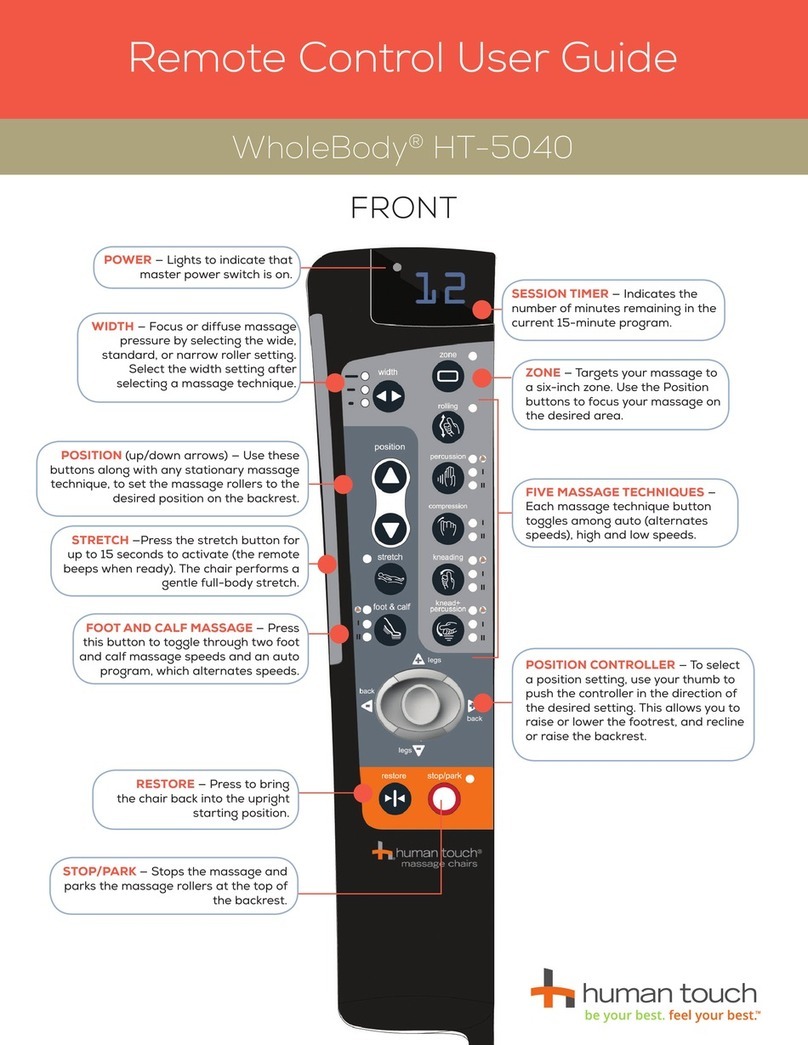
Human Touch WholeBody HT-5040 User manual

Human Touch

Human Touch WholeBody HT-5040 User manual

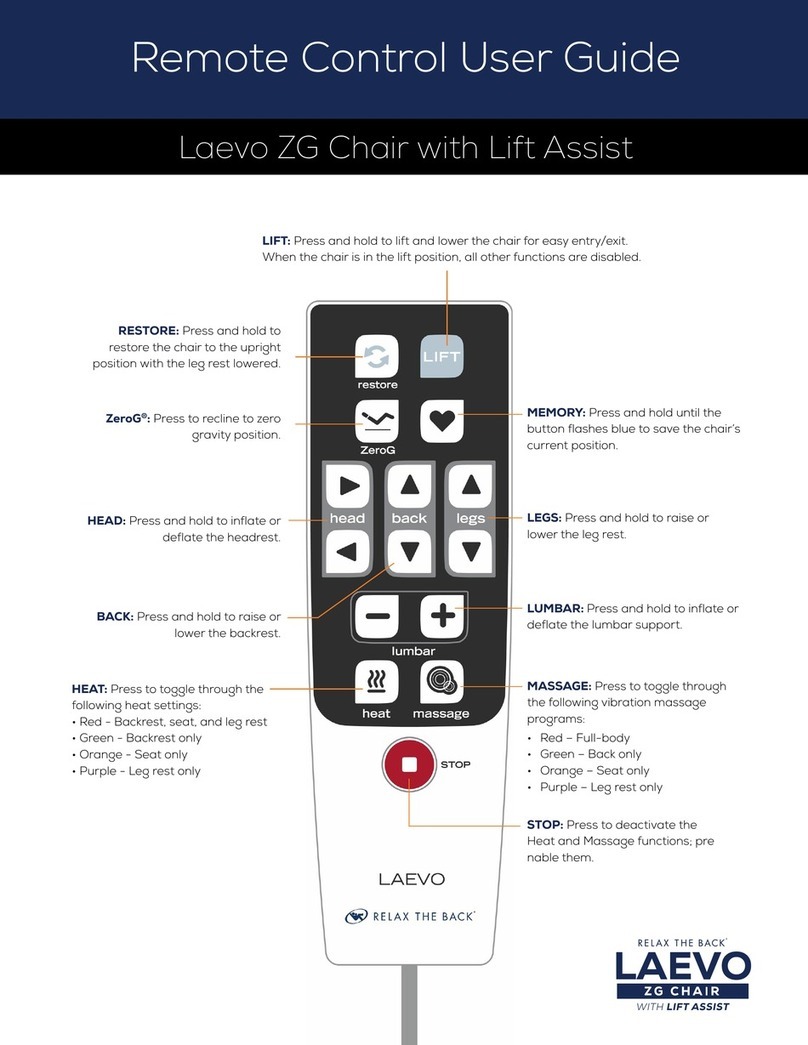
Human Touch Laevo ZG User manual

Human Touch

Human Touch Laevo ZG User manual

Human Touch WholeBody ROVE User manual

Human Touch

Human Touch WholeBody ROVE User manual

Human Touch Circa ZG Chair User manual

Human Touch

Human Touch Circa ZG Chair User manual

Human Touch WholeBody HT-275 User manual

Human Touch

Human Touch WholeBody HT-275 User manual

Popular Remote Control manuals by other brands

Bircher Reglomat RC Duo 2 user guide

Bircher Reglomat

Bircher Reglomat RC Duo 2 user guide

Emerson RCBT100 owner's manual

Emerson

Emerson RCBT100 owner's manual

BILDA Element-6 user manual

BILDA

BILDA Element-6 user manual

Absima CR7P manual

Absima

Absima CR7P manual

Mitsubishi Electric PAR-32MAAG Instruction book

Mitsubishi Electric

Mitsubishi Electric PAR-32MAAG Instruction book

RCA RCRTBL08BE1 quick start guide

RCA

RCA RCRTBL08BE1 quick start guide

US Electronics NOVARI user guide

US Electronics

US Electronics NOVARI user guide

Panasonic EUR7622KB0 Operation guide

Panasonic

Panasonic EUR7622KB0 Operation guide

Bang & Olufsen Beo4 user manual

Bang & Olufsen

Bang & Olufsen Beo4 user manual

Marantz RC101 user guide

Marantz

Marantz RC101 user guide

FUTABA 9ZAP - PART2 manual

FUTABA

FUTABA 9ZAP - PART2 manual

HR Matic HR MULTI 3 quick start guide

HR Matic

HR Matic HR MULTI 3 quick start guide

Anritsu MP1777A Operation manual

Anritsu

Anritsu MP1777A Operation manual

Niles WVC100 Installation & operating guide

Niles

Niles WVC100 Installation & operating guide

Bang & Olufsen BEO6 Getting started

Bang & Olufsen

Bang & Olufsen BEO6 Getting started

GE 94901 instruction manual

GE

GE 94901 instruction manual

FUTABA R7108SB Full manual

FUTABA

FUTABA R7108SB Full manual

Invacare G91S user manual

Invacare

Invacare G91S user manual

manuals.online logo
manuals.online logoBrands
  • About & Mission
  • Contact us
  • Privacy Policy
  • Terms and Conditions

Copyright 2025 Manuals.Online. All Rights Reserved.

Super Novo
Remote Control User Guide
MENU — Displays the main menu.
QUICK ADJUST KEY SETTINGS — Use
navigation disc to adjust:
Knead speed
Cloud Touch intensity
Foot roller speed
Massage width
Back massage intensity
LEGS EXTEND — Press and hold
to extend the footrest.
TIME REMAINING — Shows the
total amount of remaining time
in your massage session.
MASSAGE AREA — Indicates
current massage focus area.
BACK — Press and hold to recline
or incline the backrest.
CLOUD — Press to adjust the Cloud
Touch intensity. The selected intensity
displays in the upper left-hand corner
of the screen.
ZeroG®— Press and hold to
automatically position the chair in
ZeroG mode, raising your feet above
your heart for maximum spine relief.
AUTO — Displays the Auto Programs
menu. When an auto program is
running, press to toggle among the
other auto programs. The active
program displays at the top of the
status screen.
STOP/POWER/RESTORE —
• Powers on the remote.
• Select STOP to stop the massage
immediately.
• Select POWER OFF, then RESTORE
return the chair to the upright position.
LEGS — Press and hold to raise or lower
the footrest.
LEGS RETRACT — Press and
hold to retract the footrest.
HEAT — Press to toggle the heat on and
off. When the heat is on, the heat icon on
the screen displays red.
POSITION — Use to move the
massage rollers to the desired
position when enjoying a Zone or Spot
massage.
HEAT — lights red to indicate heat is on.
MASSAGE MODE — indicates current
massage mode.
PROGRAM NAME — indicates the
current massage program.
For more detailed operation instructions,
please see the Use and Care Manual.

FAST-ACCESS CONTROLS
PERFORM KEY FUNCTIONS EFFORTLESSLY
QUICK PRESS — powers on the chair/remote
QUICK DOUBLE PRESS — starts default auto program
LONG PRESS THEN RELEASE — restores the chair
Press then rotate outer silver knob to adjust
Sound Soothe volume only (do not use demo program)
Press to pause/reactivate all
massage functions
Press to toggle heat on and off
ROTATE CLOCKWISE SLIGHTLY — stepped incline
ROTATE COUNTER-CLOCKWISE SLIGHTLY — stepped recline
5’11” > taller
5’8” – 5’10”
5’3” – 5’7”
5’0” – 5’2”
8 – 9
6 – 7
3 – 5
1 – 2
Overall Height Shoulder Setting
Shoulder Height Guide
Remote Control User Guide
For more detailed operation instructions,
please see the Use and Care Manual.