manuals.online logo
Brands
  1. Home
  2. •
  3. Brands
  4. •
  5. Hypex Electronics
  6. •
  7. Amplifier
  8. •
  9. Hypex Electronics NC400 Mono kit User manual

Hypex Electronics NC400 Mono kit User manual

Other Hypex Electronics Amplifier manuals

Hypex Electronics Nilai 500 User manual

Hypex Electronics

Hypex Electronics Nilai 500 User manual

Hypex Electronics NC400 Mono Kit User manual

Hypex Electronics

Hypex Electronics NC400 Mono Kit User manual

Hypex Electronics Nilai500DIY User manual

Hypex Electronics

Hypex Electronics Nilai500DIY User manual

Hypex Electronics UcD700 User manual

Hypex Electronics

Hypex Electronics UcD700 User manual

Hypex Electronics UcD180 Stereo kit User manual

Hypex Electronics

Hypex Electronics UcD180 Stereo kit User manual

Hypex Electronics UcD400 Stereo kit User manual

Hypex Electronics

Hypex Electronics UcD400 Stereo kit User manual

Hypex Electronics UcD400 Stereo kit User manual

Hypex Electronics

Hypex Electronics UcD400 Stereo kit User manual

Hypex Electronics UCD102 User manual

Hypex Electronics

Hypex Electronics UCD102 User manual

Hypex Electronics DIYclassD PreAmplifier Basic kit User manual

Hypex Electronics

Hypex Electronics DIYclassD PreAmplifier Basic kit User manual

Hypex Electronics CHDMI-4 User manual

Hypex Electronics

Hypex Electronics CHDMI-4 User manual

Hypex Electronics FusionAmp FA251 User manual

Hypex Electronics

Hypex Electronics FusionAmp FA251 User manual

Popular Amplifier manuals by other brands

Magnat Audio EDITION FOUR Owner's manual/warranty document

Magnat Audio

Magnat Audio EDITION FOUR Owner's manual/warranty document

Inter-m PA-2000A Operation manual

Inter-m

Inter-m PA-2000A Operation manual

Yamaha TX6n owner's manual

Yamaha

Yamaha TX6n owner's manual

Peavey TNT 150 user guide

Peavey

Peavey TNT 150 user guide

Bosch LBB 1903/10 Installation and user instructions

Bosch

Bosch LBB 1903/10 Installation and user instructions

Avocent Emerge DA1200D Installer/user guide

Avocent

Avocent Emerge DA1200D Installer/user guide

Redgum RGi35 operating instructions

Redgum

Redgum RGi35 operating instructions

Cambridge Audio AXA25 user manual

Cambridge Audio

Cambridge Audio AXA25 user manual

Alpine MRP-M200 owner's manual

Alpine

Alpine MRP-M200 owner's manual

Technical Pro H1502UrBT user manual

Technical Pro

Technical Pro H1502UrBT user manual

FMS EMGZ307 operating manual

FMS

FMS EMGZ307 operating manual

Racal Instruments 5601 user manual

Racal Instruments

Racal Instruments 5601 user manual

Valcom V-1094A Technical specifications

Valcom

Valcom V-1094A Technical specifications

Cambridge Audio 851D user manual

Cambridge Audio

Cambridge Audio 851D user manual

QSC 3800 Specifications

QSC

QSC 3800 Specifications

NAD C300 owner's manual

NAD

NAD C300 owner's manual

Rotel RMB-1077 owner's manual

Rotel

Rotel RMB-1077 owner's manual

Peavey Monitor 300 Series operating guide

Peavey

Peavey Monitor 300 Series operating guide

manuals.online logo
manuals.online logoBrands
  • About & Mission
  • Contact us
  • Privacy Policy
  • Terms and Conditions

Copyright 2025 Manuals.Online. All Rights Reserved.

Hypex Electronics BV
Kattegat 8
9723 JP Groningen, The Netherlands
+31 50 526 4993
sales@hypex.nl
www.hypex.nl
NC400
Mono kit
The best DIY amplifier, now made easy!
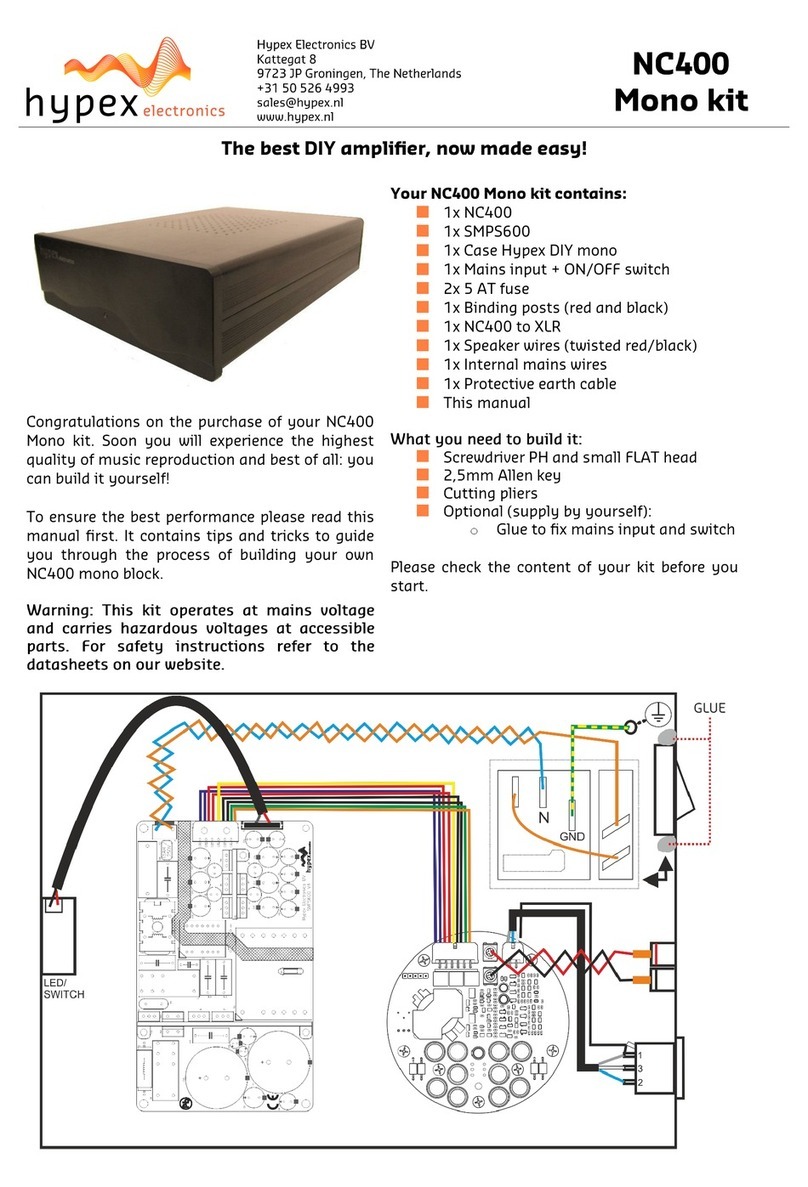
Your NC400 Mono kit contains:
1x NC400
1x SMPS600N400
1x Case Hypex DIY mono
1x Mains input + ON/OFF switch
2x 5 AT fuse
1x Binding posts (red and black)
1x XLR to NC400 cable + PCB-XLR chassis
1x Speaker wires (twisted red/black)
1x Internal mains wires
1x Protective earth cable
This manual
Congratulations on the purchase of your NC400
Mono kit. Soon you will experience the highest
quality of music reproduction and best of all: you
can build it yourself!
To ensure the best performance please read this
manual first. It contains tips and tricks to guide
you through the process of building your own
NC400 mono block.
Warning: This kit operates at mains voltage and
carries hazardous voltages at accessible parts.
For safety instructions refer to the datasheets on
our website.
What you need to build it:
Screwdriver PH and small FLAT head
2,5mm Allen key
Cutting pliers
Optional (supply by yourself):
oGlue to fix mains input and switch
Please check the content of your kit before you
start.
Let’s get started
V1D6 19-05-2020
2
Before your start assembling this kit please mind the following:
We expect you have basic knowledge of electronics and you are aware of the dangers related to electricity.
If you do not feel confident, please ask someone who has this knowledge to assist you.
1: Place amplifier and supply
Position the amplifier and power supply in your enclosure. The
cable connections will be made later. Use the spacers and bolts
supplied with the kit.
2: Place the binding post and XLR
Mount the NC400 signal wire according to the drawing, use the
screws provided with the kit.
Binding post:
The red binding post refers to the positive (+) speaker output and
the black binding post refers to the negative (-) speaker output.
Mount the binding posts accordingly. Make sure the posts are
electrically insulated from the amp case.
3: Connecting the mains to the SMPS
Mount as shown on the front page of this document
Place fuse in its holder
Connect ground correctly
Mount the ground with the M4 bolt to the bottom panel
Glue connectors and switch
3.1: Connecting LED
Connect the cable between the small LED board and the
power supply
Fits only one way
3.2: Fixing the feet
Fix the feet with a 2,5mm Allen key.
3.3: Mounting front and back panels
Use the screws and washers provided with the kit. Make
sure the spring washers are placed between all panels.
4: Connecting the SMPS to the NC400
Mount the supply cable like you can see in the picture in step 1.
The cable for the NC400 can only be placed in one way, please do
not try to force it, it either fits or is placed wrong! Use a cable tie
to fix the wires together.
5: Connecting audio wires to NC400
•Connect LS+ (red) to the red binding post.
•Connect LS- (black) to the black binding post.
ooptional: insulate with shrink sleeve.
6: Check your work!
Before you power up your amplifier you should check your work.
Check if you have followed the previous instructions cor-
rectly.
Make sure all connections are made according to the in-
structions.
Make sure all cables and wires have room to spare, there
should be no tension on the cables and wires!
Are all cables securely connected?
Tip: You can use cable ties to bind cables together.
All screws should be fixed. But remember, fixed is fixed.
Do not overdo it, you risk damaging your material.
Make sure there is no debris in the case left. Clean it care-
fully if necessary.
For further details please refer to our website: www.hypex.nl
Enjoy your new amplifier!
The Hypex Crew