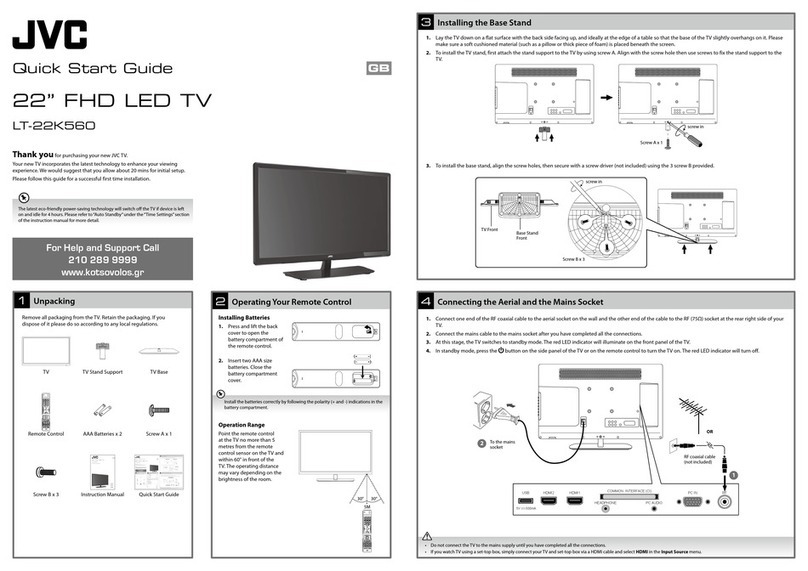
Connecting the Aerial and the Mains Socket
4
Operating Your Remote Control
2
Install the batteries correctly by following the polarity (+ and -) indications in the
battery compartment.
Turning the TV On for the First Time
5
Installing the Base Stand
3
Quick Start Guide
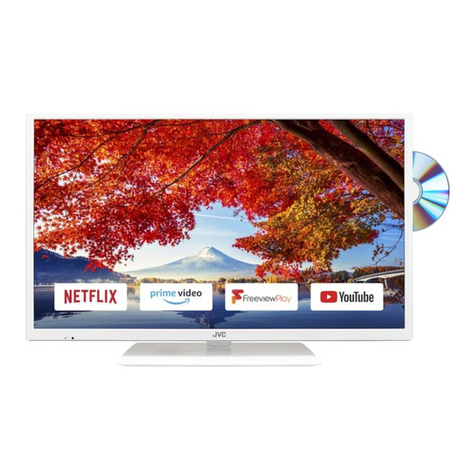
32” LED TV
LT-32C350 / LT-32C351
Thank you for purchasing your new JVC TV.
Your new TV incorporates the latest technology to enhance your viewing
experience. We would suggest that you allow about 20 mins for initial setup.
Please follow this guide for a successful first time installation.
Unpacking
1
Remove all packaging from the TV. Retain the packaging. If you
dispose of it please do so according to any local regulations.
1. Lay the TV down on a flat surface with the back side facing up, and ideally at the edge of a table so that the base of the TV slightly overhangs on it. Please
make sure a soft cushioned material (such as a pillow or thick piece of foam) is placed beneath the screen.
2. Fit the stand support onto the stand base. Ensure the stand support marking position is in right position (L = left, R = right). Align with the screw holes
then screw the support by using 4 screws A supplied.
3. Slide the stand assembly under the bottom of the TV. The stand assembly will fit snugly over the screw holes. Then screw the stand to the TV by using 4
screws B supplied.
1. Press and lift the back
cover to open the
battery compartment of
the remote control.
2. Insert two AAA size
batteries. Close the
battery compartment
cover.
TV
TV Stand Support (L) x 1
TV Stand Support (R) x 1
TV Stand Base
Remote Control
AAA Batteries x 2
Component Adapter
Cable (YPbPr)
Screw A x 4
Screw B x 4
Instruction Manual
Quick Start Guide
1. Connect one end of the RF coaxial cable to the aerial socket on the
wall and the other end of the cable to the RF (75Ω) socket at the rear
right side of your TV.
2. Connect the mains cable to the mains socket after you have
completed all the connections.
3. At this stage, the TV switches to standby mode. The red LED indicator
will illuminate on the front panel of the TV.
4. In standby mode, press the button on the right bottom panel
under the TV frame or on the remote control to turn the TV on. The
red LED indicator will turn off.
The first time you turn the TV on, it will go straight into the First Time Installation menu.
• Do not connect the TV to the mains supply until you have completed all
the connections.
• If you watch TV using a set-top box, simply connect your TV and set-top
box via a HDMI cable and select HDMI in the Input Source menu.
L
R
TV Stand
Support
(Left)
(included)
Screws A
x 2
Screws A
x 2
TV Stand
Support
(Right)
(included)
TV Stand Base Front
(Included)
TV Stand
Base Front
1
2
USB
5V 500mA
HDMI2 HDMI1(ARC) PC IN RF
COMMON INTERFACE (CI)
HEADPHONE PC AUDIO
RF coaxial cable
(not included)
OR
To the mains socket
First Time Installation
Please ensure aerial is plugged in!
Then press OK button.
OK
UK
Sweden
France
Ireland
Finland
Spain
Denmark
Portugal
Norway
Country
Channel Tuning
DTV : 3 Channel(s)
Radio : 0 Channel(s)
Data : 0 Channel(s)
36%.. . 6 68.75 MH z (DTV)
Press [MENU] to skip.
OK
English
Svenska
Dansk
Česky
Slovak
Norsk
Suomi
Please select an OSD Language
OK
Home Mode
Shop Mode
Mode Select
1. Please ensure the aerial is plugged in and then press the OK button. 4. Press the buttons to select the country where you will
operate the TV. Press the OK button to confirm.
5. DTV Channel tuning will commence. This operation may take a few
minutes. The display will show the progress of the tuning and the
number of channels found.
Target Region Setting (UK only)
During tuning your TV may have received signals from more than one
transmitter. If this has occurred the Target Region Setting screen will be
displayed. This will enable you to select the correct regional transmission
for the local news service that you require.
Press the buttons to select each option’s setting and then press the
OK button to confirm.
Country Code This will be shown as GBR for the UK.
Primary Region This will show the regional country (e.g. England, Wales,
Scotland, NI).
Secondary
Region
This will allow you to set the region for your local news
service on BBC and ITV (e.g. London, Beds and Cambs etc).
Tertiary Region
You may receive signals from more than one transmitter
within the Secondary Region, (e.g Beds and Cambs may
have Luton or Sandy Heath).
2. Press the buttons to select your desired language to be
displayed on the menu. The default on-screen menu language is set as
English. Press the OK button to confirm.
3. Press the buttons to select your desired mode and then press the
OK button. Press the button to select Ye s to confirm or the button
to select No to cancel and return to the Mode Select menu.
Home Mode Intended for use in home environment.
Shop Mode Intended for use in shop environment.
If you select Ireland as the country where you will operate the TV, a pop-
up screen will be display.You will need a 4-digit activation code for Irish
tuning. This code can be found in-store, on the back of your receipt (if
bought in Ireland), or call the customer service team / KNOWHOW.
The latest eco-friendly power-saving technology will switch o the TV if device
is left on and idle for 4 hours. Please refer to“Auto Standby” under the“Time
Settings”section of the instruction manual for more detail.
If you are going to watch TV using a set-top box, press the EXIT button on
the remote control then skip this section. Then press the INPUT button on
the remote control to select HDMI mode.
Well done, your new TV is now ready to use. You will find that there are many exciting features available. To get to know all these features, please
take some time to read the instruction manual provided with your TV.
If after reading the instruction manual you have additional questions related to the use of your TV please call:
•UKCallCentreon0344 561 1234.•IrelandCallCenteron1 890 818 575.
(QSG-LT-32C350_51-150417V1)
Screws B x 4
For Help and Support Call
UK: 0344 561 1234
Ireland: 1890 818 575