manuals.online logo
Brands
  1. Home
  2. •
  3. Brands
  4. •
  5. KEPCO
  6. •
  7. Power Supply
  8. •
  9. KEPCO HSF-1UR Series User manual

KEPCO HSF-1UR Series User manual

This manual suits for next models

24

Other KEPCO Power Supply manuals

KEPCO FPD 100W-24V User manual

KEPCO

KEPCO FPD 100W-24V User manual

KEPCO 3.3-70K User manual

KEPCO

KEPCO 3.3-70K User manual

KEPCO ERD150W-24 User manual

KEPCO

KEPCO ERD150W-24 User manual

KEPCO KLP 10-150-(2) User manual

KEPCO

KEPCO KLP 10-150-(2) User manual

KEPCO KLR SERIES Instruction Manual

KEPCO

KEPCO KLR SERIES Instruction Manual

KEPCO KT 3126-3130S User manual

KEPCO

KEPCO KT 3126-3130S User manual

KEPCO FPD 15-6.6-24 User manual

KEPCO

KEPCO FPD 15-6.6-24 User manual

KEPCO JQE 25-20MVPY-27274 User manual

KEPCO

KEPCO JQE 25-20MVPY-27274 User manual

KEPCO PAT 40-0.5 User manual

KEPCO

KEPCO PAT 40-0.5 User manual

KEPCO CC Series User manual

KEPCO

KEPCO CC Series User manual

KEPCO HSP-A Series User manual

KEPCO

KEPCO HSP-A Series User manual

KEPCO ATE 1/4 RACK User manual

KEPCO

KEPCO ATE 1/4 RACK User manual

KEPCO BOP 2KW-MG Series User manual

KEPCO

KEPCO BOP 2KW-MG Series User manual

KEPCO KLP 600-4-1.2K User manual

KEPCO

KEPCO KLP 600-4-1.2K User manual

KEPCO HSF 24-50A User manual

KEPCO

KEPCO HSF 24-50A User manual

KEPCO BOP-MG/ME 1KW User manual

KEPCO

KEPCO BOP-MG/ME 1KW User manual

KEPCO ATE 6-5 User manual

KEPCO

KEPCO ATE 6-5 User manual

KEPCO JQE Series User manual

KEPCO

KEPCO JQE Series User manual

KEPCO BOP-1KW User manual

KEPCO

KEPCO BOP-1KW User manual

KEPCO HSP Series User manual

KEPCO

KEPCO HSP Series User manual

KEPCO RKE 1500W SERIES User manual

KEPCO

KEPCO RKE 1500W SERIES User manual

KEPCO BOP 10-100GL User manual

KEPCO

KEPCO BOP 10-100GL User manual

KEPCO BOP 500DM User manual

KEPCO

KEPCO BOP 500DM User manual

KEPCO HSF 5-10-1U User manual

KEPCO

KEPCO HSF 5-10-1U User manual

Popular Power Supply manuals by other brands

Videx 520MR Installation instruction

Videx

Videx 520MR Installation instruction

Poppstar 1008821 Instructions for use

Poppstar

Poppstar 1008821 Instructions for use

TDK-Lambda LZS-A1000-3 Installation, operation and maintenance manual

TDK-Lambda

TDK-Lambda LZS-A1000-3 Installation, operation and maintenance manual

TDK-Lambda 500A instruction manual

TDK-Lambda

TDK-Lambda 500A instruction manual

Calira EVS 17/07-DS/IU operating instructions

Calira

Calira EVS 17/07-DS/IU operating instructions

Monacor PS-12CCD instruction manual

Monacor

Monacor PS-12CCD instruction manual

VOLTIMA MagicBox 15 Installation and operating instructions

VOLTIMA

VOLTIMA MagicBox 15 Installation and operating instructions

Miller Auto Deltaweld 452 owner's manual

Miller

Miller Auto Deltaweld 452 owner's manual

BCP PUOUBK How to install

BCP

BCP PUOUBK How to install

HC 2210 manual

HC

HC 2210 manual

Agilent Technologies 6032A Service manual

Agilent Technologies

Agilent Technologies 6032A Service manual

Radial Engineering SB-48UB user guide

Radial Engineering

Radial Engineering SB-48UB user guide

Puls CT5.241 installation manual

Puls

Puls CT5.241 installation manual

OCZ ZX1250W Technical specifications

OCZ

OCZ ZX1250W Technical specifications

iseg ECH 238 manual

iseg

iseg ECH 238 manual

Agilent Technologies 6631B Service manual

Agilent Technologies

Agilent Technologies 6631B Service manual

Power XXL A Series instruction manual

Power

Power XXL A Series instruction manual

HP 6200B Operating and service manual

HP

HP 6200B Operating and service manual

manuals.online logo
manuals.online logoBrands
  • About & Mission
  • Contact us
  • Privacy Policy
  • Terms and Conditions

Copyright 2025 Manuals.Online. All Rights Reserved.

©2010, KEPCO, INC 1
Data subject to change without notice 228-1675 REV 1
KEPCO, INC.  131-38 SANFORD AVENUE  FLUSHING, NY. 11355 U.S.A.  TEL (718) 461-7000  FAX (718) 767-1102
http://www.kepcopower.com  email: [email protected]
QUICK START GUIDE
KEPCO An ISO 9001 Company.
HSF
-1UR
SINGLE OUTPUT 1U
HOT SWAP PLUG-IN POWER SUPPLIES
I — INTRODUCTION
SCOPE OF MANUAL. This Quick Start Guide covers
the installation and operation of the Kepco HSF-1UR
Series of Hot Swap Plug-in Power Supplies. Full specifica-
tions are listed in the applicable 50W, 100W or 150W HSF-
1UR Operator Manual that can be downloaded from the
Kepco web site at:
www.kepcopower.com/support/opmanls.htm#hsf1ur
These power supplies are designed to be installed in
Kepco’s RA 19-1U Rack Adapter. The RA 19-1U Operator
Manual can be downloaded from the Kepco web site at:
www.kepcopower.com/support/opmanls.htm#ra19-1u
DESCRIPTION. The Kepco HSF-1UR Series power sup-
plies come in 50W, 100W and 150W power ratings. Each
group has 3.3V, 5V, 12V, 15V, 24V, 28V and 48V models
(the 28V 50W models are only available on T, X, C and Y
options). Power Factor Correction (PFC) is included in all
models.
Units may be operated with a nominal 120V a-c/240V a-c
(input voltage range 95 to 264 Va-c), 50-60 Hz (input fre-
quency range 47-440Hz (at 440Hz leakage current
exceeds UL/VDE safety spec. limit). They will also operate
on 125V to 370V d-c input. Overvoltage protection is pro-
vided. Current limiting with automatic recovery from short
circuit is featured. The 100W and 150W 3.3V units and all
50W models are convection cooled; all other 100W and
150W units use forced convection, ball-bearing fans, life
expectancy 50,000+ hours.
OPTIONS. C option (-1URC) models include a current
sensing resistor, allowing current monitoring within ±10%
(contact Kepco if greater accuracy is required). X option
models (-1URX) include the ability to turn the unit on/off
from a remote location. Y Option models (-1URY) include
both the current sensing resistor and remote on/off capabil-
ities. T Option models (-1URT for 50W Series only) weigh
less, and have improved efficiency (input current) specifica-
tions as well as one additional model (28V).
II — INSTALLATION
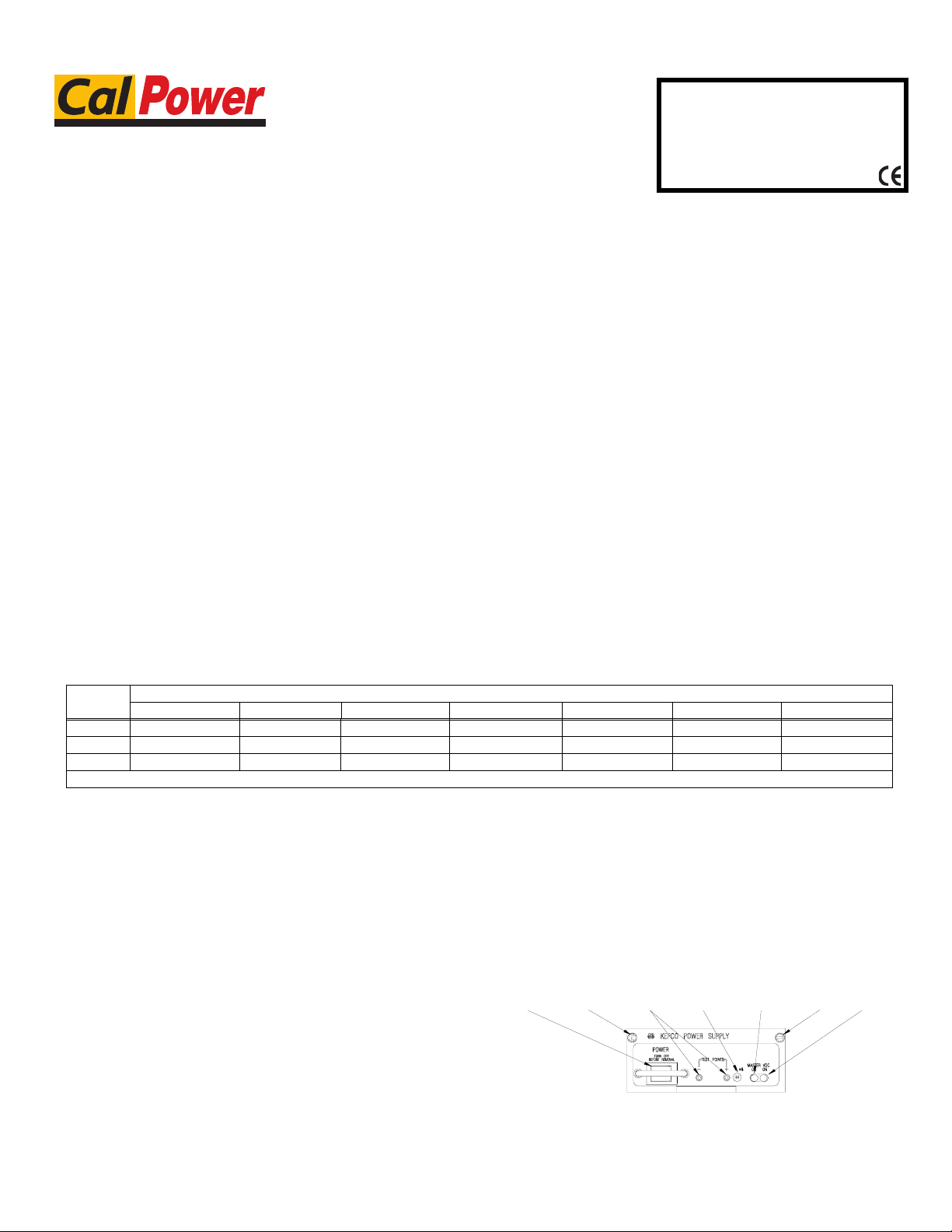
MOUNTING THE POWER SUPPLY. Refer to Figure
and insert HSF-1UR power supply in selected slot until
power supply front panel is flush with rack adapter chassis
and secure with two front panel mounting screws.
CAUTION: Do not overtighten these screws: max.
torque is 2 in.-lbs (0.23 N x m).
CONNECTIONS. All connections are made at the rear
panel of the RA 19-1U Rack Adapter (see RA 19-1U Oper-
ator Manual). Connect the load to the applicable ± DC
OUTPUT terminals. AC input power is applied via two
INPUT POWER terminal blocks: one supplying slots 2 and
4, the other supplying slots 1 and 3. Make sure to connect
the AC input Neutral, Line and Ground wires to the respec-
tive terminals of the terminal blocks.
REMOVAL. To remove a power supply, first use the
POWER switch to turn off the unit. Then loosen the two
mounting screws and extract the unit from the RA 19-1U
Rack Adapter. CAUTION: The ON/OFF switch must be
set to OFF before removing the unit from the rack
adapter.
FIGURE 1. COMPONENT LOCATIONS
TABLE 1. HSF -1UR HOT SWAP MODELS
SIZE MODELS
3.3V 5V 12V 15V 24V 28V 48V
50W HSF 3.3-10-1UR HSF 5-10-1UR HSF 12-4.3-1UR HSF 15-3.5-1UR HSF 24-2.2-1UR * HSF 48-1.1-1UR
100W HSF 3.3-25-1UR HSF 5-20-1UR HSF 12-8.4-1UR HSF 15-6.7-1UR HSF 24-4.2-1UR HSF 28-3.5-1UR HSF 48-2-1UR
150W HSF 3.3-30-1UR HSF 5-30-1UR HSF 12-12-1UR HSF 15-10-1UR HSF 24-6.3-1UR HSF 28-5.3-1UR HSF 48-3.1-1UR
* MODELS HSF 28-1.8-1URT, HSF 28-1.8-1URX, HSF 28-1.8-1URC and HSF 28-1.8-1URY only.
3043412
POWER
SWITCH
TEST
POINTS
VOLTAGE
ADJUST
TRIMMER
MASTER
ON
LED
VDC
ON
LED
MOUNTING
SCREW
MOUNTING
SCREW
NOTE: MOUNTING SCREW MAX TORQUE: 2 IN.-LBS. (0.23 N x m)
Via Acquanera, 29 22100 Como
tel. 031.526.566 (r.a.) fax 031.507.984
info@calpower.it www.calpower.it

2228-1675 REV 1 061510
KEPCO, INC.  131-38 SANFORD AVENUE  FLUSHING, NY. 11355 U.S.A.  TEL (718) 461-7000  FAX (718) 767-1102
http://www.kepcopower.com  email: hq@kepcopower.com
III — OPERATION
Turn the unit on using the front panel POWER switch (see
Figure 1). CAUTION: DO NOT repeatedly toggle the
POWER on/off switch as this may cause unit to fault.
When output voltage is available, the VDC ON LED is on
(green). For 100W and 150W 5V through 48V models the
VDC ON LED lights red to indicate a fan malfunction. The
100W 3.3V model and all 50W models use convection
cooling and do not include a fan.
While monitoring output voltage at the front panel test
points, the Output Voltage Adjust trimmer allows adjust-
ment of the output voltage.
The 3.3V models do not use forced current sharing so the
MASTER ON LED is always off. The MASTER ON LED
for 5V through 48V models goes on under any of the three
following conditions:
• Independent operation.
• Operation in a parallel master/slave configuration
to indicate which unit is the master
• Operation in a parallel master/slave configuration
to indicate that a slave unit is no longer within the
proper specifications for paralleled units. Slave 1
should be optimally adjusted to 40mV less than
master, slave 2 adjusted to 40mV less than slave
1, etc. The maximum allowable difference
between paralleled units is 250mv. The minimum
allowable difference between paralleled units is
25mV. If a slave exceeds these limits, the MAS-
TER ON light goes on.
The following features of the HSF -1UR power supplies
are covered in the applicable Operator’s manual refer-
enced on page 1.
• Parallel Operation
• Forced Current Sharing
• Current Monitoring (Option C and Y only)
• Remote On/Off (option X and Y only)
•Alarms
•Keying
FIGURE 2. HSF -1UR MODELS INSTALLED IN RA 19-1U RACK ADAPTER
3042496
PS1 PS2 PS3 PS4
Via Acquanera, 29 22100 Como
tel. 031.526.566 (r.a.) fax 031.507.984
info@calpower.it www.calpower.it