manuals.online logo
Brands
  1. Home
  2. •
  3. Brands
  4. •
  5. Lanner
  6. •
  7. Automobile Accessories
  8. •
  9. Lanner V6S User manual

Lanner V6S User manual

Other Lanner Automobile Accessories manuals

Lanner LEC-5510 User manual

Lanner

Lanner LEC-5510 User manual

Lanner LVC-2000 User manual

Lanner

Lanner LVC-2000 User manual

Lanner LVC-2001 User manual

Lanner

Lanner LVC-2001 User manual

Lanner R3S User manual

Lanner

Lanner R3S User manual

Lanner V3S User manual

Lanner

Lanner V3S User manual

Lanner V3S User manual

Lanner

Lanner V3S User manual

Popular Automobile Accessories manuals by other brands

Magneti Marelli AC161 Installation instruction

Magneti Marelli

Magneti Marelli AC161 Installation instruction

FDI uEZ GUI Start here

FDI

FDI uEZ GUI Start here

JCROffroad JT Install instructions

JCROffroad

JCROffroad JT Install instructions

Rostra VOXXElectronics 250-1930 owner's guide

Rostra

Rostra VOXXElectronics 250-1930 owner's guide

TOP VEHICLE TECH GR3FORD5 installation manual

TOP VEHICLE TECH

TOP VEHICLE TECH GR3FORD5 installation manual

Safe Fleet PRIME DESIGN AR-2000-BLK manual

Safe Fleet

Safe Fleet PRIME DESIGN AR-2000-BLK manual

Skoda Fabia Combi 5J Fitting instructions

Skoda

Skoda Fabia Combi 5J Fitting instructions

Camcar 40077 Al Mounting instructions

Camcar

Camcar 40077 Al Mounting instructions

Camcar 40089 AL Mounting instructions

Camcar

Camcar 40089 AL Mounting instructions

Impac Tradesman 2000 installation manual

Impac

Impac Tradesman 2000 installation manual

DVB OFFROAD BRSB-01 installation manual

DVB

DVB OFFROAD BRSB-01 installation manual

Safari Snorkel SS385HF installation guide

Safari Snorkel

Safari Snorkel SS385HF installation guide

ULTIMATE SPEED 279746 Assembly and Safety Advice

ULTIMATE SPEED

ULTIMATE SPEED 279746 Assembly and Safety Advice

SSV Works DF-F65 manual

SSV Works

SSV Works DF-F65 manual

ULTIMATE SPEED CARBON Assembly and Safety Advice

ULTIMATE SPEED

ULTIMATE SPEED CARBON Assembly and Safety Advice

Witter F174 Fitting instructions

Witter

Witter F174 Fitting instructions

WeatherTech No-Drill installation instructions

WeatherTech

WeatherTech No-Drill installation instructions

TAUBENREUTHER 1-336050 Installation instruction

TAUBENREUTHER

TAUBENREUTHER 1-336050 Installation instruction

manuals.online logo
manuals.online logoBrands
  • About & Mission
  • Contact us
  • Privacy Policy
  • Terms and Conditions

Copyright 2025 Manuals.Online. All Rights Reserved.

1
V6S
User Manual
Version: 1.0
Date of Release: 2019-10-08
Vehicle Computing
V6S User Manual
2
The icons are used in the manual to serve as an indication of interest topics or important messages. Below
is a description of these icons:
Note: This mark indicates that there is a note of interest and is something that you should pay
special attention to while using the product.
Warning: This mark indicates that there is a caution or warning and it is something that could
damage your property or product.
The listed websites are links to the on-line product information and technical support.
Resources
URL
Lanner
http://www.lannerinc.com
Product Resource
http://www.lannerinc.com/download-center
RMA
http://eRMA.lannerinc.com
This document is copyrighted © 2019. All rights are reserved. The original manufacturer reserves the right
to make improvements to the products described in this manual at any time without notice.
No part of this manual may be reproduced, copied, translated or transmitted in any form or by any means
without the prior written permission of the original manufacturer. Information provided in this manual is
intended to be accurate and reliable. However, the original manufacturer assumes no responsibility for its
use, nor for any infringements upon the rights of third parties that may result from such use.
Intel® , Intel® Core™are trademarks or registered trademarks of Intel Corporation or its subsidiaries in the
U.S. and/or other countries.
Microsoft Windows and MS-DOS are registered trademarks of Microsoft Corp.
All other product names or trademarks are properties of their respective owners.
3
This product has passed the CE test for environmental specifications. Test conditions for passing included
the equipment being operated within an industrial enclosure. In order to protect the product from being
damaged by ESD (Electrostatic Discharge) and EMI leakage, we strongly recommend the use of
CE-compliant industrial enclosure products.
This equipment has been tested and found to comply with the limits for a Class A digital device, pursuant to
Part 15 of the FCC Rules. These limits are designed to provide reasonable protection against harmful
interference when the equipment is operated in a commercial environment. This equipment generates,
uses and can radiate radio frequency energy and, if not installed and used in accordance with the
instruction manual, may cause harmful interference to radio communications. The operation of this
equipment in a residential area is likely to cause harmful interference in which case the user will be required
to correct the interference at his own expense.
This equipment has been tested and found to comply with the limits for a Class A digital device, pursuant to
Part 15 of the FCC Rules. These limits are designed to provide reasonable protection against harmful
interference when the equipment is operated in a commercial environment. This equipment generates,
uses, and can radiate radio frequency energy and, if not installed and used in accordance with the
instruction manual, may cause harmful interference to radio communications. The operation of this
equipment in a residential area is likely to cause harmful interference in which case users will be required to
correct the interference at their own expense.
Follow these guidelines to ensure general safety:
Keep the chassis area clear and dust-free during and after installation.
Do not wear loose clothing or jewelry that could get caught in the chassis. Fasten your tie or scarf and
roll up your sleeves.
Wear safety glasses if you are working under any conditions that might be hazardous to your eyes.
Do not perform any action that creates a potential hazard to people or makes the equipment unsafe.
Disconnect all power by turning off the power and unplugging the power cord before installing or
removing a chassis or working near power supplies
Do not work alone if potentially hazardous conditions exist.
Never assume that power is disconnected from a circuit; always check the circuit.
V6S User Manual
4
Suivez ces consignes pour assurer la sécurité générale :
Laissez la zone du châssis propre et sans poussière pendant et après l’installation.
Ne portez pas de vêtements amples ou de bijoux qui pourraient être pris dans le châssis. Attachez votre
cravate ou écharpe et remontez vos manches.
Portez des lunettes de sécurité pour protéger vos yeux.
N’effectuez aucune action qui pourrait créer un danger pour d’autres ou rendre l’équipement
dangereux.
Coupez complètement l’alimentation en éteignant l’alimentation et en débranchant le cordon
d’alimentation avant d’installer ou de retirer un châssis ou de travailler à proximité de sources
d’alimentation.
Ne travaillez pas seul si des conditions dangereuses sont présentes.
Ne considérez jamais que l’alimentation est coupée d’un circuit, vérifiez toujours le circuit. Cet appareil
génère, utilise et émet une énergie radiofréquence et, s’il n’est pas installé et utilisé conformément aux
instructions des fournisseurs de composants sans fil, il risque de provoquer des interférences dans les
communications radio.
There is risk of Explosion if Battery is replaced by an incorrect type.
Dispose of used batteries according to the instructions.
Installation only by a skilled person who knows all Installation and Device Specifications which are to be
applied.
Do not carry the handle of power supplies when moving to another place.
Please conform to your local laws and regulations regarding safe disposal of lithium BATTERY.
Disposal of a battery into fire or a hot oven, or mechanically crushing or cutting of a battery can result in
an explosion.
Leaving a battery in an extremely high temperature surrounding environment can result in an explosion
or the leakage of flammable liquid or gas.
A battery subjected to extremely low air pressure that may result in an explosion or the leakage of
flammable liquid or gas.
Risque d’explosion si la pile est remplacée par une autre d’un mauvais type.
Jetez les piles usagées conformément aux instructions.
L’installation doit être effectuée par un électricien formé ou une personne formée à l’électricité
connaissant toutes les spécifications d’installation et d’appareil du produit.
Ne transportez pas l’unité en la tenant par le câble d’alimentation lorsque vous déplacez l’appareil.
5
Electrical equipment generates heat. Ambient air temperature may not be adequate to cool equipment
to acceptable operating temperatures without adequate circulation. Be sure that the room in which you
choose to operate your system has adequate air circulation.
Ensure that the chassis cover is secure. The chassis design allows cooling air to circulate effectively. An
open chassis permits air leaks, which may interrupt and redirect the flow of cooling air from internal
components.
Electrostatic discharge (ESD) can damage equipment and impair electrical circuitry. ESD damage occurs
when electronic components are improperly handled and can result in complete or intermittent failures.
Be sure to follow ESD-prevention procedures when removing and replacing components to avoid these
problems.
Wear an ESD-preventive wrist strap, ensuring that it makes good skin contact. If no wrist strap is
available, ground yourself by touching the metal part of the chassis.
Periodically check the resistance value of the antistatic strap, which should be between 1 and 10
megohms (Mohms).
L’équipement électrique génère de la chaleur. La température ambiante peut ne pas être adéquate pour
refroidir l’équipement à une température de fonctionnement acceptable sans circulation adaptée.
Vérifiez que votre site propose une circulation d’air adéquate.
Vérifiez que le couvercle du châssis est bien fixé. La conception du châssis permet à l’air de
refroidissement de bien circuler. Un châssis ouvert laisse l’air s’échapper, ce qui peut interrompre et
rediriger le flux d’air frais destiné aux composants internes.
Les décharges électrostatiques (ESD) peuvent endommager l’équipement et gêner les circuits
électriques. Des dégâts d’ESD surviennent lorsque des composants électroniques sont mal manipulés et
peuvent causer des pannes totales ou intermittentes. Suivez les procédures de prévention d’ESD lors du
retrait et du remplacement de composants.
Portez un bracelet anti-ESD et veillez à ce qu’il soit bien au contact de la peau. Si aucun bracelet n’est
disponible, reliez votre corps à la terre en touchant la partie métallique du châssis.
Vérifiez régulièrement la valeur de résistance du bracelet antistatique, qui doit être comprise entre 1 et
10 mégohms (Mohms).
Mounting Installation Precaution
Environment:
Do not install and/or operate this unit in any place that flammable objects are stored or used in.
If installed in a closed or multi-unit rack assembly, the operating ambient temperature of the rack
environment may be greater than room ambient. Therefore, consideration should be given to installing
the equipment in an environment compatible with the maximum ambient temperature (Tma) specified

V6S User Manual
6
by the manufacturer.
Installation of the equipment (especially in a rack) should consider the ventilation of the system’s intake
(for taking chilled air) and exhaust (for emitting hot air) openings so that the amount of airflow required
for safe operation of the equipment is not compromised.
To avoid a hazardous load condition, be sure the mechanical loading is even when mounting.
Consideration should be given to the connection of the equipment to the supply circuit and the effect
that overloading of the circuits might have on over-current protection and supply wiring. Appropriate
consideration of equipment nameplate ratings should be used when addressing this concern.
Reliable earthing should be maintained. Particular attention should be given to supply connections
other than direct connections to the branch circuit (e.g., use of power strips).
Installation & Operation:
The installation of this product must be performed by trained specialists; otherwise, a non-specialist
might create the risk of the system’s falling to the ground or other damages.
Lanner Electronics Inc. shall not be held liable for any losses resulting from insufficient strength for
supporting the system or use of inappropriate installation components.
Before turning on the device, ground the grounding cable of the equipment. Proper grounding
(grounding) is very important to protect the equipment against the harmful effects of external noise and to
reduce the risk of electrocution in the event of a lightning strike. To uninstall the equipment, disconnect
the ground wire after turning off the power. A ground wire is required and the part connecting the
conductor must be greater than 4 mm2 or 10 AWG.
Avant d’allumer l’appareil, reliez le câble de mise à la terre de l’équipement à la terre.
Une bonne mise à la terre (connexion à la terre) est très importante pour protéger l’équipement contre
les effets néfastes du bruit externe et réduire les risques d’électrocution en cas de foudre.
Pour désinstaller l’équipement, débranchez le câble de mise à la terre après avoir éteint l’appareil.
Un câble de mise à la terre est requis et la zone reliant les sections du conducteur doit faire plus de 4
mm2 ou 10 AWG.
7
Loosen the screw of the earthing point.
Connect the grounding cable to the ground.
The protection device for the power source must provide 30 A
current.
This protection device must be connected to the power source
before power.
The cable hould 16 AWG
Desserrez la vis du terminal de mise à la terre.
Branchez le câble de mise à la terre à la terre.
L’appareil de protection pour la source d’alimentation
doit fournir 30 A de courant.
Cet appareil de protection doit être branché à la source
d’alimentation avant l’alimentation.
Le câble doit 16 AWG
This equipment must be grounded.
Cet équipement doit être mis à la terre.
Suitable for installation in Information Technology Rooms in accordance with Article 645 of the National
Electrical Code and NFPA 75.
Peut être installé dans des salles de matériel de traitement de l'information conformément à l'article 645
du National Electrical Code et à la NFPA 75.
The machine can only be used in a restricted access location and has installation instructions by a skilled
person.
Les matériels sont destinés à être installés dans des EMPLACEMENTS À ACCÈS RESTREINT.
V6S User Manual
8
Package Content......................................................................................................................... 10
Ordering Information ................................................................................................................. 11
System Specifications ................................................................................................................. 11
Front Panel ................................................................................................................................. 13
Rear Panel ................................................................................................................................. 14
Block Diagram............................................................................................................................. 15
Internal Jumpers & Connectors.................................................................................................. 17
Installing the Disk Drive.............................................................................................................. 22
Installing 4G Module .................................................................................................................. 24
Installing SIM Cards .................................................................................................................... 25
Enter BIOS Setup ........................................................................................................................ 26
Main............................................................................................................................................ 27
Advanced .................................................................................................................................... 28
Chipset........................................................................................................................................ 55
Security....................................................................................................................................... 70
Boot ............................................................................................................................................ 73
Save and Exit............................................................................................................................... 74
9
Connecting the Devices .............................................................................................................. 76
Power States Cycle ..................................................................................................................... 77
Using the Ignition System Manager (ISM).................................................................................. 78
Warranty Policy .......................................................................................................................... 79
RMA Service................................................................................................................................ 79
RMA Service Request Form ........................................................................................................ 80
V6S User Manual
10
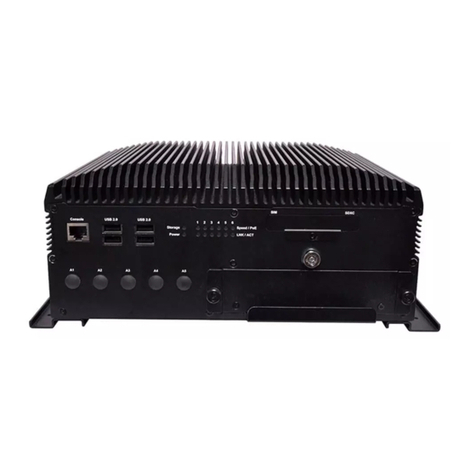
V6S is the next-generation rugged, fanless vehicle surveillance NVR. It is designed for public transit video
surveillance, recording and analytics. V6S, being the robust vehicle surveillance NVR, can operate under
wide temperature range (-20~60°C), indicating its excellent reliability in a harsh environment.
V6S is powered by the 7th Generation 14 nm Intel® Core™ i7-7600U SoC (formerly Kaby Lake), offering
power-efficient performance and accelerated graphics performance for vehicle computing needs.
Designed for mobile surveillance, the new V6S series offers 1 x GbE RJ45 ports plus 10 x RJ-45 PoE ports for
IP camera connection, and two removable 2.5” HDD/SSD drive bays for the storage of recorded footages.
For wireless connectivity, V6S is internally built with 1 x full-sized Mini-PCIe with dual SIM card reader for
LTE/ WiFi, and 1x external M.2 3042 with dual SIM card readers, which allows 4G/LTE module to be
removable externally.
Intel® Core™ i7-7600U Dual Cores Processor
CE/FCC and E-mark certified, MIL-STD-810G anti-vibration & shock qualified. and E-mark certified

10x PoE and 1x GbE RJ45 ports
2x External Removable 2.5” HDD/SDD drive bays
1 x full-sized Mini-PCIe with dual SIM card reader for LTE/ WiFi, and 1x external M.2 3042 with dual SIM
card readers
2x COM, 2x USB 3.0, 2xUSB 2.0, 6x DI/DO, optional CAN bus, Audio, DVI, VGA
Wallmount kit
Fanless rugged design
Your package contains the following items:
1x V6S Vehicle Computer
1x Pack of Screws
1x DC to DC Adapter
Note: If you should find any components missing or damaged, please contact your dealer
immediately for assistance.