7
ENGLISH
Receiving a Call
While on the
Phone
You can receive another call while on the phone by pressing and holding the Call button
for 1 second.
The existing call switches to a call waiting status. Press and hold the Call button again for
1 second to switch back to the previous call.
Call button to hang up in the middle of a call or to hang up both calls.
(It works differently depending on the mobile phone settings.)
Rejecting a Call Press and hold the Call button for 2 seconds.
Enabling/
Disabling Mute
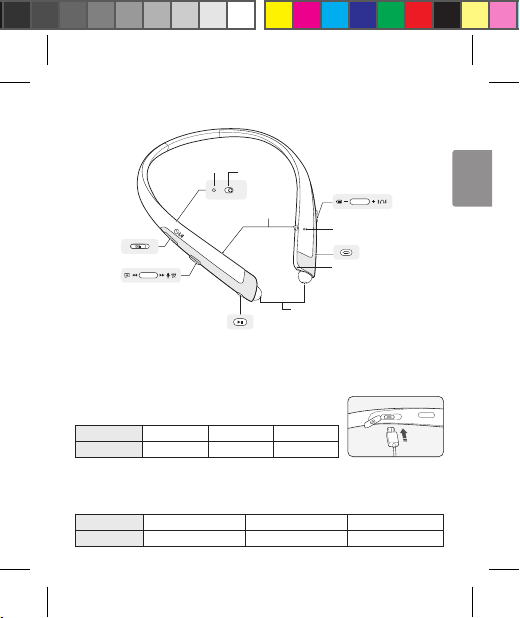
Simultaneously slide and hold the Volume jog switch in the volume up (+) direction, and
slide the Previous/Next jog switch in the position for 1 second.
CAUTION: Do not disable/enable the mute while driving, as you need to use both hands.
NOTE: The Voice Dial and Redial functions work on the Main Connected Device or on the device on which
you made the last call. (The Voice Dial and Redial functions may work differently depending on the
mobile phone being used.)
Playing Music
Functions Description
Play Play/Pause/Stop button.
Music will play from the activated player of the connected device.
Pause Play/Pause/Stop button.
Stop Press and hold the Play/Pause/Stop button for 1 second.
Play Previous/Next
Song Previous/Next jog switch in the or position.
Fast Rewind/Forward Slide the Previous/Next jog switch in the or direction until you reach the
desired section of the track.
Change Equalizer Mode
Play/Pause/Stop button twice
. Changes modes with a beeping
sound in the following order: Bass Boost (default) > Tone Platinum > Treble Boost.
NOTE: The Tone Platinum mode is an EQ mode optimized for the BA unit used
in HBS-1100.