10
6 BASIC FUNCTIONS
Tt will be necessary to go to different menus to modify some parameters.
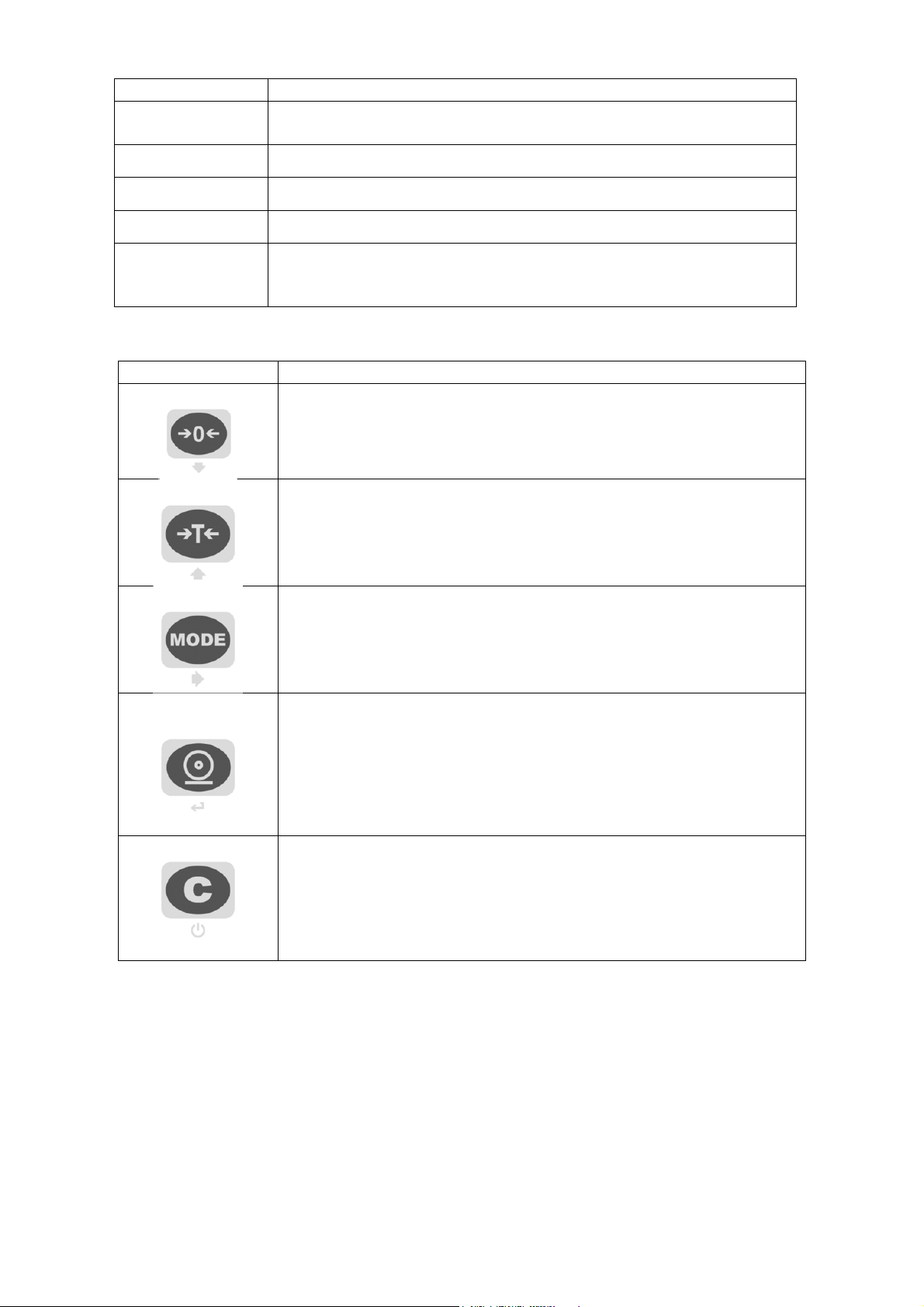
To enter into these menus , turn on the unit, press the ->0<- key when 07.xx is displayed, after 09.01, DGT
and the version of the software are displayed, press ->T<- key during the countdown the display shows the
first parameter “TyPE”.
6.1 ZERO SCALE
By pressing the ->0<- key, it is possible to zero a gross weight value which is within +/- 2% of the capacity;
after the zeroing, the display shows 0 weight and the LED ->0<- is turned on.
6.2 TARE OPERATIONS
SEMI-AUTOMATIC TARE
By pressing the ->T<- key any weight value present on the display is tarred: the display shows “tArE” for
an instant and then 0 (net weight); the relative keys turn on.
In any case a new tare operation cancels and substitutes the previous one.
NOTE: The semiautomatic tare will be acquire only if the weight is AT LEAST A DIVISION, STABLE
(instability ~led off) and VALID (in other words, the OVERLOAD condition should not be created).
ENTERING THE MANUAL TARE FROM KEYBOARD
Press ->T<- for a few seconds: the display shows “– tM –“ and then "000000". Enter the desired value
using the following keys:
->0<- decreases the blinking digit.
->T<- increases the blinking digit.
MODE selects the digit to be modified (blinking); the scrolling of the digits takes place from left to
right.
Cif pressed for an instant it quickly zeros the present value; if pressed at length it allows to
return to weighing without saving the changes made.
NOTE: With the IPE50P one enters the value directly with the numeric keyboard
Confirm with the ↵key; the value will be subtracted from the weight present on the plate and the relative
pilot lights will turn on.
If the entered value is not a multiple of the scale’s minimum division, it will be rounded up if it is
equal or greater than half of the division, or rounded down if lower.
In any case a new tare operation cancels and substitutes the preceding one.
CANCELLING A TARE
One can manually cancel the tare value in different ways:
- unload the scale and press the ->0<- or ->T<- key.
- carry out the tares in deduction, partially unloading the scale and pressing ->T<- to zero the display.
- press C without unloading the scale.
- enter a manual tare equal to 0.
NOTE: it is possible to automatically cancel the tare value; see the section
“LOCKED/UNLOCKED/DISABLED TARE SELECTION”.
SELECTION OF LOCKED / UNLOCKED / DISABLED TARE
Normally, when a tare value is entered (automatic, manual, or from storage) by unloading the scale plate,
the display shows the tare value with a negative sign (LOCKED TARE). For one’s convenience it is also
possible to choose that the tare value cancels itself automatically each time that the scale is unloaded
(UNLOCKED TARE); or disable the tare functions.
With the UNLOCKED tare:
In case of SEMIAUTOMATIC TARE the net weight, before unloading the scale, may also be 0.