Quick Start
Required equipment:
Windows®PCwithaUSBport
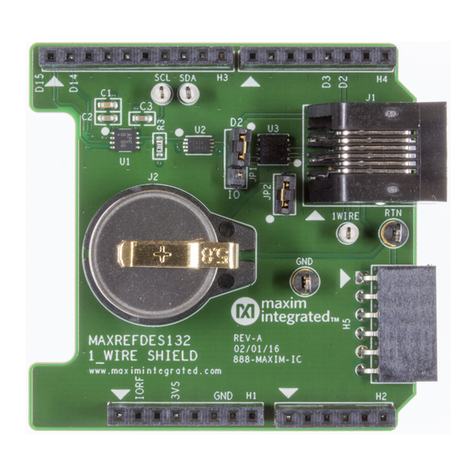
MAXREFDES132#
CompatibleArduinoform‐factormbedplatform
Procedure
The reference design is fully assembled and tested. Follow the steps below to verify board
operation.
mbed.org
1. ConnectMAXREFDES132#toyourplatform.
2. EnsureJP1andJP2areconfiguredproperlyforthe1‐Wiremasteryouwouldliketouse.
1. DS2484:JP1onpins2‐3,JP2removed.
2. BitBang:JP1onpins1‐2,JP2installed.BitBangisonlysupportedonMAX32600MBED
platform.
3. InstalltheprovidedDS1920iButton,orusersupplied1‐Wiredevice.
4. ConnectUSBcablefromthePCtoyourplatform.
5. Ifyouhaveneverusedmbed,setupanaccountandaddyourplatformtoyouronlinecompiler
accordingtotheinstructionsonyourplatform'sproductpage.
6. IfyouareusingWindowsandhaveneverusedserialcommunicationsbetweenyourPCandyour
mbedplatform,followtheinstructions.https://developer.mbed.org/handbook/Windows‐
serial‐configuration
7. Navigateyourbrowsertothefollowinglink.https://developer.mbed.org/teams/Maxim‐
Integrated/code/MAXREFDES132_OneWire_Demo/
8. Clickthe'Importthisprogram'buttonandimportthedemoasa'program'
9. Ensurethatthe#defineforthe1‐Wiremasteryouwanttouseisuncommentedandallothers
commentedout
10. Compileanddownloadtheresultingbinarytoyourplatform.
11. OpenHyperterminal,oryourfavoriteterminalemulatortofindtheappropriateCOMportfor
yourplatform,andconfiguretheconnectionfor9600bps,8‐N‐1withnoflowcontrol.
12. Ensuretheterminalisconfiguredfor'Auto'receiveand'CR+LF'transmit.
13. Presstheresetbuttononyourplatformandexercisethedemo.
Arduino
1. DownloadtheOneWireLibraryandinstallittoyourlibrariesfolderfollowingthedirections.
https://github.com/MaximIntegratedRefDesTeam/OneWire
https://www.arduino.cc/en/Guide/Libraries
2. ConnectMAXREFDES132#toyourArduinoboard.
3. EnsureJP1andJP2areconfiguredproperlyforthe1‐Wiremasteryouwouldliketouse
1. DS2484–JP1onpins2‐3,JP2removed
2. Bit‐Bangmaster–JP1onpins1‐2,JP2installed.