manuals.online logo
Brands
  1. Home
  2. •
  3. Brands
  4. •
  5. Memphis
  6. •
  7. Grill
  8. •
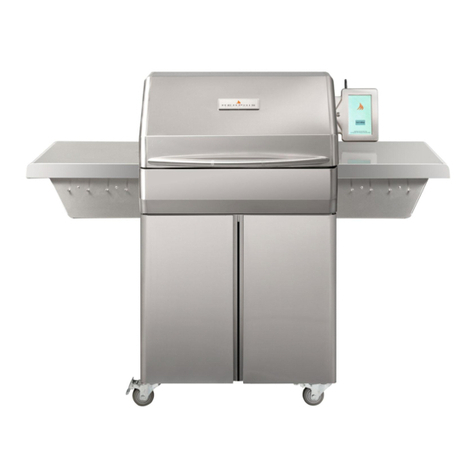
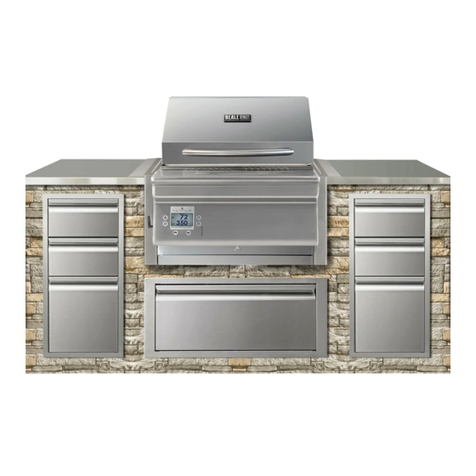
  9. Memphis VGB0002S User manual

Memphis VGB0002S User manual

This manual suits for next models

2

Other Memphis Grill manuals

Memphis VGB0001 User manual

Memphis

Memphis VGB0001 User manual

Memphis Elite User manual

Memphis

Memphis Elite User manual

Memphis ITC 3 IntelliBurn Technology Elite Cart User manual

Memphis

Memphis ITC 3 IntelliBurn Technology Elite Cart User manual

Memphis Pro User manual

Memphis

Memphis Pro User manual

Memphis Pro User manual

Memphis

Memphis Pro User manual

Memphis Wood Fire Convection Grill Guide

Memphis

Memphis Wood Fire Convection Grill Guide

Memphis Wood Fire Convection Grill Guide

Memphis

Memphis Wood Fire Convection Grill Guide

Memphis Pro Built-in Wook Fired Guide

Memphis

Memphis Pro Built-in Wook Fired Guide
Memphis Beale Street BGSS26 User manual

Memphis

Memphis Beale Street BGSS26 User manual

Memphis Beale Street BGSS26 User manual

Memphis

Memphis Beale Street BGSS26 User manual

Memphis Elite User manual

Memphis

Memphis Elite User manual

Memphis Elite User manual

Memphis

Memphis Elite User manual

Memphis PRO CART ITC 3 User manual

Memphis

Memphis PRO CART ITC 3 User manual

Memphis ITC IntelliBurn Technology User manual

Memphis

Memphis ITC IntelliBurn Technology User manual

Memphis Elite User manual

Memphis

Memphis Elite User manual

Memphis ELITE VG0002 User manual

Memphis

Memphis ELITE VG0002 User manual

Memphis Pro User manual

Memphis

Memphis Pro User manual
Memphis Beale Street BGBS26 User manual

Memphis

Memphis Beale Street BGBS26 User manual

Memphis VGB0001S User manual

Memphis

Memphis VGB0001S User manual

Memphis Elite Built-In ITC 3 User manual

Memphis

Memphis Elite Built-In ITC 3 User manual
Memphis Elevate ITC 2 User manual

Memphis

Memphis Elevate ITC 2 User manual

Memphis Elite Built-In ITC 3 User manual

Memphis

Memphis Elite Built-In ITC 3 User manual

Memphis PRO CART ITC 3 User manual

Memphis

Memphis PRO CART ITC 3 User manual

Memphis Elite Built-In ITC 3 User manual

Memphis

Memphis Elite Built-In ITC 3 User manual

Popular Grill manuals by other brands
LMS BBQ08873P owner's manual

LMS

LMS BBQ08873P owner's manual

Cookworks LW-8010A Care & instruction manual

Cookworks

Cookworks LW-8010A Care & instruction manual

Campingaz CV Instructions for use

Campingaz

Campingaz CV Instructions for use

Metos XBL Series Installation and operation manual

Metos

Metos XBL Series Installation and operation manual

Fiesta ET34567 Use and care instructions

Fiesta

Fiesta ET34567 Use and care instructions

Mayer Barbecue BRENNA MKG-318A BASIC Assembly instructions

Mayer Barbecue

Mayer Barbecue BRENNA MKG-318A BASIC Assembly instructions

Landmann Avalon PTS Plus 5.1 Plus 12122 Assembly and operating manual

Landmann

Landmann Avalon PTS Plus 5.1 Plus 12122 Assembly and operating manual

Kenyon B70200 owner's manual

Kenyon

Kenyon B70200 owner's manual

Better Homes and Gardens GBC1486W owner's manual

Better Homes and Gardens

Better Homes and Gardens GBC1486W owner's manual

Orbegozo GR 2300 instruction manual

Orbegozo

Orbegozo GR 2300 instruction manual

bora PT11 Operating and installation instructions

bora

bora PT11 Operating and installation instructions

Klarstein 10031664 manual

Klarstein

Klarstein 10031664 manual

Garland MWE3W Installation and operation manual

Garland

Garland MWE3W Installation and operation manual

Char-Broil 463722714 Product guide

Char-Broil

Char-Broil 463722714 Product guide

MPM MOP-03 user manual

MPM

MPM MOP-03 user manual

Kenmore 415.16123800 Use and care guide

Kenmore

Kenmore 415.16123800 Use and care guide

Tucker Barbecues GTR Series Assembly, installation and operating instructions

Tucker Barbecues

Tucker Barbecues GTR Series Assembly, installation and operating instructions

Monogram ZGG540NCP1SS owner's manual

Monogram

Monogram ZGG540NCP1SS owner's manual

manuals.online logo
manuals.online logoBrands
  • About & Mission
  • Contact us
  • Privacy Policy
  • Terms and Conditions

Copyright 2025 Manuals.Online. All Rights Reserved.

Contents
Grill Clearance to Combustible Materials
2
Grill Island Dimensions
3
Hardware Kit
4
Installation Step 1-6
5-10
WiFi Setup
11
Wiring Diagram
12-13
Memphis Elite Built-In
Model Number VGB0002S
Appendixes and Model-Specific Information
2
DIMESION
METRIC
UNIT WITH OPTIONAL HEAT
SHIELD KIT (VGBHSK)
A
45.8 cm
45.8 cm
B
1.0 cm
1.0 cm
C
5.1 cm
5.1 cm
D
8.9 cm
8.9 cm
E
45.8 cm
0.5 cm
F
76.2 cm
76.2 cm
DIMENSION (US)
UNIT WITH OPTIONAL HEAT SHIELD
KIT (VGBHSK)
A
18”
18”
B
3/8”
3/8”
C
2”
2”
D
3.5”
3.5”
E
18”
1/8”
F
30”
30”
Clearance To Combustible Materials
WARNING: The structure and surrounding objects MUST maintain the specified minimum clearance to
combustible materials.
Built-in structures constructed of wood or other combustible materials may require the use of the OPTIONAL Built- In Heat Shield Kit to maintain
the required clearance to combustible materials. The grill may be supported by either the three support brackets, or the four leveling feet. Please
note that there must be at least 3/8” (1.0cm) clearance between the bottom of the grill and the structure.
Maintain the clearance to combustible materials as specified below.
A MAJOR CAUSE OF FIRES IS FAILURE TO MAINTAIN REQUIRED CLEARANCES
(AIR SPACES) TO COMBUSTIBLE MATERIALS. IT IS OF UTMOST IMPORTANCE
THAT THIS PRODUCT BE INSTALLED ONLY IN ACCORDANCE WITH THESE
INSTRUCTIONS
3
Built-In Grill Island Dimensions
VGB0002 ELITE BUILT-IN
DIMENSION
TOLERANCE
A
42 5/8”
± 1/8”
B
16 ¾”
± 1/8”
C
24 ½”
± 1/8”
D
8 ½”
+ 1/8” -0”
E
6 ½”
+ 1/8” -0”
F
3” to 9’
G
3 ½” MIN
H
12” MIN
J
22”
±1”
K
Standard
Cabinet
Height
VGB0002 ELITE BUILT-IN
DIMENSION
TOLERANCE
A
108.3 cm
± .30cm
B
42.6 cm
± .30cm
C
62.9 cm
± .30cm
D
21.6 cm
+.30cm -0cm
E
16.5 cm
+.30 cm -0cm
F
7.7 cm to
2.74 m
G
8.9 cm
H
30.5 cm
J
55.9 cm
±2.54cm
K
Standard
Cabinet
Height
WARNING: See clearance to combustible materials, when designing and constructing a built-in island. Built-In islands must
be built to the specifications listed below.
The owner and/or builder are responsible for consulting local, county and state building codes for securing any necessary
building permits before construction. NOTE: Construction codes vary from locality to locality.
NOTE: Dimensions are to the finished surfaces. Grill cavity
surfaces are to be plumb and level to ensure a proper fit.
ITC Control Location
110/120v* AC supply required
within 10 ft. of the ITC.
NOTE: The location of the ITC is for
illustration purposes only. The grill
is equipped with 10 feet of cable,
allowing it to be mounted in a
variety of locations.
*European 230V
Controller cable way is to
maintain dimensions D and E
throughout its entire path.
The controller cable way may be
located either through the back
of the island’s cavity, or in
either side of the cavity as
depicted below.
4
· 3/8” Open End Wrench,
Socket or Adjustable
Wrench
· Phillips Screw Driver or Drill
· Snips or Heavy Duty Scissors
· Cut Resistant Gloves
1.5 Hours
HARDWARE COMPONENTS
TIME REQUIRED
· 3/8” Open End Wrench,
Socket or Adjustable
Wrench
· Phillips Screw Driver or Drill
· Snips or Heavy Duty Scissors
· Cut Resistant Gloves
QTY:
1
1
1
1
10
9
2
1
1
4
2
2
DESCRIPTION/PART
NO.
1) Grate Kit
VG4401, VG4406
2) Flavorizer
VG4403
3) Direct Flame
Insert
VG4407
4) Genie Tool
VG1594
5) Bracket Bolt
DS2311
6) Antenna
VG9025
7) #10 Screw (SS)
DS2186
8) Power Cord
VG0911
9) Meat Probe
VG0956
10) Leveling Feet
DS4668
11) Concrete Anchor
DS2349
12) #10 SS PH SCREW
DS2350
PICTURE
HARDWARE COMPONENTS CONT.
DESCRIPTION/PART
NO.
13) Left Mounting Bracket
VG0803
14) Right Mounting Bracket
VG0802
15) Rear Mounting Bracket
VGE0801
16) Prewired Controller Box
VG1165
17) Controller Box Bracket
VG1065
OPTIONAL
18) HEAT SHIELD
VGBHSK
19) #10 Screw (BLK)
DS2185
QTY:
1
1
1
1
1
2
4
PICTURE
TOOLS REQUIRED
5
INSTALLATION STEP 1: UNPACKING
Grill requires (2) two people for safe assembly
Please note that during shipping some movement may have taken place, so a complete visual
inspection is required. Be sure to inspect entire grill after removing the protective shipping carton.
Report any damage to your local dealer immediately. Shipping damage is not covered under warranty.
Some surfaces may be sharp so wear gloves when assembling. Do not plug in the grill until it's fully
assembled, the plastic protective film is removed from all stainless steel surfaces, and you're ready to
cook. See: “startup procedure” for more details.
1) Unpack the controller box (16) and
bracket (17) from inside of the grill
hood. Also remove the Flavorizer
(2) and included grates (1) from
inside the grill hood. To remove the
Flavorizer, cut the 4 zip ties holding
it in place. Set aside grates and
Flavorizer until needed.
2) Peel all plastic protective film from
the grill. Be diligent about
inspection as the protective film
will be hard to remove once a grill
is installed and first burned.
3) Detach the controller bracket (17)
from the controller box (16) by
pulling directly backward on the
bracket. This is the same way the
box will detach once installed.
4) Install the bracket into your
structure as shown. The bracket
will require a minimum cavity
opening of 8 1/2” Width, 6 1/2”
Tall, and 3 3/4” Deep.
5) Fasten the bracket using the 4
mounting holes which accept
hardware up to 3/16” wide (not
included). Choose a fastener
appropriate to your island material
type.
Controller Box
Hardware Kit, Direct
Flame, & Genie Tool
(Ash Pans)
Flavorizer
Grate Kit
Mounting Brackets
Packaging Locations
1
3
4
5
MINIMUM
PASS-THROUGH
OPENING:
4” X 4”
6
Follow the assembly steps listed below, prior
to installation of the unit.
6) Remove the back panel of the grill by
removing the two screws as shown and
then lifting the panel up.
7) The prewired controller box has an
Ethernet cord which must be routed
through the controller cableway and into
the back of the grill body before the
support brackets are installed. To do this,
pass the cord through the strain relief
which is located on the back left side of
the grill. (Looking at the grill from the
front) This strain relief is located next to
the strain relief used for the component
wiring harness.
8) Once the Ethernet cord is passed into the
back of the grill, connect it into the bottom
of the WiFi card as shown. The tab on the
Ethernet cord goes towards the front of the
grill.
9) Tighten the strain relief onto the Ethernet
cord as shown.
10) Replace the back panel by locating its
three bottom tabs into their slots provided.
Replace the two screws which secure the
back panel in place.
11) Install the included antenna into its bulk
head. The bulk head is located on the left
panel of the grill (Looking at the grill from
the front).
INSTALLATION STEP 2: WIRING
6
7
8
9
10
11
7
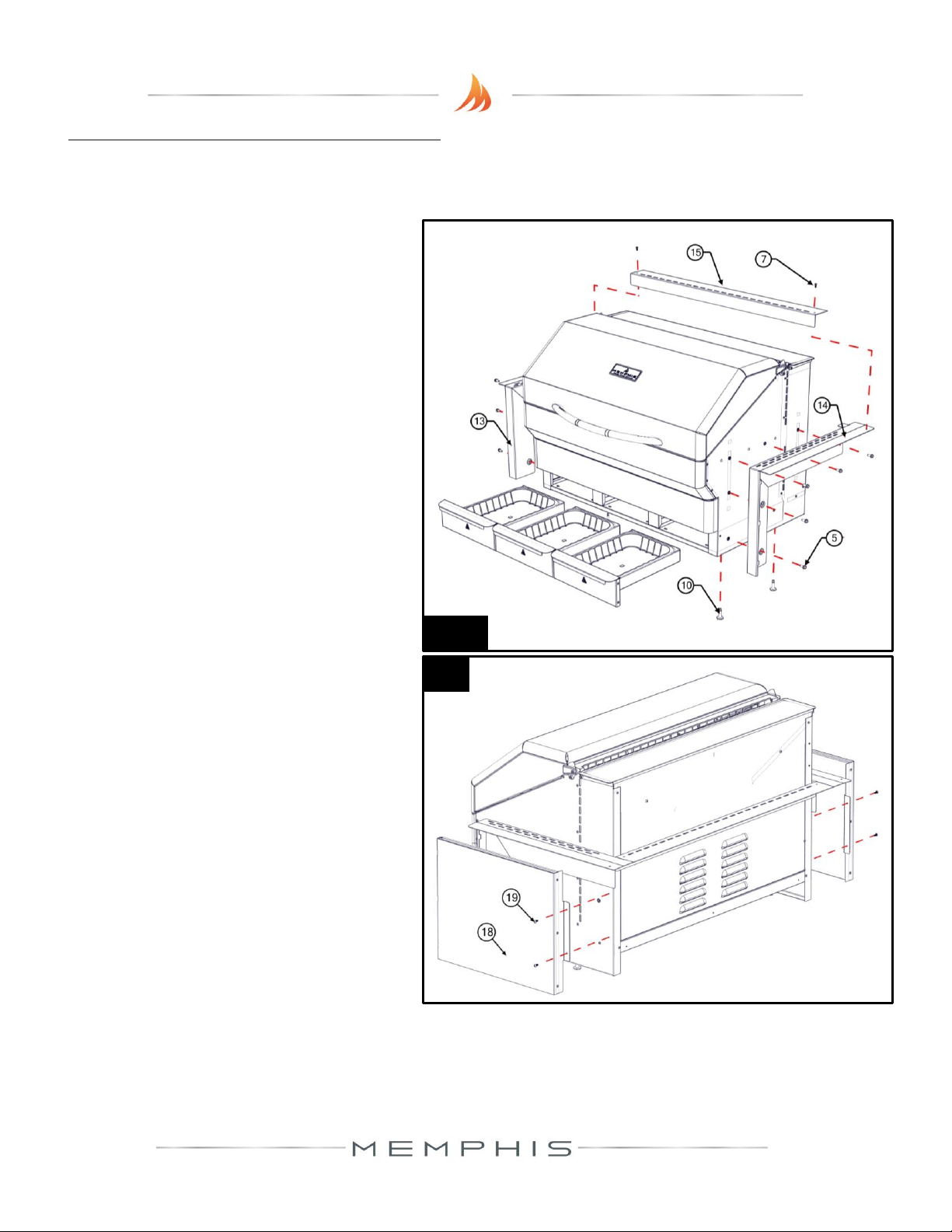
Follow the assembly steps listed below, prior
to installation of the unit. The unit can be
supported by either the support brackets
(items 13, 14 & 15) or by the four leveling feet
(item 10). Refer to page 4 for item part
numbers, descriptions and quantities.
Note that the support brackets must be
installed with either support method.
12) Remove the ash/grease drawers from the
unit.
13) Fasten the left and right support brackets
(items 13 and 14) to the unit using the ten
1/4”-20 stainless steel hex bolts (item 5).
14) Fasten the rear support bracket (item 15)
to the left and right support brackets
(items 13 and 14) with two 10-24 x ½”
long stainless steel screws (item 7).
15) This step is only to be done if the grill is
going to be supported by the four leveling
feet (item 10) and not the support
brackets. Thread the four leveling feet
(item 10) into the bottom of the unit.
Optional:
16) To reduce the clearance to combustible
materials, the optional heat shield kit
should be used. Refer to page one to
determine if the heat shield kit is required
for your installation. Follow the assembly
instructions provided with the heat shield
kit to properly fasten the kit to the unit.
INSTALLATION STEP 3: BRACKETS
12-15
16
8
17) Route the component harness
and power cord alongside of
the Ethernet cable previously
routed in the controller
cableway. Connect the ends to
the controller box as shown.
18) Place the unit into the island,
and position it to the desired
depth. Ensure that the vent
holes in the support brackets
are unobstructed.
19) Locate the two mounting holes
found in the back of the left
and right support brackets
(items 13 & 14), and mark the
hole locations onto the island’s
countertop.
20) Carefully slide the unit out of
the island, exposing the
marked holes on the
countertop.
21) Drill two 5/16” holes into the
countertop using a drill bit
appropriate for the material of
the countertop.
22) Insert two concrete anchors
(item 11), into the two 5/16”
holes.
23) Slide the unit back into
position, lining up the
mounting holes in the left and
right support brackets with the
concrete anchors.
24) Fasten the unit into place
using the two 1¾” long
stainless steel screws (item
12). Do not over-tighten.
INSTALLATION STEP 4: GRILL MOUNTING
17
18-19
20-22
23-24
9
Refer to page 5 for item part numbers,
descriptions and quantities
25)Skip this step if grill will be supported
by the support brackets. Adjust the
four leveling feet from the inside of
the ash/grease drawer cavity with a
1/4” socket ensuring that the unit is
level, and that the support brackets
(items 13,14 & 15) come in contact
with the island’s countertop.
26)Ensure that the controller box has the
following connections into the back
of it.
a. The prewired Ethernet cable.
This cable is pre routed into
the back of the controller box
prior to shipment.
b. The component harness. This
harness carries electricity to
the grills component such as
auger, fans, and igniter.
c. Power cord. Ensure that the IEC
on the back of the controller
box has the included power
cord attached to it as shown.
27)After checking for the connections as
described above, push the controller
box into the pre-installed bracket.
The box will lock into place. To
remove this box for maintenance or
software updates in the future,
simply pull on the controller box and
the ball detents will release.
INSTALLATION STEP 5: CONTROLLER BOX INSTALL
25
26
27
10
Refer to page 5 for item part numbers, descriptions and quantities
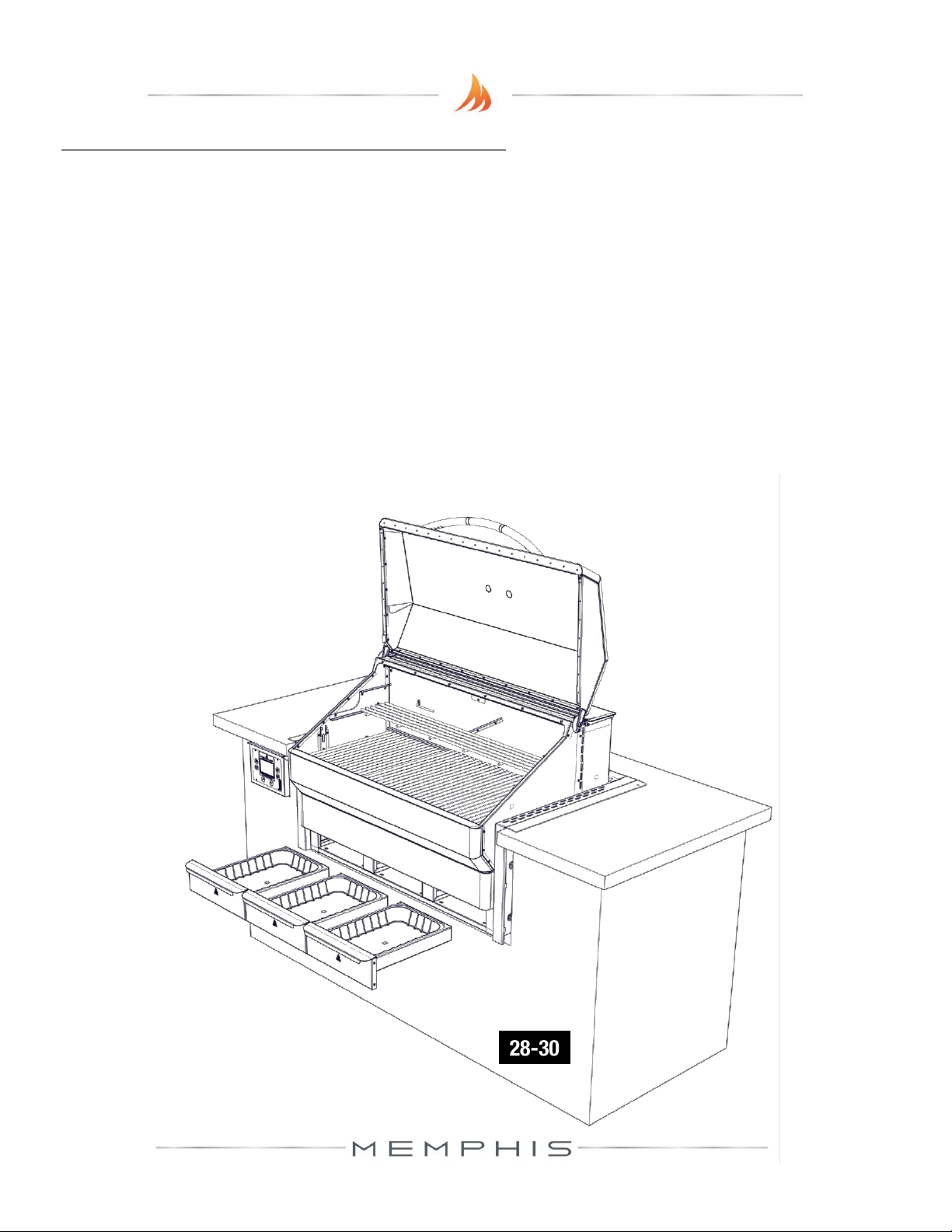
28) Insert the three ash/grease drawers back into the unit.
29) Place Flavorizer (item 2) onto the left and right lower brackets found inside the unit.
30) Place the three lower cook grates (item 1) onto the front and rear supports. Place the
long cook grate (item 1) onto the left and right upper brackets found inside the unit.
Vent holes on the mounting brackets must remain unobstructed.
Refer to the manual for first time use instructions.
INSTALLATION STEP 6: FINAL ASSEMBLY
28-30