manuals.online logo
Brands
  1. Home
  2. •
  3. Brands
  4. •
  5. Mindray
  6. •
  7. Medical Equipment
  8. •
  9. Mindray Veta 3 User manual

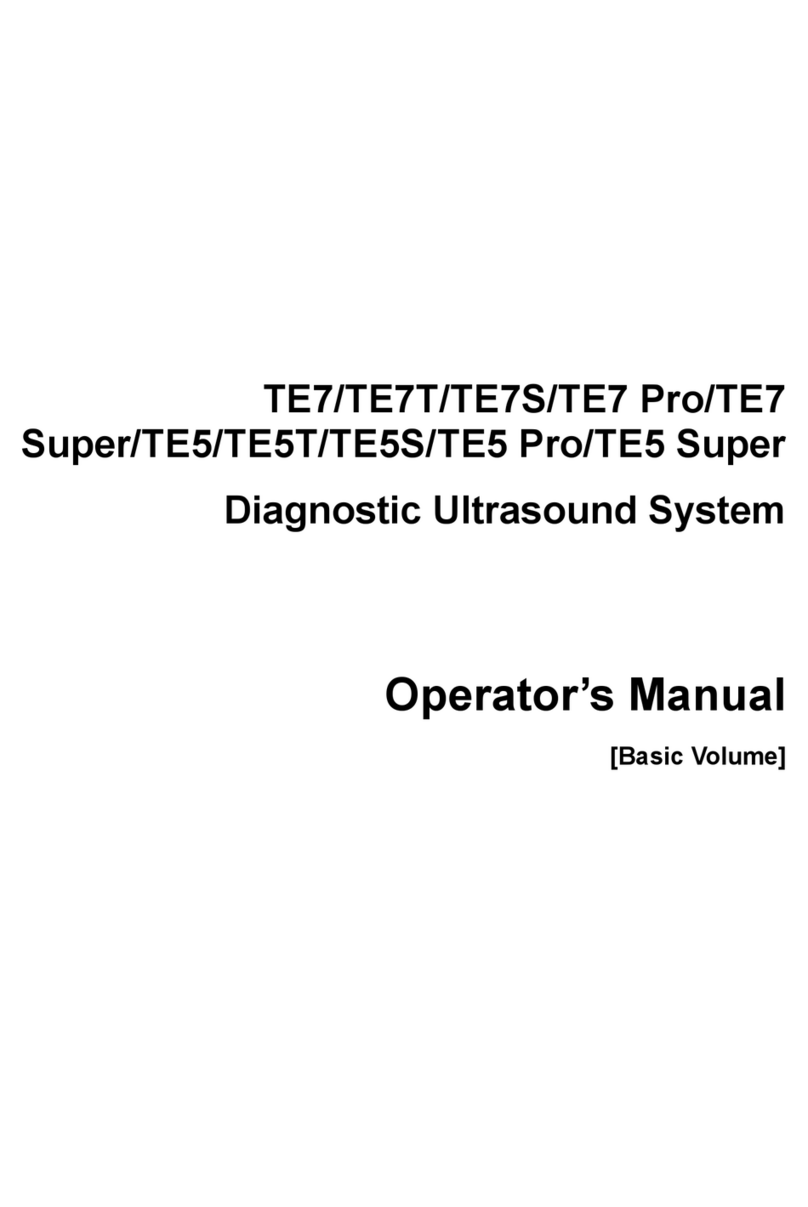
Mindray Veta 3 User manual

This manual suits for next models

3

Other Mindray Medical Equipment manuals

Mindray M5 User manual

Mindray

Mindray M5 User manual

Mindray DP-50T User manual

Mindray

Mindray DP-50T User manual

Mindray BeneView T6 User manual

Mindray

Mindray BeneView T6 User manual

Mindray DC-8 EXP User manual

Mindray

Mindray DC-8 EXP User manual

Mindray iMEC12 User manual

Mindray

Mindray iMEC12 User manual

Mindray ePM 10M User manual

Mindray

Mindray ePM 10M User manual

Mindray DC-T6 User manual

Mindray

Mindray DC-T6 User manual

Mindray M9 User manual

Mindray

Mindray M9 User manual

Mindray V Series User manual

Mindray

Mindray V Series User manual

Mindray M5 User manual

Mindray

Mindray M5 User manual

Mindray Accutorr 7 User manual

Mindray

Mindray Accutorr 7 User manual

Mindray DC-40 User manual

Mindray

Mindray DC-40 User manual

Mindray Rosebud Accutorr V User manual

Mindray

Mindray Rosebud Accutorr V User manual

Mindray DPM 1 User manual

Mindray

Mindray DPM 1 User manual

Mindray M6 User manual

Mindray

Mindray M6 User manual

Mindray BeneView T1 User manual

Mindray

Mindray BeneView T1 User manual

Mindray M8 Elite User manual

Mindray

Mindray M8 Elite User manual

Mindray TE7 User manual

Mindray

Mindray TE7 User manual

Mindray DICOM User manual

Mindray

Mindray DICOM User manual

Mindray BeneHeart C  Series User manual

Mindray

Mindray BeneHeart C Series User manual

Mindray MR6501 User manual

Mindray

Mindray MR6501 User manual

Mindray BeneHeart D1 User manual

Mindray

Mindray BeneHeart D1 User manual

Mindray BeneHeart D3 User manual

Mindray

Mindray BeneHeart D3 User manual

Mindray Spectrum User manual

Mindray

Mindray Spectrum User manual

Popular Medical Equipment manuals by other brands

Itamar Medical WatchPAT Operation manual

Itamar Medical

Itamar Medical WatchPAT Operation manual

PROTEOR 1P650 KNEE Assembling and adjustment instructions

PROTEOR

PROTEOR 1P650 KNEE Assembling and adjustment instructions

Liberate Medical VentFree user manual

Liberate Medical

Liberate Medical VentFree user manual

Dicarre DA20 user guide

Dicarre

Dicarre DA20 user guide

Stryker Medical M Series Operation manual

Stryker Medical

Stryker Medical M Series Operation manual

Invacare ScanBed 750 user manual

Invacare

Invacare ScanBed 750 user manual

Getinge Arjohuntleigh Nimbus 3 Professional Instructions for use

Getinge

Getinge Arjohuntleigh Nimbus 3 Professional Instructions for use

Mettler Electronics Sonicator 730 Maintenance manual

Mettler Electronics

Mettler Electronics Sonicator 730 Maintenance manual

Pressalit Care R1100 Mounting instruction

Pressalit Care

Pressalit Care R1100 Mounting instruction

Denas MS DENAS-T operating manual

Denas MS

Denas MS DENAS-T operating manual

bort medical ActiveColor quick guide

bort medical

bort medical ActiveColor quick guide

AccuVein AV400 user manual

AccuVein

AccuVein AV400 user manual

agiliti NP Trio user manual

agiliti

agiliti NP Trio user manual

Rocket Medical Rocket Digital Oocyte Aspiration Pump Service manual

Rocket Medical

Rocket Medical Rocket Digital Oocyte Aspiration Pump Service manual

Monteris Medical Neuroblate Instructions for use

Monteris Medical

Monteris Medical Neuroblate Instructions for use

Otto Block 8E33 7 manual

Otto Block

Otto Block 8E33 7 manual

ADVANCED HOME CARE Helios Guide

ADVANCED HOME CARE

ADVANCED HOME CARE Helios Guide

NeuLog NUL-208 Guide

NeuLog

NeuLog NUL-208 Guide

manuals.online logo
manuals.online logoBrands
  • About & Mission
  • Contact us
  • Privacy Policy
  • Terms and Conditions

Copyright 2025 Manuals.Online. All Rights Reserved.

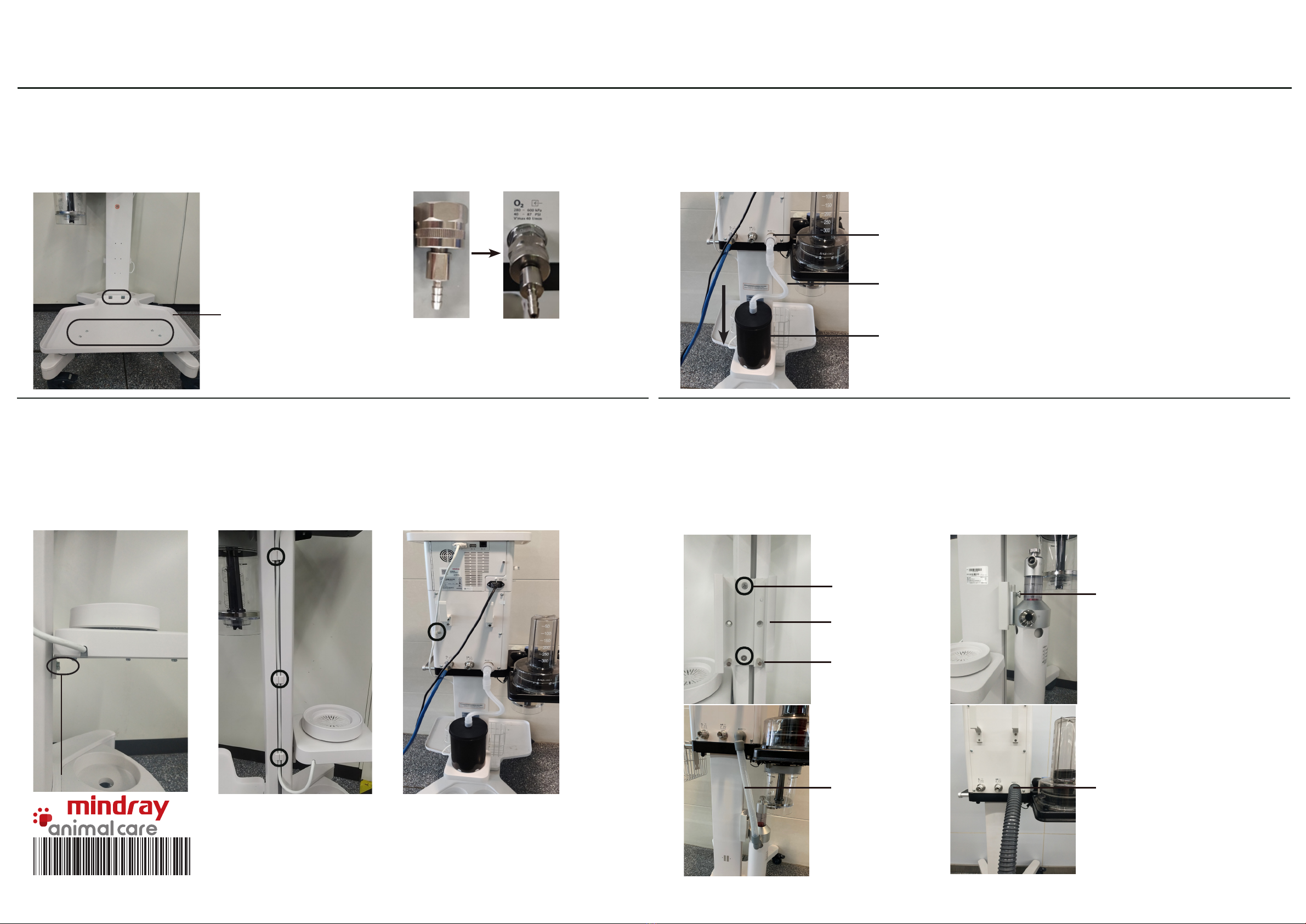
2. Install the Main Unit
4. Install the CO2 Absorbent Canister
3. Install the Breathing Circuit (Veta 5 Only)

1. Install the Trolley
Main unit
supporting
board
Veta 3/Veta 5 Installation Guide
Insert the column into the trolley base; then, put the trolley down and tighten the screws.
Lock four casters of the trolley. Then, place the main unit securely on the trolley by aligning
three positioning columns under the main unit with three locating pins on the trolley, and
tighten screws.
a. Align the guiding post slots of the breathing system with the guiding post of the main unit
circuit connector, and fix the breathing circuit with screws.
b. Fix the fastener under the supporting board and insert the inner hexagon spanner into it.
c. Insert the microswitch cable plug into the slot.
Rotate the CO2 absorbent canister counterclockwise to fix it.
5. Install the Bellows (Veta 5 Only)
Tools:
●M8X25 screws:4
●Inner hexagon spanner
Column
Tools:
●M8X25 screws:4
●Inner hexagon spanner
Positioning column
Microswitch
cable plug
Screws
Screws
Screws
Check the
connector for
absorbent
particles.
6. Install the Basket
Hang the basket on the handrail of the machine directly or install it on the column.
Screws
Inner hexagon spanner
a. Attach the bottom ring of the bellows to the bellows base and ensure that the bellows is
tightly connected to the base.
b. Align the bellows housing bayonet with the slots, and rotate it clockwise firmly.
Tools:
●M8X25 screws:3
●Inner hexagon spanner
Tools:
●M4X12 screws:4
●Phillips screwdriver
Screws
9. Install the Anesthesia Gas Filter Canister
8. Install the Tray or Weigher (Optional) 10. Connect the AGSS System or Passive Scavenging Pipe (Optional)
a. Place the anesthesia gas filter canister (self-prepared) on the weigher or the tray by
aligning the groove.
b. Use the silicone tube to connect the gas filter canister with the AGSS inlet pipeline
connector.
AGSS inlet pipeline connector
Silicone tube
Anesthesia gas filter
canister
AGSS support rail
Stop pin
AGSS gas supply
hose ools:
●M4X12 screws:2
●Phillips screwdriver
7. Install the Oxygen Generator Tray and Connector (Optional)
a. Fix the oxygen generator tray assembly to the column and trolley by using screws and the
fixing plate respectively.
b. Rotate the oxygen generator connector clockwise into the gas supply inlet and connect the
oxygen generator with a tube.
Tray assembly
a. Insert the tray or weigher (Veta 5 Only) into the screw arbor and tighten the screws.
b. Connect the weigher cable with the communication interface (SP).
c. Use three silicon plugs to attach the cable to the column and fix the cable on the back of
the machine.
Knob
a. Rotate the two stop pins into the AGSS support rail and fix the AGSS support rail into the
side of column with screws.
b. Insert the AGSS assembly into the AGSS support rail and rotate the knob tightly. Use the
AGSS gas supply hose to connect the waste gas outlet with the AGSS assembly inlet.
c. Connect the waste gas outlet with the passive scavenging pipe when using the passive
scavenging method.
Passive scavenging pipe
Veta 3/Veta 5 Installation Guide
Screws
Tools:
●M4X12 screws:6
●Phillips screwdriver
Tools:
●M4X12 screws:4
●Phillips screwdriver
0 4 6 - 0 2 2 5 1 5 - 0 0 ( 1 . 0 )