logo
Brands
  1. Home
  2. •
  3. Brands
  4. •
  5. Osram
  6. •
  7. Dj Equipment
  8. •
  9. Osram CLAYPAKY AXCOR PROFILE 900 User manual

Osram CLAYPAKY AXCOR PROFILE 900 User manual

This manual suits for next models

2

Other Osram Dj Equipment manuals

Osram BY-P06 User manual

Osram

Osram BY-P06 User manual

Osram BY-M03B User manual

Osram

Osram BY-M03B User manual

Osram M51 User manual

Osram

Osram M51 User manual

Osram Clay Paky MYTHOS User manual

Osram

Osram Clay Paky MYTHOS User manual

Osram Claypaky CloudIO User manual

Osram

Osram Claypaky CloudIO User manual

Osram ADB Stagelight LEXPERT PROFILE L User manual

Osram

Osram ADB Stagelight LEXPERT PROFILE L User manual

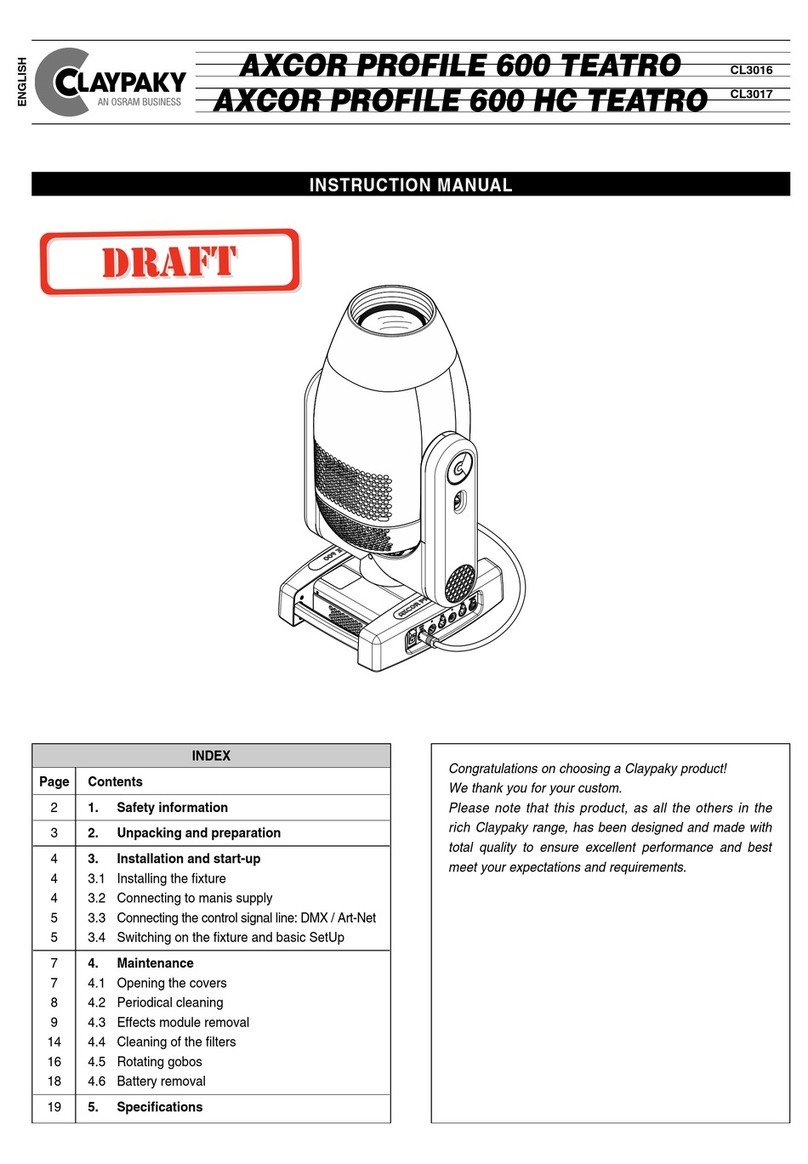
Osram Claypaky AXCOR PROFILE 600 TEATRO User manual

Osram

Osram Claypaky AXCOR PROFILE 600 TEATRO User manual

Osram KREIOS PAR162W VNSP IP 100-240V User manual

Osram

Osram KREIOS PAR162W VNSP IP 100-240V User manual

Osram Clay Paky Scenius Spot Use and care manual

Osram

Osram Clay Paky Scenius Spot Use and care manual

Osram ARCHISHAPE 2.0 Linear User manual

Osram

Osram ARCHISHAPE 2.0 Linear User manual

Osram KREIOS PROFILE 80W WW User manual

Osram

Osram KREIOS PROFILE 80W WW User manual

Osram BY-P12 User manual

Osram

Osram BY-P12 User manual

Osram BY-P23B User manual

Osram

Osram BY-P23B User manual

Osram CLAYPAKY ALPHA WASH 1500 User manual

Osram

Osram CLAYPAKY ALPHA WASH 1500 User manual

Osram BY-P05 User manual

Osram

Osram BY-P05 User manual

Popular Dj Equipment manuals by other brands

ALPHA LITE ALPHA 1500 User manual book

ALPHA LITE

ALPHA LITE ALPHA 1500 User manual book

Chauvet OVATION E-930VW Quick reference guide

Chauvet

Chauvet OVATION E-930VW Quick reference guide

Snow Masters Zig Oscillator user manual

Snow Masters

Snow Masters Zig Oscillator user manual

EuroLite 50530554 user manual

EuroLite

EuroLite 50530554 user manual

Beamz BUV243 user manual

Beamz

Beamz BUV243 user manual

thomann Stairville DJ Lase 40-G MK-III user manual

thomann

thomann Stairville DJ Lase 40-G MK-III user manual

Eagletone 6 Eyes Flower user manual

Eagletone

Eagletone 6 Eyes Flower user manual

EuroLite FLD-1508 user manual

EuroLite

EuroLite FLD-1508 user manual

Technical Pro LG8xSEA user manual

Technical Pro

Technical Pro LG8xSEA user manual

JB Systems Lounge Laser DMX Operation manual

JB Systems

JB Systems Lounge Laser DMX Operation manual

Lightmaxx Vega Halo 90 user manual

Lightmaxx

Lightmaxx Vega Halo 90 user manual

Elation FUZE WASH Z350 user manual

Elation

Elation FUZE WASH Z350 user manual

Maverick MK3 WASH Quick reference guide

Maverick

Maverick MK3 WASH Quick reference guide

Infinity TF-260C7 Fresnel manual

Infinity

Infinity TF-260C7 Fresnel manual

Chauvet EVE E-50Z Quick reference guide

Chauvet

Chauvet EVE E-50Z Quick reference guide

Eliminator Lighting E 138 manual

Eliminator Lighting

Eliminator Lighting E 138 manual

EuroLite Mini Multicolor LED Flashing Light SC user manual

EuroLite

EuroLite Mini Multicolor LED Flashing Light SC user manual

KAM DMX Laser80 FScan instruction manual

KAM

KAM DMX Laser80 FScan instruction manual

https://manuals.online logo
https://manuals.online logoBrands
  • About & Mission
  • Contact us
  • Privacy Policy
  • Terms and Conditions

Copyright 2026 Manuals.Online. All Rights Reserved.

1
INSTRUCTI N MANUAL
Congratulations on choosing a Claypaky product!
We thank you for your custom.
Please note that this product, as all the others in the rich
Claypaky range, has been designed and made with total quality
to ensure excellent performance and best meet your expectations
and requirements.
INDEX
ENGLISH
C61700
C61701
AXCOR PROFILE 900
Page Contents
2 Safety information
3 Unpacking and preparation
4 Installation and start-up
5 Control panel
7 Maintenance
19 Optional accessories
20 Technical information
SAFETY INF RMATI N
2
AXCOR PROFILE 900
EN
IT
DE
ES
FR
RU
SAFETY INSTRUCTI NS
IMPORTANT: Claypaky recommends you carefully read and keep the safety information on this product, also
available in digital format at the following link:
www.claypaky.com
Ref: FIS017 - Safety Information Axcor series
INF RMAZI NI DI SICUREZZA
IMPORTANTE: Claypaky raccomanda di leggere accuratamente e conservare le informazioni di sicurezza relative
a questo prodotto, sempre reperibili in versione digitale al seguente link:
www.claypaky.com
Rif: FIS017 - Safety Information Axcor series
INF RMATI NEN ZUR SICHERHEIT
WICHTIG: Claypaky empfiehlt, die Sicherheitsinformationen bezüglich dieses Produkts genau zu lesen und
aufzubewahren. Sie sind in Digitalversion immer unter folgendem ink auffindbar:
www.claypaky.com
Ref: FIS017 - Safety Information Axcor series
INF RMACI NES DE SEGURIDAD
IMPORTANTE: Claypaky recomienda leer detenidamente y conservar la información de seguridad relativa a este
producto. Además, está disponible una versión digital de la misma en el siguiente enlace:
www.claypaky.com
Ref: FIS017 - Safety Information Axcor series
C NSIGNES DE SÉCURITÉ
IMPORTANT: Claypaky recommande de lire attentivement et de conserver les informations de sécurité relatives à
ce produit, disponibles en version digitale au lien suivant:
www.claypaky.com
Réf. : FIS017 - Safety Information Axcor series
ИНСТРУКЦИЮ ПО ТЕХНИКЕ БЕЗОПАСНОСТИ
ВАЖНО: Claypaky рекомендует внимательно прочитать и сохранить инструк ию по технике безопасности
данного изделия, которая всегда доступна в электронном формате по следующей ссылке:
www.claypaky.com
Наименование: FIS017 - Safety Information Axcor series
3
AXCOR PROFILE 900
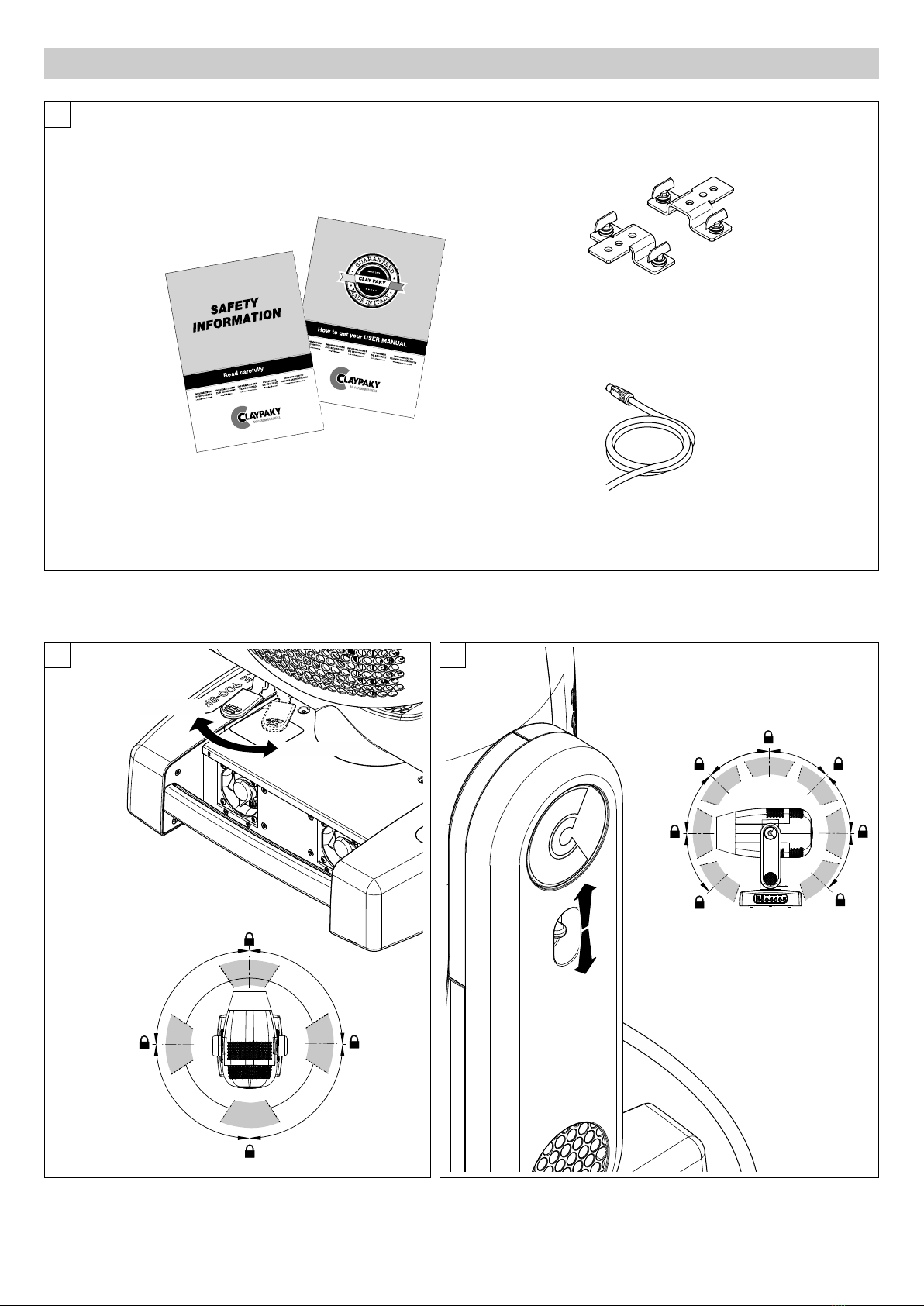
UNPACKING AND PREPARATI N
1
PAN Mechanism Lock and Release (every 90°) - Fig. 2
TILT Mechanism Lock and Release (every 45°) - Fig. 3
2 3
Packing contents - Fig. 1
90°
90°
90°
90°
UNLOCKED
LOCKED
45°
45°
45°
45°
45°
45°
45°
2 x 183102/805
4
AXCOR PROFILE 900
4
2
1
1
2
3
5
INSTALLATI N AND START-UP
Connecting and disconnecting power cable - Fig. 5
Installing the projector - Fig. 4
The projector can be installed on the floor resting on special rubber feet, on a truss or on the ceiling or wall.
WARNING: with the exception of when the projector is positioned on the floor, the safety cable must be fitted. (Cod. 105041/003 a ailable on request).
This must be securely fixed to the support structure of the projector and then connected to the fixing point at the centre of the base.
5
AXCOR PROFILE 900
Switching on the projector - Fig. 8
Press the switch. The projector starts resetting the effects. At the same time, the following information scrolls on the display:
Model Firmware xxx (Fixture ID) System errors
Axcor Version X.X.X Dmx Address xxx E: .........................
Profile 900 Date - Hour W: .........................
On conclusion of resetting in case of absence of the dmx signal, Pan and Tilt move to the “Home” position (Pan 128 bit - Tilt 128 bit). The control
panel (Fig. 8) has a display and buttons for the complete programming and management of the projector menu. The display can be in one of two
conditions: rest status and setting status. When it is in the rest status, the display shows the projector’s DMX address and the Fixture ID address
(if set).
During menu setting status, after a wait time (about 30 seconds) without any key having been pressed, the display automatically returns to rest status.
It should be noted than when this condition occurs, any possible value that has been modified but not yet confirmed with the
F
key will be cancelled.
C NTR L PANEL
1
2
Dmx Address
War ning Message
Fixture ID
8
Connecting to the control signal line (DMX) - Fig. 7
Use a cable conforming to specifications EIA RS-485: 2-pole twisted, shielded, 120Ohm characteristic impedance, 22-24 AWG, low capacity. Do not use
microphone cable or other cable with characteristics differing from those specified. The end connections must be made using X R type 3 or 5 pin male/female
connectors. A terminating plug must be inserted into the last projector with a resistance of 120Ohm (minimum 1/4 W) between terminals 2 and 3.
IMP RTANT: The wires must not make contact with each other or with the metal casing of the connectors. The casing itself must be connected to the
shield braid and to pin 1 of the connectors.
Connecting to the mains supply - Fig. 6
SIGNAL
SCREEN
DMX 512
5 PIN
1
2
3
4
5
SIGNAL
SCREEN
1
3
2
DMX 512
3 PIN
SIGNAL
SIGNAL
Mains
6
7
Continue ➔
AXCOR PROFILE 900
6
28
28
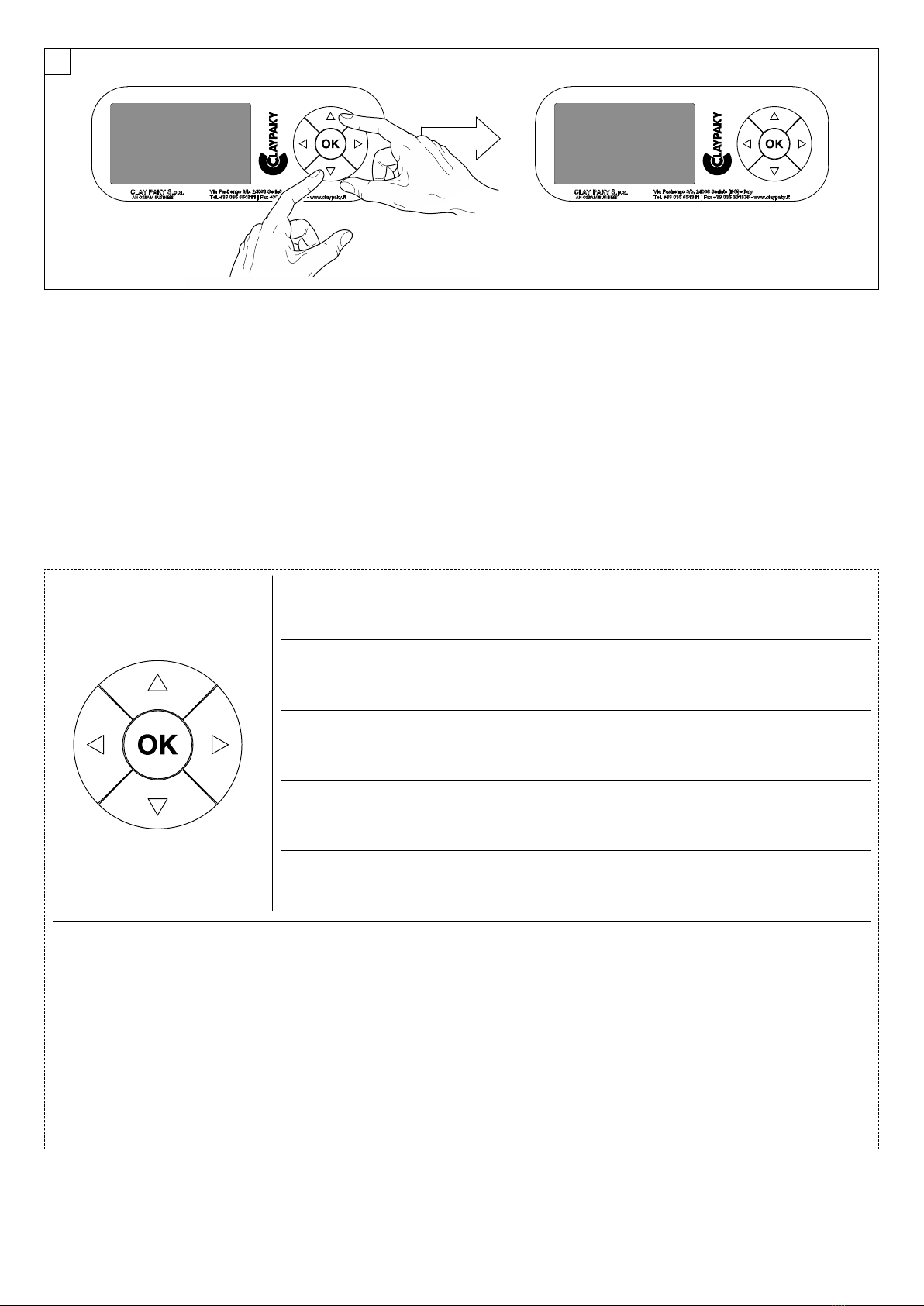
Reversal of the display - Fig. 9
To activate this function, press UP
B
and DOWN
C
keys simultaneously while the display is in the rest mode. This status will be memorised and
maintained even for the next time it will be switched on. To return to the initial state, repeat the operation all over again.
Setting the projector starting address
On each projector, the starting address must be set for the control signal (addresses from 1 to 512).
The address can also be set with the projector switched off.
Setting the projector Fixture ID
On each projector, the Fixture ID address must be set for an easy identification of the fixtures in an installation (ID from 1 to 255).
The Fixture ID address can be set with the projector switched off.
9
Functions of the buttons - Using the menu
Setting addresses and options with the projector disconnected
The projector’s DMX address, as well as other possible operating options, can also be set when the appliance is disconnected from the electricity supply.
All that is needed is to press
F
to momentarily activate the display and thus access the settings. Once the required operations have been carried out,
the display will switch off again after a wait time of 30 seconds.
USING THE MENU:
1) Press
F
once – “Main Menu” appears on the display.
2) Use the UP
B
and DOWN
C
keys to select the menu to be used:
• Setup (Setup Menu): To set the setting options.
• Option (Option Menu): To set the operating options
• Informations (Informations Menu): To read the counters, software version and other information.
• Manual Control (Manual control Menu): To trigger the test and manual control functions.
• Test (Test Menu): To check the proper functionning of effects
• Advanced (Advanced Menu): Access to the "Advanced menu" is recommended for a trained technical personnel.
3) Press
F
to display the first item in the selected menu.
4) Use the UP
B
and DOWN
C
keys to select the MENU items.
Confirms the displayed value, or activates the displayed function, or enters the successive
menu.
Decreases the value displayed (with auto-repetitions) or passes to the next item in the menu.
Increases the value displayed (with auto-repetitions) or passes to the previous item in a menu.
Return to the top level
Commute from units, tens, hundreds, in the "Address", "Fixture ID" and "Calibration" menù.
F
C
DOWN
B
UP
D
EFT
E
RIGHT

7
AXCOR PROFILE 900
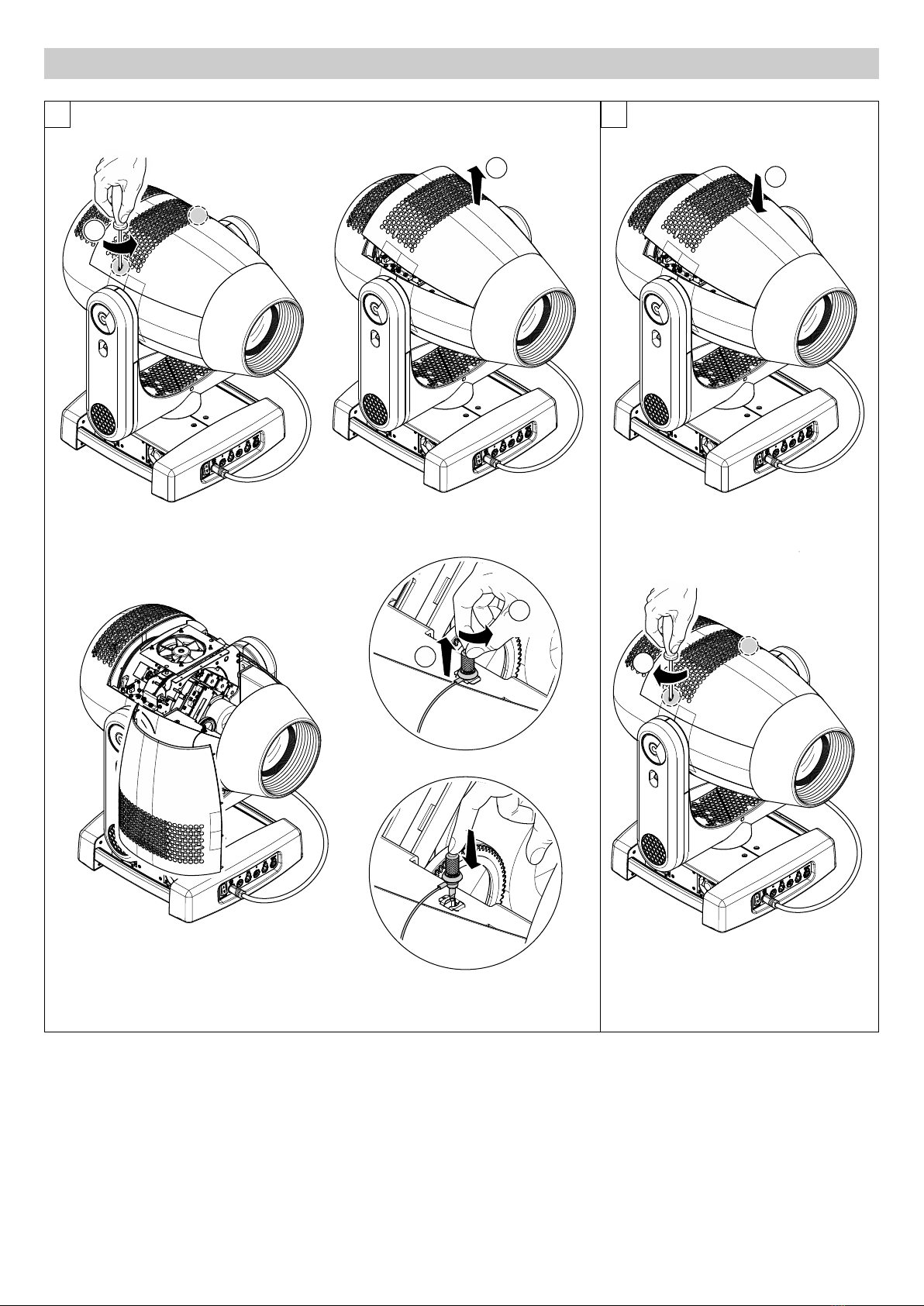
Locking and releasing Pan and Tilt movements - Refer to the instructions in the UNPACKING AND PREPARATION section.
pening the head covers - Fig. 10.
Closing the head covers - Fig. 11.
21
1/4 Turn
2
1
CLICK!!
1/4 Turn
1
1/4 Turn
2
10 11
MAINTENANCE
Continue ➔
Upper side
Upper side
8
AXCOR PROFILE 900
12
Periodical cleaning - Fig. 12
To ensure optimal operation and performance for a long time it is essential to periodically clean the parts subject to dust and grease deposits. The
frequency with which the following operations are to be carried out depends on various factors, such as the amount of the effects and the quality of the
working environment (air humidity, presence of dust, salinity, etc.).
Use a soft cloth dampened with any detergent liquid for cleaning glass to remove the dirt from the reflectors, from the lenses and filters. It is recommended
that the projector undergoes an annual service by a qualified technician for special maintenance involving at least the following operations:
•General cleaning of internal parts.
•Restoring lubrication of all parts subject to friction, using lubricants specifically supplied by Claypaky.
•General visual check of the internal components, cabling, mechanical parts, etc.
•Electrical, photometric and functional checks; eventual repairs.
N TE: keep a careful cleaning
of the ''CMY/colour filters assembly''
to prevent rapid deterioration.
Light collimation system
This product contains internal light
collimation system. Avoid intense
light from any angle.
9
AXCOR PROFILE 900
1
2
Lower side
Upper side
13
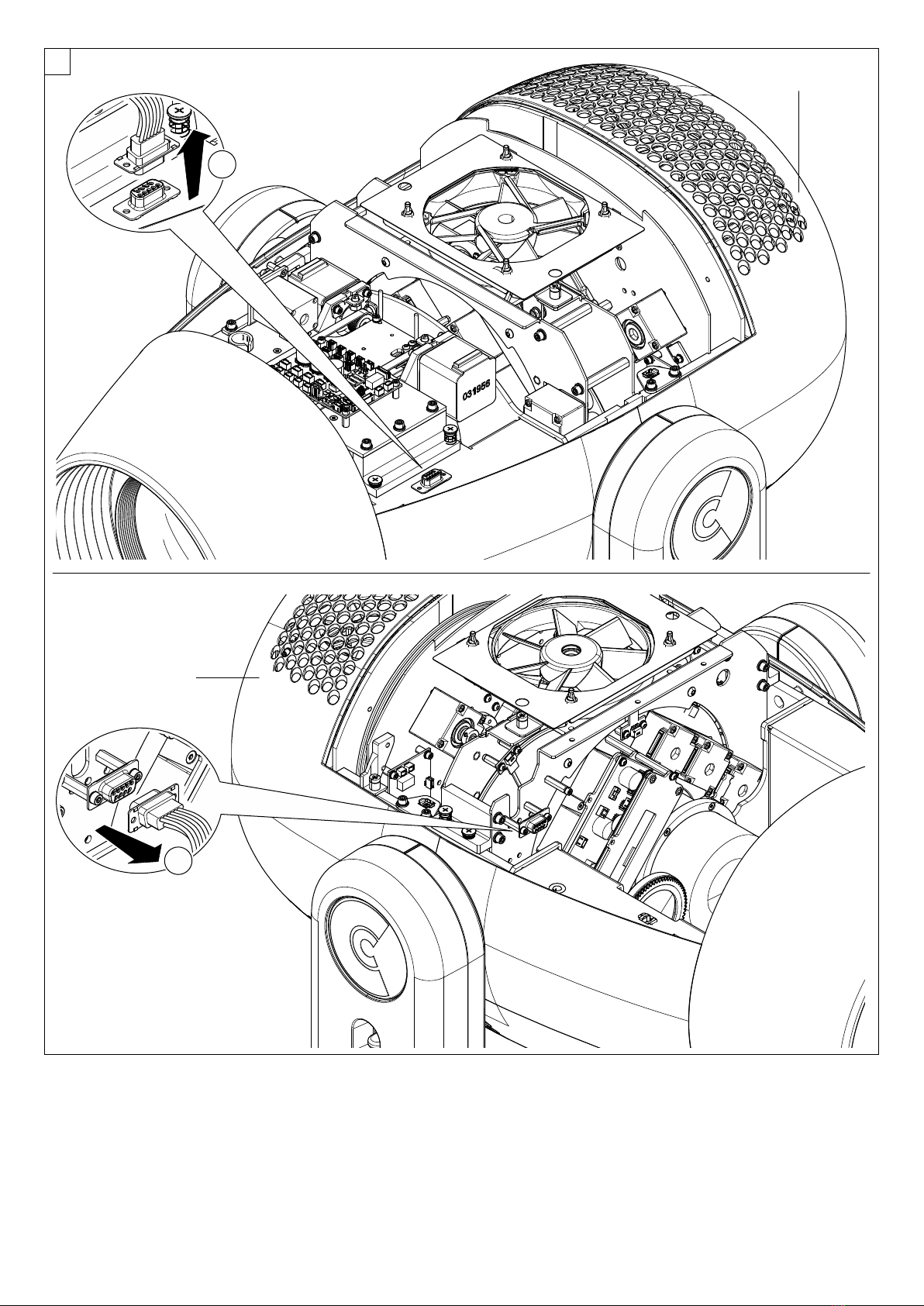
Extraction of the effect modules: Preliminary operations - Fig. 13.
N TE:
- Do not disconnect wiring harnesses when the fixtures is switched-on, to avoid to damage electronic boards.
- Do not switch-on the fixtures with wiring harness disconnected.
Continue ➔
10
AXCOR PROFILE 900
2Upper side
1
Lower side
1
3
3
2
14
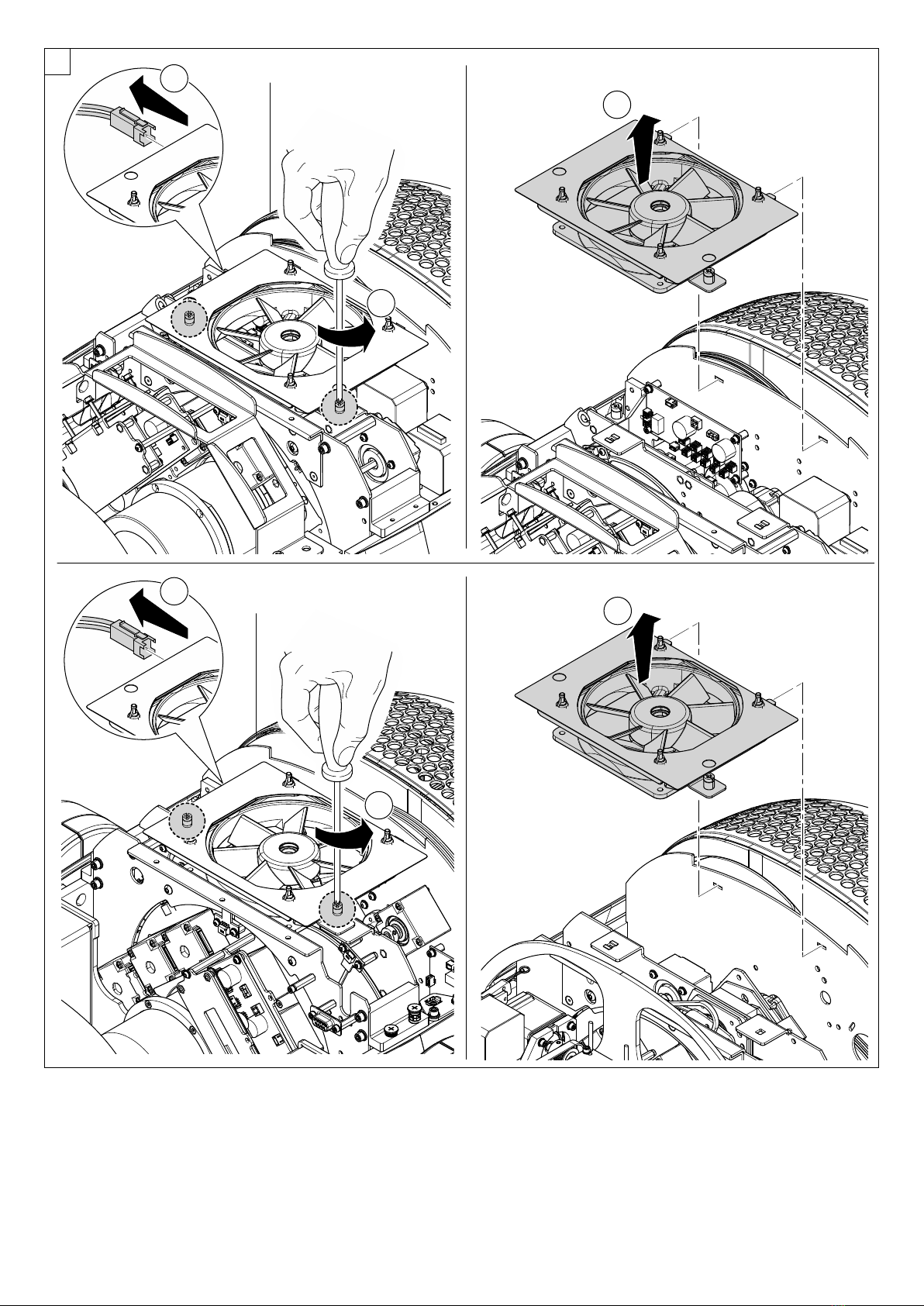
Extraction of the effect modules: Preliminary operations - Fig. 14.
N TE:
- Do not disconnect wiring harnesses when the fixtures is switched-on, to avoid to damage electronic boards.
- Do not switch-on the fixtures with wiring harness disconnected.