manuals.online logo
Brands
  1. Home
  2. •
  3. Brands
  4. •
  5. Panasonic
  6. •
  7. Projector
  8. •
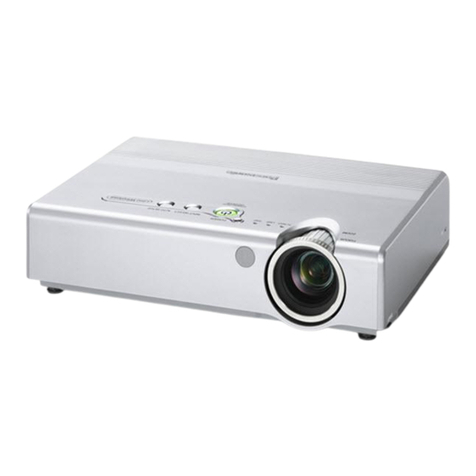
  9. Panasonic PT-LX22 System manual

Panasonic PT-LX22 System manual

This manual suits for next models

1

Other Panasonic Projector manuals

Panasonic PT-LB20 User manual

Panasonic

Panasonic PT-LB20 User manual

Panasonic Whisper-Lite FV-08VQL4 User manual

Panasonic

Panasonic Whisper-Lite FV-08VQL4 User manual

Panasonic PT-RZ660 User manual

Panasonic

Panasonic PT-RZ660 User manual

Panasonic PT-DW7000E-K User manual

Panasonic

Panasonic PT-DW7000E-K User manual

Panasonic PT-DW105XEA Operating instructions

Panasonic

Panasonic PT-DW105XEA Operating instructions

Panasonic PT-L759X User manual

Panasonic

Panasonic PT-L759X User manual

Panasonic PT-EX620 User manual

Panasonic

Panasonic PT-EX620 User manual

Panasonic PT-LM2U User manual

Panasonic

Panasonic PT-LM2U User manual

Panasonic PT-LW80NT System manual

Panasonic

Panasonic PT-LW80NT System manual

Panasonic DW6300K User manual

Panasonic

Panasonic DW6300K User manual

Panasonic PT-65WX50 User manual

Panasonic

Panasonic PT-65WX50 User manual

Panasonic PT-L711E User manual

Panasonic

Panasonic PT-L711E User manual

Panasonic PT-TW230 Guide

Panasonic

Panasonic PT-TW230 Guide

Panasonic PTAX200U - LCD PROJECTOR User manual

Panasonic

Panasonic PTAX200U - LCD PROJECTOR User manual

Panasonic PT-AX100U User manual

Panasonic

Panasonic PT-AX100U User manual

Panasonic PT-JW130FBE Operating instructions

Panasonic

Panasonic PT-JW130FBE Operating instructions

Panasonic PTL785U - LCD PROJECTOR UNIT User manual

Panasonic

Panasonic PTL785U - LCD PROJECTOR UNIT User manual

Panasonic PT-VX400U User manual

Panasonic

Panasonic PT-VX400U User manual

Panasonic PT-VX431K User manual

Panasonic

Panasonic PT-VX431K User manual

Panasonic PT-LB1VU User manual

Panasonic

Panasonic PT-LB1VU User manual

Panasonic PT-EX16KE User manual

Panasonic

Panasonic PT-EX16KE User manual

Panasonic PT-D4000U Series User manual

Panasonic

Panasonic PT-D4000U Series User manual

Panasonic PT-LMZ460 Operating instructions

Panasonic

Panasonic PT-LMZ460 Operating instructions

Panasonic PTD5500U - DLP PROJECTOR User manual

Panasonic

Panasonic PTD5500U - DLP PROJECTOR User manual

Popular Projector manuals by other brands

iEmmet MP-312 user manual

iEmmet

iEmmet MP-312 user manual

Epson VS400 Specifications

Epson

Epson VS400 Specifications

Sony VPL-HS10 Marketing Specifications & Features manual

Sony

Sony VPL-HS10 Marketing Specifications & Features manual

Sony VPL-HW65ES Quick reference manual

Sony

Sony VPL-HW65ES Quick reference manual

Toshiba TLP-791U Specifications

Toshiba

Toshiba TLP-791U Specifications

Philips LC1341 Declaration of conformity

Philips

Philips LC1341 Declaration of conformity

NEC NP600S EDU Specifications

NEC

NEC NP600S EDU Specifications

BenQ SH753P user manual

BenQ

BenQ SH753P user manual

Eiki EK-623U series quick start guide

Eiki

Eiki EK-623U series quick start guide

Epson PowerLite Pro Cinema 6020UB user guide

Epson

Epson PowerLite Pro Cinema 6020UB user guide

Epson PowerLite Home Cinema 705HD user guide

Epson

Epson PowerLite Home Cinema 705HD user guide

Christie LHD700 user manual

Christie

Christie LHD700 user manual

Navitar FX instruction manual

Navitar

Navitar FX instruction manual

InFocus LitePro 560 user guide

InFocus

InFocus LitePro 560 user guide

Sony SRX-R815P operating instructions

Sony

Sony SRX-R815P operating instructions

Vivitar DP1500 X specification

Vivitar

Vivitar DP1500 X specification

Asus ZenBeam Latte user manual

Asus

Asus ZenBeam Latte user manual

Epson PowerLite 810p specification

Epson

Epson PowerLite 810p specification

manuals.online logo
manuals.online logoBrands
  • About & Mission
  • Contact us
  • Privacy Policy
  • Terms and Conditions

Copyright 2025 Manuals.Online. All Rights Reserved.

SPEC FILE
Product Number : PT-LX22
Product Name : LCD Projector
As of June 2012. Specifications and appearance are subject to change ithout notice.
SFL11M018-1
1/12
SPEC FI L E
PT-LX22
LCD Projector
As of June 2012
SFL11M018-1
2/12
Specifications
Main unit
Power supply
Power consumption
LCD panel Panel size
Display method
Pixels
Pixel configuration
Lens
Throw ratio
Lamp
Screen size
Colors
Brightness*2
Center-to-corner uniformity*2
Contrast*2
Resolution
Scanning frequency RGB
YPBPR(YCBCR)
Video/S-Video
Optical axis shift
eystone correction range
Installation
Terminals COMPUTER (RGB) IN
R, G, B
Y, PB(CB), PR(CR)
S-Video
VIDEO IN
SERIAL IN
Power cord length
Cabinet materials
Dimensions (W ×H×D)
Weight
Operation noise
Operating temperature
Operating humidity
100–240 V AC, 50/60 Hz
287 W
(0.47 W when standby mode set to eco,*17.1 W when standby mode
set to network.)
14.0 mm (0.55 inches) diagonal (4:3 aspect ratio)
Transparent LCD panel (× 3, R/G/B)
786,432 (1,024 × 768) × 3, total of 2,359,296 pixels
Stripe
Manual zoom (1:1–1.2:1), manual focus F 2.10– 2.25, f 19.11–22.94 mm
1.7–2.0:1
230 W UHM lamp
0.76–7.62 m (30 –300 inches) diagonally, 4:3 aspect ratio
Full color (16,777,216 colors)
2,200 lumens (lamp mode: high)
85%
500:1 (full on / full off) (LAMP MODE: HIGH)
1,024 × 768 pixels (Input signals that exceed this resolution will be
converted to 1,024 × 768 pixels.)
fH: 15 kHz–100 kHz, fV: 50 Hz–100 Hz, dot clock: 140 MHz or lower
(Signals above 140 MHz are downsampled.)
480i (525i): fH15.75 kHz; fV60 Hz,
576i (625i): fH15.63 kHz; fV50 Hz,
480p (525p): fH31.50 kHz; fV60 Hz,
576p (625p): fH31.25 kHz; fV50 Hz,
720 (750)/60p: fH45.00 kHz; fV60 Hz,
720 (750)/50p: fH37.50 kHz; fV50 Hz,
1080 (1125)/60i: fH33.75 kHz; fV60 Hz,
1080 (1125)/50i: fH28.13 kHz; fV50 Hz
fH: 15.75 kHz, fV: 60 Hz [NTSC/NTSC4.43/PAL-M/PAL60]
fH: 15.63 kHz, fV: 50 Hz [PAL/PAL-N/SECAM]
6:1 (fixed)
Vertical: ±30° (±20° with Real-Time eystone)
Ceiling/desk, front/rear (menu selection)
D-sub HD 15-pin (female) ×1
G: 0.7 Vp-p (1.0 Vp-p for sync on G), 75 ohms;
B, R: 0.7 Vp-p, 75 ohms;
HD/VD, SYNC: high impedance, TTL (positive/negative)
OTE: SY C/HD and VD terminals do not accept tri-level sync signals.
Y: 1.0 Vp-p (including sync signal);
PB(CB), PR(CR): 0.7 Vp-p, 75 ohms
Y: 1.0 Vp-p; C: 0.286 Vp-p, 75 ohms
OTE: D-sub to S-Video adaptor cable ET-ADSV is required.
RCA pin × 1, 1.0 Vp-p, 75 ohms
D-sub 9-pin (male) × 1, for external control (RS-232C compliant)
2.0 m (6 ft 7 in)
Molded plastic
349 mm × 105 mm*4× 247 mm* 5
(13-3/4 × 4-5/32*4× 9-3/4*5inches)
Approximately 2.9 kg (6.4 lbs)
37.0 dB (LAMP MODE: HIGH), 34.1 dB (LAMP MODE: NORMAL),
29.0 dB (LAMP MODE: ECO)
5 – 35 °C (41– 95 °F)
20%–80% (no condensation)

SPEC FI L E
PT-LX22
LCD Projector
As of June 2012
SFL11M018-1
3/12
Remote control unit
Power supply
Operation range*6
Dimensions (W × H × D)
Weight
Supplied accessories
Optional accessories
Replacement lamp unit
Replacement filter unit
Ceiling mount bracket
Bracket assembly
D-sub to S-Video adaptor cable
3 V DC (R03/LR03/AAA type battery × 2)
Approximately 7 m (23 ft) when operated from directly in front of the
signal receptor
52 × 110 × 18 mm (2-1/16 × 4-11/32 × 23/32 inches)
Approx. 67 g (2.4 oz) (including batteries)
Power cord with security lock (× 1) (× 2 for PT-LX22EA)
Wireless remote control unit (× 1)
Batteries for remote control (R03/AAA type × 2)
VGA cable (× 1)
Software CD-ROM (Logo Transfer Software) (× 1)
Filter cover (× 1)
ET-LAL100
ET-RFL100
ET-P V100H (for high ceilings)
ET-P V100S (for low ceilings)
ET-P L100B
ET-ADSV
Weights and dimensions shown are approximate. Specifications subject to change without notice.
*1 When the standby mode is set to eco, only certain commands can be received for external control using the serial terminal.
*2 Measurement, measuring conditions, and method of notation all comply with ISO 21118 international standards.
*3 WUXGA resolution is supported only when the signals are compliant with VESA CVT-RB (Coordinated Video Timing-Reduced Blanking).
*4 With legs at shortest position.
*5 Protruding parts not included.
*6 Operation range differs depending on environments.
172
(6-25/32)
349 (13-3/4)
72
(2-27/32)
247
105
(4-5/32)
85
(3-3/8)
69
(2-23/32)
20
(25/32)
(9-3/4)
Dimensions
unit : mm (inch)
OTE: This illustration is not drawn to scale.
SPEC FI L E
PT-LX22
LCD Projector
As of June 2012
SFL11M018-1
4/12
Terminals
123
1 Serial input
2 Computer input
3 Video input
SPEC FI L E
PT-LX22
LCD Projector
As of June 2012
SFL11M018-1
5/12
Standard setting-up position
Projected image
Lower edge of projected image
Upper edge of projected image
Projected image
927–1,497
(36-1/2–58-15/16)
Adjustable in
30-mm
(1-3/16-inch) step.
110
∅38
(4-11/32)
137
(5-13/32)
(1-1/2)
70
(2-3/4)
100
(3-15/16) 100
(3-15/16)
200
(7-7/8)
140
(5-1/2)
70
(2-3/4)
67
(2-5/8)
L
L
L
HH
unit : mm (inch)
OTE:
Illustrations show the projector
installed using optional ceiling mount
bracket ET-PKV100H and bracket
assembly ET-PKL100B.
This illustration is not drawn to scale.
Caution:
• All construction work should be done by a qualified technician.
• When mounting to the ceiling, use the special mounting bracket. To prevent the projector from swaying or drop-
ping, attach the wire that is included with the projector between the mounting bracket and the ceiling.
SPEC FI L E
PT-LX22
LCD Projector
As of June 2012
SFL11M018-1
6/12
Calculation of the projection distance
For a screen size different from the above, use the equation below to calculate the projection distance.
Aspect ratio 4:3
minimum L (m) = (diagonal screen size in inches) × 0.0345 – 0.0233
maximum L (m) = (diagonal screen size in inches) × 0.0414 – 0.0237
OTE:
Distances calculated with the above equations will include a slight error.
0.76 m
1.02 m
1.27 m
1.52 m
1.78 m
2.03 m
2.29 m
2.54 m
3.05 m
3.81 m
5.08 m
6.35 m
7.62 m
1.0
1.4
1.7
2.0
2.4
2.7
3.1
3.4
4.1
5.2
6.9
8.6
10.3
1.2
1.6
2.0
2.5
2.9
3.3
3.7
4.1
4.9
6.2
8.3
10.3
11.0
0.07
0.09
0.11
0.13
0.15
0.17
0.20
0.22
0.26
0.33
0.44
0.54
0.65
30˝
40˝
50˝
60˝
70˝
80˝
90˝
100˝
120˝
150˝
200˝
250˝
300˝
/
/
/
/
/
/
/
/
/
/
/
/
/
(2.9)
(3.9)
(4.9)
(5.9)
(6.9)
(7.9)
(8.9)
(9.9)
(11.9)
(14.8)
(19.8)
(24.8)
(29.8)
(3.5)
(4.7)
(5.9)
(7.1)
(8.3)
(9.5)
(10.7)
(11.9)
(14.3)
(17.8)
(23.8)
(29.8)
(36.1)
(0.21)
(0.29)
(0.36)
(0.43)
(0.50)
(0.57)
(0.64)
(0.71)
(0.86)
(1.07)
(1.43)
(1.79)
(2.14)**
Projection size
[diagonal]
Projection distance [L]
Min [wide] Max [telephoto]
P
Height from the edge of screen
to center of lens [H]
Projection distance for 4:3 aspect ratio screen
unit: meters (feet)
OTE:
• The value for L (distance to screen) varies slightly depending on the zoom lens characteristics.
• At the shortest projection distance, the zoom lens characteristics may cause slight image distortion.
* Lens performance cannot be guaranteed for projection sizes larger than 11.0 m (36.1 ft).
+30°
–30°
–20°
+20°
Installable angle
Install the projector at an angle within the range shown below.
• Vertical direction
The projector may be installed at a vertical
angle of 30°.
• Horizontal direction
The projector may be installed at a horizontal
angle of 20°.
SPEC FI L E
PT-LX22
LCD Projector
As of June 2012
SFL11M018-1
7/12
List of compatible signals
The signals that can be input to this projector are shown in the table below. Horizontal scanning fre-
quencies of 15 kHz to 100 kHz, vertical scanning frequencies of 50 Hz to 100 Hz, and a dot clock of
140 MHz maximum can be input.
OTE: The native resolution of this projector is 1,024 × 768 pixels. If the display resolution of the input signal is different from the
native resolution, image compression or expansion will be used to convert the input signal to a level within the native resolution.
Display mode Display
resolution
(dots)*1
Scanning frequency
H
(kHz)
V
(kHz)
Dot clock
frequency
(MHz)
Format
720 × 480i
720 × 576i
640 × 480i
768 × 576i
640 × 480
768 × 575
1280 × 720
1920 × 1035i
1920 × 1080i
640 × 400
640 × 480
720 × 400
640 × 480
800 × 600
832 × 624
1024 × 768
1024 × 768i
1024 × 768
15.7
15.6
15.7
15.6
31.5
31.3
45.0
37.5
33.8
33.8
28.1
31.5
31.5
37.5
37.9
37.9
43.3
31.5
35.0
35.0
32.7
34.5
35.2
37.9
37.9
38.0
38.6
46.9
48.1
53.7
49.7
44.0
46.9
47.0
48.4
48.5
58.0
60.0
60.3
61.0
62.0
63.5
56.5
68.7
36.0
35.5
60.2
59.9
50.0
59.9
50.0
59.9
50.0
60.0
50.0
60.0
60.0
50.0
70.1
59.9
75.0
72.8
74.4
85.0
70.1
66.6
66.7
51.1
55.4
56.3
60.3
61.0
60.5
60.3
75.0
72.2
85.1
74.6
54.6
58.2
58.3
60.0
60.0
72.0
75.0
74.9
75.7
77.1
79.4
70.1
85.0
87.2
87.0
75.1
−
−
12.3
14.8
25.2
29.5
74.3
74.3
74.3
74.3
74.3
25.2
25.2
31.5
31.5
31.5
36.0
28.3
31.3
30.2
32.7
36.4
36.0
40.0
40.0
40.1
38.6
49.5
50.0
56.3
57.3
59.1
63.0
61.7
65.0
65.2
74.7
78.8
79.3
81.0
84.3
83.4
75.0
94.5
47.3
44.9
80.0
NTSC/NTSC4.43/PAL-M/PAL60
PAL/PAL-N/SECAM
480i (525i)
576i (625i)
480p (525p)
576p (625p)
720p
1035i
1080i
VGA
MAC LC13
MAC13
SVGA
MAC16
XGA
MAC19
VIDEO/S-VIDEO*2
YPBPR/RGB
RGB
*1 The “i” appearing after the resolution indicates an interlaced signal.
*2 A D-sub to S-Video adaptor cable (ET-ADSV) is required for S-Video signal input.
SPEC FI L E
PT-LX22
LCD Projector
As of June 2012
SFL11M018-1
8/12
Display mode Display
resolution
(dots)*1
Scanning frequency
H
(kHz)
V
(kHz)
Dot clock
frequency
(MHz)
Format
1280 × 768
1280 × 800
1360 × 768
1366 × 768
1376 × 768
1152 × 870
1152 × 900
1280 × 960
1280 × 1024
1280 × 1024i
1280 × 960
1280 × 1024
1400 × 1050
1440 × 900
1600 × 1200
1680 × 1050
1920 × 1200
47.8
60.3
68.6
41.2
49.6
49.7
56.0
57.6
58.2
60.0
62.8
63.9
71.5
47.7
56.2
48.4
48.4
68.7
61.2
71.4
61.9
60.0
62.5
63.3
63.7
63.9
71.7
81.1
64.0
80.0
63.4
77.0
63.8
91.1
50.0
50.0
46.4
75.0
80.0
64.0
65.4
65.1
55.9
74.9
75.0
81.3
87.5
93.8
65.3
74.0
74.6
59.9
74.9
84.8
50.0
60.1
59.8
70.0
72.0
70.0
72.0
74.9
60.0
84.8
60.0
72.0
60.0
60.0
75.1
65.2
75.6
66.0
60.0
58.6
60.0
60.0
60.0
67.2
76.1
60.2
75.0
60.0
72.0
60.2
85.0
86.0
94.0
86.7
75.1
75.1
60.2
60.1
59.9
59.9
60.0
60.0
65.0
70.0
75.0
60.0
59.9
59.9
79.5
102.3
117.5
68.6
79.4
83.5
95.0
97.8
98.9
102.8
106.5
108.0
122.5
86.7
86.7
100.1
86.7
100.0
92.0
105.1
94.5
108.0
108.0
107.3
109.5
108.0
117.0
135.0
108.1
135.0
111.5
130.1
109.5
157.5
80.0
80.0
78.4
126.0
135.2
108.0
122.9
122.4
106.5
161.9
162.0
175.5
189.0
202.5
146.3
154.0
193.3
WXGA
MAC21
SXGA
MAC
SXGA+
WXGA+
UXGA
WSXGA+
WUXGA
RGB
*1 The “i” appearing after the resolution indicates an interlaced signal.
SPEC FI L E
PT-LX22
LCD Projector
As of June 2012
SFL11M018-1
9/12
Serial connector
The serial connector complies with RS-232C. To control the projector from a personal computer, com-
mands must be input through communication software, based on the format and satisfying the commu-
nication conditions shown below.
Basic format
Transmission from the computer begins with STX, then command, parameter, and ETX are sent in this
order. Add parameters according to the details of control.
Communication conditions (factory setting)
Pin assignments and signal names
6
15
9
D-sub 9-pin (male)
Serial input
Description
NC
Receive data
Send data
NC
Ground
Signal name
–
RXD
TXD
–
GND
No.
1
2
3
4
5
Description
NC
NC
NC
NC
Signal name
–
–
–
–
No.
6
7
8
9
CAUTIO
• It may not be possible to send or receive commands for about 10 to 60 seconds when the lamp is first turned on. If this occurs, wait for 60 sec-
onds, then try sending or receiving again.
• When sending multiple commands, be sure to wait for at least 0.5 second after receiving a response from the projector before sending the next
command.
• Additional time is sometimes required for response due to processing inside the projector. Set the time-out period for command response to 10
seconds or more.
Start
(1 byte)
End
(1 byte)
Colon
(1 byte) Parameters
(undefined length)
Command
(3 bytes)
STX ETXC1P1P2...PnC2C3 :
Signal level
Synchronization method
Baud rate
Parity
RS-232C-compliant
Start-stop synchronization
19,200 bps
None
OTE: When sending commands without parameters, a colon (:) is not necessary.
Basic format with sub-commands
Same as the basic format without sub-commands
Parameters (6 bytes):
“+” or “-” sign (1 byte) with setting/adjusting value (5 bytes)
Sub-command
(5 bytes)
Operation (1 byte):
“=” (Sets the value designated by the parameters)
S1 P1 P2 P3 P4 P5 P6S2S3S4S5 E
STX ETXC1C2C3 :
Character length
Stop bit
X parameter
S parameter
8 bits
1 bit
None
None
OTE: When sending sub-commands that require no parameters, operation (E) and parameters are not necessary.
SPEC FI L E
PT-LX22
LCD Projector
As of June 2012
SFL11M018-1
10/12
Cable specifications
1
2
3
4
5
6
7
8
9
1
2
3
4
5
6
7
8
9
PC (DTE)Projector
NC
NC
NC
NC
NC
NC
NC
NC NC
NC NC
NC
Control commands
PON*1/*2
POF*1
IIS:<input signal>
OFZ:<off on>
VPM:STD
VPM:DYN
VPM:CIN
VPM:REA
VPM:BBD
VPM:CBD
VPM:IM1
VPM:IM2
VPM:IM3
VPM:IM4
AUU
AUD
OSH*1
DZU
DZD
Power on (standby mode on)
Power off (standby mode off)

Input signal selection
Freeze
Picture mode: Standard
Picture mode: Dynamic
Picture mode: Cinema
Picture mode: Real
Picture mode: Blackboard
Picture mode: Colorboard
Picture mode: Image 1
Picture mode: Image 2
Picture mode: Image 3
Picture mode: Image 4
Volume up
Volume down
Blank
Digital zoom: Enlargement
Digital zoom: Reduction
PON
POF
IIS:<input signal>
OFZ:<off on>
VPM:STD
VPM:DYN
VPM:CIN
VPM:REA
VPM:BBD
VPM:CBD
VPM:IM1
VPM:IM2
VPM:IM3
VPM:IM4
AUU
AUD
OSH
DZU
DZD
–
–
–
0
–
–
–
–
–
–
–
–
–
–
–
–
–
–
–
–
–
–
1
–
–
–
–
–
–
–
–
–
–
–
–
–
–
–
Command: <Parameter> Function Callback: <Parameter> Parameter value
Min Max
*1 Do not send PO , POF, or OSH commands continuously in a short period of time. Doing so may burst the lamp or shorten the lamp replace-
ment cycle.
*2 These commands are effective when the standby mode is set to eco. (Other commands are not effective.)