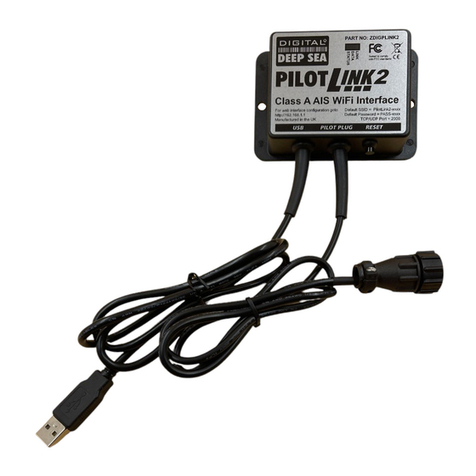
3. Connect the otherendof the short Ethernetpower/datacabletotheport
labelled“Data+PoEOUT”on the Power-over-Ethernet (PoE)Injector.
4.Locatethe black waterproofconnectoratthe end ofthe long 10m(typical)
Ethernetpower/datacable.Plug thatendofthe Ethernetpower/datacable
intothe black connectoron the bottomrighthand side ofthe MWB-AP
labelled“MWB-4GLINEOUTData+PoE”,then screwthe waterproof
connectoroverthecableend.Makesurethecompression nutistightaround
the washerand cable, takingcarenot toover-tighten.
5.Connectthe otherend ofthe long 10m(typical)Ethernetpower/datacable
tothe MWB-4G labelled “PCData+PoE”, thenscrewthe waterproof connector
overthe cableend.Makesurethecompression nutistightaroundthewasher
and cable,taking carenottoover-tighten.
6.ConnectyourstandardEthernetcategory5(cat5)patchdatacable(not
supplied)tothe PowerInjectorportlabelled“DataIN”then connectthe other
end toyourPCEthernet port.
WARNING! Never connect yourPCEthernetport to any port onthe MWB-
4G, MWB-AP orPoEpowersupply,otherthan the PowerInjectorPort
labelled“DataIN”.Anyotherconnection couldresultindamage toyourPC.
NORESPONSIBILITYWILLBE TAKENBYTHEMANUFACTUREROR
SUPPLIERFORANYDAMAGESO CAUSED.
7. Connect the PowerInjectortothe vessel12/24vDC systemasindicated on
the injectorlabelusingthe sideterminals.Notetherearetwocommon “VIN+”
terminalsforconvenientlooped cablepowerconnection.
WARNING! The powerinjectormustbe properlygrounded!FortheDC
powerinjector,connectasuitablysized ground wirebetween the ground
terminalon the injectorand the powersystemground.Foran ACpower
injector,connectthe suppliedpowerplugonlytoagrounded three-pinoutlet.
DAMAGECAUSEDBYFAILURETO PROPERLYGROUND YOURSYSTEM
ISNOTCOVEREDBY OUR WARRANTY.