manuals.online logo
Brands
  1. Home
  2. •
  3. Brands
  4. •
  5. Qls
  6. •
  7. MP3 Player
  8. •
  9. Qls QA-350 User manual

Qls QA-350 User manual

Other Qls MP3 Player manuals

Qls QA390 User manual

Qls

Qls QA390 User manual

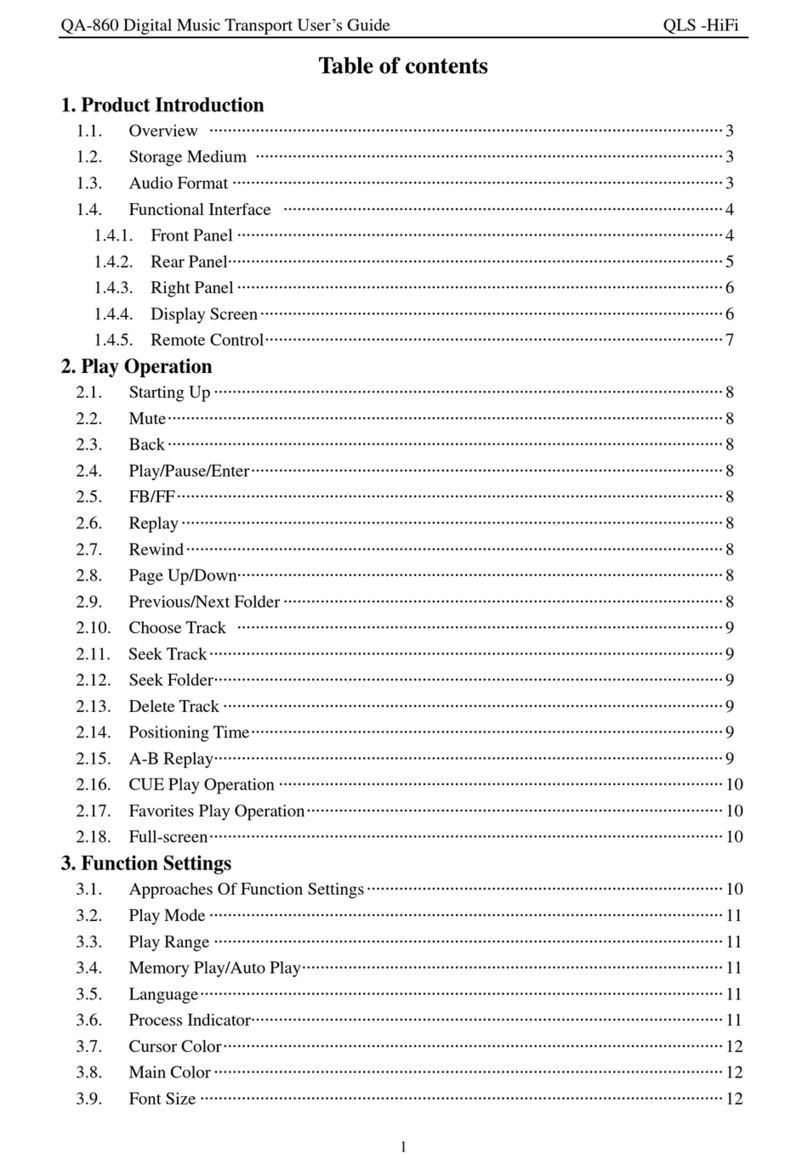
Qls QA-860 User manual

Qls

Qls QA-860 User manual

Popular MP3 Player manuals by other brands

FINIS Neptune instruction manual

FINIS

FINIS Neptune instruction manual

Majestic BT 3280R MP4 instructions

Majestic

Majestic BT 3280R MP4 instructions

Slick MP418C-4 user guide

Slick

Slick MP418C-4 user guide

GPX MW6815DT instruction manual

GPX

GPX MW6815DT instruction manual

Sony NWZ-B135F - Walkman - 2 GB Digital Player Specifications

Sony

Sony NWZ-B135F - Walkman - 2 GB Digital Player Specifications

ID-AL NanoPlayer box user manual

ID-AL

ID-AL NanoPlayer box user manual

Blaupunkt Compact Drive MP3 operating instructions

Blaupunkt

Blaupunkt Compact Drive MP3 operating instructions

Memorex MMP9008 - 8GB USB 2.0 user guide

Memorex

Memorex MMP9008 - 8GB USB 2.0 user guide

Meizu Electronic Technology E5 user manual

Meizu Electronic Technology

Meizu Electronic Technology E5 user manual

Naxa NMV-173NX user manual

Naxa

Naxa NMV-173NX user manual

Philips PSA250 Specifications

Philips

Philips PSA250 Specifications

Impecca MP1202 user guide

Impecca

Impecca MP1202 user guide

Sony NW-MS7 - Memory Stick Walkman Service manual

Sony

Sony NW-MS7 - Memory Stick Walkman Service manual

Irradio RF-42UC user manual

Irradio

Irradio RF-42UC user manual

NABAIJI SWIM MUSIC 100 user guide

NABAIJI

NABAIJI SWIM MUSIC 100 user guide

Laser MP3-A9-4GB user manual

Laser

Laser MP3-A9-4GB user manual

Samsung YP-T7F Service manual

Samsung

Samsung YP-T7F Service manual

MobiBlu DAH-1500i user manual

MobiBlu

MobiBlu DAH-1500i user manual

manuals.online logo
manuals.online logoBrands
  • About & Mission
  • Contact us
  • Privacy Policy
  • Terms and Conditions

Copyright 2025 Manuals.Online. All Rights Reserved.

Page
1
QA-350 WAV highfidelitymusicplayerusermanual
WelcometouseQA-350 WAVhighfidelitymusicplayer,Pleasespendseveral
minutesto readthisusermanualbeforepreparingusing it.
QA350 isaWAVhighfidelitymusicplayerdesignedandmadebyQLSElectronics.SD
cardisappliedasstoragemediumwhilelosslessWAVformatasthesound source.The
playerintegratesDACandheadphoneAmplifiercircuit withthebuilt-inhigh-capacity
rechargeablelithiumpolymerbattery.Itisconvenienttocarrywithandplaymusic.
Meanwhile,theplayerisdesignedhaveRCAcoaxialoutputandopticaloutputto
facilitatetheQA350 tobeapuredigitalsoundsource.QA350 isalsohaveanalogsignal
outputwhichcanbedirectlyconnectedtoamplifierorpreampetc.
Cautionofusing lithiumpolymerbattery:
1. non-equilibriumchargerisprohibitedwhichmaycauselithiumbatteriesdamage,
smoking, heatedorburned!
2. overdischarge,overchargeorreversechargewill immediatelyleadtolithium
damage!Theoverchargedstatewhenthebatteriesareleftasideforlongtimewill
bepresentedbyitsself-dischargecharacteristics.Inordertopreventover-discharge,
thebatteryshall bechargedperiodically, atleastonetimeinamonth,orelselithium
batteriesmaybedamagedbecauseofover-discharge.
3. batteriesortheplayershall beputintheclean,dry,andventilatedplaceswiththe
relativehumidityless than75%.Storageshouldavoidtheshortcircuit; donotplace
thebatterynearaheatsourceorprolongedexposuretosunlight.Temperaturerise
will shortenbatterylife.
4. inordertoavoidover-dischargeddamagetothebattery,pleaseensurethatthe
powerswitchisatOFF whentheplayerisnotused.(Evenifthebatteryisusedto
theautomaticshutdown,thepowerswitchshouldcertainlybepulledtotheOFF
position).
5. forthesafetyofuserandtheproperty,whenchargingthebatteries,pleaseensure
thatsomeoneisatthesite.Donotchargewhennooneisathomeorsleepingat
night.
6. Preventfalls, shocks, andbendingbatteriesagainstfires.
7. inanycase,thebatteryshell cannotbedismantled,orelsetheinnershortcircuitcan
becaused, leadingtobumpand fire.
8. it isprohibitedthatthedirectconnectionofshort-circuit ofthebatterypositiveand
negativepoles.Itmayresult inseriousdamagetothebattery,orevenfire.
9. strictlyprohibitedtothrowbatteryinfireorliquidstoavoiddanger.
10. strictlyprohibitedtochargerinthecar.
11. inordertoavoidadverseconsequencescausedbythebatteryabnormaluse,please
donotputlithiumbatteriesortheplayertoplaceswithinreachofchildren.
MainFeaturesofQA350 Player:
lHigh accuracycrystalclock2ppmTCXO crystaltoensurethebestsoundquality.
lSupport16ohm-300ohmheadphones.
lOpticalandCoaxialdigitaloutput, andLINEOUToutput, HeadphoneAmpoutput.
lSupporttwocontrolmethods:buttonsandremote. buttonscanbelocked.
lSupporttwopowersupplymethods:thebatteryandexternalDCpowersupply.
l0802LCDsynchronousdisplay.Backlightcontrollable.
lSupportfirmwareupgrade.
lEachmoduleindependentLDO offerpowersupply.Theplayerworksmorestable
withless powernoise.
lReal-timemonitoring ofbatteryvoltage.Whenthebatteryvoltageislow,outputis
automaticallyshutdown.
SoundSource File:
Filesareputinorderbythenumber/alphabetascending order.Filesintherootdirectory
comeinfrontofall thefilesinall folders.folderareputinorderbythenumber/alphabet
ascendingordertoo, whichinclude:
1)All thefilesintherootdirectorycomebeforethefirstfolder.
2)Foldersareputinthesameorder.
3)filesineachfolderisputinthesameorder.
SDcardformat:
FAT32 formatless than(equalto)16G, SD/SDHC
Power:
1, anexternal9V-12Vlinearpowersupplyisapplied.Polarityrequirementsare:
positiveisinsideandthenegativeisoutside.
2, 7.4 Vbuilt-inlithiumbattery
Whenanexternalpowersupplyandthelithiumbatteryareappliedatthesametime,the
powersupplyofhighervoltageisautomaticallyselected;whenchargingthebattery,an
externalpowersupplycanbeapplied.
Whenusingbatterypower,itisrecommendedthatyouturnofftheLCD backlight
to savebatterypower.
Battery protection:
Intheworkprocess, thereal-timemonitoringwill beappliedtothebatteryvoltage.
1, whenthebatteryvoltageisbelowtheprotectionthresholdvalue,thehostwill
automaticallyturnthepoweroff;ifnowtheexternalpowerisapplied,firstthepoweris
turnedoff beforeturnuptheplayeragain.

Page
2
2, intheprocess ofbatterypowering,whenthebatteryvoltagedropstotheprotection
thresholdvalue,it will automaticallycutoff thebuttoninputandremotecontrolinput,as
well astheout. LCDshall display"Battery:LOW" foruser sattentiontocharge.
3, ifthepowerhasbeendisconnectedintimeorcharged, whenthebatteryvoltagefalls
belowtheprotectionthresholdvalue,all powerconsumptionmoduleswill automatically
becutoff (exceptthecontrolmodule)toprotectthebatteryfromdamage.
BATTERY CHARGE:
Chargingmethod:thechargercableconnectsthehosttothecharger,whichcanachieve
thebatterycharging.Thechargingtimeisabout1.5-3hours.Whenall indicating lights
onthechargerturnfromredtoblue,it indicatesthecompletionofcharging(Twolights
isred WhenCharging).
Productfunctionblockdiagram:
1positive.
2)left.
3)right
Functionsofeachmoduleareasfollows:
LCDdisplay:relevantinformationissynchronousdisplayedasfollows:
1),intheupgradeprocess,whethertheSDcardisdetected,whetherthecardowns
upgradefile, andwhethertheupgradeiscompleteshall bedisplayed.
2),powerinitialization showswhethertheSDcardisdetected,whetherthecardcontains
musicfiles, andfinallyindicatesthesystemisready.
3),innormalplayback,it displaysthefilenameofcurrentplayingtrackandthelocation
inmusicfilesystem.
4), displaysplay/pausestatus.
5),whenthefoldersareinoperation,it displaysfoldernamesandtotalnumberoftracks
infolders.
6),whenthebatteryvoltageislow,it displaysthebatteryvoltageislowtoremindthe
charge.
Backlightbuttons:on/off LCDbacklight. Meanwhileservesastheautomaticstart
buttonofupgradeoperations.
Page
3
Remote:remotereceivewindowservesasreceiverofcontrollingsignalsfrom
remote.
Play/pause:startplayingorpausecurrentplaying.
Thepreviousmusic:turnstoplaythepreviousmusic.If it isthefirstone,this
operationisinvalid.
Nextmusic:turnstoplaynextmusic. Ifit isthelastone, thisoperationisinvalid.
Thepreviousfolder:ifthereis,it will turntothepreviousfolderofthecurrent
folder.Whilecurrentfolderisthefirstone,it canoverthefolderoperating.
Thenextfolder:ifthereis, it will turntothenextfolderofthecurrentfolder.
Coaxialout/opticalout: 16Bit 44.1KSPDIFPCMdigitaloutput.
LINEOUT:outputbytheDACandLVPaftertheanalogsignal,candirectlyconnect
toyouramplifiersoramp.
VolumeRegulationVR:adjustthevolumeleveloftheoutputsignaloftheamp.
Headphonejack:connectheadphones
Remoteinterface:Interface reserved.
Standby:it lightswhendisplayerisinstandbystate
Powerswitch:ON/OFF controlling thewholepower.
Power:9V-12VDCPowersupplyinput.Maximumcurrentprovidedbythepower
hasbetterexceedorequal500mA.
BatteryChargingInterface:usechargerthroughthebuilt-ininterface tochargethe
battery. Forcharging method, pleaseseerelatedintroduction.
KeyLockSwitch:topreventthekeysbeingmisuse,whenit isinthestateofON,
press thebuttontolockit;onthecontraryit isalsooperational.
SDsocket: whereSDcardinsertde
Remoteuser smanual
Functionsofeachkey :
Hoststandby:pressthiskey,thehost(player) will enterastandbystate.Press it
again, thehostwill startnormalworkingfromstandbymode.
Hostreset: ifpress it, thehostwill resetandstartworkingagain.
Numberkeys0-9:worktogetherwithotherkeystoselectmusicorsomethingelse.
2 bit number:rapidlysetmusicfromthe1st onetothe99th.
3 bit number:rapidlysetmusicfromthe100th onetothe999th.
KeyA:press thenumberkeysand2 /3 numberkeystoselectthefolder.
KeyB:useless.
Thepreviousmusic:choosethepreviousmusic,samewiththepreviousmusickey
inthehost.。
Thenextmusic:choosethenextmusic, samewiththenextmusickeyinthehost.
Thepreviousfolder:ifthereis,itwill turntothepreviousfolderofthecurrent
folder.
If thecurrentfolderisthefirstone,it will outofthefoleroperations.
Thenextfolder:ifthereis, it will turntothenextfolderofthecurrentfolder.
Play/pause:startplayingorpauseplaying, samewiththeplay/pausekeyinthehost
Page
4
Playerusage:
InsertthepreparedSDcard,connecttheheadsetand adjustthevolumeVRtothe
appropriatevolume.Whenfirstusing,it isbettertoadjustthesoundvolumetothe
minimum.
Poweronandswitchonthesupplypower,thentheplayerwillfirstlyself-testand
LCDwill displaymessage “QA-350start”inlines;ifSDcardformatisn tcorrect,it
shows “NOCARD”;ifthereisnovalidsourceofsound fileinSDcard,it shows “NO
MUSIC”.Andifself-testfinishes,it will showmessage “SUM:XXX ready…” andwait
forthenextorders.
Whenitplays,LCDshows “filenamecurrentnumber[thetotalfilenumbers]”in
lines;
Whenit pauses,LCDshowsmessage “filenamePAUSE ”inlines.Andifpress
theplay/pausekeysagain, itspausedirectlyends.
If theplayercannotbebootedorwhenLCDdisplays"battery:LOW", pleasecharge
firstbeforeusingit.
Wheninnormaloperation,youcanusetheBackLightButtontoturnon/off LCD
backlight.
Choosemusic:
1),whenautomaticallyplaying,it will automaticallystartfromthefirsttrackfor
replaywhenthefinaltrackiscompleted.
2),If press previous/nextmusic,it will turntotheprevious/thenextmusicand
automaticallyplay.Butifit playsthefirstone,previousmusickeyisinvalid;ifthelast
one,nextmusickeyinvalid;ifit automaticallyplaysthelastone,it will turnbacktothe
firstonetoplay.
3),If press numbers1-9, it willdirectlyplaythecorrespondingmusic.It sinvalidto
press 0 key;it svalid, ifwhatyoupress exceedsthesum.
4).If press __or___tochoosemusic,LCDshows “currentfilename__”or
“currentfilename___”inlines.Ifinputmusicnumber,itwill playthatmusic
directly.Ifthenumberisbeyondthesumoffiles,it isconsideredasinvalidandmakes
noresponse.
5).Press F+orF-tochoosemusicinfolders.Ifpress F+,it turnstothenextfolderto
play.And F+isinvalidwhenit comestothelastfolder.If pressF-,itturnstothe
previousfoldertoplay,whenit comestothefirstfolder. twill outofthefoleroperations,
and playformthefirstmusic.
6 Press Aand within5secondspress numbers1-9directlyorpress__followedby
press numberkeytoselecttheappropriatefolder.If morethan5secondsafterpressingA
key,theinputnumberthatisusedtoselectthefile.
7),afterselectingthefolder,theabovedescribedmethodsarebasedonoperations
withinselectedfolder. Forexample,enterthenumber9, andthen the9th trackisselected
withinthefolderratherthanthe9thtrackintheentireSDcard.
Howto firmwareupdate
1. Firstlyformat1G/2GSDcardinordertoupdate.
2. Downloadupdatefilesfromourwebsite http://www.qlshifi.com/en/Download.htm
and savethemonyourlocalharddisk. Decompress suchfiles, extractthefollowing*.qls
fileand saveit totheSDcardrootdirectory. Notethatfilenamecan tbeamended.
(onlycanhavethisa*.qlsfileinyourSDcardrootdirectory, Pleasedeleteit If have
other*.qlsfile)
3. Plug SDcard,presson updatekeySWIandturnonthepowersupply.ThenLCD
shows “updatestart…” and theplayerwillautomaticallyfindrelevantfiles.Ifyou
don tinsertthecardorit failstofindupdatefiles,LCDwill show “NO CARD”or “no
file”.Afterfinishtheupdate,LCDshows “updateok”.
Thankyouforyouruse.Ifyouhaveanyotherquestionsorfeedback,welcometo
contactus: http://www.qlshifi.com/en/lxfs_e.htm