manuals.online logo
Brands
  1. Home
  2. •
  3. Brands
  4. •
  5. Rockford Fosgate
  6. •
  7. Automobile Accessories
  8. •
  9. Rockford Fosgate ELEMENT READY RFGNRL-K8 Guide

Rockford Fosgate ELEMENT READY RFGNRL-K8 Guide

This manual suits for next models

1

Other Rockford Fosgate Automobile Accessories manuals

Rockford Fosgate RFYXZ-RSW16 Guide

Rockford Fosgate

Rockford Fosgate RFYXZ-RSW16 Guide

Rockford Fosgate RFRNGR-PMXDK Guide

Rockford Fosgate

Rockford Fosgate RFRNGR-PMXDK Guide

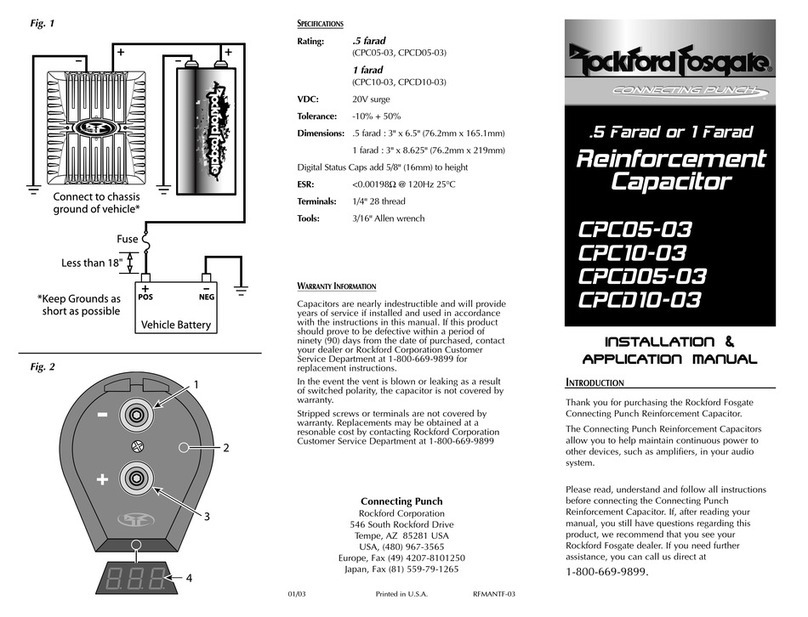
Rockford Fosgate Connecting Punch CPC05-03 User manual

Rockford Fosgate

Rockford Fosgate Connecting Punch CPC05-03 User manual

Rockford Fosgate Polaris PMX-P2 User manual

Rockford Fosgate

Rockford Fosgate Polaris PMX-P2 User manual

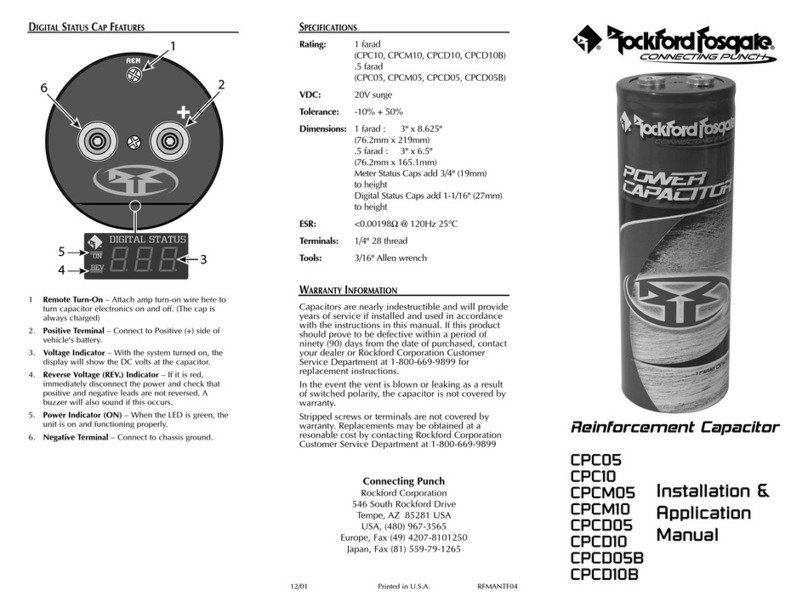
Rockford Fosgate CPC05 User guide

Rockford Fosgate

Rockford Fosgate CPC05 User guide

Rockford Fosgate DSR1 User manual

Rockford Fosgate

Rockford Fosgate DSR1 User manual

Rockford Fosgate RFX8310 Installation and operating manual

Rockford Fosgate

Rockford Fosgate RFX8310 Installation and operating manual

Popular Automobile Accessories manuals by other brands

James Baroud Odyssey user guide

James Baroud

James Baroud Odyssey user guide

Motorola i50sx owner's manual

Motorola

Motorola i50sx owner's manual

Yakima 9MM STANDARD BIKE MOUNT instructions

Yakima

Yakima 9MM STANDARD BIKE MOUNT instructions

Feniex T3 instruction manual

Feniex

Feniex T3 instruction manual

Kia E8300-4D000 manual

Kia

Kia E8300-4D000 manual

Brink 756843 installation instructions

Brink

Brink 756843 installation instructions

Whispbar K085W Fitting instructions

Whispbar

Whispbar K085W Fitting instructions

v.link CI-VL2-PC-HSD manual

v.link

v.link CI-VL2-PC-HSD manual

Viking Stack-Rack Assembly and use instructions

Viking

Viking Stack-Rack Assembly and use instructions

Aries 203015 installation manual

Aries

Aries 203015 installation manual

Choetech AT0005 user manual

Choetech

Choetech AT0005 user manual

ZZ2 ZZAIR-PRO instruction manual

ZZ2

ZZ2 ZZAIR-PRO instruction manual

Holman 4A80L installation guide

Holman

Holman 4A80L installation guide

Thule 2075 parts manual

Thule

Thule 2075 parts manual

Motorola T325 quick start guide

Motorola

Motorola T325 quick start guide

TAUBENREUTHER 16-3950 FITTING INSTRUCTION

TAUBENREUTHER

TAUBENREUTHER 16-3950 FITTING INSTRUCTION

DV8 FBJL-02 Product installation manual

DV8

DV8 FBJL-02 Product installation manual

Prorack K1163 manual

Prorack

Prorack K1163 manual

manuals.online logo
manuals.online logoBrands
  • About & Mission
  • Contact us
  • Privacy Policy
  • Terms and Conditions

Copyright 2025 Manuals.Online. All Rights Reserved.

InstructionDisclaimer
Dennis Kirk provides instructions to help our customers better understand how to install the
products we sell. The instructions are exact copies of what the manufacturer includes with the
product being sold.
That means the quality and accuracy of the instructions is solely dependent on what the
manufacturer produces. We do our best to make the text legible and the pictures viewable.
However, the end result depends largely on the quality of instructions the manufacturer
provides.
Therefore, you will find that some instructions are not of the highest quality. Sometimes text is
hard to read and pictures are not easy to see. At times you will find the overall look of the
instructions to be less than professional. However, we feel it is better to provide what we have
rather than provide nothing at all.
To the best of our knowledge the instructions and application information contained in the
instructions is accurate. However, Dennis Kirk assumes no liability related to any errors that
may be contained in the copy of the manufacturer’s instructions we provide. Buyers are solely
responsible to insure that product use is consistent with their application.
If you have any questions please contact us at [email protected] or
800-969-7501 so we can further assist you regarding additional product information or any other
business related questions.
Thank you for doing business with Dennis Kirk.
Installation & Operation
RFGNRL-K8
POLARIS®GENERAL®
AMPLIFIER
INSTALLATION KIT
ROCKFORDFOSGATE.COM
600 South Rockford Drive • Tempe, Arizona 85281
United States
Direct: (480) 967-3565 • Toll Free: (800) 669-9899
Printed In China
070717
1230-62173-01-A
Installation assistance available at:
www.rockfordfosgate.com/rech
2
Dear Customer,
Congratulations on your purchase of the world’s finest brand of
audio products. At Rockford Fosgate we are fanatics about musical
reproduction at its best, and we are pleased you chose our product.
Through years of engineering expertise, hand crasmanship and critical
testing procedures, we have created a wide range of products that
reproduce music with all the clarity and richness you deserve.
For maximum performance we recommend you have your new
Rockford Fosgate product installed by an Authorized Rockford Fosgate
Dealer, as we provide specialized training through Rockford Technical
Training Institute (RTTI). Please read your warranty and retain your
receipt and original carton for possible future use.
Great product and competent installations are only a piece of the puzzle
when it comes to your system. Make sure that your installer is using
100% authentic installation accessories from Rockford Fosgate in your
installation. Rockford Fosgate has everything from RCA cables and
speaker wire to power wire and battery connectors. Insist on it! Aer all,
your new system deserves nothing but the best.
To add the finishing touch to your new Rockford Fosgate image order
your Rockford accessories, which include everything from T-shirts to
hats.
Visit our web site for the latest information on all Rockford products;
www.rockfordfosgate.com
or, in the U.S. call 1-800-669-9899 or FAX 1-800-398-3985. For all other
countries, call +001-480-967-3565 or FAX +001-480-966-3983.
Table of Contents
If, aer reading your manual, you still have questions regarding this
product, we recommend that you see your Rockford Fosgate dealer.
If you need further assistance, you can call us direct at 1-800-669-
9899. Be sure to have your serial number, model number and date of
purchase available when you call.
Safety
This symbol with “WARNING” is intended to
alert the user to the presence of important
instructions. Failure to heed the instructions
will result in severe injury or death.
This symbol with “CAUTION” is intended to
alert the user to the presence of important
instructions. Failure to heed the instructions
can result in injury or unit damage.
• To prevent injury and damage to the unit, please read and
follow the instructions in this manual. We want you to enjoy
this system, not get a headache.
• If you feel unsure about installing this system yourself, have
it installed by a qualified Rockford Fosgate technician.
• Before installation, disconnect the battery negative (-)
terminal to prevent damage to the unit, fire and/or possible
injury.
Contents
Installation Tools
The following is a list of suggested tools needed for installation:
Introduction
©2017 Rockford Corporation. All Rights Reserved. ROCKFORD FOSGATE and associated logos where applicable are registered
trademarks of Rockford Corporation in the United States and/or other countries. All other trademarks are the property of their respective
owners. Specifications subject to change without notice.
2Introduction
3Installation
4Warranty
• Small Flat Blade Screwdriver
• T-40 Torx
• 13 mm Wrench
• 1/2” Wrench
• 2.5 mm Allen Driver
• Wire Cutters
• Panel Tool
• (1) Wire Harnesses
• Mounting Screws
• Plastic Wire Tie Wraps
PRACTICE SAFE SOUND
Continuous exposure to sound pressure levels over 100dB
may cause permanent hearing loss. High powered auto
sound systems may produce sound pressure levels well
over 130dB. Use common sense and practice safe sound.

3
Installation Considerations
This section focuses on some considerations for installing your Polaris
GENERAL amplifier installation kit. This kit is designed to work in
conjunction with Rockford’s other GENERAL specific audio kits and
parts.
If you feel unsure about installing this system yourself, have it installed
by a qualified technician.
When drilling holes, make sure what is on the other side. Be sure that
any electrical, fuel lines or any other important components are free
and clear from the area.
Before installation, disconnect the battery
negative (-) terminal to prevent damage to
the unit, fire and/or possible injury.
Before beginning any installation, follow
these simple rules:
Be sure to carefully read and understand the
instructions before attempting to install this
wiring kit.
• Consult your UTV’s service manual for model specific information.
Models may dier from year to year depending on factory options
and aermarket accessories added.
• This amplifier wiring kit is specifically designed to work with
Rockford Fosgate’s compact chassis amplifiers.
• With the addition of an amplifier or source unit, be sure that your
current charging system is in proper working order.
• Visit rockfordfosgate.com for more comprehensive product
information.
• Visit our YouTube channel for comprehensive installation videos
demonstrating complete installation guides and install tips.
Installation
Applicable Models:
Polaris GENERAL 1000 (2 & 4 seat models)
This amplifier wiring kit is designed to work with Rockford Fosgate’s
GENERAL specific enclosures and dash kits. The kit can be installed in
both 2-seat and 4-seat models.
Step 1. Remove the hardware holding the under seat storage bins,
centerline drivesha cover, hood and dash top trim panel
allowing access to run the cables forward.
NOTE: To make running the power harness easier, we recommend
disconnecting the blue remote turn-on wire from the amplifier power
plug.
Step 2. Starting at the battery location, direct the wire to the center
of the vehicle and pass it forward along the centerline of the
vehicle following the main wire harness.
NOTE: If installing into a 4-seat model, you will need to pass the cables
from the rear seat to the front seat through the wire tunnel. Enough
cable length has been provided for this.
Step 3. Pass the harness through into the front passenger wheel
well area from the inside of the vehicle, up along the shock
assembly through the underhood grommet.
Step 4. Feed the harness through the firewall grommet and re-
connect the remote wire and amplifier speaker harness to the
power plug.
Step 5. Plug the input, output and power/ground harnesses into the
amplifier.
Step 6. Connect input connector(s) from the radio.
Step 7. Connect the power and ground to the battery terminals.
Step 8. Test the system and once verified, wire tie the cables starting
at the rear pulling any slack forward as you go.
NOTE: When securing the wire in the wheel well area, keep cables as far
from the shock assembly as possible to avoid possible damage.
Step 9. Reassemble the vehicle