2. ERP
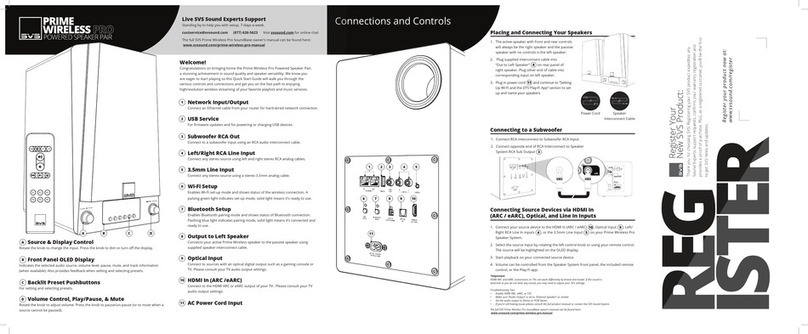
There are 2 ways to allow the unit to visit Internet .
one is Ethernet and the other is WIFI . if you want Ethernet method , you
just need to plug the network cable into the according port on the back of
the unit and then the connection will be built automatically . Otherwise,
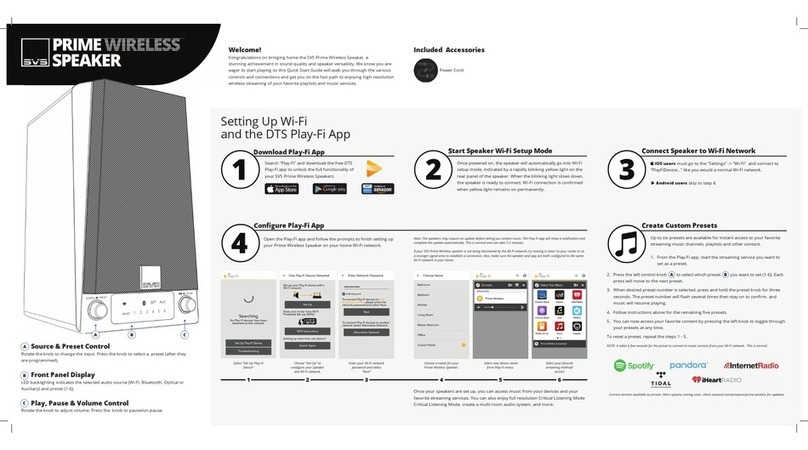
you need to setup the wifi from the PlayFi APP .these are the steps as
following .
1.long press the wps button for 8s , there will be 2 tones you can hear .
2.After a while , the wifi LED will breath, which indicates you are allowed to
setup the wifi ;
3.In wifi list of your iPhone ,select the hot point named
“PlayFiDevicexxxxxx”;
4.Open the PlayFi app , then the app will automatically search the device
and you only need to follow the guidance of the APP to finish the setting .
If you want to disconnect the network, pls plug out the RJ45 or power off
the router.
If you want to build connection between BT clients and Mercury , you
should make the unit enter the pairing mode by short pressing the BT
button on the back.The BT led will fast blinking in that mode . then you will
be able to discover the unit in the BT clients . for example ,you can find
the unit in the BT device list on you iPhone After that , select the unit to
build the connection and then you can enjoy your music on Mercury .
Once the connection is OK and current source is BT ,the BT LED will be
solid on .
There are 2 ways to disconnect the BT connection :
1.making the unit enter BT pairing mode , The previous connection will be
disconnected automatically ;
2.Break the connection on the BT clients ,for example ,on cell phone;
The device is a HiNA equipment and never enter non-network standby
mode. If the current Input channel has no audio signal , the unit will enter
network standby mode after 10min.The power consumption in networked
standby mode is less than 8W.
3.FCC related warnings
This device complies with Part 15 of the FCC Rules / Industry Canada
licence-exempt RSS standard(s). Operation is subject to the following two
conditions: (1) this device may not cause harmful interference, and (2) this
device must accept any interference received, including interference that
may cause undesired operation.
Le présent appareil est conforme aux CNR d'Industrie Canada applicables
aux appareils radio exempts de licence. L'exploitation est autorisée aux
deux conditions
suivantes : (1) l'appareil ne doit pas produire de brouillage, et (2)
l'utilisateur de l'appareil doit accepter tout brouillage radioélectrique subi,
même si le brouillage est
susceptible d'en compromettre le fonctionnement.