manuals.online logo
Brands
  1. Home
  2. •
  3. Brands
  4. •
  5. Swidget
  6. •
  7. Control Unit
  8. •
  9. Swidget WI003UWA User manual

Swidget WI003UWA User manual

Other Swidget Control Unit manuals

Swidget WI001UWA User manual

Swidget

Swidget WI001UWA User manual

Swidget WI000UWA User manual

Swidget

Swidget WI000UWA User manual

Swidget WI002UWA User manual

Swidget

Swidget WI002UWA User manual

Swidget WI006UWA User manual

Swidget

Swidget WI006UWA User manual

Swidget WI000UWA User manual

Swidget

Swidget WI000UWA User manual

Swidget WI008UWA User manual

Swidget

Swidget WI008UWA User manual

Popular Control Unit manuals by other brands

Seitz 14A80 user manual

Seitz

Seitz 14A80 user manual

Wilo RS485 Installation and operating instructions

Wilo

Wilo RS485 Installation and operating instructions

Becker CentralControl CC41 Commissioning Instruction

Becker

Becker CentralControl CC41 Commissioning Instruction

SICK CDB650 operating instructions

SICK

SICK CDB650 operating instructions

Panduit NetKey NKP5E88M Series installation instructions

Panduit

Panduit NetKey NKP5E88M Series installation instructions

MX Options Concentric Petite Fitting instructions

MX

MX Options Concentric Petite Fitting instructions

Clean Water Systems Fleck 2510 Installation & start?up guide

Clean Water Systems

Clean Water Systems Fleck 2510 Installation & start?up guide

Fairchild FSB44104A user guide

Fairchild

Fairchild FSB44104A user guide

LEGRAND Wattstopper LMIN-104 installation instructions

LEGRAND

LEGRAND Wattstopper LMIN-104 installation instructions

PMK ATT10BNCS instruction manual

PMK

PMK ATT10BNCS instruction manual

Tektronix TDS3FFT user manual

Tektronix

Tektronix TDS3FFT user manual

Woodward easYgen Technical manual

Woodward

Woodward easYgen Technical manual

Balluff BNI EIP-502-105-R015 user guide

Balluff

Balluff BNI EIP-502-105-R015 user guide

NXP Semiconductors TWR-LS1021A Getting started

NXP Semiconductors

NXP Semiconductors TWR-LS1021A Getting started

Advantech PCM-3117 Startup manual

Advantech

Advantech PCM-3117 Startup manual

Danfoss MCO 101 manual

Danfoss

Danfoss MCO 101 manual

Moons' Lin Engineering R701P user manual

Moons'

Moons' Lin Engineering R701P user manual

Aventics RV1 operating instructions

Aventics

Aventics RV1 operating instructions

manuals.online logo
manuals.online logoBrands
  • About & Mission
  • Contact us
  • Privacy Policy
  • Terms and Conditions

Copyright 2025 Manuals.Online. All Rights Reserved.

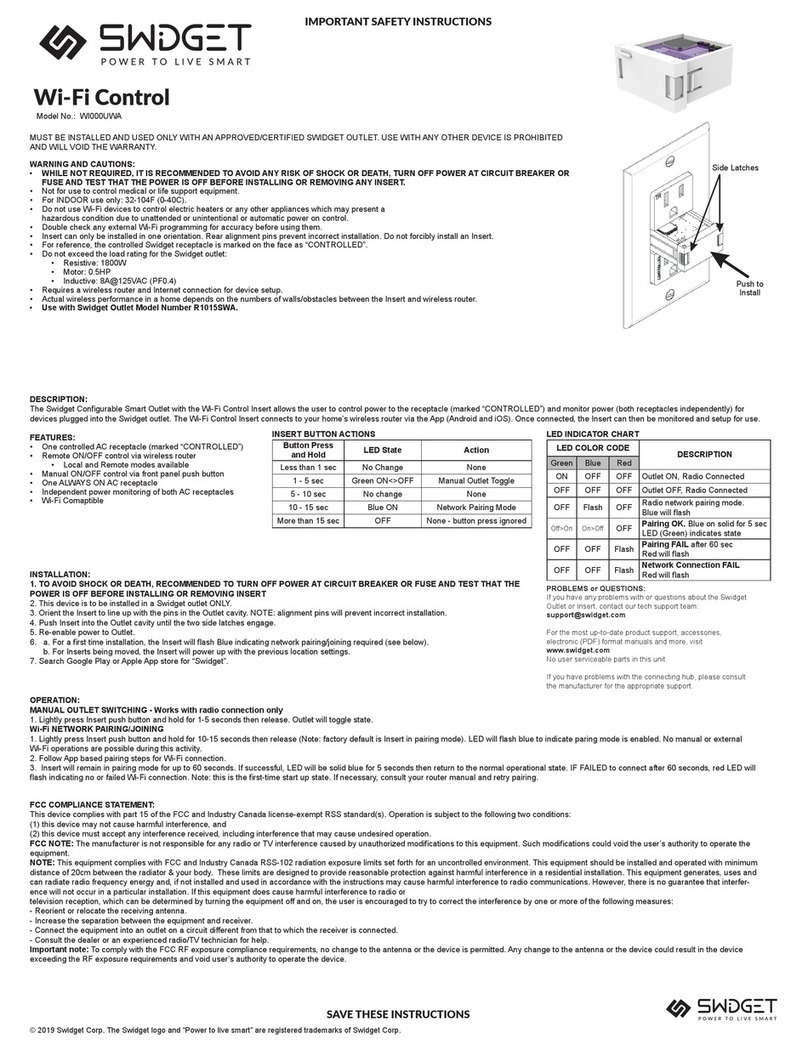
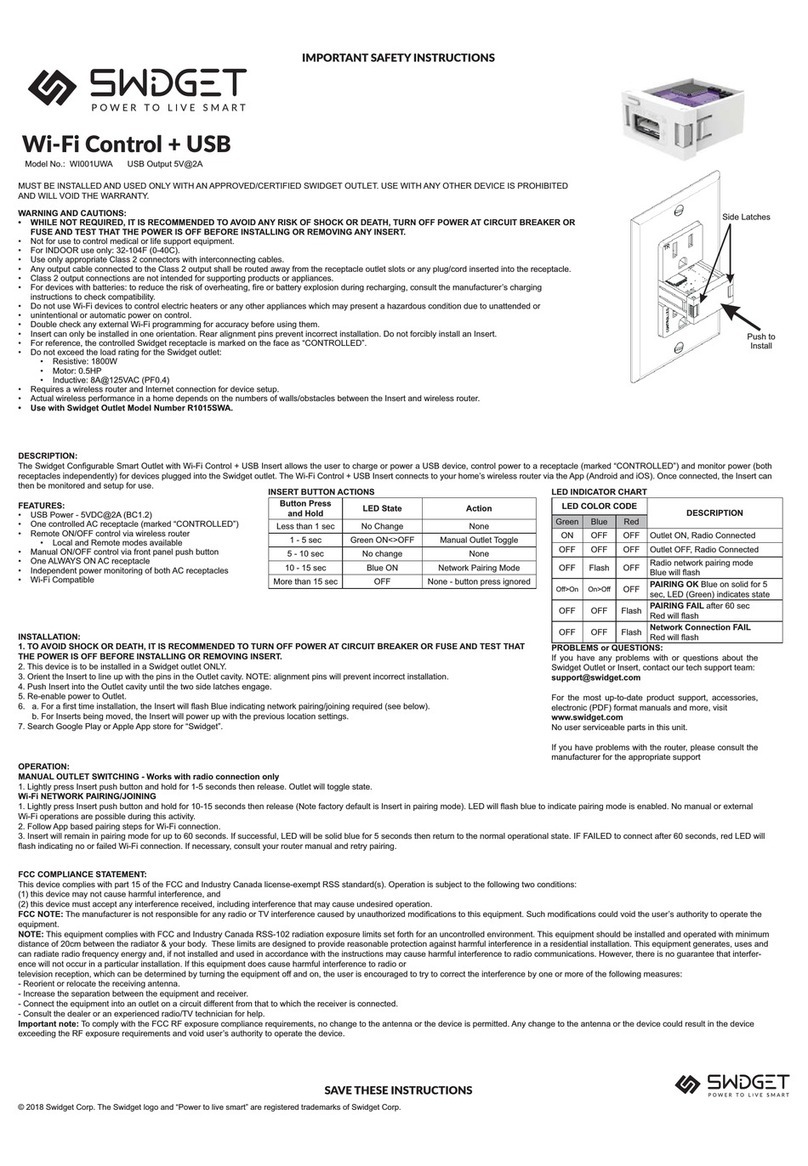
Button Press
and Hold LED State Action
Less than 1 sec No Change None
1 - 5 sec Green ON<>OFF Manual Outlet Toggle
5 - 10 sec No change None
10 - 15 sec Blue ON Network Pairing Mode
More than 15 sec OFF None - button press ignored
LED COLOR CODE DESCRIPTION
Green Blue Red
ON OFF OFF Outlet ON, Radio Connected
OFF OFF OFF Outlet OFF, Radio Connected
OFF Flash OFF Radio network pairing mode

Off>On On>Off OFF PAIRING OK Blue on solid for 5
sec, LED (Green) indicates state
OFF OFF Flash PAIRING FAIL after 60 sec

OFF OFF Flash Network Connection FAIL

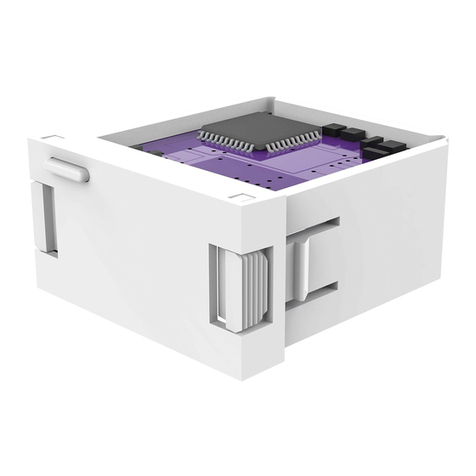
Push to
Install
Side Latches
IMPORTANT SAFETY INSTRUCTIONS
Model No.: WI003UWA
INSERT BUTTON ACTIONS
FCC COMPLIANCE STATEMENT:
This device complies with part 15 of the FCC and Industry Canada license-exempt RSS standard(s). Operation is subject to the following two conditions:
(1) this device may not cause harmful interference, and
(2) this device must accept any interference received, including interference that may cause undesired operation.
FCC NOTE: 

NOTE:

-


- Reorient or relocate the receiving antenna.


- Consult the dealer or an experienced radio/TV technician for help.
Important note:

LED INDICATOR CHART
SAVE THESE INSTRUCTIONS
PROBLEMS or QUESTIONS:

Swidget Outlet or Insert, contact our tech support team:
[email protected]
For the most up-to-date product support, accessories,
electronic (PDF) format manuals and more, visit
www.swidget.com
No user serviceable parts in this unit.
If you have problems with the router, please consult the
manufacturer for the appropriate support
OPERATION:
MANUAL OUTLET SWITCHING - Works with radio connection only
1. Lightly press Insert push button and hold for 1-5 seconds then release. Outlet will toggle state.
Wi-Fi NETWORK PAIRING/JOINING

Wi-Fi operations are possible during this activity.
2. Follow App based pairing steps for Wi-Fi connection.
3. Insert will remain in pairing mode for up to 60 seconds. If successful, LED will be solid blue for 5 seconds then return to the normal operational state. IF FAILED to connect after 60 seconds, red LED will

INSTALLATION:
1. TO AVOID SHOCK OR DEATH, IT IS RECOMMENDED TO TURN OFF POWER AT CIRCUIT BREAKER OR FUSE AND TEST THAT
THE POWER IS OFF BEFORE INSTALLING OR REMOVING INSERT.
2. This device is to be installed in a Swidget outlet ONLY.
3. Orient the Insert to line up with the pins in the Outlet cavity. NOTE: alignment pins will prevent incorrect installation.
4. Push Insert into the Outlet cavity until the two side latches engage.
5. Re-enable power to Outlet.

b. For Inserts being moved, the Insert will power up with the previous location settings .
7. Search Google Play or Apple App store for “Swidget”.


WARNING AND CAUTIONS:
• WHILE NOT REQUIRED, IT IS RECOMMENDED TO AVOID ANY RISK OF SHOCK OR DEATH, TURN OFF POWER AT CIRCUIT BREAKER OR
FUSE AND TEST THAT THE POWER IS OFF BEFORE INSTALLING OR REMOVING ANY INSERT.
• 
• For INDOOR use only: 32-104F (0-40C).
• Do not use Wi-Fi devices to control electric heaters or any other appliances which may present a hazardous condition due to unattended or
unintentional or automatic power on control.
• Double check any external Wi-Fi programming for accuracy before using them.
• Insert can only be installed in one orientation. Rear alignment pins prevent incorrect installation. Do not forcibly install an Insert.
• For reference, the controlled Swidget receptacle is marked on the face as “CONTROLLED”.
• Do not exceed the load rating for the Swidget outlet:
• Resistive: 1800W
• 
• Inductive: 8A@125VAC (PF0.4)
• 
• Actual wireless performance in a home depends on the numbers of walls/obstacles between the Insert and wireless router.
• Use with Swidget Outlet Model Number R1015SWA.
Wi-Fi Control + Power Out Light
Rated 5VDC
DESCRIPTION:

for as long as 1 hour on a full charge. It also allows the user to control power to a receptacle (marked “CONTROLLED”) and monitor power (both receptacles independently) for devices plugged into the

FEATURES:
• 
• 90% full charge in 2 hours (usable charge within 10 minutes)
• NO BATTERIES
• One controlled AC receptacle (marked “CONTROLLED”)
• Remote ON/OFF control via wireless router
• Local and Remote modes available
• Manual ON/OFF control via front panel push button
• One ALWAYS ON AC receptacle
• Independent power monitoring of both AC receptacles
• Wi-Fi Compatible
© 2018 Swidget Corp. The Swidget logo and “Power to live smart” are registered trademarks of Swidget Corp.
DESCRIPTIF:


-

CARACTÉRISTIQUES:
• 
• 
• AUCUNE BATTERIE REQUISE
• 
• 

• 
• 
du panneau avant
• 
• 
prises CA
• Compatible Wi-Fi
• 
• 
“CONTROLLED”
Bouton Enfoncé
en Continu État de la DEL Fonctionnement
Moins de 1 sec Aucun changement Aucun
1 - 5 sec Vert

Basculement manuel de
la prise
5 - 10 sec Aucun changement Aucun
10 - 15 sec  Mode APPARIEMENT au

  

CODE DE COULEUR DEL DESCRIPTIF
Vert Bleu Rouge
   
   
 CLIGNOTE-
MENT  
DEL bleu clignotera



 
Appariement A RÉUSSI. DEL sera
bleu pendant 5 secondes. DEL (vert)

  CLIGNOTE-
MENT
Appariement A ÉCHOUÉ.
secondes.DEL rouge clignotera
  CLIGNOTE-
MENT
Connexion au réseau A ÉCHOUÉ DEL
rouge clignotera
Push to
Install
Side Latches
CONSIGNES DE SÉCURITÉ IMPORTANTES

Model No.: WI003UWA
FONCTIONNEMENT DU BOUTON DE L’INSERT
DÉCLARATION DE CONFORMITÉ FCC:




MISE EN GARDE DE LA FCC: 

MISE EN GARDE:

MISE EN GARDE:




des mesures suivantes:




MISE EN GARDE IMPORTANTE:


CONSERVER SOIGNEUSEMENT CES DIRECTIVES
TABLEAU DE L’INDICATEUR DEL
FONCTIONNEMENT:
COMMUTATION MANUELLE DES PRISES – fonctionne uniquement avec la connexion radio

La prise va basculer le mode.
APPARIEMENT/RACCORDEMENT AU RÉSEAU Wi-Fi
 


 

PROBLÈMES OU QUESTIONS:


[email protected]


(PDF) et plus encore, visitez le site www.swidget.com.



INSTALLATION:
1. POUR ÉVITER LES RISQUES DE CHOC ÉLECTRIQUE OU D’ÉLECTROCUTION,, IL EST RECOMMANDÉ DE COUPER
L’ALIMENTATION AU DISJONCTEUR OU À LA FUSIBLE ET VÉRIFIER QUE L’ALIMENTATION EST ÉTEINTE AVANT D’INSTALLER
OU DE RETIRER UN INSERT.


installation incorrecte.






-
EIL EST INTERDITE ET ANNULE LA GARANTIE.
AVERTISSEMENTS ET MISES EN GARDE:
• BIEN QU’IL NE SOIT PAS NÉCESSAIRE, IL EST RECOMMANDÉ D’ÉVITER TOUT RISQUE DE CHOC ÉLECTRIQUE OU D’ÉLECTROCUTION;
COUPER L’ALIMENTATION AU DISJONCTEUR OU À LA FUSIBLE ET VÉRIFIER QUE L’ALIMENTATION EST ÉTEINTE AVANT D’INSTALLER
OU DE RETIRER UN INSERT.
• 
• 
• 

• 
• 
un Insert.
• 
• 
• 
• 
• Inductif: 8A @ 125VAC (PF 0.4)
• 
• 
• Utiliser avec le numéro de modèle R1015SWA de la Prise Swidget.

Pousser pour
Installer


