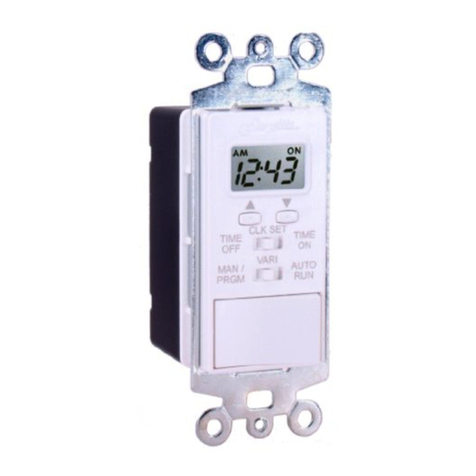
Set Clock time
NOTE - The clock time must be set first or you can not set the timer ON or
OFF times.
1. Position the Display Time slide switch to the Middle position of CLK SET
(Clock Set).
2. Position the Operating Mode slide switch to Left position of MAN/PRGM
(Manual / Program)
3. Depress the UP or DOWN button and hold for 2 seconds, the time will
begin to scroll slowly in the direction you have selected. After 5
seconds, the time will scroll rapidly. There is an AM / PM indicator that
will appear to indicate morning or evening.
Reset
Holding down both the UP and DOWN buttons simultaneously for 5 seconds will
reset the CLOCK time.
The Timer programmed event times will not be reset; they are stored in solid state
memory indefinitely.
Note: During a power failure the LCD screen display will be blank. When the
power is restored the Clock time will be re-displayed.
Set Timer ON / OFF times
Setting the dual ON and OFF times referred to as Events 1 & 2 (E:1 & E:2) on the
display. When the Mode switch is placed in the Manual position the display will
show the Event to be programmed. The Event will start with E:1 when the unit is
programmed or reset. The Event number will change each time the Mode switch is
moved into the Manual position. Once set up, the programmed times are stored in
solid state memory and need never be programmed again unless desired by the
user. If you encounter a power failure the programmed event times will not be lost.
Timer ON / OFF:
1. Position the Display Time slide switch to the Right position to TIME ON
for Event 1 (E:1) programming.
2. Position the Operating Mode set slide switch to Left position to
MAN/PRGM (Manual / Program)
3. Depress the UP or DOWN button and hold for 2 seconds, the time will
begin to scroll slowly in the direction you have selected. After 5
seconds, the time will scroll rapidly. There is an AM / PM indicator on
the top right of the display that will appear to indicate morning or
evening.
4. Position the Display Time slide switch to the Left position to TIME OFF
for Event 1 (E:1) programming.
5. Depress the UP or DOWN button and hold for 2 seconds, the time will
begin to scroll slowly in the direction you have selected. After 5
seconds, the time will scroll rapidly. There is an AM / PM indicator that
will appear to indicate morning or evening.
6. Move the Operating Mode slide switch to the VARI position and back to
MAN/PRGM (Manual / Program) to program Event 2 (E:2). Repeat
steps 1 thru 5.
7. Either Event is disabled when the TIME ON equals the TIME OFF.
8. Position Operating Mode slide switch to the VARI or AUTO RUN
position to enable the timer.
Note: To disable either Event (E:1 or E:2), the Event TIME ON must be
programmed to equal the TIME OFF.
Operation of Manual Delayed OFF Mode:
The Model LST200 / LST200+ Digital Wall Switch Timer is capable of leaving the
light or load ON while leaving a room or building and automatically turning the light
OFF after a factory pre-set amount of time after 10 minutes without user
programming. This function does not interfere with pre-programmed times or
cycles.
NOTE - The clock time must be set first or you cannot use the Delayed OFF
mode. If the Timer is in an automatic ON cycle, the Delayed OFF mode will
not function.
1. The manual Delayed OFF mode is activated by ANY two consecutive
transitions of one (1) second or less of the rocker switch. The position of
the Display switch or Mode switch is irrelevant. i.e., If the load is ON,
turn the Rocker switch OFF then ON or if the load is OFF, then turn the
Rocker switch ON then OFF quickly.
2. The display will show a factory pre-set count down value of ten (10)
minutes for the count down cycle. The ON indicator will turn on, the
AM/PM indicators will turn off, the load will turn ON, and the time will
start decrementing at one (1) minute intervals. At the end of the count
down cycle, the load will turn OFF.
3. The count down value can be changed at any time by pressing the UP
or DOWN buttons. A maximum value of sixty (60) minutes or a minimum
value of one (1) minute can be set. The Delayed OFF can be stopped
before the end of the cycle by moving the rocker switch to the other
position, or by moving the remote 3-way switch (if wired) to the other
position.
Technical Specifications:
Model: LST200 / LST200+
Supply: 110 - 125 VAC, 60 Hz, Neutral Line Required
Load: 15 Amp Resistive, 5 Amp Inductive,
625 Watts Incandescent, 1/2 HP Motors
Approvals: ETL CUS Listed, Conforms to UL STD 60730-1A & 60730-2-7,
Certified to CAN/CSA E60730-1 & E730-2-7,
Complies with FCC Part 15, Class B Requirements.
Surge Protection: Self-protecting against 1000V Transient Voltage Spikes
Storage Temperature: -4°F to +158°F (-20°C to +70°C )
Operating Temperature: +14°F to +131°F (-10°C to +5 5°C)
5% - 95% Relative Humidity, Non-Condensing
Memory Backup: Real Time is protected against power failure by internal battery.
The screen is blank during a power outage. Programmed Times are permanently
stored in system memory.
IMPORTANT NOTES:
1. Separate dimmers and photoelectric switches cannot be used in
combination with your timer.
2. It is recommended that your timer not be used with PAR or “R” type
outdoor flood lamps or lamps higher than 150 watts, since currents
generated during lamp burn-out could damage the timer.
Warranty:
LIMITED ONE (1) YEAR LIMITED WARRANTY
If within one (1) year from the date of purchase, this product fails due to a defect in
material or workmanship, Swylite Corporation will repair or replace it, at its sole
option, free of charge. This warranty is extended to the original household
purchaser only and is not transferable. This warranty does not apply to: (a) damage
to units caused by accident, dropping or abuse in handling, acts of God or any
negligent use; (b) units which have been subject to unauthorized repair, opened,
taken apart or otherwise modified; (c) units not used in accordance with
instructions; (d) damages exceeding the cost of the product; (e) sealed lamps
and/or lamp bulbs, LED’s and batteries; (f) the finish on any portion of the product,
such as surface and/or weathering, as this is considered normal wear and tear; (g)
transit damage, initial installation costs, removal costs or reinstallation costs.
SWYLITE CORPORATION WILL NOT BE LIABLE FOR INCIDENTAL OR
CONSEQUENTIAL DAMAGES, SOME STATES DO NOT ALLOW THE
EXCLUSION OR LIMITATION OF INCIDENTAL OR CONSEQUENTIAL
DAMAGES, SO THE ABOVE LIMITATION OR EXCLUSION MAY NOT APPLY
TO YOU. THIS WARRANTY IS IN LIEU OF ALL OTHER EXPRESS OR IMPLIED
WARRANTIES. ALL IMPLIED WARRANTIES, INCLUDING THE WARRANTY OF
MERCHANTABILITY AND THE WARRANTY OF FITNESS FOR A PARTICULAR
PURPOSE, ARE HEREBY MODIFIED TO EXIST ONLY AS CONTAINED IN THIS
LIMITED WARRANTY, AND SHALL BE OF THE SAME DURATION AS THE
WARRANTY PERIOD STATED ABOVE. SOME STATES DO NOT ALLOW
LIMITATIONS ON THE DURATION OF AN IMPLIED WARRANTY, SO THE
ABOVE LIMITATION MAY NOT APPLY TO YOU.
This warranty service is available by either (a) returning the product to the dealer
from whom the unit was purchased, or (b) mailing the product, along with proof of
purchase, postage prepaid to the authorized service center listed below. This
warranty is made by: Swylite Corporation, 1025 South Semoran Blvd., Suite 1093,
Winter Park, Florida, 32792 / T: (407) 673-6544 http://www.Swylite.com
Please be sure to wrap the product securely to avoid shipping and handling
damage.
CALIFORNIA PERCHLORATE ADVISORY
“Perchlorate Material – special handling may apply, See
www.dtsc.ca.gov/hazardouswaste/perchlorate.”
Swylite Corporation
1025 S. Semoran Blvd, Suite 1093
Winter Park, FL 32792 USA
http://www.Swylite.com
Questions/Problems? (407) 673-6544 Doc. No. 7000-0015, Rev. C