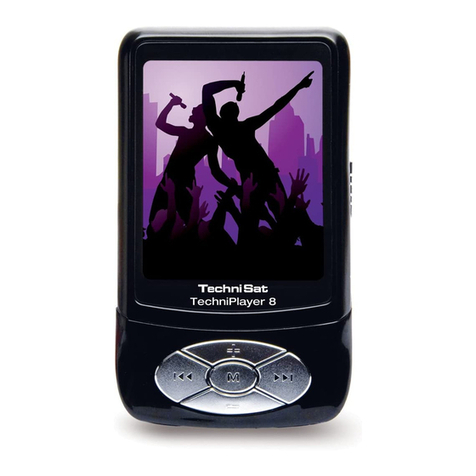
TechniSat TechniPlayer User manual

TechniPlayer
ser manual
TechniPlayer_GB.qx :BDA_MP4-Player 02.10.2007 11:05 Uhr Seite 1

2
Contents
Disposal 3
Safety information 4
Overview 8
Charging the battery 9
Built-in loudspeaker 10
Tastensperre 11
Switching ON/OFF 12
Function selection 13
Music 14
Repeat A-B 15
Recording 16
Song lyrics 16
Video 17
Pictures 17
FM radio 18
FM recording 21
e-book 22
Navigator 23
Settings 24
Memory card 30
Connection to computer 31
video conversion 32
FAQ 34
TechniPlayer_GB.qx :BDA_MP4-Player 02.10.2007 11:05 Uhr Seite 2

3
Disposal
Disposal information
The packaging for your unit is made entirely of recyclable materials. Please
sort these appropriately and send them to back to the "dual system."
Ensure that electrical and electronics scrap items are not placed in house-
hold waste, but are disposed of properly (return to specialized shop, special
waste).
Disposal of electrical and electronic equipment
The waste bin symbol on the item or on its packaging indicates that the
item cannot be disposed of in normal household waste. The item must be
returned to a recycling collection point for old electrical and electronic
equipment.
TechniPlayer_GB.qx :BDA_MP4-Player 02.10.2007 11:05 Uhr Seite 3

By ensuring that this device is properly disposed of, you are helping to pre-
vent negative effects on the environment and the health of humans, which
could arise if this device is not properly disposed of. The recycling of raw
materials contributes to preserving natural resources.
For more detailed information on disposing of this device, please contact
your local authorities, the waste recycling service in your region or the dea-
ler from whom you purchased this device.
Safety information
For your protection, you should carefully read the safety precautions before
you operate your new device. The manufacturer assumes no liability for
damages that may result from improper handling and non-compliance with
the safety precautions.
Safety information
4
TechniPlayer_GB.qx :BDA_MP4-Player 02.10.2007 11:05 Uhr Seite 4

> The device must only be operated with the plug-in power supply unit
provided.
> Do not expose the device to water droplets or spray and do not place
any liquid-filled objects on the device.
> The device must only be operated in a moderate climate.
> Never open the device! There is a risk of electrical shock. Any neces-
sary intervention must only be performed by trained personnel.
In the following cases, you should disconnect the device from the power
source and call a technician to assist you:
> the plug-in power supply unit is damaged
> the device was exposed to moisture or liquid has penetrated it
> when malfunctions are considerable
> when there is heavy external damage
Safety information
5
TechniPlayer_GB.qx :BDA_MP4-Player 02.10.2007 11:05 Uhr Seite 5

6
Features/accessories in the delivery kit
Features
• Power supply: battery (3.7 V), plug-in power supply unit
• Output power: 5 mW + 5 mW (32 Ohms)
• Frequency: 20 Hz - 20 KHz
• Supported compression rates: 32 kbps - 320 kbps
• USB 2.0
• Recording format: WAV
• Playback formats: AVI, MP3, WMA
• VHF (FM): 87.5 MHz - 108.0 MHz
Accessories in the delivery kit
• Charger
• USB cable
• Earphones
• Installation CD-ROM
• Operating instructions
TechniPlayer_GB.qx :BDA_MP4-Player 02.10.2007 11:05 Uhr Seite 6

7
Product features
Product features
• 2.0" colour screen
• Supported video functions
• JPE viewing
• Reading of e-books
• VHF radio with recording function
• Voice recording via built-in microphone
• Supports SD and MMC cards
Note
Check to see whether the complete set of accessories is in the package.
Do not allow the device to be dropped or shaken with great force.
Avoid damp environments. Do not setup the device in the vicinity of water
or a water source.
Do not attempt to open the device. You could damage the device and void
the warranty.
An unexpected shutdown while formatting or during a data transfer can
lead to a loss of data or damage to the device.
TechniPlayer_GB.qx :BDA_MP4-Player 02.10.2007 11:05 Uhr Seite 7

Neckstrap
Headphone jack - USB jack/jack for charger
Play/Pause/OFF/ON
Title selection, fast forward,
fast reverse, highlight
VOL- VOL+
ON/OFF switch Recording/A-B
Menu
Speaker
Microphone
Memory card
8
Overview
TechniPlayer_GB.qx :BDA_MP4-Player 02.10.2007 11:05 Uhr Seite 8

9
Charging the battery
If the charge on the battery is no longer sufficient for operation, the empty
battery symbol appears or the device switches itself off. Please recharge
the battery at this time.
> To do this, connect the device to the power supply unit via the USB
jack and connect this to the main power supply. The battery is automa-
tically charged.
The device is automatically switched on when charging. The charging pro-
cedure is indicated by the charging symbol on the display. Additional infor-
mation: If the device is connected to the PC via a USB cable, the battery
charges automatically.
Note
• Please only use the supplied charger to charge the battery.
• To enjoy the full capacity of the battery, it should be charged for 12 hours
the first time it is charged.
• Later, a full charge will take approximately 5 hours.
TechniPlayer_GB.qx :BDA_MP4-Player 02.10.2007 11:05 Uhr Seite 9

10
Built-in loudspeaker
Use of the built-in speaker.
The device has a built-in speaker. The speaker is located on the back of
the device.
> The speaker is active until a headphone is connected to the headpho-
ne jack.
> If a headphone is connected to the jack, the internal speaker shuts off.
TechniPlayer_GB.qx :BDA_MP4-Player 02.10.2007 11:05 Uhr Seite 10
Table of contents
Other TechniSat MP3 Player manuals