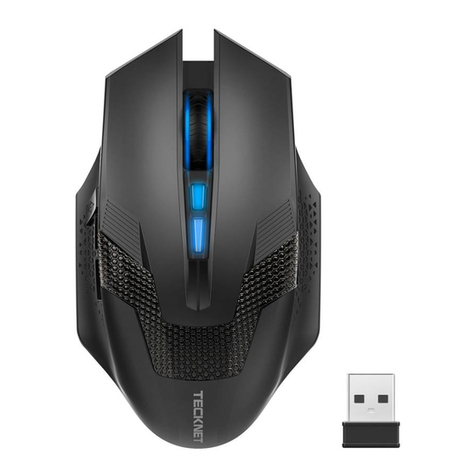
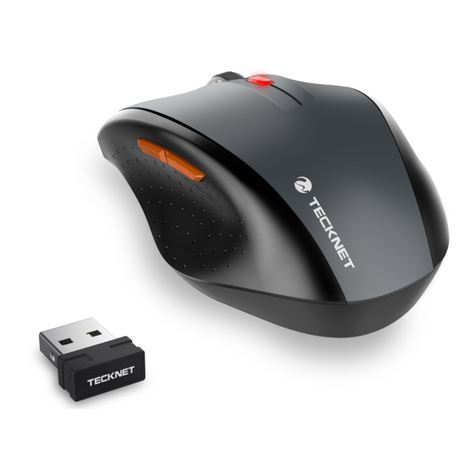
Tecknet M002 User manual

RF 2.4GHz Cordless Optical Mouse (2000DPI)
Manual
MODEL: M002
Caution: To use this device correctly, please read this manual
before use.

System Requirements
To use this mouse, your computer must meet the following hardware
requirements and run one of the operating systems listed below.
Hardware
• PC with a Pentium processor or equivalent AMD processors
• USB 2.0
Operation System
• Windows2000,2003,XP,Vista,Win7,Win8,Mac10.x
Note: The scroll wheel only works under the operating systems listed
above. If you use the mouse under a different operating system, the
mouse may either not work or lose its enhanced features and function
as a standard five-button mouse only.
Supplied with the Product
• 1 × Cordless Mouse
• 1 × USB Nano Receiver
• 1 × User Manual
5-Button Mouse
The mouse is featured with five buttons and one scroll wheel as
shown in below picture.
1. Left Click Button
2. Right Click Button
3. Scroll Wheel
4. DPI Switch Button/Low Battery Indicator
5. Froward Button
6. Backward Button
4
3
2
1
5
6
Scroll Wheel
DPI Switch Button/
Low Battery Indicator
Right Click Button Backward Button
Froward Button
Left Click Button
1

18-Month Battery Life
The mouse consumes little power and offers a long battery life of up
to 18 months without changing battery. However please note that the
actual battery life may vary based on user and computing conditions.
Install the Batteries
The RF 2.4GHZ optical mouse uses one AA battery (Battery is not
included).
1. Open the battery cover.
2. Insert the batteries into the compartment, ensuring they correspond
with the polarity marking.
3. Replace the battery cover.
4. Switch on the mouse by adjusting the power switch underneath the
mouse. The red LED of the power indicator at the top of the mouse
will flash.
Note: Make sure that the polarity of the batteries is correct. The positive (+) and
negative (-) ends of each battery must match the positive (+) and negative (-)
markings in the battery housing.
Connecting the Receiver
Take out USB Nano receiver and plug it into a free USB port in your
computer. The Plug & Play function of your system will detect that a
new device has been connected and install it automatically.
2
1
USB Port Nano receiver
2

USB Nano Receiver
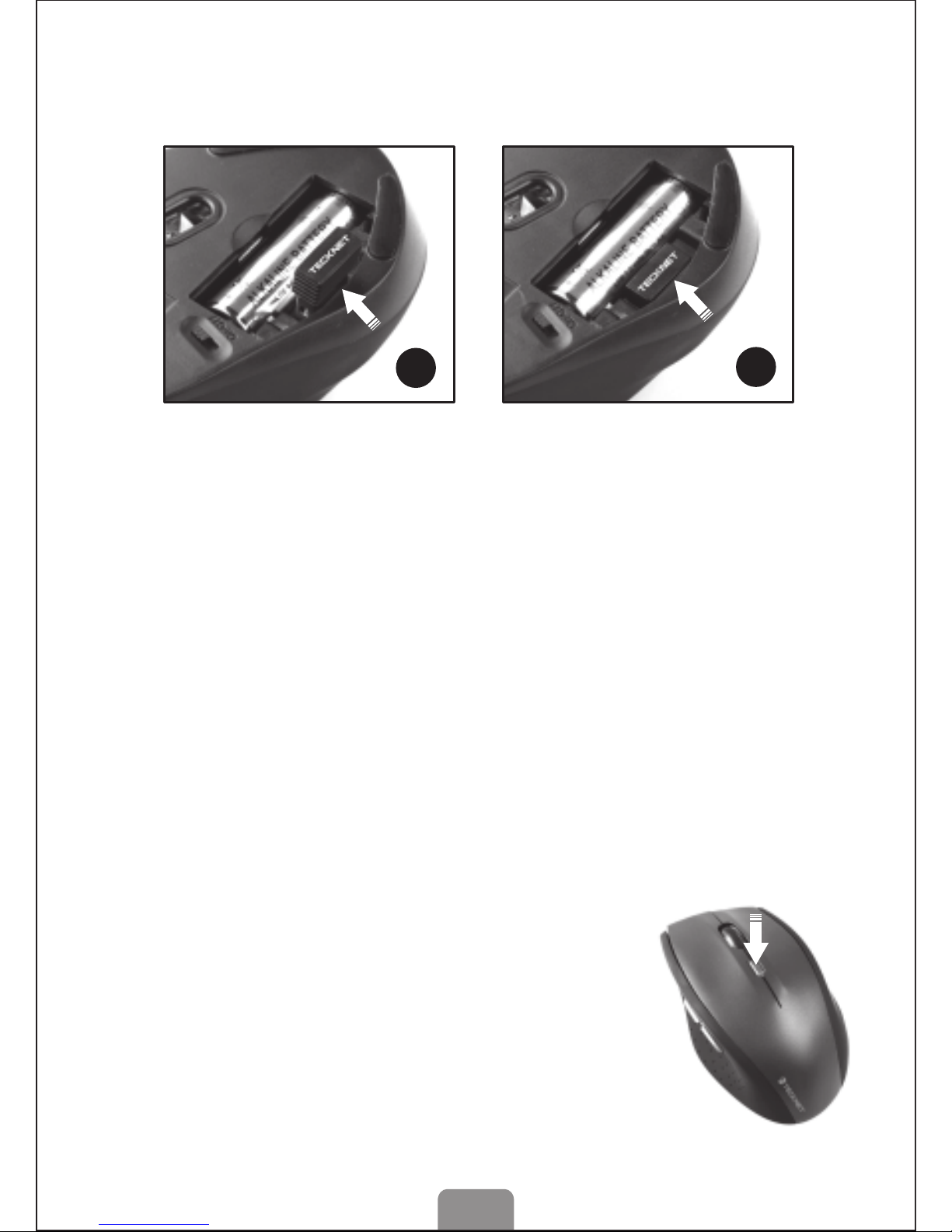
The receiver can be removed and stored in the battery compartment
while not in use.
Intelligent Power Saving (IPS)
The mouse is equipped with Intelligent Power Saving (IPS) function.
• When the USB Nano receiver is disconnected or the PC is switched
off, the mouse will be switched off automatically for the purpose of
power-saving.
• When your mouse is not operated for 3 seconds, it will automatically
drop to the first level of IPS. To wake the mouse, click any button.
• When your mouse is not operated for 10 seconds, it will
automatically drop to the second level of IPS. To wake the mouse,
click any button.
• When your mouse is not operated for 8 minutes, it will automatically
drop to the third level of IPS, e.g. sleep model. To wake the mouse,
click any button.
DPI Switch
The mouse supports 2000DPI, 1500DPI and 1000DPI. To switch to
either setting, press the DPI button.
• The default setting is 1000DPI.
• Short press the DPI button on the top of the
mouse once to switch from 1000DPI to 1500DPI,
the scroll wheel LED will flash twice.
• Short press the DPI button on the top of the
mouse once again to switch from 1500DPI to
2000DPI, the scroll wheel LED will flash three
times.
• Short press the DPI button on the top of the
mouse once again to switch from 2000DPI to
1000DPI, the scroll wheel LED will flash once.
2
1
Take out the receiver Store the receiver
DPI Switch
18-Month Battery Life
The mouse consumes little power and offers a long battery life of up
to 18 months without changing battery. However please note that the
actual battery life may vary based on user and computing conditions.
Install the Batteries
The RF 2.4GHZ optical mouse uses one AA battery (Battery is not
included).
1. Open the battery cover.
2. Insert the batteries into the compartment, ensuring they correspond
with the polarity marking.
3. Replace the battery cover.
4. Switch on the mouse by adjusting the power switch underneath the
mouse. The red LED of the power indicator at the top of the mouse
will flash.
Note: Make sure that the polarity of the batteries is correct. The positive (+) and
negative (-) ends of each battery must match the positive (+) and negative (-)
markings in the battery housing.
3

Low Power Capacity Indication
The mouse is equipped with low power
capacity indicator. When the battery power
gets low during use, the Low Power
Capacity Indicator (the DPI Switch Button)
on the top of the mouse will flash. Please
replace the battery.
Low Power Indicator
Note: we recommend you use AA alkaline dry cell
batter which supplies longer battery life.
4. The mouse might not work smoothly on certain types of surface,
such as smooth, dark,black, reflectiveand 3D mouse pads surfaces.
5. Please avoid using the mouse on a metal surface. Metals, such as
iron, aluminium or copper, shield the radio frequency transmission
and may slow down the mouse cursorresponse time or cause
the mouse to fail temporarily
6. If your PC has a metal case that contains aluminium or magnesium,
use the mouse to the side. The display panel may interfere with the
radio frequency signal if you use the mouse directly in front of the PC.
7. Please remove the batteries if you are not going to use it for a
prolonged period of several weeks or months.
4
Reconnection
There is a connection code for this Mouse. High temperatures,
electro-magnetic fields or vibration may influence the code signal and
the Mouse may need to be reconnected.
Both Mouse and Nano Receiver have a built-in code and one Mouse
can be connected to one receive,or severial Mice to one Nano
Receive.The Mouse and Nano Receiver may need to be reconnected
if subjected to high temperature, electro magnetic fields or strong
vibrations.
1. Unplug the Nano receiver from USB port, and plug it back in.
2. Move the Mouse to within 50cm of the Nano receiver or re-install the
battery or press any key to reconnect; the above process must be
completed in 15 seconds.
3. Mouse will ready for use after reconnection.
Attention
1. To maximize battery life, it is recommended you use the mouse on
a white or light coloured surface.
2. If not used the mouse will drop into auto-sleeping mode within 60
seconds, press any key or scroll wheel to activate the mouse.
3. Never use the mouse on a glass or mirrored surface as these
surfaces will cause the mouse to fail temporarily.

• Check whether the low power indicator on the top of the mouse
lights up. If the sensor lights up, it is likely that the batteries are
discharged. Please replace them.
• If replacing the batteries does not help, it is likely that the mouse is not
connected to the receiver. Please try restoring the factory default settings
(Manual Syncing Steps) and ensure that the mouse is within the optimal
operational working distance (1.5m) from its USB Nano receiver.
Note on Handling Batteries
• Keep batteries out of the reach of children.
• Replace old or weak batteries promptly.
• Remove the batteries if the mouse is not going to be used.
Safety Measures
• Keep the mouse away from young children.
• Any attempt to disassemble, adjust or repair the mouse may result
in exposure and other safety hazards.
Specifications
Button Count: 5 buttons
Operating Frequency: 2.4GHz
Number of Channels: 34
Resolution: 1000/1500/2000DPI
Receiver interface: USB version 2.0
Operating Voltage: 1.5V
Operating Current: 6.5 mA
Distance: up to 15m
Troubleshooting
What do I do if the mouse does not work?
• Make sure that the polarity of the batteries is correct. The positive
(+) and negative (-) ends of each battery must match the positive
(+) and negative (-) markings in the battery housing.
• Make sure the batteries are not discharged.
• Please try to remove the batteries, and reinstall the batteries again.
• Verify that your computer's power management features is turned off.
• Check that the Nano receiver's USB connector is firmly attached to
the USB port of your computer.
• Still not working? Please try restoring the factory default settings
(Manual Syncing Steps)
The USB Nano receiver is recognized by Windows (Windows2000,
2003,XP,Vista,Win7,Win8,Mac10.x) but the cursor does not move.
5

When I use the mouse, other 2.4G Cordless devices work more
slowly or fail temporarily – what should I do?
• The mouse has 34 channels to prevent interference. However the
mouse may cause interference with any cordless, radio-based device
that operates at 2402MHz - 2480MHz, such as a 2.4G telephone,
2.4G baby monitors, 2.4G cordless routers and toys. To reduce
interference, move the mouse’s receiver and the base unit of the
affected device as far away from each other as possible; alternatively
try to change the 2.4G frequency of the affected devices.
What do I do if the response time of the mouse is slow or the
mouse intermittently stops working?
• Ensure that the mouse is within the operational working distance
(ideally 1.5m) from the USB Nano receiver and restart your PC.
• Increase the distance between the Nano receiver and the base units
of other cordless devices.
• Turn off any cordless device and their base units that are near the
mouse Nano receiver.
• If you are using the mouse on a metal surface, move the mouse and
the receiver to a non-metallic surface. Metals, such as iron,
aluminium or copper, shield the radio frequency transmission and
may slow down the mouse presenter’s response time or cause the
mouse to fail temporarily.
I can not use the mouse while another cordless mouse is in use
– what should I do?
Reset the identification code. See “Restoring factory default settings
(Manual Syncing Steps)”
Disclaimer
Every effort has been made to ensure that the information and
procedures in this guide are accurate and complete, no liability can be
accepted for any errors or omissions and we reserve the right to make
any changes without further notice to any products mentioned herein.
Warranty
We warrant that product from authorized distributors will meet the
applicable product specifications and be free from all defects in design,
assembly, material and workmanship. Please contact TeckNet retailers,
or visit our website for more information about the product.
6

4
3
2
1
5
6
Scrollrad
DPI-Schalter-Taste/Anzeige
für niedrigen Batteriestand
Rechtsklicktaste Rückwärts-Taste
Vorwärts-Taste
Linksklicktaste
Systemvoraussetzungen
Um diese Maus verwenden zu können, muss Ihr Computer die
folgenden Hardware-Voraussetzungen erfüllen und mit einem der
untenstehenden Betriebssysteme ausgestattet sein.
Hardware
• PC mit Pentium-Prozessor oder einem gleichwertigen AMD-Prozessor
• USB 2.0
Betriebssystem
Windows 2000, 2003, XP, Vista, Win7, Win8, Mac10.X
Hinweis: Das Scrollrad funktioniert nur unter den obenstehenden
Betriebssystemen. Wenn Sie die Maus unter einem anderen
Betriebssystem verwenden, könnte die Maus entweder nicht
funktionieren oder ihre erweiterten Funktionen verlieren und damit nur
als standardmäßige 5-Tasten-Maus dienen.
Packungsinhalt
• 1 x Kabellose Maus
• 1 x USB-Nano-Empfänger
• 1 x Bedienungsanleitung
5-Tasten-Maus
Die Maus ist, wie im untenstehenden Bild dargestellt, mit fünf Tasten
und einem Scrollrad ausgestattet.
1. Linksklicktaste
2. Rechtsklicktaste
3. Scrollrad
4. DPI-Schalter-Taste/Anzeige für niedrigen Batteriestand
5. Vorwärts-Taste
6. Rückwärts-Taste
DE

18-monatige Batterielebensdauer
Die Maus verbraucht nur wenig Energie und bietet eine Lebensdauer
von 18 Monaten ohne Batterieaustausch. Beachten Sie jedoch bitte,
dass die tatsächliche Batterielebensdauer je nach Benutzer und
Computerzustand variieren kann.
Die Batterie einsetzen
Die optische RF 2,4 GHz-Maus verwendet eine AA-Batterie
(Batterie ist nicht enthalten).
1. Öffnen Sie die Batteriefachabdeckung.
2. Die Batterie unter Beachtung der angegebenen Polarität in das
Fach einsetzen.
3. Schließen Sie die Batteriefachabdeckung.
4. Die Maus mithilfe des Netzschalters auf der Unterseite der Maus
einschalten. Die rote LED der Betriebsanzeige oben auf der Maus
blinkt.
Hinweis: Stellen Sie sicher, dass die Polarität der Batterie korrekt ist. Das
positive (+) und negative (-) Ende der Batterie muss mit der positiven (+)
und negativen (-) Markierung im Batteriefach übereinstimmen.
Den Empfänger anschließen
Nehmen Sie den USB-Nano-Empfänger heraus und schließen Sie ihn
an einen freien USB-Port Ihres Computers an. Die Plug & Play-Funktion
Ihres Systems erkennt, dass ein neues Gerät angeschlossen wurde,
und installiert es automatisch.
2
1
USB-Port Nano-Empfänger
DE
DE
USB-Nano-Empfänger
Der Empfänger kann bei Nichtverwendung entfernt und im Batteriefach
aufbewahrt werden.
Intelligentes Energiesparen (IES)
Die Maus verfügt über eine Funktion für Intelligentes Energiesparen (IES).
• Wenn der USB-Nano-Empfänger getrennt ist oder der PC
ausgeschaltet ist, wird auch die Maus zu Energieeinsparungszwecken
automatisch ausgeschaltet.
• Wird Ihre Maus für 3 Sekunden nicht bedient, wird automatisch die
erste IES-Stufe aktiviert. Zum Aufwecken der Maus auf eine beliebige
Taste drücken.
• Wird Ihre Maus für 10 Sekunden nicht bedient, wird automatisch die
zweite IES-Stufe aktiviert. Zum Aufwecken der Maus auf eine
beliebige Taste drücken.
• Wird Ihre Maus für 8 Minuten nicht bedient, wird automatisch die
dritte IES-Stufe aktiviert, d. h. der Schlafmodus. Zum Aufwecken der
Maus auf eine beliebige Taste drücken.
DPI-Schalter
Die Maus unterstützt 2000DPI, 1500DPI und 1000DPI. Zum
Umschalten auf jede Einstellung die DPI-Taste drücken.
• 1000DPI ist standardmäßig eingestellt.
• Einmal kurz auf die DPI-Taste oben auf der
Maus drücken, um von 1000DPI auf 1500 DPI
umzuschalten; die LED des Scrollrads blinkt
zwei Mal.
• Noch einmal kurz auf die DPI-Taste oben auf
der Maus drücken, um von 1500DPI auf 2000
DPI umzuschalten; die LED des Scrollrads
blinkt drei Mal.
• Noch einmal kurz auf die DPI-Taste oben auf der
Maus drücken, um von 2000DPI auf 1000 DPI
umzuschalten; die LED des Scrollrads blinkt einmal.
2
1
Empfänger herausnehmen Empfänger aufbewahren
DPI-Schalter
Other manuals for M002
2
Table of contents
Languages:
Other Tecknet Mouse manuals
Tecknet
Tecknet M021 User manual
Tecknet
Tecknet TK-MS001 User manual
Tecknet
Tecknet M011 User manual

Tecknet
Tecknet M001 User manual
Tecknet
Tecknet M001 User manual

Tecknet
Tecknet EUM01888 User manual
Tecknet
Tecknet M002 User manual
Tecknet
Tecknet TK-WM389 User manual
Tecknet
Tecknet M268 User manual
Tecknet
Tecknet M268 User manual
Tecknet
Tecknet UM013 User manual
Tecknet
Tecknet M002 User manual
Tecknet
Tecknet GM299 User manual
Tecknet
Tecknet M001 User manual
Tecknet
Tecknet bm306 User manual

Tecknet
Tecknet M008 User manual
Tecknet
Tecknet M010 User manual
Tecknet
Tecknet M001 User manual
Tecknet
Tecknet EWM01576BA01 User manual

Tecknet
Tecknet X9800 User manual