manuals.online logo
Brands
  1. Home
  2. •
  3. Brands
  4. •
  5. Toa
  6. •
  7. Microphone
  8. •
  9. Toa EM-700 User manual

Toa EM-700 User manual

Other Toa Microphone manuals

Toa WM-5220 User manual

Toa

Toa WM-5220 User manual

Toa EM-360 AS User manual

Toa

Toa EM-360 AS User manual

Toa WM-3210 User manual

Toa

Toa WM-3210 User manual

Toa AM-1B Mounting instructions

Toa

Toa AM-1B Mounting instructions

Toa WM-220 User manual

Toa

Toa WM-220 User manual

Toa WM-280 User manual

Toa

Toa WM-280 User manual

Toa IR-200M User manual

Toa

Toa IR-200M User manual

Toa EC-100M User manual

Toa

Toa EC-100M User manual

Toa DLAWM-5270 User manual

Toa

Toa DLAWM-5270 User manual

Toa DM-1200 User manual

Toa

Toa DM-1200 User manual

Toa WM-5265 User manual

Toa

Toa WM-5265 User manual

Toa IP-A1 Series User manual

Toa

Toa IP-A1 Series User manual

Toa EM-362-AS User manual

Toa

Toa EM-362-AS User manual

Toa EM-371HS-AS User manual

Toa

Toa EM-371HS-AS User manual

Toa WM-5225 User manual

Toa

Toa WM-5225 User manual

Toa WM-5420 User manual

Toa

Toa WM-5420 User manual

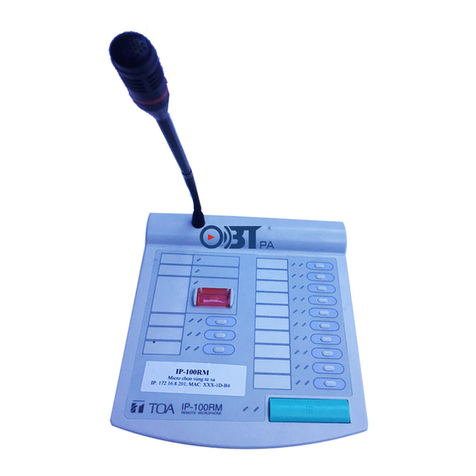
Toa IP-100RM User manual

Toa

Toa IP-100RM User manual

Toa AM-1B User manual

Toa

Toa AM-1B User manual

Toa EM-600 User manual

Toa

Toa EM-600 User manual

Toa IT-310M User manual

Toa

Toa IT-310M User manual

Toa WM-370 User manual

Toa

Toa WM-370 User manual

Toa WM-270 User manual

Toa

Toa WM-270 User manual

Toa AN-9001 User manual

Toa

Toa AN-9001 User manual

Toa WM-320 User manual

Toa

Toa WM-320 User manual

Popular Microphone manuals by other brands

IK Multimedia iRig Stream MIC PRO user manual

IK Multimedia

IK Multimedia iRig Stream MIC PRO user manual

DAPAudio RM-101 user manual

DAPAudio

DAPAudio RM-101 user manual

AKG CHM 21 User instructions

AKG

AKG CHM 21 User instructions

Sennheiser evolution wireless series EM 100 instruction manual

Sennheiser

Sennheiser evolution wireless series EM 100 instruction manual

Sony C-48 operating instructions

Sony

Sony C-48 operating instructions

GIGAMEDIA GGM PAMICUHFG user manual

GIGAMEDIA

GIGAMEDIA GGM PAMICUHFG user manual

Shure WH30TQG user guide

Shure

Shure WH30TQG user guide

auna PRO MIC-900 manual

auna PRO

auna PRO MIC-900 manual

AKG D 3800 User instructions

AKG

AKG D 3800 User instructions

Shure KSM141 user guide

Shure

Shure KSM141 user guide

MAIIN SOUND IIN style instruction manual

MAIIN SOUND

MAIIN SOUND IIN style instruction manual

Earthworks TC25 user manual

Earthworks

Earthworks TC25 user manual

Alesis MicLink Wireless user guide

Alesis

Alesis MicLink Wireless user guide

DSPPA D6234 manual

DSPPA

DSPPA D6234 manual

Monacor IMG STAGELINE ECM-300B manual

Monacor

Monacor IMG STAGELINE ECM-300B manual

Ansr Audio Scan16 user manual

Ansr Audio

Ansr Audio Scan16 user manual

Shure MXA710 Series user guide

Shure

Shure MXA710 Series user guide

Sennheiser evolution D1 user manual

Sennheiser

Sennheiser evolution D1 user manual

manuals.online logo
manuals.online logoBrands
  • About & Mission
  • Contact us
  • Privacy Policy
  • Terms and Conditions

Copyright 2025 Manuals.Online. All Rights Reserved.

OPERATING INSTRUCTIONS
日本語の取扱説明書は裏面をご覧ください。
1. SAFETY PRECAUTIONS
• Before installation or use, be sure to carefully read
all the instructions in this section for correct and
safe operation.
• Be sure to follow all the precautionary instructions
in this section, which contain important warnings
and/or cautions regarding safety.
• After reading, keep this manual handy for future
reference.
• Avoid installing or mounting the unit in unstable
locations, such as on a rickety table or a slanted
surface. Doing so may result in the unit falling
down and causing personal injury and/or property
damage.
• Do not expose the unit to rain or an environment
where it may be splashed by water or other liquids,
as doing so may result in electric shock.
• Do not lay the connection cable where it can be
walked on or tripped over, causing personal injury.
2. GENERAL DESCRIPTION
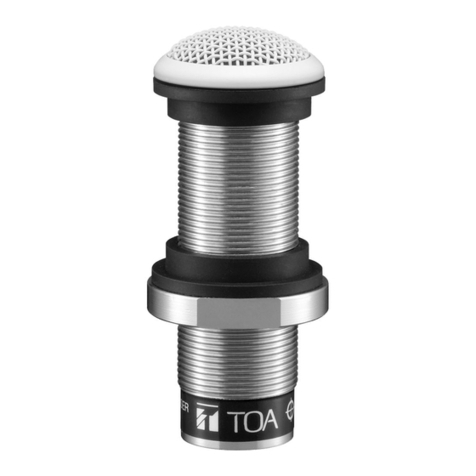
The EM-700 is a cardioid boundary condenser microphone
suitable for installation on a lecture desk or table top in a
conference room for sound pick-up and public address
applications.
3. FEATURES
•Sound field characteristic correction in a condition being
placed on a flat surface such as a desk, realizing pure,
natural sound quality.
•A low cut switch that effectively eliminates noises such
as vibration noise from the installation surface.
• High-quality, low-profile, and unobtrusive design
4. HANDLING PRECAUTIONS
• Be sure to turn off the phantom power switch on the
equipment that the unit is connected to before
connecting or disconnecting the unit. As doing otherwise
may cause loud noise or damage to the unit or
connected equipment.
• Avoid installing the unit in humid or dusty locations, in
locations exposed to the direct sunlight, near the heaters,
or in locations generating sooty smoke or steam as doing
otherwise may result in unit failure.
• Take care not to drop the unit onto the floor nor bump it
against a hard object as the unit could fail.
• Avoid using a mobile telephone near the microphone in
use. Noise could be picked up.
• To clean, be sure to first disconnect the connection
cable, then wipe with a dry cloth. When the unit gets very
dirty, use a cloth damped in a neutral cleanser. Never
use benzene, thinner, alcohol, or chemically-treated
cleaning cloth because such volatile liquids could deform
or discolor the unit.
Thank you for purchasing TOA's Boundary Microphone.
Please carefully follow the instructions in this manual to ensure long, trouble-free use of your equipment.
EM-700BOUNDARY MICROPHONE
CAUTION
Indicates a potentially hazardous situation which,
if mishandled, could result in moderate or minor
personal injury, and/or property damage.
5. SPECIFICATIONS
Note: The design and specifications are subject to change
without notice for improvement.
Element Electret condenser
Polar Pattern Cardioid
Rated Impedance 120 Ω, balanced
Rated Sensitivity –33 dB (0 dB = 1 V/Pa, 1 kHz)
Frequency Response 35 Hz – 20 kHz
Low Cut Filter 100 Hz, –12 dB/oct.
Phantom Power 9 – 52 V DC
Output Connector XLR-3-12 or equivalent
Cable Length 7.5 m (24.61 ft)
Finish Body:
Die-cast aluminum, black, mat,
paint
Punched net:
Surface treated steel sheet, black,
mat, paint
Weight 290 g (0.64 lb)

133-04-189-70
URL: http://www.toa.jp/
6. APPEARANCE
83 (3.27)

83 (3.27)
23 (0.91)
Low cut switch
Speak into the microphone from the arrow
direction as it has unidirectional pattern.
Unit: mm (in)
XLR connector
7. LOW CUT SWITCH
Low cut switch
LOW CUT
To cut the vibration noise coming from the installation surface
or background noise (e.g. air conditioner), shift the low cut
switch located on the unit's back side to " " position.
8. CIRCUIT DIAGRAM
Low cut circuit
Filter circuit
Power circuit
Hot
Cold
Shield
Body earth
3
2
1
9. DIRECTIVITY CHARACTERISTICS
5
0
90°
120°
150°
180°
240°
270°
210°
300°
330°
0°
30°
60°
-
5
-
10
-
15
-
20
1 kHz
4 kHz
10. FREQUENCY RESPONSE
When the low cut filter is active
Response
-
30
-
20
-
10
-
0
10
20
[dB]
Frequency
20 50 100 500 1 k 5 k 10 k 20 k
[Hz]
Traceability Information for Europe (EMC directive 2004/108/EC)
Manufacturer:
TOA Corporation
7-2-1, Minatojima Nakamachi, Chuo-ku, Kobe, Hyogo, Japan
Authorized representative:
TOA Electronics Europe GmbH
Suederstrasse 282, 20537 Hamburg, Germany