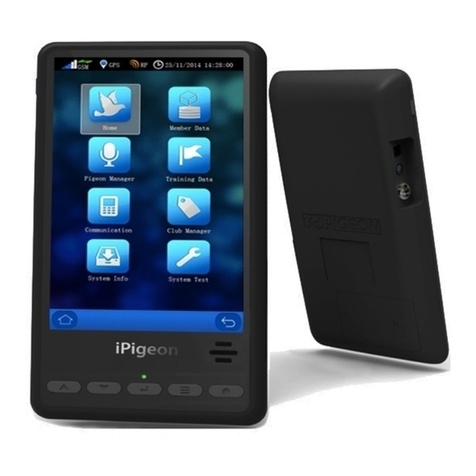
TOPigeon iPigeon V8 User manual

TOPigeon iPigeon V8 User Manual
The Next Generation Timer
Oct.
2015

2
Support Information
To be
i
n
f
o
r
m
e
d
of
the
l
a
t
e
s
t
updates
and
m
a
nu
a
l
s
p
l
ea
s
e
v
i
s
i
t
www
.top
i
g
e
on.co
m
T
h
i
s
M
a
nu
a
l
was updated based
on firmware v
e
r
s
i
on V8.78
V 8.0 wh
i
ch
was r
e
l
ea
s
e
d
i
n
May 2015
Before you read this manual, please check your TOPigeon iPigeon clock firmware version. The
manual content will be different if your clock firmware version is different.

3
Content
Content .....................................................................................................................................................3
Getting Start .............................................................................................................................................5
iPigeon Timer...................................................................................................................................6
Loft Antenna.....................................................................................................................................8
Accessories.....................................................................................................................................10
iPigeon Functional Description ..............................................................................................................14
Main Menu .....................................................................................................................................14
Home Page .....................................................................................................................................16
Summary Information: ...........................................................................................................16
Latest Pigeon Information ......................................................................................................17
Race Information....................................................................................................................17
Race Export to SD card ..........................................................................................................17
Member Data..................................................................................................................................19
Fancier Information:...............................................................................................................19
Pigeon Information.................................................................................................................19
Pigeon Status ..........................................................................................................................20
Search Pigeons........................................................................................................................20
Pigeon Manager..............................................................................................................................21
Add Pigeons............................................................................................................................21
Delete Pigeons........................................................................................................................21
Training Data..................................................................................................................................22
Speed Calculation...................................................................................................................23
Communication ......................................................................................................................................24
Apply SIM card..............................................................................................................................24
Disable the SIM PIN...............................................................................................................25
Insert your SIM to iPigeon .....................................................................................................26
Communication Menu....................................................................................................................27
SMS Notify.............................................................................................................................27
Data Upload............................................................................................................................27
Read Association Number......................................................................................................28
APN Setting............................................................................................................................28
SMS Center ............................................................................................................................28
Host ........................................................................................................................................29

4
Phone Number........................................................................................................................29
Communication testing...........................................................................................................29
Club Management ..................................................................................................................................30
Authentication Key.........................................................................................................................31
Set Time .........................................................................................................................................32
Manual Adjust the Club antenna master time.........................................................................32
Manual synchronize to iPigeon clock.....................................................................................32
Connect to PC.................................................................................................................................33
Ring Assignment ............................................................................................................................34
Race Marking .................................................................................................................................34
Unmark Birds .........................................................................................................................37
Race Manager.................................................................................................................................38
Add Race ................................................................................................................................38
Arrival Operation....................................................................................................................39
Arrival Mode (Race in Progress)............................................................................................39
System Info.....................................................................................................................................41
Device Information:................................................................................................................41
Landing Board Information....................................................................................................42
System Log.............................................................................................................................42
Firmware upgrade...................................................................................................................42
System Test ....................................................................................................................................43
Club Antenna Operation.........................................................................................................................45
Declaration of Conformity .....................................................................................................................48
iPigeon Timer .........................................................................................................................48
4 Channel Landing Board.......................................................................................................49
1 Channel Landing Board.......................................................................................................50
Club Antenna..........................................................................................................................51
iPigeon Technical Data...........................................................................................................................52

5
Getting Start
The TOPigeon iPigeon Timer is developed by Avance Technology for modern pigeon racing.
Combining the most advanced technologies, we hope to provide a complete solution for
pigeon fanciers and pigeon associations around the world. We hope these new technologies
will bring the pigeon racing game more fun and enhance the game to the next level!
Thanks for purchasing TOPigeon V8 iPigeon electronic timer. iPigeon is a next generation
electronic timing system (ETS) and not only complies with FCI requirements, It’s also
equipped with the most advanced communication capabilities for fanciers to really enjoy the
fun of pigeon racing. iPigeon is the clocking system designed in the way that all club and
personal detail operation is logged for fraud protection and operation transparency which no
other product can compete. The iPigeon also complies with international pigeon racing
regulations and fancier training management.
The 7”high resolution color LED display and touch panel provides user friendly interface.
Graphical icon software design provides the easiest and intuitive user operational
environment. iPigeon supports in-display keyboard for loft information creation and a
comprehensive search engine that provides fancier’s with the best loft management tool.
Considering the loft environment, iPigeon’s mechanical structure is designed for water
repellent. The arc shape of iPigeon is easy to hold. All the outlet ports are located in
right/left sides of the body to avoid dripping. The rugged material machine housings
(ABS+Anti-UV) and the new waterproof loft antenna connector provides the most powerful
and safe machine shell protection.

6
iPigeon Timer
A quick preview of the iPigeon appearance: The front side has a 7 inches large LED color
display and 5 navigation hotkeys for fanciers to easily navigate in timer operation.
The navigation buttons provides basic navigation features to operate the menu, including Up,
Down, Enter, Main Menu, and Return.
There is a high volume speaker in the lower right side which provides different audio signal
during clock operation. The speaker can also read the pigeon association number last two
digits which can help the fancier to easily identify which specific birds have arrived.
Lower left side has an embedded RFID reader inside. The RFID reader can be the backup
solution if your loft antenna malfunctions. The RFID reader also can read TOPigeon chip
ring’s UID if your pigeon club support UID regulation. The reader can also test chip rings and
help fanciers to identify the specific birds in your loft easily. Because the iPigeon has an
embedded RFID reader, please keep the other antenna device, such as loft antenna and club
antenna a distance away to avoid interference and we suggest a distance of 50 cm or above for
this operation.

7
In the left side, a big display button can turn on and off the display to save power. Standard
power plug is compatible with all TOPigeon power adopter as well as the mobile power bank.
Audio out can connect to the external speaker if you need audio assistance. DIN connection
is to connect loft antenna.
On the right side, a MiniDIN connector is to connect to the club antenna. 9 Pin RS-232 port
can connect to club manager and also connect to TOPigeon Micro Thermal Printer. SD card
reader slot is for the iPigeon firmware upgrade. The firmware version can be found inside
the System Information Menu. Please note on this side, all the connection port are in reverse
(upside down) in order to differentiate the connection with club antenna.

8
Loft Antenna
4 Channel Loft Antenna
The loft antenna shelling is made of super strong material which provides the protection like
clocking timer does. Inside the antenna, all the printed circuit board is painted by waterproof
plastic glue. The antenna is modularized designed which is easy for maintenance works.
For example, should cable ever break, fanciers can just replace the cable replace the cable
instead of getting rid of the whole antenna. The connector of the club antenna is special
patent designed. The connection follows by DIN (RS-485) standard and the connector has
special patent design which provides air tight connection, waterproof and super light even
outdoors. The following is specs of the antenna:
With anti-collision and
anti-interference mechanism design,
high reading distance with maximum
clocking speed
Flat and water resistant
5m (15 feet) connecting cable is
included.
sizes: 540mm x 186mm x 35mm

9
The cable termination plug also provides a cover for waterproof protection to the cable.
iPigeon and loft antenna connection

10
Accessories
Other accessories are available by your request. Please contact your local TOPigeon agent for
support.
TOPigeon Timer Bag Pack
Thermal Printer
Table of contents
Other TOPigeon Timer manuals