Vacron WQHD User manual

WQHD
Vehicle Video Recorder
User Manual
2015 FEB V1.0

Vehicle Video Recorder
User Manual
i
Safety Precautions
Please Take and review some testing videos initially to make sure
the images were recorded correctly.
Please note that manufacturer, its subsidiaries and affiliates, and its
distributors are not liable for consequential damages arising from
any malfunction of main device accessory, including memory
device that results in the failure of an image to be recorded or to be
recorded in a way that is machine readable.
Before using the product, please ensure that you read the safety
precautions described below. Always ensure that the product is
used correctly.
• Use only recommended power sources.
• Do not attempt to disassemble, alter or apply heat to the
product.
• DO not apply multi cigarette lighter adapters-Applying such
devices will cause unstable power input to damage the vehicle
video recorder.
• Please always make sure all power connectors are fully secured.
• Avoid dropping or subjecting the product to severe impacts.
• To avoid the risk of injury, do not touch the interior of the
product if it has been dropped or otherwise damaged.
• Stop using the product immediately if it emits smoke, a strange
smell, or otherwise behaves abnormally.
• Do not use organic solvents such as alcohol, benzene, or
thinner to clean the product.

Vehicle Video Recorder
User Manual
ii
• Do not let the product come into contact with water (e.g. sea
water) or other liquids.
• Do not allow liquids or foreign objects to enter the VVR.
• Do not place the VVR near or in direct flame.
• Do not handle the power cord with wet hands.
• Do not use the equipment in a manner that exceeds the rated
capacity of the electrical outlet or wiring accessories.
• Do not use if the power cord or plug are damaged, or not fully
plugged into the outlet.
• Do not allow dirt or metal objects (such as pins or keys) to
contact the terminals or plug.
• Avoid using, placing or storing the product in the humid or
dusty areas.

Vehicle Video Recorder
User Manual
iii
Index
A. ACCESSORIES ................................................................................................... 1
B. FEATURE DESCRIPTION ............................................................................... 2
C. SPECIFICATIONS ............................................................................................. 3
D. INSTALLATION ................................................................................................ 5
E. CONTROL PANEL / FUNCTION BOARD................................................. 7
F. SD CARD INSTALLATION ............................................................................ 9
G. RECORD AND STOP .................................................................................... 10
H. REMOTE CONTROL (optional) ................................................................. 11
I. OSD MENU FUNCTION .............................................................................. 12
J. Playback ........................................................................................................... 13
K. VACRON VIEWER ......................................................................................... 14
L. RECORD TIME ESTIMATION ..................................................................... 18
M. CRITERIA OF TFT LCD INSPECTION ....................................................... 19
APPENDIX – EXCEPTION CLAUSE ................................................................ 20

Vehicle Video Recorder
User Manual
1
A. ACCESSORIES
Please review the contents prior to use. Please contact your
local dealer if something not found in the box.
※ Storage card is not included in the box as free provision.
Standard
Cigar Lighter Adapter / Bracket / Quick User Guide
Optional
8G / 16G / 32G / 64G Class10 or above SDHC Card
SD Card USB Reader
IR Remote Controller

Vehicle Video Recorder
User Manual
2
B. FEATURE DESCRIPTION
■WQHD super high resolution 2560*1440, H.264, real-
time recording.
■120° wide-angle 5MP sensor.
■2.5”TFT LCD.
■Records video and audio of a car around.
■SDHC Card in Use.
■Loop recording / on start recording.
■Manual Record Events Not Overwritten.
■G-Sensor Built in Crash Event Saved Securely.
■Build-in super-capacitor to offer extra 3-second
recording after car stopping supplying power and ensure
the video is well stored.
■Zoom IN/OUT by mouse wheel on Carbox player.
■Enhanced night view capacity to offer clear image even
when under low-light environment.
Vehicle Video Recorder
User Manual
3
C. SPECIFICATIONS
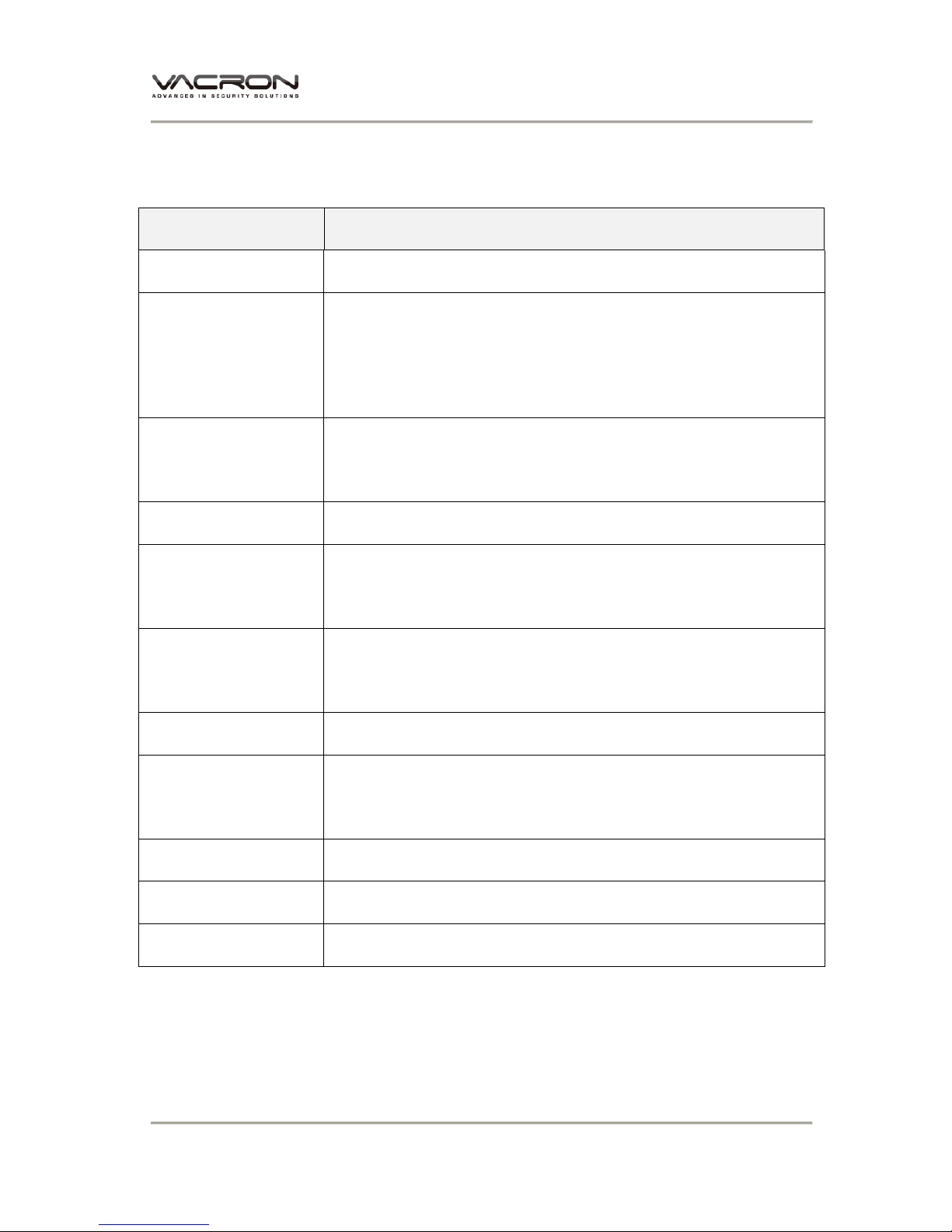
Item Description
Sensor CMOS Sensor
Resolution
WQHD Resolution
NTSC: 2560x1440(4M) 15fps
PAL: 2560x1440(4M) 15 fps
Power Supply DC5V±5% / 1 Amp.
Build-in 1.5F super-capacitor.
Operating Tmp. -10℃~ +60℃
Storage SDHC Card Recommended SanDisk Class 10or
above 8GB at least
Recording Start recording automatically when power up,
extensional 3 seconds recording after power off.
Recording Data Date/Time/Video/Audio/G-Sensor
Playback Playing on LCD screen.
Or Playback the video files on PC.
Audio Input Built-in microphone
Time setting Time Setup by OSD Menu.
G-Sensor Built-in 3D G-Sensor

Vehicle Video Recorder
User Manual
4
Notification
1. Startup Menu and OSD (on screen display)
might be varied with firmware update.
2. Please refer to the SD card usage and life
limit, and check video recording periodically
with Carbox player on PC to ensure normal
recording.
3. Please replace build-in battery CR1220 for
clock memory when time is not calibrated.
※ Storage card is not included as free provision.
※ Specifications shall be changed subject to necessary update.

Vehicle Video Recorder
User Manual
5
D. INSTALLATION
1. Install the device on the windshield by “Stick-Holder” type
2. The best position to install
the device on the windshield 3. Adjust the view angle properly
4. Plug in DC5V Power Supply 5. Plug in the Cigarette Charger
Sticker Adhesive Spot

Vehicle Video Recorder
User Manual
6
6. VVR Installation
Notice
(a) This device should be installed on the windshield of clean and
dry.
(b) The best location must be in the range of the moving wipes.
(c) Format the memory card in the DVR prior the very first
recording.
(d) Set time zone and timing on OSD.
Best Location
Cigar Lighter
Table of contents