manuals.online logo
Brands
  1. Home
  2. •
  3. Brands
  4. •
  5. Vais Technology
  6. •
  7. Automobile Accessories
  8. •
  9. Vais Technology GSR Generation 2 Series User manual

Vais Technology GSR Generation 2 Series User manual

This manual suits for next models

1

Other Vais Technology Automobile Accessories manuals

Vais Technology GSR-TY51 User manual

Vais Technology

Vais Technology GSR-TY51 User manual

Vais Technology LitLED AL6-K01 User manual

Vais Technology

Vais Technology LitLED AL6-K01 User manual

Vais Technology SEER User manual

Vais Technology

Vais Technology SEER User manual

Popular Automobile Accessories manuals by other brands

Magneti Marelli AC161 Installation instruction

Magneti Marelli

Magneti Marelli AC161 Installation instruction

FDI uEZ GUI Start here

FDI

FDI uEZ GUI Start here

JCROffroad JT Install instructions

JCROffroad

JCROffroad JT Install instructions

Rostra VOXXElectronics 250-1930 owner's guide

Rostra

Rostra VOXXElectronics 250-1930 owner's guide

TOP VEHICLE TECH GR3FORD5 installation manual

TOP VEHICLE TECH

TOP VEHICLE TECH GR3FORD5 installation manual

Safe Fleet PRIME DESIGN AR-2000-BLK manual

Safe Fleet

Safe Fleet PRIME DESIGN AR-2000-BLK manual

Skoda Fabia Combi 5J Fitting instructions

Skoda

Skoda Fabia Combi 5J Fitting instructions

Camcar 40077 Al Mounting instructions

Camcar

Camcar 40077 Al Mounting instructions

Camcar 40089 AL Mounting instructions

Camcar

Camcar 40089 AL Mounting instructions

Impac Tradesman 2000 installation manual

Impac

Impac Tradesman 2000 installation manual

DVB OFFROAD BRSB-01 installation manual

DVB

DVB OFFROAD BRSB-01 installation manual

Safari Snorkel SS385HF installation guide

Safari Snorkel

Safari Snorkel SS385HF installation guide

ULTIMATE SPEED 279746 Assembly and Safety Advice

ULTIMATE SPEED

ULTIMATE SPEED 279746 Assembly and Safety Advice

SSV Works DF-F65 manual

SSV Works

SSV Works DF-F65 manual

ULTIMATE SPEED CARBON Assembly and Safety Advice

ULTIMATE SPEED

ULTIMATE SPEED CARBON Assembly and Safety Advice

Witter F174 Fitting instructions

Witter

Witter F174 Fitting instructions

WeatherTech No-Drill installation instructions

WeatherTech

WeatherTech No-Drill installation instructions

TAUBENREUTHER 1-336050 Installation instruction

TAUBENREUTHER

TAUBENREUTHER 1-336050 Installation instruction

manuals.online logo
manuals.online logoBrands
  • About & Mission
  • Contact us
  • Privacy Policy
  • Terms and Conditions

Copyright 2025 Manuals.Online. All Rights Reserved.

Copyright (C) 2003-2018 VAIS Technology Published April 28, 2018
TOYOTA
Model GSR-TY51
SiriusXM Satellite Radio interface
www.vaistech.com
Owner’s Manual
(SXV300 SiriusXM Tuner required)
Generationx2
VAIS Technology, 8811 American Way, Englewood, CO 80112
www.vaistech.com Phone: 720-733-2348 inf[email protected]
Installation 4
User Interface - Channels, Presets, Categories 10
Warranty 12
SiriusXM Source Selection 7
DO NOT DISASSEMBLE OR ALTER
Doing so may result in an accident, fire or electric shock
Do not block the airbag
Do not mount product or any added audio and/or video equipment where it can obstruct the operation of any safety
devices such as the airbag.
Distraction warning
Do not let product or any added audio and/or video equipment distract you while you are driving.
BEFORE WIRING, DISCONNECT THE CABLE FROM THE NEGATIVE BATTERY TERMINAL
Before starting any installation work , you must wait 90 seconds after turning the ignition switch to the LOCK position and disconnecting the negative (-) terminal
from the battery. The supplemental restraint system (airbag) is equipped with a backup power source. If installation work is started less 90 seconds after
disconnection of the negative (-)battery terminal, the SRS may deploy. When the negative (-) terminal cable is disconnected from the battery the clock and audio
systems memory will be erased. Before starting installation work make a record of the clock and audio systems memory settings. When installation is complete,
reset the clock and audio systems to their previous settings . Power tilt, power telescopic steering column, front power seats, power mirrors, and power shoulder
belt anchorage are equipped with a memory function .The rear power seat is not equipped with a memory function. e and they can make a record of the memory
contents, rear power seat is not equipped with the memory function. When installation is complete, it is necessary to readjust the features to their previous settings
Never use a backup power supply (such as another battery) during installation work to avoid losing these memory settings.
DO NOT SPLICE INTO ELECTRICAL CABLES
Never cut away cable insulation to supply power to other equipment. Doing so will exceed the current carrying capacity of
the wire and result in fire or electric shock.
DO NOT ALLOW CABLES TO BECOME ENTANGLED IN SURROUNDING OBJECTS
Cables or wiring that obstruct or get caught on places such as the steering wheel, shift lever, brake pedals, etc. can be
extremely hazardous.
DO NOT INSTALL IN LOCATIONS WITH HIGH MOISTURE OR DUST
Moisture or dust may result in product failure.
HAVE THE WIRING AND INSTALLATION DONE BY EXPERTS
The wiring and installation of this product requires special technical skills and experience.
USE ONLY SPECIFIED ACCESSORY PARTS
Use of other than specified parts may damage product internally.
Follow the operational and installation manuals.
YOU SHOULD READ AND FAMILIARIZE YOURSELF THOROUGHLY WITH THE FOLLOWING INFORMATION PRIOR
TO INSTALLING AND USING THIS UNIT. IN ADDITION, YOU MUST CAREFULLY READ AND FOLLOW THE
INSTALLATION SCHEMATICS/INSTRUCTIONS FOR THE PRODUCT AND THE VEHICLE IN WHICH IT IS BEING
INSTALLED. FAILURE TO FOLLOW INSTALLATION INSTRUCTIONS MAY DAMAGE THE PRODUCT AND THE
VEHICLE, WILL VOID THE PRODUCT WARRANTY, AND MAY VOID THE VEHICLE WARRANTY
Check your local laws
Some States/Provinces or other governmental jurisdictions (such as cities) may have laws that prohibit the operation of a
video screen within the sight of the Driver. If you have purchased such a product, you should use the product only in
locations where it is legal to do so, and if you do use the product, set up the screen so it is only visible to passengers.
TROUBLESHOOTING
Should this product fail to operate properly, please contact your Dealer or our Customer Service Department at
[email protected].
WARNING
CAUTION
This unit is an interface adapter for Toyota/Scion head unit to control the SiriusXM Tuner SXV300 (SOLD SEPARATELY).
IMPORTANT
The unit may refuse to change the channel if your reception is going ON and OFF.
Please wait until your reception stabilizes in order for the unit to allow you to change the channel easily.
Due to bad reception in some areas, SiriusXM Satellite Radio may not work and/or not able to display text.
About SiriusXM Satellite Radio Operation
Before You Start
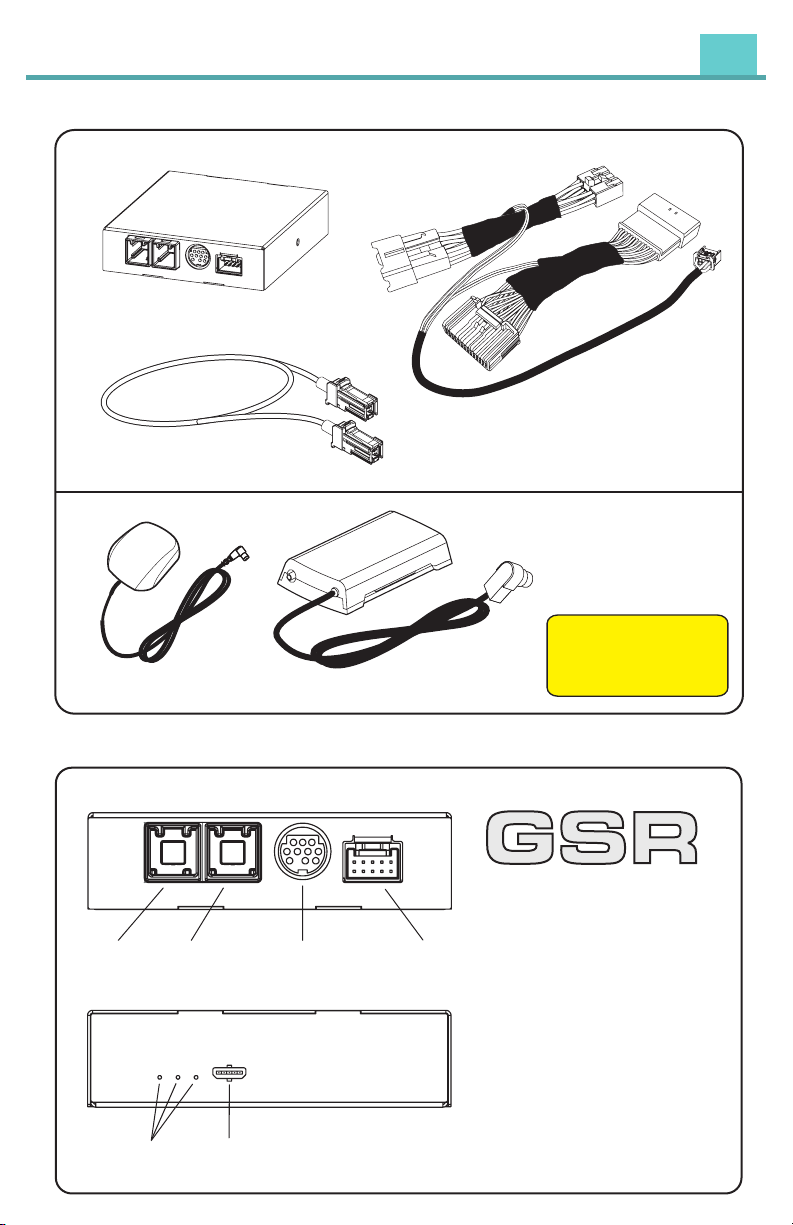
What’s Included
Vehicle Antenna
SiriusXM Tuner
SXV300
Vehicle Antenna and
SiriusXM Tuner SXV300
are included in GSR-TY51
Tuner Kit only
Model: GSR-T Y51
GSR Connectors and Ports
Installation
Power and steering
wheel control harness
GSR-TY51
Interface Adapter
USB Connector Brown (M) to
USB Connector Gray (M) cable
Interface connector
for SiriusXM SXV300 Tuner
Gray USB
interface
connector
Brown USB
interface
connector
Power connector
Not UsedLEDs
4

What’s Included
Vehicle Antenna
SiriusXM Tuner
SXV300
Vehicle Antenna and
SiriusXM Tuner SXV300
are included in GSR-TY51
Tuner Kit only
Model: GSR-T Y51
GSR Connectors and Ports
Installation
Power and steering
wheel control harness
GSR-TY51
Interface Adapter
USB Connector Brown (M) to
USB Connector Gray (M) cable
Interface connector
for SiriusXM SXV300 Tuner
Gray USB
interface
connector
Brown USB
interface
connector
Power connector
Not UsedLEDs
5
Connecting GSR
CAUTION
!
Make sure all connectors are plugged in all the way.
Power/Steering Wheel Control Harness Connection
To Radio
Power Connector
To Factory Power
harness from the Radio
To Factory
Radio Harness
To the Radio
To GSR
Power
Connector
Installation
To SiriusXM Tuner SXV300
To USB Connector
on the radio
(gray connector)
Brown
Connector
Factory USB
Connector
from the Radio
(gray connector)
GSR Power Connector
About GSR (Gen 2) firmware update
Check GSR-TY51 product page to see if update is available:
https://www.vaistech.com/product/gsr-ty51-w-tuner-kit/
AUDIO
SETUP
CAR
AUDIO
SETUP
CAR
View all Audio Sources available
A
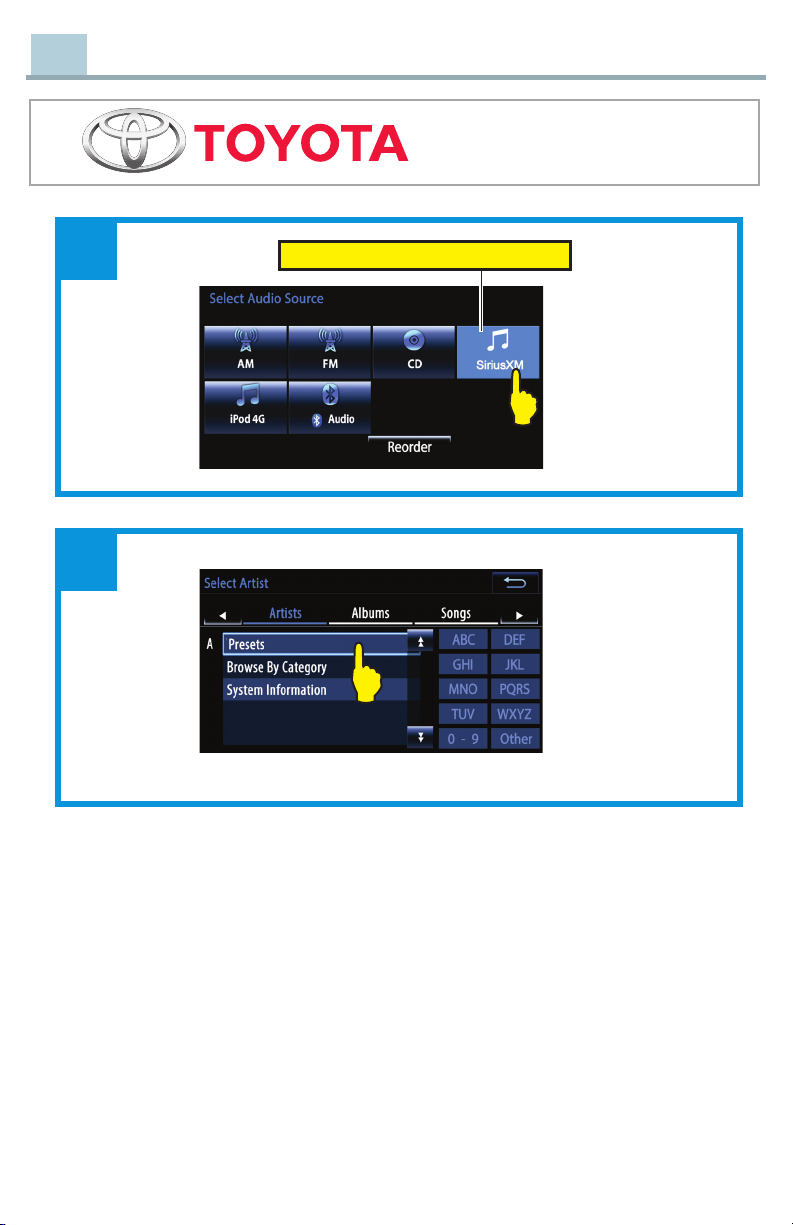
SiriusXM Source Selection
6
AUDIO
SETUP
CAR
AUDIO
SETUP
CAR
View all Audio Sources available
A
SiriusXM Source Selection 7
Touch to select “SiriusXM” Audio Source
B
C
SiriusXM Source Selection
AUDIO
SETUP
CAR
Mute/Unmute
1
2
Tuning Knob - switch to next available channel, depending on direction of rotation.
(Tuning knob may not be available while radio is loading channel list.)
“Track Seek+” and “Track Seek-” switch to next available channel.
Long Touch on “Track Seek+” and “Track Seek-” switch to next available Preset.
1
2
SiriusXM
SiriusXM
All
26
27
28
29
30
CH025 Classic Rewind
CH026 Classic Vinyl
CH027 Deep Tracks
CH028 The Spectrum
CH029 Jam On
Touch to select
All Channels
SiriusXM Source Selection
8
AUDIO
SETUP
CAR
Mute/Unmute
1
2
Tuning Knob - switch to next available channel, depending on direction of rotation.
(Tuning knob may not be available while radio is loading channel list.)
“Track Seek+” and “Track Seek-” switch to next available channel.
Long Touch on “Track Seek+” and “Track Seek-” switch to next available Preset.
1
2
SiriusXM
SiriusXM
All
26
27
28
29
30
CH025 Classic Rewind
CH026 Classic Vinyl
CH027 Deep Tracks
CH028 The Spectrum
CH029 Jam On
Touch to select
All Channels
SiriusXM Source Selection 9
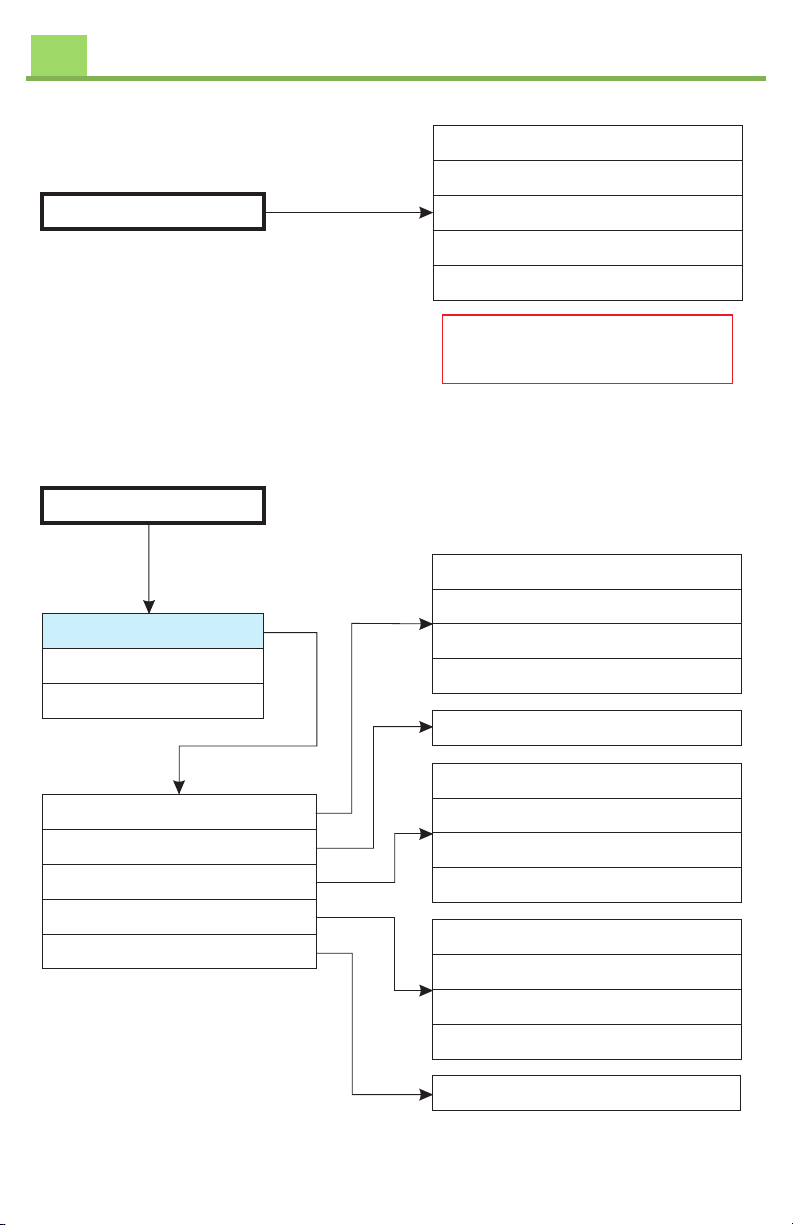
Songs
CH004 50s on 5
5
1C000HRadio ID ABCD1234
2C001HSiriusXM Preview
3C002H Hits 1
4C003HVenus

This list has all channels
Presets
Browse by Category
System Information
My Presets
Save Current Channel as Preset
Delete Preset
Replace Preset
Delete All Presets
Artists
1CH025 Classic Rewind
2CH033 1st Wave
3CH002 Hits 1
4CH301 Road Trip Radio
1CH025 Classic Rewind
2CH033 1st Wave
3CH002 Hits 1
4CH301 Road Trip Radio
Delete ALL ‘XX’ Presets
1
Save as P1 - ‘CH Name’
1
1CH025 Classic Rewind
2CH033 1st Wave
3CH002 Hits 1
4CH301 Road Trip Radio
User Interface - Channels, Presets, Categories
Tune Presets/Channels
Browse by Category
System Information
Pop
Rock
R&B
Artists
1CH019 Elvis
2CH020 E Street Radio
3CH021 Underground Garage
4CH022 Pearl Jam Radio
Tune Presets/Channels
Browse by Category
System Information
SiriusXM Radio ID - ABCD1234
Signal Quality - No Signal
SW Version - XXX / vX.XX.XXX
Artists
1SiriusXM Radio ID ABCD1234
1No Signal
HW Edition X.XX
System Reset
1Poor
1Good
1Excellent

Signal Quality does not
update dynamically.
Some radios require to “click”
on “Signal Quality” to
display actual Signal Quality.
User Interface - Channels, Presets, Categories
10