
Xiaomi Redmi Buds 4 User manual

Redmi Buds 4 User Manual
21
PAP
01
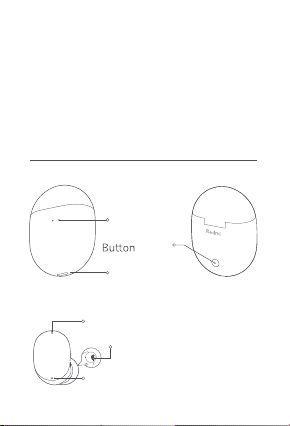
Product Overview
Charging Case
Charging Port
Indicator
Charging Case
Earbuds
Read thismanual carefully before use, and retain
it for future reference.
Illustrations of product, accessories, and user
interface in the user manual are for reference
purposes only. Actual product and functions
may vary due to product enhancements.
Feedforward Microphone
Talk Microphone
Feedback Microphone
02
First-time Use
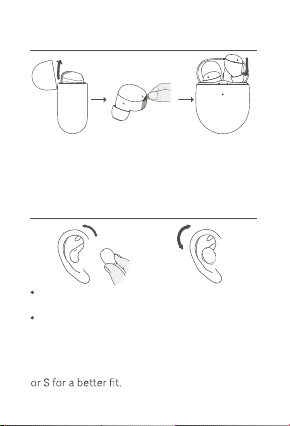
Wearing
Gently place the earbud into your ear canal,
then adjust it to a comfortable position.
During calls, make sure to point the talk
microphone towards your mouth for clearer
calls.
Note: The M-size ear tips are preinstalled. If
feeling uncomfortable, please change to size L
Open the lid and take out earbuds.
Remove the protective film.
Put both earbuds into the charging case.
Close and then open the lid to start pairing.
1.
2.
3.
03
Make sure the charging case is not out of
charging case, and the earbuds will
automatically turn on.
Turning On
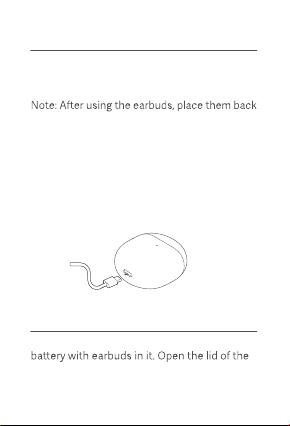
Charging
When the earbuds are placed in the charging
case, they will automatically start charging.
into the charging case. This will extend their
service lifeand helps to avoid losing or misplacing
them.
Use the Type-C charging cable to charge both
the earbuds and the charging case. The charging
case indicator remains white while charging,
and turns o when fully charged.
Charging the earbuds
Charging the charging case
04
First time connection
Connection
Turning O
When using for the first time, put both earbuds
into the charging case and close the lid. Open
the lid again and the charging case indicator
will blink white slowly for about 1 minute.
During this period, enable the Bluetooth
function on your phone, and then search and
tap "Redmi Buds 4" to connect the earbuds. If
the earbuds are connected successfully, the
seconds;otherwise,it willturn o automatically
Make sure the charging case is not out of
charging case and close the lid, they will
automatically disconnect and start charging,
and automatically turn o once fully charged.
When turned on and out of the charging case,
about 1 hour if remaining disconnected from
the device without any operations (such as
being worn on or put back into the case).
05
Note: If the earbuds cannot be connected,
close and open the lid and then repeat the
above operation.
Automatic connection
When the earbuds are in the charging case,
opening the lid of the charging case will
automatically connect the earbuds to the most
recently used Bluetooth device. If the earbuds
cannot successfully connect to any Bluetooth
device, they will automatically enter the
low-power consumption mode.
Make sure the charging case is not out of
case. Keep the lid open, and press and hold
the charging case indicator starts blinking.
Now you can search and connect with the
earbuds on a new device.
When the earbuds are connected,any previously
paired device can select and reconnect with
the earbuds from its paring records. Once
reconnected, the earbuds will disconnect from
the current device it is already paired with.
Connecting to other devices
06
Place the earbuds into the charging case.
Methods :
Method 1: Close the charging case lid. Press
10 seconds until the charging case indicator
stays on for about 3 seconds and then turns
o.
Method 2: Open the charging case lid. Press
10 seconds until the charging case indicator
stays on for about3seconds and then blinks
slowly.
1.
2.
Disconnected
When the earbuds are connected to a device,if
the device'sBluetooth is disabled, the device is
too far to be connected to, or both earbuds are
in the charging case with the lid closed, the
earbuds will disconnect from the device.
The connection history has been cleared and
the earbuds are waiting for a connection.
Note: Due to the technical characteristics of
loss of connection or sound in areas with dens e
electromagnetic signal interference at 2.4 GHz.
07
Function Overview
Note: Once the weather is cold outdoors and
your hands become dry, the earbuds may not
function when touching them.
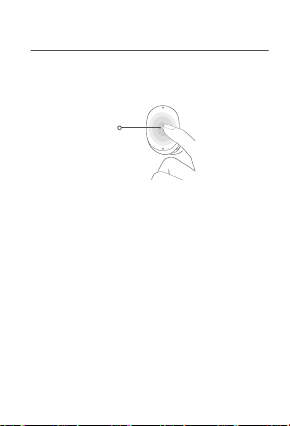
Multi-function
Touch Area
During calls
Double-tap: Answer a call
Triple-tap: Decline or end a call
Music
Double-tap: Pause or play
Triple-tap: Play next track
Take outeitherearbud: Pause music/Wear the
earbud back within 120 seconds to resume
playing
Noise cancellation mode/Transparency mode
When wearing both earbuds, press and hold
either earbud to switch between: Noise
cancellation mode <> Transparency mode
08
Download and open the app.
Place the earbuds into the charging case and
close its lid. Ensure the phone is unlocked
and its Bluetooth is enabled,andhold itclose
to the charging case. Open the chargingcase
lid and follow the instructions on the phone
to connect the earbuds.
1.
2.
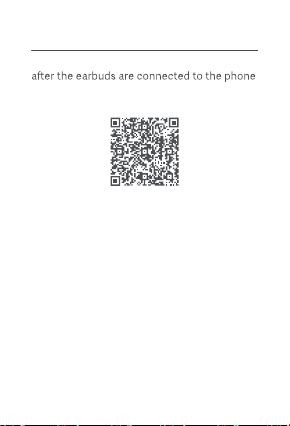
How to Use the App
The built-in function can be used with the app
via Bluetooth. Scan the QR code below to
download the app.
Note: Once connected, you can use the app
to update the firmware of the earbuds.
Quick connection
Connecting with the app

09
Examples of frequently used functions
Once connected with the app for phones,
press and hold the multi-function touch area
on either earbud (in the app, set the "press
and hold" as waking up the voice assistant) to
activate the AI voice assistant to assist you in
completing tasks by voice.
Set an alarm for 8:00 tomorrow morning.
Pause .
Please speak louder.
What's the weather like today?
How do I speak "thank you" in French?
Other manuals for Redmi Buds 4
1
This manual suits for next models
1
Table of contents
Other Xiaomi Headset manuals


















