manuals.online logo
Brands
  1. Home
  2. •
  3. Brands
  4. •
  5. Yellobrik
  6. •
  7. Transceiver
  8. •
  9. Yellobrik OTR 1810 User manual

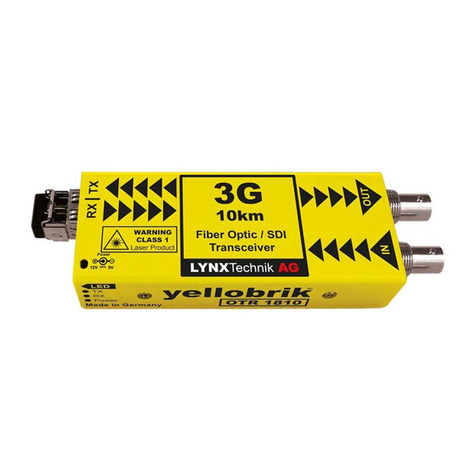
Yellobrik OTR 1810 User manual

This manual suits for next models

1

Other Yellobrik Transceiver manuals

Yellobrik OBD 1410 User manual

Yellobrik

Yellobrik OBD 1410 User manual

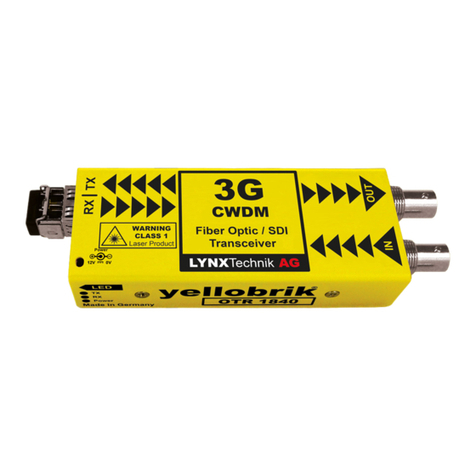
Yellobrik OTR 1840-1 User manual

Yellobrik

Yellobrik OTR 1840-1 User manual

Yellobrik OBD 1810-2 LC User manual

Yellobrik

Yellobrik OBD 1810-2 LC User manual

Yellobrik OBD 1410 User manual

Yellobrik

Yellobrik OBD 1410 User manual

Yellobrik OTR 1810-1 User manual

Yellobrik

Yellobrik OTR 1810-1 User manual

Popular Transceiver manuals by other brands

Kenwood ProTalk TK-3201 instruction manual

Kenwood

Kenwood ProTalk TK-3201 instruction manual

City Theatrical SHoW DMX SHoW Baby user manual

City Theatrical

City Theatrical SHoW DMX SHoW Baby user manual

Standart Horizont HX407 owner's manual

Standart Horizont

Standart Horizont HX407 owner's manual

B&G V90S quick start guide

B&G

B&G V90S quick start guide

VictelGlobal ALK300 series Operation manual

VictelGlobal

VictelGlobal ALK300 series Operation manual

Cactus Wireless Flash Transceiver V6 user manual

Cactus

Cactus Wireless Flash Transceiver V6 user manual

Yaesu FT-11R user guide

Yaesu

Yaesu FT-11R user guide

Skanti TRP 5000 instruction manual

Skanti

Skanti TRP 5000 instruction manual

ELECRAFT KX3 Installation and operation guide

ELECRAFT

ELECRAFT KX3 Installation and operation guide

American Lighting DMX512 quick start guide

American Lighting

American Lighting DMX512 quick start guide

Furuno FM-77 Operator's handbook

Furuno

Furuno FM-77 Operator's handbook

Yaesu FT-7B manual

Yaesu

Yaesu FT-7B manual

Mizuho MX-2 Operating & assembly instruction

Mizuho

Mizuho MX-2 Operating & assembly instruction

Kenwood TK-3180 Manuale di istruzioni

Kenwood

Kenwood TK-3180 Manuale di istruzioni

Blitz MJ-398U instruction manual

Blitz

Blitz MJ-398U instruction manual

Utilicom LongRanger 2050 Operator's manual

Utilicom

Utilicom LongRanger 2050 Operator's manual

Standart HX290UKA Service manual

Standart

Standart HX290UKA Service manual

Altronix Pace1PTM installation guide

Altronix

Altronix Pace1PTM installation guide

manuals.online logo
manuals.online logoBrands
  • About & Mission
  • Contact us
  • Privacy Policy
  • Terms and Conditions

Copyright 2025 Manuals.Online. All Rights Reserved.

yellobrik Quick
Reference
OTR 1810 / OTR 1810 MM
3Gbit SDI / Fiber Optic Transceiver
SDI Video
Input
Transmitting
Data
DC Power Input
Power
Connected
SDI Video
Output
Receiving
Data
WARNING
WARNING
CLASS 1M LASER PRODUCT
yellobrik
®
LYNXTechnik AG Broadcast Television Equipment
®
We are constantly adding additional yellobrik modules.
Please visit our website for the latest product updates.
www.lynx-technik.com
®
LASER RADIATION
Do not view directly with
optical instruments
LC Singlemode
SFP Module
LC Multimode
SFP Module
Fiber input / output
The OTR 1810 will have the LC Singlemode SFP installed
The OTR 1810 MM with have the LC Multimode SFP installed
Technical Specifications
SDI Video 1 x SDI video input, 1 x SDI Video output
75 Ohm BNC connectors
SMPTE 424M, SMPTE 292M, SMPTE 259M, DVB-ASI
Multi-standard operation from 270Mbit/s to 3Gbit/s
Multi-rate reclocking: 270Mbit/s - 1.48Gbit/s - 3Gbit/s
Return Loss: > 15dB to 1.5GHz and > 10dB up to 3GHz
Automatic cable EQ (Belden 1694A cable)
250m @ 270Mbit/s, 140m @ 1.5Gbit/s, 80m @ 3Gbit/s
Fiber Optic 1 x fiber optic input, 1 x fiber optic output
Duplex using LC Connections
SMPTE 297M - 2006
Singlemode Version: OTR 1810
Transmitter: 1310nm (-5dBm)
Receiver: 1260nm to 1620nm (-3dBm to -19dBm)
Max. distance 10km (6.2 miles) @ 3Gbit/s
Multimode Version: OTR 1810 MM
Transmitter: 850nm (-5dBm)
Receiver: 750nm to 880nm (0dBm to -15dBm)
Max. distance 300m (984 feet) @ 3Gbit/s
TX active LED, and RX active on side of module
Power +12VDC power supply (included)
Supports external power input from 9 - 14 VDC (1.6W)
Power Lead Strain Relief
The module has a small hole in the case located above the power
connection to prevent the power lead being accidentally pulled out.
Use the supplied tie-wrap and secure the lead as shown below.
Connections
The SDI video input and output is connected to the corresponding 75
Ohm BNC connections provided (up to 3Gbit). The ber connections
are made to the ber SFP sub module as indicated on the module.
Both versions (OTR 1810 - Singlemode, and OTR 1810 MM - Multimode)
use a dual LC simplex connection. Please enure the ber cable used is
of the correct type for the module. (Singlmode or Multimode)
The module ber connection is supplied with a rubber plug installed,
this is to prevent dust contamination. Please retain the plug and use if
the cables are ever disconnected from the module. An example of a
LC connector is shown below:
Operation
The OTR 1810 combines an independent ber optic transmitter and
receiver into a single package. Dierent SDI video formats and
standards can be transmitted and received. Operation of the receiver
and transmitter is automatic. For transmission, the Input video format
is automatically detected and the video signal is reclocked and then
transmitted over the ber optic connection. For reception, the received
SDI format is detected automatically and provided on the SDI output
connection (up to 3Gbit)
The module supports hot swapping and hot plugging of connections.
No user settings are provided for this module.
Distance
Two versions of the module are available. Each version is supplied with
a dierent SFP sub module :
OTR 1810 - This is designed for use with Singlemode cable and has a
max distance of approx 10km (6.2 miles) for SDI signals up to 3Gbit/s
OTR 1810 MM - This is designed for use with Multimode cable and has
a max distance of approx 300m (984 feet) for SDI signals up to 3Gbit/s
Power
The module requires a 12V DC power input and a LED is provided to
conrm power is connected. A power supply is provided, but if
applying your own power, please provide a clean 12V DC power
source. Module power consumption is approx 1.6W
SFP Fiber sub modules plug into
main module ber socket.