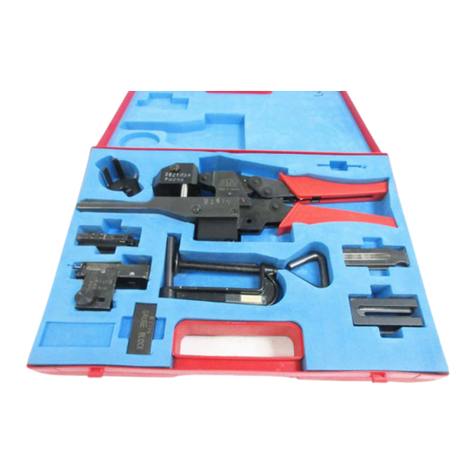
Theuniversal3MbrandFiberOpticConnectorCrimpTool
is designed to be used with all 3M field-mountable
connectors. Thepackagecontainsthreesetsofcrimping
dies. Eachsetofdiesisdesignedfordifferentconnectors
andtheirmarkingandapplicationareshowninthefollowing
table.
Lift For Emergency
Ratchet Release
Thumb Screws
(To secure dies)
Movable
Jaw
ST* (BAYONET), FC-1, BICONIC
TECS (SMA) 200/230
PROTECTIVE COVER-8500
SPLICE
BC/ST .151
.178
.213
Application
2.4mm CABLE CRIMP RING
3.0mm CABLE CRIMP RING
KEVLAR CRIMP AREA
.120
.137
.190
SC SC and FC-3
Die
Marking Cavity
Marking
PPST
.120
.137
.226
ST ( PUSH PULL)
2.4mm CABLE CRIMP RING
3.0mm CABLE CRIMP RING
KEVLAR CRIMPAREA
1. Select the appropriate set of dies as identified in
the table above.
2. Squeeze and release the handles of the crimp tool
to open the jaws.
3. Insert the dies into the jaws with the deep half of
the
round dies into the movable jaw. Match the
shallow
half with corresponding cavities before inserting.
4. Retain the dies loosely with the thumb screws.
5. Close the jaws completely to exactly align the
dies. Then secure them in place by tightening the
thumb screws.
6. Follow mounting procedures outlined in the
appropriate connector instruction manual. See
listing at right.
Installing the Dies in the Base Tool
CONNECTOR
STYLE
BICONIC**
SC/FC-3
ST* (BAYONET) and FC-1
ST* (PUSH PULL) EPOXY ADHESIVE
ST* (PUSH PULL) HOT MELT ADHESIVE
ST* (BAYONET) HOT MELTADHESIVE
TECS (SMA)
78-6900-1917-5
34-7033-9144-0
78-6900-1806-0
78-8073-7530-4
78-8073-7529-6
80-6106-2571-9
(Crimp Tool Not
Required)
34-7031-4262-9
**
To prevent deformation of the Biconic
housing, insert the connector from the non-
recessed side of the die.
3M Telecom Systems
6801 River Place Blvd.
Austin, TX 78726-9000
800/426-8688
INSTRUCTION
MANUAL NUMBER
Note: The crimp rings for the ST Push Pull
Connector have been improved over the
ones used in the manuals listed above. To
obtain a new die to fit previous ST Push Pull
crimp tools, please call customer service.
34-7034-5908-0
Printed in USA
© 3M 1993
Important Notice
All statements, technical information and recommendations
related to the Seller's products are based on information believed
to be reliable, but the accuracy or completeness thereof is not
guaranteed. Before utilizing the product, the user should
determine the suitability of the product for its intended use. The
user assumes all risks and liability whatsoever in connection with
such use.
Any statements or recommendations of the Seller which are not
contained in the Seller's current publications shall have no force
or effect unless contained in an agreement signed by an
authorized officer of the Seller. The statements contained herein
are made in lieu of all warranties, express or implied, including
but not limited to the implied warranties of merchantability and
fitness for a particular purpose which warranties are hereby
expressly disclaimed.
SELLER SHALL NOT BE LIABLE TO THE USER OR ANY
OTHER PERSON UNDER ANY LEGAL THEORY, INCLUDING
BUT NOT LIMITED TO NEGLIGENCE OR STRICT LIABILITY,
FOR ANY INJURY OR FOR ANY DIRECT OR
CONSEQUENTIAL DAMAGES SUSTAINED OR INCURRED BY
REASON OF THE USE OF ANY OF THE SELLER'S
PRODUCTS THAT WERE DEFECTIVE.
"ST*" is a trademark of AT&T