manuals.online logo
Brands
  1. Home
  2. •
  3. Brands
  4. •
  5. ADTRAN
  6. •
  7. Network Hardware
  8. •
  9. ADTRAN 1442890G2 User manual

ADTRAN 1442890G2 User manual

This manual suits for next models

1

Other ADTRAN Network Hardware manuals

ADTRAN HTU-C User manual

ADTRAN

ADTRAN HTU-C User manual

ADTRAN U-BR1TE Maintenance and service guide

ADTRAN

ADTRAN U-BR1TE Maintenance and service guide

ADTRAN FXS+ Dual User manual

ADTRAN

ADTRAN FXS+ Dual User manual

ADTRAN Quad T1 IMA Instruction Manual

ADTRAN

ADTRAN Quad T1 IMA Instruction Manual

ADTRAN DSU III ARdc User manual

ADTRAN

ADTRAN DSU III ARdc User manual

ADTRAN 17004660F1/F3 Manual

ADTRAN

ADTRAN 17004660F1/F3 Manual

ADTRAN Express 6530 6530 Manual

ADTRAN

ADTRAN Express 6530 6530 Manual

ADTRAN HDSL4 User manual

ADTRAN

ADTRAN HDSL4 User manual

ADTRAN NetVanta 1224 Instruction Manual

ADTRAN

ADTRAN NetVanta 1224 Instruction Manual

ADTRAN Total Access 3000 Manual

ADTRAN

ADTRAN Total Access 3000 Manual

ADTRAN DS3 NIU3 PM Instruction Manual

ADTRAN

ADTRAN DS3 NIU3 PM Instruction Manual

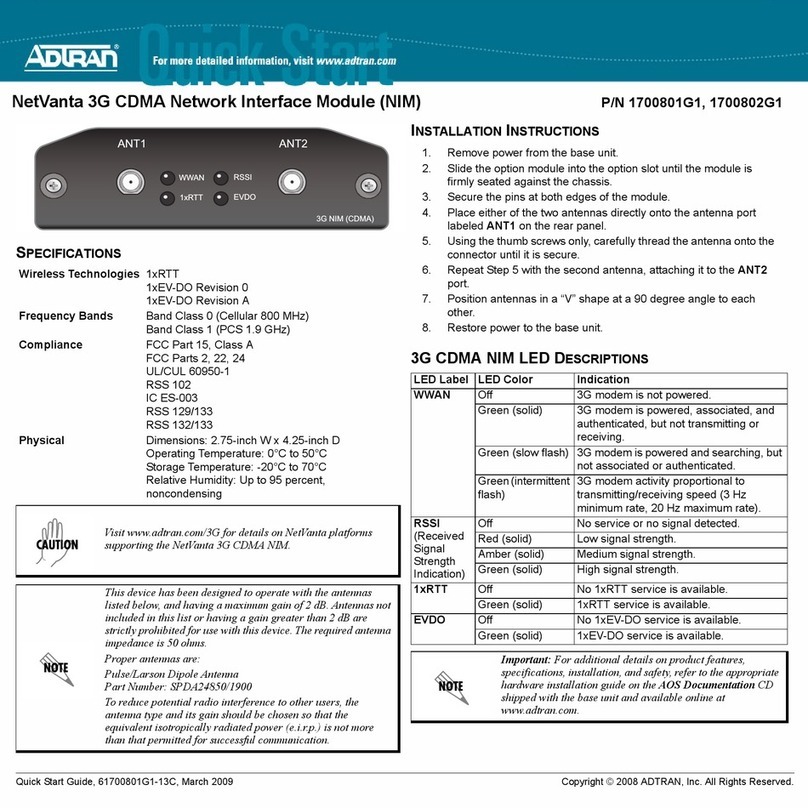
ADTRAN NetVanta 1700801G1 User manual

ADTRAN

ADTRAN NetVanta 1700801G1 User manual

ADTRAN Express 3100 User manual

ADTRAN

ADTRAN Express 3100 User manual

ADTRAN ISU 512E User manual

ADTRAN

ADTRAN ISU 512E User manual

ADTRAN Total Access 351 User manual

ADTRAN

ADTRAN Total Access 351 User manual

ADTRAN SFP User manual

ADTRAN

ADTRAN SFP User manual

ADTRAN ATLAS 800 Series Module QUAD E1 User guide

ADTRAN

ADTRAN ATLAS 800 Series Module QUAD E1 User guide

ADTRAN 1442823F1 User manual

ADTRAN

ADTRAN 1442823F1 User manual

ADTRAN NetVanta Series User manual

ADTRAN

ADTRAN NetVanta Series User manual

ADTRAN T200 H4R User manual

ADTRAN

ADTRAN T200 H4R User manual

ADTRAN BVL3ADJD User manual

ADTRAN

ADTRAN BVL3ADJD User manual

ADTRAN Total Access 850 User guide

ADTRAN

ADTRAN Total Access 850 User guide

ADTRAN Total Access 1500 Total Reach DDS-DP User manual

ADTRAN

ADTRAN Total Access 1500 Total Reach DDS-DP User manual

ADTRAN 414 RG User manual

ADTRAN

ADTRAN 414 RG User manual

Popular Network Hardware manuals by other brands

socomec SNMP Card II quick start guide

socomec

socomec SNMP Card II quick start guide

NVR SYSTEMS 4-CH user manual

NVR SYSTEMS

NVR SYSTEMS 4-CH user manual

Draytek VigorSwitch G1240 quick start guide

Draytek

Draytek VigorSwitch G1240 quick start guide

Westermo TD-34 LV installation manual

Westermo

Westermo TD-34 LV installation manual

LaCie Network Space MAX Quick install guide

LaCie

LaCie Network Space MAX Quick install guide

ZoneVu ZSI-450-IP Installation guide & user manual

ZoneVu

ZoneVu ZSI-450-IP Installation guide & user manual

QNAP Turbo NAS Application notes

QNAP

QNAP Turbo NAS Application notes

OpenEye MV Series quick start guide

OpenEye

OpenEye MV Series quick start guide

Huawei SmartAX MT880a quick start guide

Huawei

Huawei SmartAX MT880a quick start guide

Proxim Tsunami QuickBridge 2454-R installation guide

Proxim

Proxim Tsunami QuickBridge 2454-R installation guide

Bay Networks CLAM quick start guide

Bay Networks

Bay Networks CLAM quick start guide

Innodisk SATADOM-SH 3SE Series manual

Innodisk

Innodisk SATADOM-SH 3SE Series manual

Cisco CGR 1000 Series Getting connected guide

Cisco

Cisco CGR 1000 Series Getting connected guide

Matrix Switch Corporation MSC-HD161DEL product manual

Matrix Switch Corporation

Matrix Switch Corporation MSC-HD161DEL product manual

National Instruments NI 653x user manual

National Instruments

National Instruments NI 653x user manual

B&B Electronics ZXT9-IO-222R2 product manual

B&B Electronics

B&B Electronics ZXT9-IO-222R2 product manual

Yudor YDS-16 user manual

Yudor

Yudor YDS-16 user manual

D-Link ShareCenter DNS-320L datasheet

D-Link

D-Link ShareCenter DNS-320L datasheet

manuals.online logo
manuals.online logoBrands
  • About & Mission
  • Contact us
  • Privacy Policy
  • Terms and Conditions

Copyright 2025 Manuals.Online. All Rights Reserved.

Description
The 3.125 Gagabit Ethernet 1552.52 nm DWDM (SFP) is
a single-mode fiber SFP that plugs into ADTRAN Gigabit
Ethernet modules designed to accept SFPs. The SFP
provides a dual optical interface to a 3.125 Gigabit
Ethernet physical interface.
Installed into an appropriate module, the SFP provides a
3.125 Gigabit Ethernet tributary interface to the
supporting system.
This SFP should not be used in applications requiring
standard Gigabit (1000Base) Ethernet services.
This SFP is designed for use in Dense Wavelength
Division Multiplexing (DWDM) applications.
NOTE
Non-DWDM lasers cannot be used in DWDM
applications.
The following features are supported on the SFP:
♦Data rate: 3.125 Gbps
♦Optical connectors: LC
♦Transmit wavelength: 1552.52 nm
♦Receive wavelength: 1200 to 1620 nm
♦Transmit center wavelength spacing: 100 GHz
♦Optical distance: 80 km maximum
Operational Specifications
♦Optical Specifications:
◊Optical transmit level: 0 dBm to +4 dBm
◊Optical receive level: –5 dBm to –29 dBm
♦Extended Environmental Support:
◊Operational temperature range: –40°C to +85°C
◊Storage temperature range: –40°C to +85°C
◊Relative humidity to 95%, noncondensing
INSTALLATION
To install the SFP into an appropriate module, complete
the following steps:
1. Inspect the SFP. If damaged, file a claim with the
carrier and then contact ADTRAN Customer Sup-
port.
Do not remove the protective end cap from the SFP until
the fiber optic cable is ready to be connected.
2. Insert the SFP into the SFP cage on the module.
Ensure the manufacturer’s label on the SFP is facing
upward for correct installation.
3. Slide the SFP all the way into the receptacle until
there is an audible “click”.
NOTE
The latch on the SFP is used to remove the SFP from the
cage on the circuit card.
COMPLIANCE
♦ Electrostatic Discharge (ESD) can damage electronic
modules. When handling modules, wear an antistatic
discharge wrist strap to prevent damage to electronic
components. Place modules in antistatic packing
material when transporting or storing. When working
on modules, always place them on an approved
antistatic mat that is electrically grounded.
♦ The SFP meets or exceeds all the applicable
requirements of NEBS, Telcordia GR-63-CORE, and
GR-1089-CORE. The SFP is intended for deployment
in Central Office type facilities, EEEs, EECs, and
locations where the NEC applies (for example,
Customer Premises). The SFP is to be installed in
ADTRAN products in Restricted Access Locations only,
and installed by trained service personnel.
CLEI: BVL3AF0D_ _
Product P/N: 1442890G2
Issue Date: 0906
Document P/N: 61442890G2-22A
Small Form-Factor Pluggable
3.125 Gigabit Ethernet 1552.52 nm DWDM

NOTE
The Gigabit port(s) are optical and therefore are not
classified as any type of port as defined in Appendix B of
GR-1089-CORE, Issue 4.
The SFP is designed to meet the following environmental
classes:
♦ETSI EN 300 019-1-1 “Classification of environmental
conditions; Storage,” Class 1.2
♦ETSI EN 300 019-1-2 “Classification of environmental
conditions; Transportation,” Class 2.3
♦ETSI EN 300 019-1-3 “Classification of environmental
conditions; Stationary use at weather-protected
locations,” Class 3.3
The equipment is designed to function without degra-
dation during exposure to all test severities per Class 3.3
The 3.125 Gagabit Ethernet 1552.52 nm DWDM Small
Form-Factor Pluggable meets EU RoHS Directive 2002/
95/EC and/or applicable exemptions. Refer to
www.adtran.com for further information on RoHS/
WEEE.
NOTE
This SFP is compliant with SFF-8472 “Digital
Diagnostics Monitoring Interface for Optical
Transceivers,” Revision 9.3.
This SFP is compliant with the Small Form-Factor
Pluggable (SFP) Multi-Source Agreement (MSA).
This device complies with Part 15 of the FCC rules.
Operation is subject to the following two conditions:
1. This device may not cause harmful interference.
2. This device must accept any interference received,
including interference that may cause undesired
operation.
Changes or modifications not expressly approved by
ADTRAN could void the user's authority to operate this
equipment.
♦ Per GR-1089-CORE, the ADTRAN system in which the
SFP is being deployed is designed and intended for
installation as part of a Common Bonding Network
(CBN). The ADTRAN system in which the SFP is being
deployed is not designed nor intended for installation
as part of an Isolated Bonding Network (IBN).
♦ Per GR-1089-CORE Section 9, the SFP does not have
an internal DC connection between battery return and
frame ground. The SFP can be installed in a DC-I
(isolated) or DC-C (common) installation. For
installations where other cards or the host system
have internal connections between battery return and
frame ground, the system would be intended for
deployment only in a DC-C installation.
The ADTRAN system chassis frame ground terminal
must be connected to a reliable earth ground to ensure
that the metal enclosure of the SFP is properly grounded
via the backplane connector.
The SFP is a Class 1 Laser Product and complies with the
Laser Safety requirements of FDA 21CFR 1040.10 and
1040.11, and EN60825-1 and -2. The SFP is NRTL listed
and CB Certified to all applicable American and
European safety standards.
For continued compliance with the above laser safety
standards, only approved Class 1 modules from our
approved vendor list, located on the ADTRAN website,
should be installed in ADTRAN products.
Warranty: ADTRAN will replace or repair this product within the warranty period if it does not meet its
published specifications or fails while in service. Warranty information can be found online at
www.adtran.com/warranty.
© 2009 ADTRAN, Inc. All Rights Reserved.
*61442890G2-22A*
C A U T I O N !
SUBJECT TO ELECTROSTATIC DAMAGE
OR DECREASE IN RELIABILITY.
HANDLING PRECAUTIONS REQUIRED.
CLEI: BVL3AF0D_ _
Product P/N: 1442890G2
Issue Date: 0906
Document P/N: 61442890G2-22A
PRICING AND AVAILABILITY 800.827.0807
TECHNICAL SUPPORT 800.726.8663
RETURN FOR REPAIR 256.963.8722
Small Form-Factor Pluggable
3.125 Gigabit Ethernet 1552.52 nm DWDM