manuals.online logo
Brands
  1. Home
  2. •
  3. Brands
  4. •
  5. AEG
  6. •
  7. Coffee Maker
  8. •
  9. AEG CaFamosa User manual

AEG CaFamosa User manual

This manual suits for next models

1

Other AEG Coffee Maker manuals

AEG EC6-1 Series User manual

AEG

AEG EC6-1 Series User manual

AEG KF7800 User manual

AEG

AEG KF7800 User manual

AEG KAM400 User manual

AEG

AEG KAM400 User manual

AEG Favola Plus User manual

AEG

AEG Favola Plus User manual

AEG PE 8036-M User manual

AEG

AEG PE 8036-M User manual

AEG PE 4541-M User manual

AEG

AEG PE 4541-M User manual

AEG LM 3100 User manual

AEG

AEG LM 3100 User manual

AEG PE8038-M User manual

AEG

AEG PE8038-M User manual

AEG FRESH AROMA KAM300 User manual

AEG

AEG FRESH AROMA KAM300 User manual

AEG CM3-1-3ST User manual

AEG

AEG CM3-1-3ST User manual

AEG CF2 series User manual

AEG

AEG CF2 series User manual

AEG KKK884500 User manual

AEG

AEG KKK884500 User manual

AEG KF 5265 User manual

AEG

AEG KF 5265 User manual

AEG KF 5 Series User manual

AEG

AEG KF 5 Series User manual

AEG LM 7000 User manual

AEG

AEG LM 7000 User manual

AEG CG 6200 User manual

AEG

AEG CG 6200 User manual

AEG KF3700 User manual

AEG

AEG KF3700 User manual

AEG EA 100 CREMA User manual

AEG

AEG EA 100 CREMA User manual

AEG EBA6310X User manual

AEG

AEG EBA6310X User manual

AEG Cafe Classic CC 101, CC 102 User manual

AEG

AEG Cafe Classic CC 101, CC 102 User manual

AEG KF 11 Series User manual

AEG

AEG KF 11 Series User manual

AEG KKE994500 User manual

AEG

AEG KKE994500 User manual

AEG CF 300 User manual

AEG

AEG CF 300 User manual

AEG KKA894500M User manual

AEG

AEG KKA894500M User manual

Popular Coffee Maker manuals by other brands

illy FrancisFrancis X7.1 user manual

illy

illy FrancisFrancis X7.1 user manual

Continental Electric CE23601 instruction manual

Continental Electric

Continental Electric CE23601 instruction manual

Electrolux EKF3 series Instruction book

Electrolux

Electrolux EKF3 series Instruction book

MIA KF 1740 instruction manual

MIA

MIA KF 1740 instruction manual

DeLonghi ECAM26455M Instructions for use

DeLonghi

DeLonghi ECAM26455M Instructions for use

Fagor CG-414 D Instructions for use

Fagor

Fagor CG-414 D Instructions for use

Bunn JDF-2S Installation & operating guide

Bunn

Bunn JDF-2S Installation & operating guide

Somogyi Elektronic Home HG PR 14 instruction manual

Somogyi Elektronic

Somogyi Elektronic Home HG PR 14 instruction manual

Morphy Richards Accents Espresso MR47580 instructions

Morphy Richards

Morphy Richards Accents Espresso MR47580 instructions

Crux 14634 instruction manual

Crux

Crux 14634 instruction manual

Taurus Livorno 6 manual

Taurus

Taurus Livorno 6 manual

Delta-q QUICK instruction manual

Delta-q

Delta-q QUICK instruction manual

Bunn LCA-1 Installation & operating guide

Bunn

Bunn LCA-1 Installation & operating guide

Chris Coffee Service Silvano owner's manual

Chris Coffee Service

Chris Coffee Service Silvano owner's manual

Black & Decker BLACK DECKER HOME DE790 Use and care book

Black & Decker

Black & Decker BLACK DECKER HOME DE790 Use and care book

Saeco Vienna Plus Sup 018M operating instructions

Saeco

Saeco Vienna Plus Sup 018M operating instructions

INCAPTO BXCO1470E Instructions for use

INCAPTO

INCAPTO BXCO1470E Instructions for use

Bosch TASSIMO finesse TAS16B Series user manual

Bosch

Bosch TASSIMO finesse TAS16B Series user manual

manuals.online logo
manuals.online logoBrands
  • About & Mission
  • Contact us
  • Privacy Policy
  • Terms and Conditions

Copyright 2025 Manuals.Online. All Rights Reserved.

CaFamosa
Kaffee-Espresso-Vollautomat
Fully Automatic Espresso-Maker
Macchina per espresso completamente automatica
Volautomatische koffie- en espressomachine
Täysin automaattinen espressokahviasema
Gebrauchsanweisung
Operating instructions
Istruzioni per l’uso
Gebruiksaanwijzing
Käyttöohje
2
23
D
E
F
A
B
C
G
H
J
K
1
P
L
M
N
O
J
K
L
M
N
O
P
A
B
C
D
E
F
G
H
3
456
78
9/A
9/B 10 11/A
11/B 12 13
4
14 15/A 16/A
15/B
16/B
17 18/A 18/B
19/A 19/B 20
21 22 23
g
18
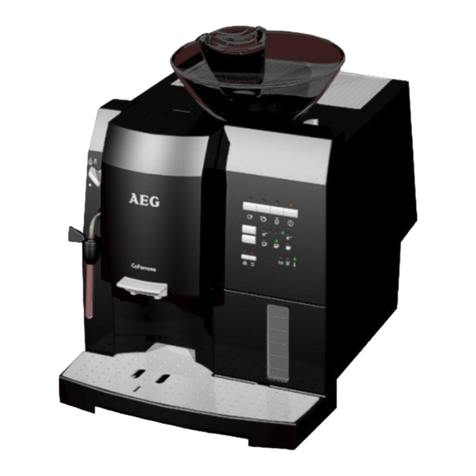
gFeatures (Figure 1)
AFresh Water Tank, Lid
BFiller Opening for Ground Coffee with
Lid
CCup Rack
DBean Container with Lid (inside: grind-
ing texture adjustment)
ESelector Dial for Steam and Hot Water
FSwivelling Nozzle for Steam and Hot
Water
GHeight Adjustable Outlet
HSpouts
JDrip Grille
KDrip Catcher
LSpent Coffee Drawer with Spent Cof-
fee Container
MFloat
NRating Plate (on the underside of the
appliance)
OControls and Indicators (see Figure 2)
PMeasuring Spoon
Controls (Figure 2)
APower Indicator: Illuminates when the
appliance is switched on
BMain Switch: Switches the appliance
on and off
CIndicator For 1 Cup of Strong Coffee
DIndicator For 1 Cup of Normal Coffee
EButton For 1 Cup of Coffee
FButton For 2 Cups of Coffee
GIndicator For Ground Coffee
HButton For Ground Coffee
JIndicator For “Flushing“
KButton For Flushing
LIndicator For “Cleaning“
MIndicator For “Descaling“
NIndicator For “Water Tank“
OIndicator For Emptying or Refitting The
“Drip Catcher and Spent Coffee Con-
tainer“
PSelector Dial For Amount of Water per
Cup
Indicator illuminates:
Indicator flashes:
Dear customer,
Please read these operating instruc-
tions through carefully. Above all,
observe the safety instructions! Please
keep these operating instructions for
later reference, and pass them on to
any subsequent owners of the appli-
ance.
The form and function of your AEG
coffee machine guarantee you
• straightforward operation and
• excellent, individual taste
• with the easiest of maintenance and
care.
The excellent, individual taste is
achieved by
• The pre-brewing system: prior to the
actual brewing process, the ground
coffee is moistened to extract its full
aroma,
• The individually adjustable quantity of
water per cup that can be varied
between a small espresso and a large
“frothy“ coffee,
• The grinding texture that can be
adjusted to suit the roasting of the
beans,
• The facility to choose between normal
or strong coffee,
• And last but not least, through the
guaranteed crema, that small crown of
froth that makes an espresso incompa-
rable for connoisseurs.
Incidentally: The time that the water is
in contact with the ground coffee is
considerably shorter for espressos than
for conventional filter coffee. As a
result, less bitterness is released from
the coffee, it is this that makes
espresso coffee so much pleasanter!
g
19
Table of Contents
Safety Instructions
1. Before Using for the First Time
1.1. Setting Up the Appliance
1.2. Cable Compartment (Figure 3)
1.3. Adjusting the Water Hardness
1.4. Adjusting the Safety Cut-Out
2. Prior to Making Coffee
2.1.
Filling the Water Tank (Figure 4)
2.2. Filling the Bean Container
(Figure 5)
2.3. Adjusting the Grinding Texture
(Figure 6)
2.4. Switching On the Appliance
(Figure 7)
2.5.
“Flushing“ the Appliance (Figure 8)
3. Making Coffee
3.1. Adjusting the Amount of Water
(Figure 9/B)
3.2. One Cup of Normal Coffee from
Beans (Figure 10)
3.3. One Cup of Strong Coffee from
Beans (Figure 11/A)
3.4. One Cup of Extra Strong Coffee
from Beans (Figure 11/B)
3.5. Two Cups of Normal Coffee
from Beans (Figure 12)
3.6. One or Two Cups of Coffee from
Ground Coffee (Figure 13, 14)
4. Frothing Milk (for Cappuccino)
(Figure 15, 16)
5. Preparing Hot Water (Figure 16)
6. Switching Off the Appliance
7. Emptying the Water Tank, Drip
Catcher and Spent Coffee Con-
tainer (Figure 17, 18)
8. Cleaning
8.1.
Exterior Cleaning (Figure 19, 20)
8.2. Internal Cleaning: “Clean“ Indi-
cator Illuminates (Figure 21)
9. Descaling the Appliance: “Des-
cale“ Indicator Illuminates (Fig-
ure 22, 23)
10. What to do if ...
11. Protecting the Environment
12. In the Case of Need for Service
1 Safety Instructions
• The appliance may only be connected
to a mains supply on which the volt-
age, type of supply, and frequency
match the information given on the
rating plate (see underside of the
appliance)!
• Never allow children to operate the
appliance unsupervised.
• Never bring the mains lead into con-
tact with the hot parts of the appli-
ance.
• Never pull the plug from the socket by
means of the mains lead!
• Do not use the appliance if:
– the mains lead is damaged or
– the housing shows visible signs of
damage.
• The coffee outlet, swivelling nozzle,
and cup rack will become hot during
use due to the nature of their func-
tions. Keep children away!
• Only fill the water tank with cold
water, do not use hot water, milk or
other liquids.
• Do not place frozen or caramelised
coffee beans in the bean container,
only use roasted coffee beans! Remove
any foreign bodies from the coffee
beans. Otherwise the guarantee will be
void.
• Only put ground coffee in the ground
coffee filler opening.
• Observe the cleaning and descaling
instructions.
• Prior to maintaining or cleaning,
switch off the appliance and unplug it
from the mains!
• Never immerse the appliance in water.
• Do not allow any liquid to enter the
housing via the ventilation holes on
the cup rack.
• Do not wash the parts of the appliance
in a dishwasher.
• Do not leave the appliance switched on
longer than necessary.
• Do not expose the appliance to the
weather.
g
20
Do not open or repair the appliance.
Improper repairs can give rise to signif-
icant hazards for the user.
Repairs to electrical appliances are only
to be performed by qualified service
engineers.
In the case that repair becomes neces-
sary, including the replacement of the
mains lead, please contact
• the dealer from whom you purchased
the appliance, or
• an AEG customer service centre.
In no circumstance should the appli-
ance be sent by post - there is a risk of
transport damage that cannot be cov-
ered under the guarantee!
If the appliance is used for a purpose
other than that intended, or is incor-
rectly operated, no liability for any
resulting damage or claims under the
guarantee can be accepted - this is also
the case if the cleaning and descaling
programs are not performed immedi-
ately after the illumination of the cor-
responding indicators (Figure 2), and in
accordance with the information given
in these operating instructions.
; This appliance complies with the fol-
lowing EC directives:
• 73/23/EWG dated 19.02.1973 “Low
Voltage Directive“, including Directive
Amendment 93/68/EWG
• 89/336/EWG dated 03.05.1989 “EMC
Directive“, including Amendment
Directive 92/31/EWG
1. Before Using for the First Time
1.1. Setting Up the Appliance
Choose a suitable, level, stable,
unheated, dry surface. Pay attention to
adequate air circulation.
Important: If the appliance is placed in
a warm room after being brought in
from the cold - wait approx. 2 hours
before switching on the appliance!
1.2. Cable compartment (Figure 3)
Your appliance has a cable compart-
ment on the rear. If the mains lead is
too long, you can push the cable that is
not needed into the cable compart-
ment.
1.3. Adjusting the Water Hardness
Your appliance can be adjusted to the
hardness of the water used. The correct
adjustment of the water hardness is
necessary for the correct function of
the automatic scaling indicator (see
also Section 9.).
Use the Aquadur® test strips supplied
to determine the hardness the local
water. Follow the instructions given on
the test strip packaging. Or: Ask your
water board about the hardness of
your water!
The appliance has 5 hardness settings,
the appliance is set to the middle set-
ting, 3, in the factory (corresponds to
16°-23° degrees German hardness).
You can change this setting as follows:
0Plug the appliance into the mains.
0Do not switch on the appliance.
0Press the “1 Cup“ button for
approx. 3 seconds. The “Descale“
indicator flashes.
Pressing the “1 Cup“ button again
changes the water hardness setting by
one step to 4, 0, 1, 2, 3, and so on.
0To store the water hardness setting and
to end the procedure, press the
“On/Off“ button. All indicators go out.
If a button is not pressed for more than
30 sec., the procedure is automatically
ended without changing the value
saved previously.

g
21
The individual water hardness settings
(degrees German hardness, ° dH) are
indicated as follows:
The “Descale“ indicator flashes
( ), in addition the following indica-
tors illuminate ()
for setting 1 (1°-7° dH): “1 Strong
Cup“
for setting 2 (8°-15° dH): “1
Strong Cup“ and “Ground Coffee“
for setting 3 (16°-23° dH): “1
Strong Cup“, “Ground Coffee“
and “Spent Coffee“
for setting 4 (24°-30° dH): “1
Strong Cup“, “Ground Coffee“,
“Spent Coffee“ and “Clean“
for setting 0: no further indicators
illuminate. The automatic descale indi-
cator is switched off.
Note: The water hardness setting is
only to be adjusted prior to using the
appliance for the first time, or if the
quality of the water used changes.
1.4. Adjusting the Safety
Cut-Out
If the appliance is not used for an
extended period of time, it switches
itself off for safety reasons and to save
energy.
The appliance has 3 timer settings;
after the expiry of the time set, the
appliance switches off automatically.
The middle setting 2 (switch off after
2 hours), is set in the factory.
You can change this setting as follows:
0Plug the appliance into the mains.
0Do not switch on the appliance.
0Press the “2 Cups“ button for
approx. 3 seconds. The “Flush“
indicator illuminates.
0Pressing the “2 Cups“ button again
adjusts the timer setting by one step to
3, 1, 2 and so on.
0To save the safety cut-out setting and
end the procedure, press the “On/
Off“ button. All indicators go out.
If a button is not pressed for more than
30 sec., the procedure is automatically
ended without changing the value
saved previously.
The individual timer settings are indi-
cated as follows:
The “Flush“ indicator flashes, in
addition the following indicators illu-
minate
for setting 2 (switch off after 2
hours): “Water Tank“ and
“Spent Coffee“
for setting 3 (switch off after 5
hours): “1 Strong Cup“,
“Ground Coffee“, “Clean“,
“Water Tank“ and “Spent Coffee“
for setting 1: no further indicator illu-
minates, the automatic cut-out is not
activated.
2. Prior to Making Coffee
2.1. Filling the Water Tank
(Figure 4)
Open the lid (Figure 1/A) and remove
the water tank by the handle. Please
only use cold, clear water, and do not
fill beyond the MAX mark.
Then refit the water tank in the appli-
ance and press it down until it engages
so the valve on the base is opened.
For aromatic coffee, you should:
• Change the water in the tank daily,
• Not use mineral or distilled water and
• Clean the water tank at least once a
week in normal washing up water (not
in a dishwasher). Then rinse with clean
water.
Incidentally: When the “Water
Tank“ indicator (Figure 2/N) illumi-
nates, your appliance is signalling to
you that the water tank must be
refilled.
g
22
2.2. Filling the Bean Container
(Figure 5)
Open the lid of the bean container
(Figure 1/D) and fill the container with
roasted coffee beans (do not use fro-
zen and caramelised beans). Ensure
that no foreign bodies enter the bean
container. Close the lid.
Tip: You can use both espresso and fil-
ter coffee beans! Try out different sorts
of beans to find the ones that taste the
best to you!
2.3. Adjusting the Grinding Tex-
ture (Figure 6)
To release the full aroma from the
beans, you can adjust the grinding tex-
ture to suit the roasting of the beans.
The grinding texture adjustment is on
the rear right inside the bean con-
tainer.
Important: The grinding texture is only
to be adjusted when the grinder is in
operation.
Starting from the factory medium set-
ting, turn the adjustment knob clock-
wise for darker beans (coarser
grinding texture), anticlockwise for
lighter beans (finer grinding tex-
ture).
Tip: Try different grinding textures to
find the one that suits your taste the
best!
2.4. Switching On the Appliance
(Figure 7)
By pressing the “On/Off“ button
(Figure 2/B) for approx. 1 second, you
can switch on the appliance. The red
power indicator (Figure 2/A) illumi-
nates.
Only when using the appliance for
the first time:
To show that the system must be filled,
the green “1 Strong Cup“, “1
Normal Cup“, “Ground Coffee“
and “Flush“ indicators flash
(Figure 7).
0Place an empty cup under the swivel-
ling nozzle (Figure 1/F).
0Turn the selector dial (Figure 1/E) anti-
clockwise to the stop.
0Hot water runs out of the swivelling
nozzle and is stopped automatically.
0Turn the selector dial clockwise back to
“0“. Please repeat this process until the
green flashing indicators go out.
This process is necessary to fill the sys-
tem with water.
2.5. “Flushing“ the Appliance
(Figure 8)
When the operating temperature is
reached, the green “Flush“ indica-
tor (Figure 2/J) illuminates. Place an
empty cup under the spouts (Figure
1/H) and press the “Flush“ button
(Figure 2/K). The flushing process stops
automatically. The “1 Cup of Nor-
mal Coffee“ indicator (Figure 2/D) then
illuminates. The appliance is now ready

for brewing coffee.
Note: The water left in the appliance is
removed from the the system by the
flushing action so that coffee is made
with fresh water.
3. Making Coffee
Although you are brewing espresso
coffee with your coffee machine, the
term coffee is used in the following for
clarity.
Note: The following process starts
completely automatically after
the “1 Cup“ or “2 Cups“ button
is pressed: grinding, portioning, press-
ing, pre-brewing, brewing, and ejection
of the used ground coffee.
You can interrupt this process at any
time by pressing the “1 Cup“
or “2 Cups“ button!
Store your cups upside down on the
cup rack (Figure 1/C). Steam escapes
through the openings in the cup rack,
this warms the cups!
The outlet (Figure 1/G) can be
adjusted in height and can thus be
adjusted to suit different sizes of cup.
g
23
To adjust the height, use the thumb
and index finger to grip the ribbing on
the side of the outlet and move it up or
down (Figure 9/A). Important: There is
a risk of burns!
3.1. Adjusting the Amount of
Water (Figure 9/B)
Using the selector dial (Figure 2/P),
adjust the amount of water per cup.
Depending on your taste, select a
“small“ espresso (turn selector dial
anticlockwise) or a large “frothy“ cof-
fee (turn selector dial clockwise).
Note: You can also change the amount
of water during the brewing process.
To adjust the required quantity during
the brewing process: turn the selector
dial slowly anticlockwise from the
maximum setting, until coffee ceases
to run out at the required quantity.
When two cups of coffee are drawn,
the amount of water is more or less
doubled.
Note: While the appliance is heating
up, the “1 Normal Cup“ indicator
(Figure 2/D) flashes.
3.2. One Cup of Normal Coffee
from Beans (Figure 10)
The appliance is ready for use when
the “1 Normal Cup“ indicator (Fig-
ure 2/D) illuminates. Place an empty
cup centrally under the spouts. By
briefly pressing the “1 Cup“ but-
ton (Figure 2/E), you will obtain one
cup of normal coffee. “1 Normal Cup“
flashes.
3.3. One Cup of Strong Coffee
from Beans (Figure 11/A)
The appliance is ready for use when
the “1 Normal Cup“ indicator (Fig-
ure 2/D) illuminates. Place an empty
cup centrally under the spouts. Now
press the “1 Cup“ button (Figure
2/E) until the “1 Strong Cup“ indi-
cator (Figure 2/C) illuminates and “1
Normal Cup“ flashes. You will then
obtain one cup of strong coffee.
3.4. One Cup of Extra Strong
Coffee from Beans (Figure 11/B)
The appliance is ready for use when the
“1 Normal Cup“ indicator (Figure 2/D)
illuminates. Place an empty cup cen-
trally under the spouts. Now press the
“1 Cup“ button (Figure 2/E) until the “1
Normal Cup“ and “1 Strong Cup“ indi-
cators flash. You will then obtain one
cup of extra strong coffee.
3.5. Two Cups of Normal Coffee
from Beans (Figure 12)
The appliance is ready for use when
the “1 Cup“ indicator (Figure 2/D)
illuminates. Place a cup under each of
the spouts.
Note: The correct position for the cups
is given by the two holes in the drip
grille (Figure 1/J) as these are directly
below the spouts.
By pressing the “2 Cups“ button
(Figure 2/F), you will obtain two cups
of normal coffee. “1 Normal Cup“
flashes.
3.6. One or Two Cups of Coffee
from Ground Coffee (Figure 13, 14)
Using this function you can, e.g., brew
decaffeinated coffee.
The appliance is ready for use when
the “1 Normal Cup“ indicator
(Figure 2/D) illuminates.
0Place one or two cups under the
spouts.
0Press the “Ground Coffee“ button
(Figure 2/H) until the “Ground Cof-
fee“ indicator (Figure 2/G) illuminates
(Figure 13).
0Open the lid (Figure 1/B) and place the
required amount of ground coffee for
one or two cups in the filler opening
(Figure 14).
0Close the lid.
Note: Add a maximum of 2 portions of
ground coffee. The filler opening for
ground coffee is not a storage con-
tainer. Do not add anything other than
ground coffee!