$1
HOLD/PRESET/
0TUNING
2
1FfADIOON/OFF 2’
,% ‘“:&
m m
RECEPCION DE LA
RADIO +❑
RADIO RECEPTION -+ QRECEPTION RADIO +❑Frequency range and step
Radio broadcasts have different frequency ranges and change
in different steps in different countries.
This unit is factory preset to use in North and South America.
To use the unit in another country, change the receivable
frequency ranges and steps as below.
Intervalo ymargen de frecuencia
Las emisiones de radio tienen m#rrgenes de frecuencia
diferentes ycambian en intervals diferentes en funci6n del
paki.
Esta unidad estft ajustada de fAbrica para su uso en Norte y
Sudamr%ica. Para utilizar dicha unidad en otro pa[e, cambie
Ios intervals ymdrgenes de frecuencia recibibles como se
muestra acontinuaci6n.
Plage et intervalle de frequence
Les stations de radio 6metfent clans des plagea de fr~quences
difk%entes et suivant des intervalles difk$rents clans chaque
pays.
Cet appareil est r6g16par d6faut pour Ies pays d’Am&ique du
Nerd et Iatine. Pour pouvoir ufilisercet appareil clans un autre
pays, changez Ies plages de fr6quences caplables et Ies
intervalles selon la proc6dure suivante.
Pour l’Am6rique du Nerd et Iatine (local)
AM: 530 – 1.710 kHz (inteivalle de 10 kHz)
FMI, FM2: 87,5 -108,1 MHz (intervalle de 200 kHz)
Pour Ie Japon
AM: 531-1.629 kHz (intervalle de 9 kHz)
FMI, FM2: 76-108 MHz (intervalle de 100 kHz clans la
plage 76-90 MHz, intervalle de 50 kHz clans
la plage 90-108 MHz)
Pour l’Europe et Ies autres zones g~ographiques
AM: 531-1.602 kHz (intervalle de 9 kHz)
FMI, FM2: 87,5-108 MHz (intervalle de 50 kHz)
1Appuyez sur la touche RADIO ON/OFF (BAND) pour
acfiver la radio.
1Press the RADIO ON/OFF (BAND) button to eelect AM,
FMI or FM2.
FMIand FM2 have the same frequency range. Both can
be used to tune in to an FM station.
2Press the +or -button to tune in to aetatlon.
1Appuyez sur la touche RADIO ON/OFF (BAND) pour
s61ectlonner AM, FMI ou FM2.
FM1 et FM2 offrent Ies m6mes plages de fr~quences.
Vous pouvez utiliser Ies deux pour syntoniser une station
FM.
2Appuyez sur la touche -1- ou -pour syntonlser une
etation.
Utilisation avec la t616commande
R6glez Ie commutateur HOLD/PRESETrTLf NING sur la
position TUNiNG et appiiquez la proc(?dure ci-dessus pour
syntoniser une station.
1Pulse el bot6n RADIO ON/OFF (BAND) para selecclonar
AM, FM1 OFM2.
FMI y FM2 tienen la misma gama de frecuencias, yambos
pueden utilizarse para sintonizar emisoras de FM.
2Pulse el bot6n i- 0- para sintonizar una emlsora.
Pars el empleo con el mando adietancia
Ajuste el interruptor HOLD/PRESET~LfNING en la posici6n
TUNING ysiga IOS anteriores pasos para sintonizar una
emisora.
Despu6s de la eecucha, desactive la aiimentaci6n pulsando
el bot6n RADIO ON/OFF (BAND) hasta que la indicaci6n se
apague.
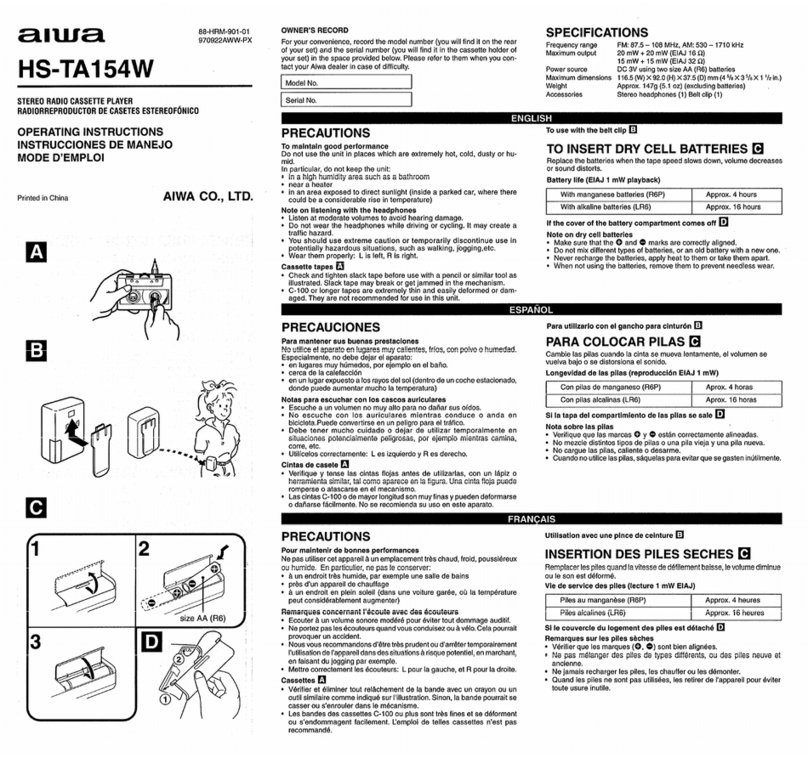
For North and South America (local) use
AM: 530 – 1,710 kHz (10 kHz step)
FMI, FM2: 87.5 –108.1 MHz (200 kHz step)
For Japan use
AM: 531– 1,629 kHz (9 kHz step)
FM1, FM2: 76 – 108 MHz (100 kHz step in 76-90 MHz,
50 kHz step in 90-106 MHz)
For Europe and other areas use
AM: 531-1,602 kHz (9 kHz step)
FMI, FM2: 87.5 – 108 MHz (50 kHz etep)
To use with remote control
Set the HOLD/PRESET~UNING switch to TUNING position
and follow the above steps to tune in to astation.
After Iietening, turn off the power by pressing the RADiO
ON/OFF (BAND) button until the display is turned off.
For quick tuning
Keep either the -F or -button pressed for 1-2 seconds.
When astation is received, the frequency indicator stops
automatically. However, it may not stop if the broadcast sig-
nal is weak.
For better reception +❑
FM: The headphone cord functions as the FM antenna, Keep
it extended and position it appropriately during radio
reception.
AM: There is abuilt-in antenna inside the unit. Turn the unit
to find the position that gives best reception.
To listen to FM stereo broadcasts
Set the FM ST/MONO switch to FM ST.
if the FM stereo signal is weak and distorted, set it to MONO.
The sound will be monaural, but the distortion will be re-
duced.
Para su uso en Norte ySudam6rica (Iocai)
AM: 530-1.710 kHz (paso,de 10 kHz)
FMI, FM2: 67,5 –106,1 MHz (paso de 200 kHz)
Para su uso en Jap6n
AM: 531-1.629 kHz (paso de 9 kHz)
FMI, FM2: 76 – 108 MHz (paso de 100 kHz en 76-90
MHz. oaso de 50 kHz en 90 – 108 MHz)
Ala fin de l’6coute, meffez I’appareil hors tension en appuyant
sur la touche RADiO ON/OFF (BAND) jusqu’~ ce que la
fer%tre d’affichage soit d6sactiv6e.
Pour une syntonisation rapide
Maintenez la touche +ou -enfonc6e pendant une Adeux
secondes. Dirs qu’une station est capt~e, I’indicateur de
fr6quence s’arr&e automatiquement. II peut cependant ne
pas s’arr&er si Ie signal d%mission est trop faible.
Pour am61iorer la rr$ception +❑
FM: Le cordon de casque fonctionne comme antenne FM.
La d6ployer et la positioner de manibre adr$quate en
mode de r6ception radio.
AM: Comme une antenne est incorpor6e AI’appareil, tourner
cekri.ci pour trouver la position qui fournit la meilleure
r6ception.
Pour r$couter des 6missions FM ster60
R6giez Ie commutateur FM ST/MONO sur FM ST.
Si Ie signai st6r60 est faible et comporte des distortions,
r6glez-le sur MONO, Le son est alors diffusd en monaural,
mais Ies distortions auront diminu6 d’intensitc$.
Para su uso en Eurooa votraa zonaa
AM: 531--1.602 ~Hz’(paso de 9 kHz)
FMi, FM2: 67,5-106 MHz (paso de 50 kHz)
Puise ei boton RADIO ON/OFF (BAND) para acthrar la
radio.
Mantenga pulsados Ios botones AUTO PRESET y+
1Press the RADIO ON/OFF (BAND) button to turn on the
radio.
2Hold down both AUTO PRESET and -1- buttone
simultaneously for 3seconds.
Each time they are held, the band aefting is displayed
cyclically as below.
I- US-JP —’”l
Para sintonizar r~pidamente
Mantenga pulsado el bot6n i-o -durante 1a2segundos.
Ai recibirse una emisora, el indicador de frecuencia se detiene
automAticamente. No obstante, es posible que no se detenga
si la seiial de radiodifusi6n es d&il.
Para mejorar la recepci6n +❑
FM: El cable de Ios auriculares funciona como antena de
FM. Mant6ngalo extendido yco16quelo correclamente
durante la recepci6n de radio.
AM: Esta unidad fiene incorporada una antena. Cambie la
direcci6n de la unidad para encontrar la mejor posici6n
de recepci6n.
Para escuchar emisiones en FM est6reo
Ajuste el intarruptor FM ST/MONO en FM ST.
Si la sefial de FM est6reo es dkhil ose distorsiona, ajrktelo
en MONO. El sonido ser~ monof6nico, pero la distorsi6n se
reducir/r.
1
2simult~neamente durante 3segundos.
Cada vez que ios mantenga pulsados, el ajuste de banda
aparece c(ciicamente como se muestra aconfinuaci6n.
US :Norte ySudam&ica (local)
JP :Jap6n
EU :Europa yotras zonas
●Para recuperar directamenie el ajuete de f6brica dal
Intervalo ymargen de frecuencia, mantenga pulsados
simultzlneamente Ios botones i- y-durante 3segundos.
●Al camblar el intervalo ymargen de frecuencia, Ias
emisoras programadas se borrar.4n.
2Maintenez Ies touches AUTO PRESET et +
slmuitan6mant enfonc6es pendant 3secondes.
Chaque fois que vous appuyez sur ces touches, ie r6glage
de bande est affich6 cycliquement comme indiqu6 ci-
dessous.
US :Am&ique du Nerd et Iatine (local)
JP :Japon
IJ
US :North and South America (local).
JP :Japan
EU :Europe and other areas
●To return to the factory preeet frequency range and
etep directly, hold down both -1- and -buttons
simultaneously for 3seconds.
*When the frequency range and step are changed, the
preset stations are erased.
❑Fhl AM
Q
$%3‘J, ,
EU :Europe et Ies autres zones g60graphiques
PRESETTING .Pour revenlr dlrectement Ala plage et hI’intervalle de
frcfquence par dr$faut, maintenez Ies touches +et -
eimultan6ment enfonc6es pendant 3secondes.
*Lorsque la plage et I’intervalle de fr4quence ont 6t6
modifi6s, ies stations pr6s61ectionn6es sent effac6es.
Atotal of 30 stations can be preset, 10 stations for each AM,
FMI and FM2 band. S&E&P TIMER SETTING
PROGRAMACION PRESELECTION
Automatic presetting -+ ❑
Stations are automatically scanned once through the receiv-
able frequency range and stored to each preset number (1-
lo).
AJUSTE DEL
TEMPORIZADOR DE
DESACTIVACION +td
Es posible programar un m~ximo de 30 emisoras, 10 para
cada banda (AM, FM1 y FM2), Vous pouvez prr%61ectionnerun total de 30 stations de radio,
Asavoir 10 clans chacune des bandes :AM, FMIet FM2. REGLAGE DU
PROGRAMMATEUR
The unit can be turned off automatically at aspecified time.
1Prese the SLEEP button until the “SLEEP indicator
flashes on the display (sleep mode).
Press each button below within 5seconds.
2Press the -i- button to designate and set the digit.
Press the -button to shift to the next digit.
(T’he first digit indicates hour while the other two digits on
the right indicate minute.)
❑
2
1
Programacion automatic +❑
Las emisoras se exploran autom&icamente una vez atraw%
de la gama de frecuencias recibibles, yse almacenan en Ios
mlmeros de memorizac16n (1 a10),
Preelection automatique +❑
Les stations sent baiay6es automatiquement clans la plage
de fr~quence captable et m6moris6es sous chacun des
numr$ros de pr6s61ection (1 &10).
1Prees the RADIO ON/OFF (BAND) button to eelact AM,
FMI or FM2.
2Keep the AUTO PRESET button pressed for 1-2 eec-
ends.
@Flret, scanning starts with the “PRESET” and preset
number display flashlng.
@Whan aStatiOn Is tuned in to, scanningstops. The
tuned station is heard for 2seconds and preset. Thenl
scanning starts again.
@When preaeffing ia completed, the last preset station
is heard.
if there Ie aetatlon you wish to eklp during presetting
When astation is tuned in to, scanning stops and the
tuned station can be heard for 2seconds. Press the
AUTO PRESET button within these 2secondq to deselect
this station.
Note
●When broadcast signais are very weak, the stations cannot
be preset automatically. Preset manually,
●When 10 or more stations can be received, auto presetting
ands after 10 stations are preset.
D9E)(TINCTION +~
La unidad puede apagarae autom&icamente a una hors
especificada.
Pulse el bot6n SLEEP haeta aue el indicador “SLEEP” L’appareil peut automatiquement &re mis hors tension Aune
heure m6d&inie,
1
2
3
1
2
Pulse el bot6n RADiO ON/OFF (BAND) para sefecclonar
AM, FM1 OFM2.
Mantenga pulsado el bot6n AUTO PRESET durante 1 a
parpadee en et visor (modo de desactivaci6n).
Pulse cada bot6n que aparece mtis abajo dentro de un
espacio de 5 segundos.
Pulse el bot6n -1-para determiner yajustar e! digito,
Pulse el bot6n –para desplazarse al dfgito siguiente.
(El primer digito indica la hors, mientras que [OSotros dos
digitos de la derecha indican Ios minutes,)
Tambi6n es posible recuperar la hors de desactivaci6n
ajustada de f~brica pulsando Ios botones numr4ricos (1 a
5).
1Q
+5
SLEEP
1Appuyez sur la touche RADIO ON/OFF (BAND) pour
s6fectionner AM, FMI ou FM2.
2Malntenez la touche AUTO PRESET enfonc6e pendant
1
2
3
Appuyez sur fa touche SLEEP jusqu’b ce que
I’indicateur “SLEEP” se mefte h“clignoter dane la
fen6tre d’afflchage (mode d’extinction),
Appuyez sur chacune des touches suivantes clans un d&ai
de 5 secondes.
Appuyez sur ia touche +pour d6signer et w$gler Ie
chiffre.
Appuyez sur la touche -pour passer au chiffre suivant,
(Le premier chiffre indique I’heure tandis que Ies deux
autree chiffres hdroite indiquent Ies minutes.)
You can also recall the factory preset slaep time by press-
ing numeric (l-5) buttons.
2aagun-dos.
@En primerIugar,laexploraci6nse iniciaconlaindicaci6n
dentimerodememorizaci6ny“PRESET” parpadeando,
@Al slntonlzareeunaamfsora,laexpioraci6nsedetiene.
La emisorasintonizadaseoirA durante 2segundos yse
programarA. Acontinuaci6n, volverA ainiciarse la
exploraci6n.
@Af finalizarae la programac16n, se oirA la tiltima emisora
programada.
Si desea omitir alguna emisora durante fa programac16n
Al sintonizarse una emisora, la exploraci6n se detiene yse
oir~ la emisora programada durante 2segundos.
Pulse el bot6n AUTO PRESET durante dichos 2seaundos
para cancelar la selecci6n de eata emisora,
Nota
●Si Ias seifales de radiodifusi6n son muy d6biies, no serA
posible programar Ias emisoras autom~ticamente.
ProgrAmelas manualmente.
●Si pueden recibirse 10 emisorae om~s, la programaci6n
autom&ica finalizartl una vez programadas 10 emisoras,
Programacion manual +III
1Pulsa et bot6n RADIO ON/OFF (BAND) para selecclonar
AM, FMI OFM2.
2Pulse Ios botonas i- 0- para slntordzar una emisora.
3Mantenga pulsado uno de Ios botonee num6ricos (1 a
5) duranta 1a2segundoe para sefecclonar al n(rmero
de memorlzac16n. Para el ntimero de memorfzaci6n 6
en adelante, pulse ysuelte primero ef bot6n +5,
Ejemplo: Para seleccionar el nhmero de memorizaci6n 6,
pulse ysuelte el bot6n +5 y, aconfinuaci6n, pulse el bot6n
1durante 1 a 2 segundos.
El indicador “PRESET” yel n(rmero seleccionado se
encender~n. Al pulsar el bot6n, se oir~ un pitido.
●Para programar doe o mds emlsoras, repita IOSpasos 2
y3.
●Se oirA un pitido al pulsar el bot6n +5.
Para cambfar la programaci6n
Repifa el procedimiento apartir del paso 1.
Recepci6n de emisoras programadas
+m
1Puhreel bot6n RADfO ON/OFF (BAND) para seleccionar
AM, FM1 OFM2.
2Pulse ysuelte Ios botones numr$ricos (1 a5) para
seleccionar el m’rmero da memorlzaci6n que desee.
Para et ntimero de memorizaci6n 6 en adalante, pulee
ysuelte prlmero al bot6n +5.
Ejemplo: Para seleccionar el mlmero de memorizaci6n 6,
pulse ysuelte el bot6n +5 y, acontinuaci6n, el bot6n 1.
Para el empleo con el mando adistancia
Ajuste el interruptor HOLD/PRESET/TLf NING en la posici6n
PRESET. Despu6s de seleccionar la banda deseada con
RADIO ON/OFF (BAND), puise el bot6n -1-,-para seleccionar
el rwlmero de memorizaci6n que desee.
Despu6s de ia escucha, desactive la alimentaci6n pulsando
et bot6n RADIO ON/OFF (BAND) hasta aue la indicaci6n se
1/r 2secondas.
@Tout d’abord, I’exploration des stations commence avec
“PRESET’ et Ieclignotement du num6ro de pr6s61ection,
@Lorsqu’une etatfon est syntonis6e, Ie balayage
s’interrompt. La station syntonisde est diffus~e pendant
2secondes et pr&61ectionn6e. Ensuite, Ie balayage
reprend.
@Loreque la proc6dure de pr6s61ection est termin6e,
la dernibre etafion pr6s61eclionn6e est diffus6e,
Si voue d&irez omattre une station durant fa
pr6e61ection
Lorsqu’une station est syntonis6e, Ie balayage s’interrompt
et la atafion syntonia&e est diffus6e pendant 2secondes.
Appuyez sur la touche AUTO PRESET pendant ce d61ai
de 2 seconde .Spour d.%activer la s61ection de cette station.
‘‘A:i mm
3
Q+5
SLEEP mVous pouvez 6galement activer I’heure d’extinction r6gi6e
par d6faut en appuyant sur Ies touches num6riques (1 A
5).
Bot6n 1 15 min.
Bot6n 2 30 min.
Bot6n 345 rein,
Bot6n 4 1 hors
Bot6n 5 1 hors 30 min.
Dentro de un esoacio no eu~erior a 5 seauridas trae
3Within 5eeconda after timer setting is completed, press
the SLEEP button to start the timer.
The “SLEEP indicator will light up and a beep sound will
be heard. Ea%H
[f the “SLEEP” indicator dieappears during the efeep
timer setting, repeat from step 1.
Manual presetting +❑
1Press the RADIO ON/OFF (BAND) button to aefect AM,
FM1 or FM2.
2Press the -i- or -button to tune fn to astation.
3Keap one of the numeric (l-5) buttone down for 1-2
seconds to seiect the preset number. For preset num-
ber 6 and above, press and refeaee the +5 button first.
Example: To select preset number 6, press and release
the +5 button and then press the 1button for 1-2 seconds.
The “PRESET” and the eelected number indicator wiii turn
on. When the button is pressed, beep sound will be heard.
Remarque
●Lorsque ie signal d’6mission est trbs faible, ia station ne
peut .4trepr6s61ectionn6e suivant la proc6dure automafique.
Dans ce cas, vous pouvez la pr6sr51ectionner manue[lement.
●Si 10 stations ou pius sent captables, la pr6s61ection
automatique s’arr6te Iorsque 10 stations ont &6
pr&.61ecfionn6es.
Note
●The maximum sleep timer setting is 5hours and 59 min-
utes.
●When the unit is turned off by the sleep timer before the
tape playback is finished, press the ■button to release the
<P button to prevent tape damage.
Touche 4 1 heure
Touche 5 1 heure 30 min.
finalizar el ajua~e del temporizador, pui~e el bot6n
SLEEP para poner dicho temporizador en
funcionamiento.
El indicador “SLEEP se iluminar~ yse oiral un pifido.
Si ei indicador “SLEEP desaparece duranta e] ajuste del
temporizador de desactivaci6n, repita el procedimiento
desde el paso 1.
Nota
●Ei ajuste mdximo del temporizador de desactivaci6n es de
5horas y59 minutes.
●Si el temporizador de desactivaci6n apaga ia unidad antes
de finalizar la reproducci6n de la cinta, pulse el bot6n ■
para Iiberar el bot6n <> con el fin de evitar dariar la cinta,
Para comprobar el tiempo restante del ajuste det
temporizador
Pulse el bot6n SLEEP hasta que aparezca el tiempo restante.
Se mostrarA durante 5segundos.
Para cancelar el temparizador de desactivac16n
Pulse el bot6n SLEEP hasta que aparezca el fiempo restante.
Dentro de un espacio de 5 segundos, pulse .slmult&neamente
Ios botones +- y-durante m~s de 2 segundos,
Una vez aparezca 000, vueiva apulsar el bot6n SLEEP
dentro de un espacio de 5 segundos. El indicador “SLEEP
desaparecer&
Dans fes 5secondes euivant Ie r6glage du
programmateur, appuyez sur la touche SLEEP paur
d6marrer Ie programmateur.
L’indicateur “SLEEP’ s’allume et un blp sonore retentit.
ml 3
2
To check the remaining Umsr aetfhtg
Press the SLEEP button until the remaining time is displayed.
it wiii be displayed for 5seconds.
To cancei the sleep timer
Press the SLEEP button until the remaining time is displayed.
Within 5seconds, press the -1-and -buttons simultaneously
for more than 2seconds.
After the 0:00 is displayed, press the SLEEP button again
within 5seconds. The “SLEEP indicator will disappear.
Si I’indicateur “SLEEP” dlsparait pendant Ie r6gfage du
programmateur, recommence Apartir de IWape 1,
Pr6s61ection manuelle +III
1Appuyez sur la touche RADIO ON/OFF (BAND) paur
s61ectlonner AM, FM1 ou FM2.
2Malntenez la touche i- ou -enfonc6e paur syntoniser
une station.
3Maintenez I’une des touches num6rlques (1 -5)
enfonc6e pendant 1h2secondes pour s61ectionner Ie
num6ro de pr&r61ection. Pour Ies num6roe de
pr&r61ection 6et aup6rieurs, appuyez d’abard sur fa
touche +5.
Exemple :Pour s61ectionner Ie num6ro de pr&51ection 6,
appuyez et rel~chez la touche +5 et appuyez ensuite sur ia
touche 1pendant 1A2secondes,
f-’incfication “PRESET” et I’indicateurdu num&o s&ectionn6
sent activ6s. Lorsque la touche est enfonc6e, un bip sonore
retentit.
Remarque
●Le r6glage maximum du programmateur d’exfincfion est
fix6 ?r5heures et 59 minutes.
*Lorsque I’appareil est mis hors tension par Ie programmateur
d’exfincfion avant la fin de la lecture de la cassette, appuyez
sur la touche ■pour d6sactiver ia touche <- afin cf%viter
d’endommager la bande magm$tique.
●To preset two or more stations, repeat eteps 2-3,
●Abeep sound will be heard when the +5 button is pressed.
To change the presetting
Repeat the procedure from step 1.
IRADIO ON/OFF
%
BAND
Listening to preset stations +III
1Prees the RADfO ON/OFF (BAND) button to sefect AM,
FM1 or FM2.
2Press and relaaae the numeric (1-5) buttons to select
the desired preset numbar. For preset number 6and
above, prese and releaae the +5 button firet.
Exampte: To select preset number 6, press and release
the +5 buffon and then the 1button.
To use with remote control
Set the HOLD/PRESETTRfNING switch to PRESET position.
After selecting the desired band with RADIO ON/OFF (BAND),
press the i-, -button to select the desired preset number.
SPECIFICATIONS Pour v&ifler la dur6e reetant avant f’extinction
Appuyez surla touche SLEEP jusqu’~ ce que la dur6e restant
avant I’extinction s’affiche, Elle reste affich6e pendant 5
secondes.
Frequency range
AM: 531/530 -1,602/1 ,710 kHz (9/10 kHz etep)
531-1,629 kHz (9 kHz step)
FMI, FM2: 67,5/87.5 -108/108.1 MHz (50/200 kHz step)
76-108 MHz (100 kHz step in 76-90 MHz,
50 kHz etep in 90 – 106 MHz)
Maximum output
20mW+20mW(EIAJ/16Q)
15mW +15mW (EIAJ132Q)
Power source
Batferv DC 3V, size AA [R6) X2
Pour d6sactiver te programmateur d’extinction
Appuyez sur la touche SLEEP jusqu% ce que la dur6e restant
avant I’extinction s’affiche, Dans un ddai de 5 secondes,
appuyez simultan~ment sur Ies touches +et -pendant au
moms 2secondes.
Lorsque I’indication 0:00 s’affiche, appuyez ~nouveau sur la
touche SLEEP clans Ies 5eecondes, L’indicateur “SLEEP
disparaft,
●Pour pr6sr5fectionner deux stations au pfue, r6p&ez Ies
6tapes 2et 3.
●Un bip sonore retenfit si vous appuyez sur la touche +5,
Pour changer une pr.4e6fection
R6p&ez la proc6dure Apartir de f’&ape 1, ESPECIFICACIONES
Afler iistening, turn off the power by pressing the RADIO
ON/OFF (BAND) button until tha display is turned off. Dome~tic AC power (us(ng bptional AC adaptor: AIWA
AC-620/AC-3021 Gama de frecuencias
AM: 531/530 -1.602/1 .710 kHz (paso de 9/10 kHz)
531 – 1.629 kHz (paso de 9 kHz)
FMI, FM2: 87,5/87,5 –108/1 08,1 MHz (paso de 50/200
kHz)
76 – 108 MHz” (paso de 100 kHz en 76-90
MHz, paeo de 50 kHz en 90-108 MHz)
Salida mdxima
20mW +20mW (EiAJ/16Q)
15mW +15mW (EIAJ/32Q)
Fuente da aIimentaci6n
2pilas secas de 3VCC, tarnario AA (R6)
Fuente de alimentaci6n de CA (per medio del adaptador
de CA optativo: AC-620/AC-302 de AlWA)
Viola de pilas
(EIAJ, ealida de 1 mW, repraducci6n)
9horas aproximadamente con Ias pilas manganr%icas
tamaiio AA (R6P)
22 horas aproximadamente con Ias pilas alcalinas tamario
AA (LR6)
Dimensioned mdximas (W XHXD)
112,6 X66,8 X34,9 mm
Peso (con excepto el pilee)
172g aproximadamente
Accesorios
Estereoaud[fonos (1)
Presilia para cintur6n (1)
●Las especificaciones asi como la configurac(on externa de
esta unidad estAn sujetas acambios sin previos aviso.
Ecouter des stations preselectionnees
+m
1Appuyez eur la touche RADiO ON/OFF (BAND) pour
s61ect[onner AM, FM1 ou FM2.
2Appuyez et rel~chez Ies touches num6riques (1 h5)
pour s6tectionner fe numth’o de pr6e61ection VOUIU.
Pour lee num6ros de pr6sr41ectlon 6et sup6rieurs,
appuyez et reltichez d’abord la touche +5.
Exempla :Pour s61ectionner Ie num&o de pr6s61ecfion 6,
appuyez et rel~chez la touche +5 et appuyez ensuite aur ia
touche 1.
Utilisation avec la t6f6commande
R6glez Ie commutateur HOLD/PRESETiTUNiNG sur la
position PRESET. Aprbs avoir s61ectionn6 la bande voulue ~
I’aide de RADIO ON/OFF (BAND), appuyez sur la touche -1-,
-pour s6iectionner Ie num6ro de la pr6s61ection de votre
cholx,
Ala fin ds I’t!coute, meftez f’appareil hors tension en appuyant
sur la touche RADIO ON/OFF (BAND) iusau’~ ce aue la
SPECIFICATIONS
Caution
When sefecting apreset station, DO NOT HOLD the
●numeric (1-5) buttons for more than asecond. Other-
wise, currently-tuned station will be preset to that button
instead.
●+5 button for more than 2seconds. Otherwise, the unit
will enter sleep mode.
Battery life ‘
(EIAJ, lmW oufput, pfaybsck)
Approx. 9hours using size AA (R6P) manganese baffer-
ies
Approx. 22 hours using size AA (LR6) alkaline batteries
Maximum dimensions (W XHXD)
112,6 X86.8 X34.9 mm (41/2X 3’/, X17/,8inches)
Weight (excluding batteries)
Approx. 172g (6.02 OZ)
Accessories
Stereo headphones (1)
Belt ciip (1)
●Tfte specifications and external appearance of this unit are
subject to change without prior notice,
•l 2
1
#
1
HOLD/PRESET/
0TUNING
2
Piage da fr6quence
AM: 531/530 -1.602/1 .710 kHz (palier de 9/10 kHz)
531 – 1.629 kHz (palier de 9 kHz)
FMf, FM2: 87,5/67,5 -108/108,1 MHz (palier de 50/200
kHz)
76- 108 MHz (paliar de 100 kHz clans la
plage 76-90 MHz, paiier de 50 kHz clans la
plage 90-108 MHz)
Puissance maximale
20mW+20mW(EIAJ/16Q)
15mW +15mW (EiAJ/32Q)
Allmentation
Courant confinu 3V, 2piles format AA (R6)
Secteur (avec emploi d’adaptateur secteur en option:
AIWA AC-620/AC-302)
Autonomic de piles
(EIAJ, sortie lmW, en lecture)
Env. 9heures avec piles au manganese format AA (R6P)
Env. 22 heures avec piles alcalines format AA (LR6)
Dlmensiona maximalas (L XHXP)
112,6 X86,6 X34,9 mm
Pofds (piles exclura)
Env. 172g
Accessoiree
Casque st&60 (1)
Attache pour ceinture (1)
apague.
Precauci6n
Al seleccionar una emisora programada, NO MANTENGA
PULSADO
cel bot6n num6rico (1 a5) durante mds de un segundo.
En caso contrario, la emisora actualmente sintonizada
se programar~ en ese bot6n.
●el bot6n +5 durante m4s da 2 segundos. En caso
contrario, la unidad entrarA en el modo de desactivaci6n,
/
fen?dre d’affichage soit dt$sacfiw%
1RADIO ON/OFF
%
BAND
Attention
Lors de la s~lecrion d’une StNO17 pr&sr31eclionn~e, ne
MAINTENEZ PAS ENFONCEES lee
ctouches numr%lques (1 ~5) pendant plus dune seconde.
Sinon, la station actuellement syntonis6e sera
pr&s61ectionn6e sous cetta touche.
●touche +5 pendant plus de 2 secondes. Sinon, i’appareii
passe en mode d’extinction.
KEcl ●Les ap6cifications et I’aspect ext&iaur de cet appareil
peuvent ~tre modifi6e saris pr6avie.
—. —— —. ——_.. .—