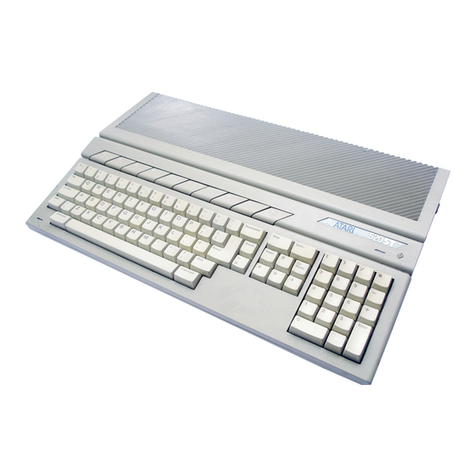
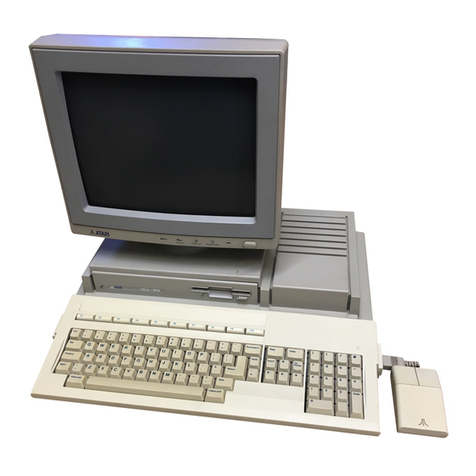
Atari Mega 2 User manual

LIST OF
SECTION
SECTION
TABLE OF CONTENTS
ILLUSTRATIONS
ONE--INTRODUCTION
Main Conponents
Case design
Differences from 520l1040ST
TWO..THEORY OF OPERATION
Overview
Main Systen
Microprocessing unit
GIue
Main Menory
Direct l4enory Access
MFP Interrupt Control
Audio/Video subsystem
Video Shifter
Video Display Menory
GIue
Memory Control-Ler
Sound Synthesizer
Video Interface
Input/output subsystens
MIDI
Intelligent Keyboard
Parallel Interface
RS232 Interface
Disk Drive Interface
Hard Disk Interface
Systen Startup
System Errors
Functional block diagran
Systen clock diagra-m
t.2
t.2
I.5
2.t
2.2
2.2
2.2
2.3
2.3
2.4
2.5
2.5
2.5
2.6
2.6
2.6
2.6
2.8
2.8
2.9
2.70
2.Lt
2.L2
2.L3
2.t4
2.15
2.L6
2.t7
11
Mega Service Manua1 i.1 Table of Contents

SECTION THREE--TESTING THE MBGA
Overview
Test equipnent
Test Configuration
Trouble-Shooting a dead unit
ST Diagnostic Cartridge
Power-up
RAM test
ROM test
Color test
Keyboard test
MIDI test
RS232 test
Audio test
Tining test
DMA test
Floppy Disk test
Printer/Joystick test
High Res Monitor
Blitter test
Clock test
Expansion port test
Error Codes Quick Reference
SECTION FOUR--DISASSBMBLY/ASSEMBLY
SECTION FIVE-.SYMPTOM CHECKLIST
Display problems
Disk Drive Problens
Keyboard problens
MIDI problems
R5232 problens
Printer Problems
Hard Disk Problens
Real Time Clock Problens
Blitter Problens
3.1
3.1
3.2
3.2
3.4
3.4
3.6
3.7
3.7
3.9
3.9
3. 10
3. 11
3.r7
3.r2
3. 13
3.t5
3.16
3.L6
3.L7
3.r7
3.18
5.t
5.L
5.2
5.2
5.2
5.2
5.2
5.2
5.2
í.2
Mega Service Manual Table of Contents

SECTION SIX.-DIAGNOSTIC FLOIlICHARTS
SECTION SEVEN..PARTS LIST AND ASSEMBLY DRAWINGS
SECTION EIGHT-.SCHEMATICS AND SILKSCREEI'I
SECTION NINE--GLOSSARY
Mega Service Manual i.3 Tab1e of Contents

LIST OF ILLUSTRATIONS
FIG 1 MEGA COMPUTER
FIG 2 BATTERY COMPARTMEI.IT
FIG 3 BACK PANEL
FIG 4 I,EM SIDE PANEL
FIG 5 TOP OF KEYBOARD
FIG 6 BOTTOM OF KEYBOARD
FIG 7 MEGA MOUSE
FrG I t{oNrron poRr
FIG 9 MIDI PORTS
FrG 10 MoUSE/JOY PoRTS
FIG 11 PRINTER PORT
FrG 12 RS232 PoRT
FIG 13 EXTERNAL FLOPPY PORT
FIG 14 EXTERNAL HARD DISK PORT
FrG 15 FLJNCTTONAL BLoCK DTAGRAM
FIG 16 SYSTEM CLOCKS
1.1
L.2
1.3
r.3
1.4
1.4
1.5
2.7
2.8
2.9
2.LO
2.tL
2.L2
2.L3
2.16
2.r7
Mega Service Manual 11 List of Illustrations

SECTION ONE
INTRODUCTION
The Mega 2 and Mega 4 are Motorola MC68000 nicroprocessor based
conputers with sinilar architectures to the 520ST/ 1040ST line. They
are styled as a nain CPU unit with a detached keyboard. The Mega 2 has
2 negabytes of RAM, the Mega 4 contains 4 negabytes. Both the Viega 2
and Mega 4 have a built-in 1 Megabyte (720K fornatted) 3,5 inch floppy
disk drive, and an internal switching power supply with built-in
cooling fan.
Since the onty difference between the Mega 2 and Mega 4 is the
size of its RAM, this nar¡ual will use ' Mega ' as a generic tern which
refers to both products.
Power Light Disk Drive
Drive Busy Light
FIG. 1
COMPUTER SYSTEM
Mega Service Manua1
ItIEGA
1.1 Introduction

The main components of the Mega 2 and Mega 4 are:
CPU
Main board assembly
Disk drive
Power supply & cooling fan
RF Shield (upper and lower)
CPU Plastic case (upper and lower)
KEYBOARD
Keyboard assembly
Interface board assembly
Keyboard Plastics (upper and lower)
MOUSE
Mouse board assembly
Mouse Plastics (upper and lower)
CASE DESIGN
shows the CPU portion
and figure 7 shows the
o
o
o
o
o
o
o
o
o
o
Figures 1 thru 4
keyboard portion,
Battery Housing
of the IUEGA, 5 ar¡d 6
mouse. shows
the
Cover
--
size AA Batteries +Top of
Computer
(+)(-)
FIG. 2
BATTERY COMPARTMENT
Mega Service Manual r.2 Introduction

On/Off
lo Power
Js
Frc. 3
BACK PANEL
FIG. 4
LEFT SIDE PANEL
loppy
I
Printer Midi ln
Cartridge Keyboard
Mega Service Manual 1.3 Introduction

Function Keys
I ¡oyst¡Jx Port I
FIG. 5
TOP OF KEYBOARD
Arrow Keys
Bottom of Keyboard
Calculator
Keypad
Computer
Jack
V I MouseiJoystick
FIG. 5
BOTTOM OF KEYBOARD
Mega Service Manual 1 .ll Introduction

Clicking
Left Mouse
Button
Right Mouse
Button
FrG. 7
MEGA UOUSE
Differences fron 520ST/1040ST
o New version of T0S
o More nenory requiring 74LS243 buffers on MAD lines
o ReaI tine clock chip & support circuit,
o Graphics Co-Processor (BITtsLiT)
o Internal expansion connector & support circuit
o Cooling fan
o New case styling with detached keyboard
Mega Service Manual r.5 Introducti.on

This manual suits for next models
1
Other Atari Desktop manuals
Atari
Atari 800 User manual
Atari
Atari 65XE User manual
Atari
Atari 130XE Instruction Manual
Atari
Atari 1200 XL User manual
Atari
Atari 800 User manual
Atari
Atari The Concise ST 68000 User manual
Atari
Atari 400 Use and care manual
Atari
Atari 400 User manual
Atari
Atari XL User manual
Atari
Atari 800 XL ROSE User manual