manuals.online logo
Brands
  1. Home
  2. •
  3. Brands
  4. •
  5. Baker Instrument Company
  6. •
  7. Test Equipment
  8. •
  9. Baker Instrument Company D6000 Guide

Baker Instrument Company D6000 Guide

This manual suits for next models

3

Other Baker Instrument Company Test Equipment manuals

Baker Instrument Company D12R User manual

Baker Instrument Company

Baker Instrument Company D12R User manual

Baker Instrument Company PP24 User manual

Baker Instrument Company

Baker Instrument Company PP24 User manual

Popular Test Equipment manuals by other brands

Ambit P.F. Series instruction manual

Ambit

Ambit P.F. Series instruction manual

Megger BMM500 Series user guide

Megger

Megger BMM500 Series user guide

RJG Lynx Sensor Tester operating instructions

RJG

RJG Lynx Sensor Tester operating instructions

Mark-10 TT02 Series user guide

Mark-10

Mark-10 TT02 Series user guide

Martel 3001 Operator's manual

Martel

Martel 3001 Operator's manual

ElproSys DiagProg4 instruction manual

ElproSys

ElproSys DiagProg4 instruction manual

Redtech TRAILERteck T05 user manual

Redtech

Redtech TRAILERteck T05 user manual

Venmar AVS Constructo 1.0 HRV user guide

Venmar

Venmar AVS Constructo 1.0 HRV user guide

Test Instrument Solutions SafetyPAT operating manual

Test Instrument Solutions

Test Instrument Solutions SafetyPAT operating manual

Hanna Instruments HI 38078 instruction manual

Hanna Instruments

Hanna Instruments HI 38078 instruction manual

Kistler 5495C Series instruction manual

Kistler

Kistler 5495C Series instruction manual

Waygate Technologies DM5E Basic quick start guide

Waygate Technologies

Waygate Technologies DM5E Basic quick start guide

StoneL DeviceNet CK464002A manual

StoneL

StoneL DeviceNet CK464002A manual

Seica RAPID 220 Site preparation guide

Seica

Seica RAPID 220 Site preparation guide

Kingfisher KI7400 Series Training manual

Kingfisher

Kingfisher KI7400 Series Training manual

Kurth Electronic CCTS-03 operating manual

Kurth Electronic

Kurth Electronic CCTS-03 operating manual

SMART KANAAD SBT XTREME 3G Series user manual

SMART

SMART KANAAD SBT XTREME 3G Series user manual

Agilent Technologies BERT Serial Getting started

Agilent Technologies

Agilent Technologies BERT Serial Getting started

manuals.online logo
manuals.online logoBrands
  • About & Mission
  • Contact us
  • Privacy Policy
  • Terms and Conditions

Copyright 2025 Manuals.Online. All Rights Reserved.

1
Baker Instrument Company
The Measure of Quality
DIGITAL TROUBLESHOOTING PROCEDURES
&FAULT LISTING
1. Knurr case removal.
2. Rittal case removal.
3. A/D board, I/O board, and controller board access instructions.
4. Voltage Busline and Crystal Checkout.
5. Open Ground fault indicator lamp lit.
•Open Ground circuit disable instructions for 6kV, 12kV, 24kV, D-Series
testers.
6. Hipot Trip fault indicator lamp lit.
7. Hipot Current Bar display not present.
8. CRT blank when PTT button depressed/surge mode.
9. Hipot voltage bar display not present.
10. Seconds/div, volts/div, µA/div, or function display incorrect.
11. Printer does not work properly.
12. No Baker logo displayed.
13. No Hipot voltage at test leads.
14. No surge voltage display.
15. Voltage drops when PTT button released.
16. Zero Start Interlock does not engage.
17. PI Value or current measurement inconsistent.
18. Display locked up after self-test.
19. Display unreadable and flashes on/off, does not initiate self-tests.
2
Baker Instrument Company
The Measure of Quality
KNURR CASE REMOVAL
All digital series 6kV and 12kV models manufactured before August 1998 are enclosed
in a blue shock mounted Knurr design case. Removal from the case is necessary to
access internal components. Removal procedure is as follows.
1. Unlock the rear cover latches and unhinge the rear cover.
2. Locate and remove four (4) Phillips M4 x 10mm screws. Two are located on the left
side and two are located on the right side.
3. Reinstall the rear cover.
4. Locate and remove on the front panel four (4) M5 x 16mm black hex head screws.
Two are on the extreme left edge on the front panel and two are located on the
extreme right edge of the front panel.
5. Grasp the CRT bezel in one hand and the test leads with the other hand and pull
straight out of the blue Knurr case.
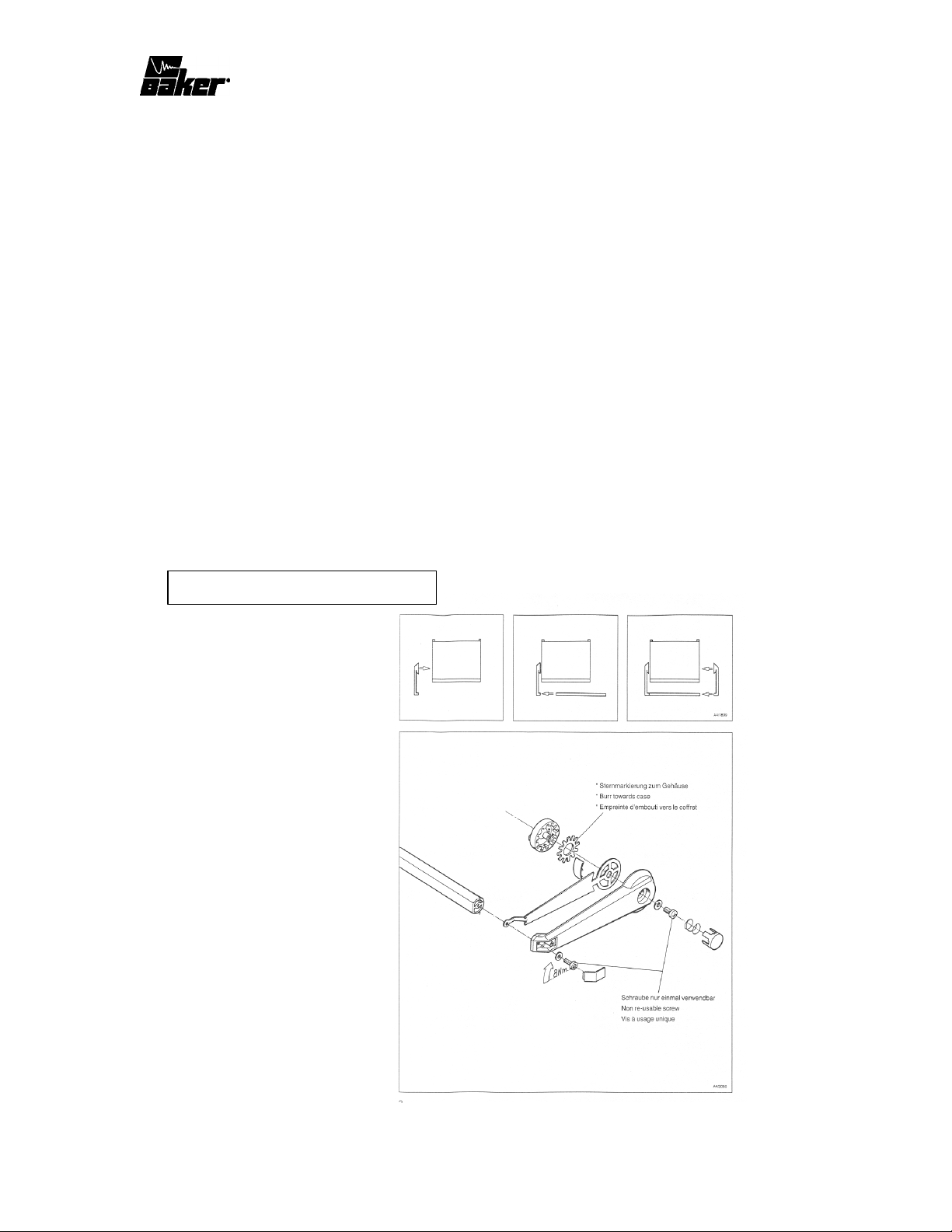
Handle Assembly for Knurr Case
3
Baker Instrument Company
The Measure of Quality
RITTAL CASE REMOVAL
The Rittal case has been used on the Digital 6kV and 12kV models after serial number
327. Removal of this case is as follows.
1. Locate and pry open, with a small slotted screwdriver, six plastic covers that overlap
six M4 screws that hold the top cover to the case assembly.
2. Remove these six (6) M4 screws and remove the top cover.
3. Locate and remove four (4) M16 x 16mm screws that secure the front panel to the
case assembly. Two screws are located to the left of the CRT bezel and two are
located to the right of the test lead set as they exit from the front panel.
4. Locate and remove five (5) M5 x 12mm black hex head screws that secure the bottom
chassis to the left and right side case L brackets. Two are located to the left of the
CRT shield, two are located to the right of the high voltage transformer, and one is
located underneath the test select switch.
5. Locate and unplug the two (2) pin molex connector from the 12 volt fan to the wiring
harness. This fan is located directly behind the CRT tube. It may be necessary to
remove a tie wrap that secures the molex connector to the side case frame.
6. Slide the front panel and bottom assembly forward to remove from the case assembly.
Access will now be gained to all internal components and assemblies except the I/O
board, A/D board and the Controller Board. See the following instructions for access to
these assemblies.
Note: For D12000 and DS212 units that are Power Pack capable, this will involve an
additional step for removal of a pot core that is mounted adjacent to the 12 volt fan.
Handle Assembly for Rittal Case
4
Baker Instrument Company
The Measure of Quality
A/D BOARD, I/O BOARD, AND CONTROLLER
BOARD ACCESS INSTRUCTIONS.
These assemblies can be accessed from the front panel from either the Knurr or Rittal
case. They are installed in the card cage portion of the unit.
1. To access the I/O board, locate on the front panel the small panel which has the
function knob, volts/div knob and the seconds/div knob.
2. Remove two (2) M3 x 7mm hex head screws located above the function knob and
below the seconds/div knob.
3. Grasp the function knob and the volts/div knob and pull away from the front panel.
These assemblies are 96-pin plug in type cards that slide on a card guide system and
plug into mating 96 pin connectors mounted on the Mother Board.
4. To remove the A/D board, locate the panel with the open ground/hipot trip indicator
lamps, intensity, vertical, and horizontal position knobs.
5. Remove two (2) M3 x 7mm hex head screws located above the open ground indicator
and below the horizontal position knobs.
6. Position fingertips behind the stenciled panel for this assembly and pull away from
the front panel.
7. Access to the Controller card is now gained, it will be the only card left in the card
cage. Simply grasp this assembly and pull away from the front panel.
Note: These assemblies contain C-MOS logic, which is ESD sensitive. Removal of
these cards are recommended to be performed at a grounded station by personnel
wearing a grounded wrist strap. Failure to do this may result in integrated circuit
damage.
VOLTAGE BUSLINE AND CRYSTAL CHECKOUT
All digital models are equipped with a Power Supply board which supplies +5 volts, +12
volts, -12 volts, and several crystals on the A/D board and Controller board. A loss or
loading of any of these supplies will result in the following conditions. To narrow down
to which assembly is defective can be done quickly by unplugging sequentially the I/O,
A/D, and the Controller boards and the CRT 10 pin connector one at a time and
5
Baker Instrument Company
The Measure of Quality
measuring if the supply that is defective is restored. If not, replacement of the Power
Supply board would be required. If a board is found to be loading a supply then any
component on that board that is tied to the supply can be suspect. To narrow to the
component level will require a one component at a time isolation from the supply via
desoldering.
1. Loss of or loading of the –12 volt supply will cause no output in the surge mode when
the PTT button is depressed. The trace will be visible at its most right upper position
on the CRT and will be non-adjustable with the vertical or horizontal position
potentiometers.
•Surge trigger will be present, but no surge waveform will be attainable when the
PTT is engaged.
•In the Hipot mode, a Hipot trip LED will illuminate and the voltage bar will show
a six (6) division up and the current bar will be extended off the screen. No Hipot
output will be attainable and numeric display for voltage and current will stay at
zero (0).
2. Loss of or loading of the +12 volt supply will cause a total non-operation of the tester.
There will be no display upon power up or self-tests or no change when any of the
output controls are used.
3. Loss of or loading of +5 volt supply will cause a total non-operation of the tester.
There will be no display upon power up or self-tests or no change when any of the
output controls are used.
4. Loss of crystal frequency X1 on the A/D board will cause the loss of positional trace
control with the surge waveform in the upper right quadrant.
•In the Hipot mode, after PTT is depressed hipot voltage and current bars will
be the same as in step #1 but numeric display for voltage will show 11950
volts and the current will show 996.0 µA. Replace X1.
5. Loss of crystal frequency on U6 on the A/D board will show an erratic unstable
sawtoothed pattern once the PTT button is depressed and also will fail the A/D
memory self-test upon power up. Replace U6.
6. Loss of crystal frequency on XTA1 on the Controller board will cause total non-
operation of the tester. There will be no display upon power up or self-test, or no
change when any of the tester controls are used. Replace XTA1.
7. Loss of frequency on Y1 on the Controller board will cause a blinking effect on the
tester CRT with no recognizable lettering or numeric display. Tester will not initiate
it’s self-tests nor will any controls have any change on the display. Replace Y1.
6
Baker Instrument Company
The Measure of Quality
OPEN GROUND FAULT INDICATOR LAMP LIT
1. Check that the tester is being operated with a two wire cord with a ground prong.
2. Check for a broken ground connection in the power cord.
3. Check that if being powered from an isolation transformer that a proper ground is
supplied to the tester.
4. Check the mating ground pin receptacle at the power outlet for a bad connection.
5. Check continuity from the ground prong on the input power receptacle to the Power
board P2 pin 1 and also to chassis ground.
6. Check MOV 1, MOV 2, MOV 3 for electrical damage. If damage is found also check
for burnt traces on both sides of this assembly. Replace Power board if traces are
damaged.
•Also to prevent future damage to this assembly or possible further damage,
measure and correct line voltage fluctuations so that they remain consistently with
the following parameters.
Unit Line Voltage Range
Lower Upper
D6000 100 Volts AC 120 Volts AC
D12000 100 Volts AC 120 Volts AC
DS206 220 Volts AC 250 Volts AC
DS212 220 Volts AC 250 Volts AC
7. Check signal at Q1 collector on the Power board for a .4 volt ripple, if not replace Q1.
8. Check U9 pin 3 on the I/O board for a 0 volts and U9 pin 4 for five (5) volts DC, if
not replace U9.
9. Check Q6 on the I/O board for a collector to emitter short, if so then replace Q6.
10. Check for a shorted Open Ground LED.
7
Baker Instrument Company
The Measure of Quality
Open Ground Circuit Disable instructions for 6kV, 12kV, and 24kV D
Series Testers.
In a testing environment where no ground can be supplied to the surge tester, the
following steps can be done so that the tester will operate. Read and follow these
instructions prior to proceeding.
1. Locate and remove the two (2) M4 x 7mm black hex head screws on the front panel.
The first is located above the function switch knob, and the second is below the
seconds/division knob.
2. Grasp the function switch knob in one hand and the seconds/division knob with the
other hand and pull away from the tester. By doing this the I/O board will no unplug
from the Motherboard.
3. Locate and remove the two (2) M4 x 7mm black hex head screws on the front panel.
The first is above the open ground lamp socket and the second is below the horizontal
potentiometer knob.
4. With your fingertips, grasp behind the front panel A/D board assembly and pull away
from the tester. By doing this the Power board will now unplug from the
Motherboard. Caution: DO NOT damage the potentiometers or cause fractured
solder joints at the legs of the potentiometers.
5. Remove the remaining printed circuit board, the Controller board. Grasp at the edges
of this assembly and pull away from the testers front panel.
6. For the 15kV and 24kV only locate and remove four (4) Phillips screws that secure
the blue top cover to the case assembly. Two (2) will be located on the left side and
two (2) will be located on the right side. This step applies to 15kV, and 24kV models
only. Remove the top cover. Skip to step 10.
7. For 6kV or 12kV models manufactured before August 1998 which are enclosed in a
blue shock mounted Knurr design case, removal of the inner chassis from the case
will be necessary. If enclosed in a Tan Rittal design case proceed to step 9.
8. Unlock the rear cover latches and unhinge the rear cover. Locate and remove four (4)
Phillips M4 x 10mm screws. Two are located on the left side and two are located on
the right side. Reinstall the rear cover. Locate and remove the front panel four (4)
M5 x 16mm black hex head screws. Two are on the extreme left edge and two are
located on the extreme right side of the front panel. Grasp the CRT bezel in one hand
and the test leads with the other hand and pull straight out of the Knurr case. Skip to
step 10.
8
Baker Instrument Company
The Measure of Quality
9. If a 6kV or 12kV model was manufactured after August 1998 and is enclosed in a tan
Rittal design case locate six (6) gray hinge covers on the top cover. With a small
slotted screw3driver pry the covers so that six (6) Phillips screws that secure the top
cover are visible. Remove all six (6) screws to remove the top cover.
10. Locate the card cage that houses the Power and Signal Boards.
11. Remove the top cover of the card cage. It is secured by eight (8) M4 x 7mm black
hex head screws and two (2) M4 kep nuts. Remove this hardware. Position one hand
inside the card cage and lift up at the back end to remove the top cover.
12. Locate on the Motherboard an insulated jumper wire J7 that is positioned between
connectors J2 and J3. If you intention is to run the tester without a supplied ground
permanently, set step 14.
13. If your intentions is to move the tester between environments that do and do not have
a supplied ground, see step 15.
14. Remove jumper at J7.
15. Remove jumper at J7. Install two 22 gauge wires one at each connector hole at J7
and exit these wires from the right side of the card cage. The length of these wires
should be long enough to reach the front panel. Tie wrap and secure these wires
along the right side of the card cage. Obtain a two-position toggle switch that has a
common/ NO and NC contacts. Drill a hole between the leads energized light and the
right side of the card cage and mount this toggle switch to the front panel
16. Solder the wires from the J7 connector to the toggle switch. This will now enable
you to more easily disable the open ground fault detection circuit.
Note: The Open Ground LED will still be lit when the tester does not sense a ground
connection, but now the tester will operate.
HIPOT TRIP FAULT INDICATOR LAMP LIT
1. Check that the winding under test is not indeed shorted.
2. Check for a shorted high voltage transformer secondary to ground. Measure with a
multimeter from D3 anode on the Stack board to ground. Normal measurements are
approximately 12K ohms with the function switch in either the 10 or 100 µA position
or approximately 20K ohms in the 1 µA position. If found to be much lower
resistance, replace T1 high voltage transformer.
3. Check for shorted SCR’s on the Stack board by measuring the resistance across all
cathode/anode junctions of each SCR. These measurements can be obtained easily by
9
Baker Instrument Company
The Measure of Quality
measuring across resistors R1 through R10. Good measurements will be 70K ohms
or higher. Replace any SCR’s found to be shorted.
4. Check U2 pin 7 on the I/O board, this should be a zero (0) volts DC, if at five (5)
volts DC then replace U2 and U7.
5. Check Q3 on the I/O board for a collector to emitter short, if so replace Q3.
6. Check for shorted Hipot trip lamp on the A/D board, if so replace D3.
HIPOT CURRENT BAR/DISPLAY NOT PRESENT
1. Check continuity from test lead one (1) alligator clip to deck one (1) of the selector
switch.
2. Check continuity from test lead ground alligator clip to the metal spacer adjacent to
D1 and D2 on the Discharge board.
3. For the purposes of troubleshooting this circuit, set up will require the tester to be in
the Hipot mode with leads one (1) and ground connected to a 10 megohm 35 watt
resistor. Use a digital multimeter from these measurements with the negative lead of
the meter connected to pin 29C on the I/O board. Set tester to 100µA/division.
4. Measure at U11 pin 3 on the I/O board and raise output control to 6 kV. The
measurement should increase negatively as more current is drawn through the test
load. At 6 kV this should be approximately -.040 volts DC. Measurement at the
output U11 pin 6 on the I/O board should be identical. If not replace U11.
5. Measure at U10 pin 6 as the output control is raised to 6kV. At 6kV, this
measurement will increase to approximately 2.9 volts DC. If not replace U10.
6. Measure at RPK1 pin 15 and then pin 2 for the output as described in step 5, if not
present at RPK1 pin 2, Replace RPK1.
7. Measure at U25 pin 8, use a 10X scope probe, set scope to 1 volt/division and 5 ms
and an internal trigger at the 3 volt level. Raise output of tester to 6kV across the 10
megohm load. Measure for approximately 3 volts with a negative going square wave
approximately .4 volts at a 5 ms duration. If not present, replace U25.
8. Measure at U22 pin 18 for the same signal as in step 7 and then measure at U22 pin 9,
the output of u22 should be doubled to approximately 6 volts with the same negative
going square waveform. If not replace U22.
9. Measure at U23 pin 7, if same measurements taken in step 8 is not present, replace
U23.
10
Baker Instrument Company
The Measure of Quality
CRT BLANK WHEN PTT BUTTON
DEPRESSED/SURGE MODE
This particular fault is associated with the loss of one or more of the following signals:
line trigger, stack power, real test or sync trigger.
1. Check the stack power signal at P1 pin 2 on the Power board, this signal should be a
360 volt AC sine wave with the negative portion clipped at zero (0) volts. Frequency
will be at approximately 60 Hz. If not present remove the P1 connector on the Power
board and remeasure at R2. If still not present, check T1, D1, and R2 for defects and
replace. If this signal is loaded down upon reconnecting, then check FET Q6 on the
Stack board for defects.
2. Check the line trigger signal starting at the junction R1 and T1 pin 5 on the Power
board. This signal will be an AC sine wave with an approximate amplitude of 900
volts peak to peak with a 60 Hz frequency. At P1 pin 1 this signal changes due to
components tied to this signal line on the I/O board. At his point, this signal will be a
1.2-volt square wave with a frequency of 60 Hz. If this signal is not present or
incorrect proceed to the I/O board. Check D1, Q2, and U9 for defects and replace if
necessary. Signal at U19 pin 3 should be a 5-volt square wave with a frequency of 60
Hz.
3. Check the real test signal at U29 pin 16 on the Controller board. This signal will be
5-volt logic and should be a positively pulsed waveform with a changing high state
duration of approximately 1 to 20ms. Frequency will be 5 Hz. Depressing the PTT
button will activate this signal. This signal is then routed to the I/O board at U19 pin
5 and also through an inverter U4 to U19 pin 4, if these signals are missing or
incorrect, then any of the three components listed above are suspected to be faulty.
4. Sync trigger will be the output from the flip-flop U19 pin 1. This signal should be a
positively pulsed waveform with an approximately 450µS high state duration with a
frequency of 6 Hz.
5. The PTT button again needs to be depressed to activate this signal. If signal is not
present, replace U19 on the I/O board. Check the stack trigger signal at R22 on the
A/D board for a 10-volt positively pulsed waveform with a frequency of 5 Hz. If not
present, check Q1, Q2, and Q3 for faults. The Stack trigger signal is then routed to J1
pin 4 on the Stack board. Possible loading of this signal can also be attributed to
component defects in the Stack board trigger and charging circuit such as C1 or Q6.