manuals.online logo
Brands
  1. Home
  2. •
  3. Brands
  4. •
  5. Bogen
  6. •
  7. Microphone System
  8. •
  9. Bogen ENHANCER ESYS1 User manual

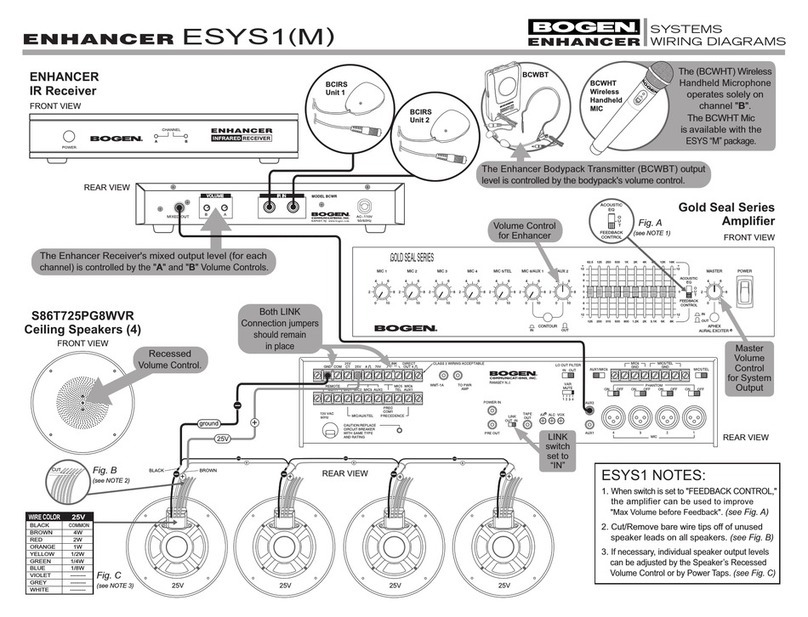
Bogen ENHANCER ESYS1 User manual

Other manuals for ENHANCER ESYS1

5

This manual suits for next models

9

Other Bogen Microphone System manuals

Bogen UHF8011BP/HH User manual

Bogen

Bogen UHF8011BP/HH User manual

Bogen UDR800 User manual

Bogen

Bogen UDR800 User manual

Bogen NQ-ZPMS User manual

Bogen

Bogen NQ-ZPMS User manual

Bogen UDMS16BP User manual

Bogen

Bogen UDMS16BP User manual

Bogen UDMS800HH User manual

Bogen

Bogen UDMS800HH User manual

Bogen UDMS16BP User manual

Bogen

Bogen UDMS16BP User manual

Bogen Enhancer User manual

Bogen

Bogen Enhancer User manual

Bogen ENHANCER ESYS1 User manual

Bogen

Bogen ENHANCER ESYS1 User manual

Bogen ENHANCER ESYS1 User manual

Bogen

Bogen ENHANCER ESYS1 User manual

Bogen ENHANCER ESYS1 Manual

Bogen

Bogen ENHANCER ESYS1 Manual

Popular Microphone System manuals by other brands

INIM SAGITTARIUS VW2W instructions

INIM

INIM SAGITTARIUS VW2W instructions

AKG IVM 4500 User instructions

AKG

AKG IVM 4500 User instructions

Earthworks Audio PM40 manual

Earthworks Audio

Earthworks Audio PM40 manual

Nady Systems ENCORE 2 owner's manual

Nady Systems

Nady Systems ENCORE 2 owner's manual

Oklahoma Sound WM-200H instruction manual

Oklahoma Sound

Oklahoma Sound WM-200H instruction manual

Chiayo SDR-8200 Operation manual

Chiayo

Chiayo SDR-8200 Operation manual

Paso R824 quick start guide

Paso

Paso R824 quick start guide

Naxa NAM-982 instruction manual

Naxa

Naxa NAM-982 instruction manual

Xvive U3 user manual

Xvive

Xvive U3 user manual

Tekon DUOS installation guide

Tekon

Tekon DUOS installation guide

Heyuan Intelligence IOT-G2S-01 user manual

Heyuan Intelligence

Heyuan Intelligence IOT-G2S-01 user manual

Devine WMD-IE user manual

Devine

Devine WMD-IE user manual

LG LF-D7150 owner's manual

LG

LG LF-D7150 owner's manual

LD U305 HBH 2 user manual

LD

LD U305 HBH 2 user manual

Chainway URA8 user manual

Chainway

Chainway URA8 user manual

ORATOR D860TD instruction manual

ORATOR

ORATOR D860TD instruction manual

Sennheiser Evolution Wireless Digital EW-DX EM 2 quick guide

Sennheiser

Sennheiser Evolution Wireless Digital EW-DX EM 2 quick guide

Shure UA844 user guide

Shure

Shure UA844 user guide

manuals.online logo
manuals.online logoBrands
  • About & Mission
  • Contact us
  • Privacy Policy
  • Terms and Conditions

Copyright 2025 Manuals.Online. All Rights Reserved.

Bogen Enhancer
Instruction Manual
© 2005 Bogen Communications, Inc.
All Rights Reserved.
54-2141-01D 0804
Contents
Introduction ....................................................................................................................................................................... 3
Using This Manual ............................................................................................................................................................ 3
Enhancer System Contents ........................................................................................................................................... 3
System Features ............................................................................................................................................................... 4
BCWR Receiver ............................................................................................................................................................... 5
BCIRS Infrared (IR) Sensors .......................................................................................................................................... 6
BCWBT Body-Pack Transmitter ................................................................................................................................... 7
BCHM Headset Microphone ......................................................................................................................................... 8
BCBM Body-Pack Microphone ..................................................................................................................................... 8
BCLM Lavaliere Microphone ......................................................................................................................................... 8
BCWHT Handheld Microphone Transmitter ............................................................................................................ 9
Specifications ..................................................................................................................................................................... 10
Limited Warranty ............................................................................................................................................................. 11
Service ................................................................................................................................................................................ 11
2
Introduction
The Bogen Enhancer is an infrared wireless microphone system offering professional performance and
operating features. Infrared transmission is used to reduce room-to-room interference while sending a sig-
nal from a presenter’s microphone to a dual-channel receiver.The receiver works in tandem with an
amplifier and speaker(s) to reduce the effects of poor room acoustics and the weakening effect of voice
traveling through air.
Using This Manual
This manual provides instructions for operating the Bogen Enhancer wireless system, and covers all avail-
able accessories. Depending on your system configuration, all sections may not apply to your system.
Please read the instructions pertaining to your system completely before operating.
This manual first lists the features of the Enhancer and then shows you how to operate the system.After
reading the receiver instructions, turn to the section that covers the type of transmitter and microphone
you are using with the system. Each section will give you detailed operating instructions. Also included in
this manual are system specifications, as well as warranty and servicing information.
Enhancer System Contents
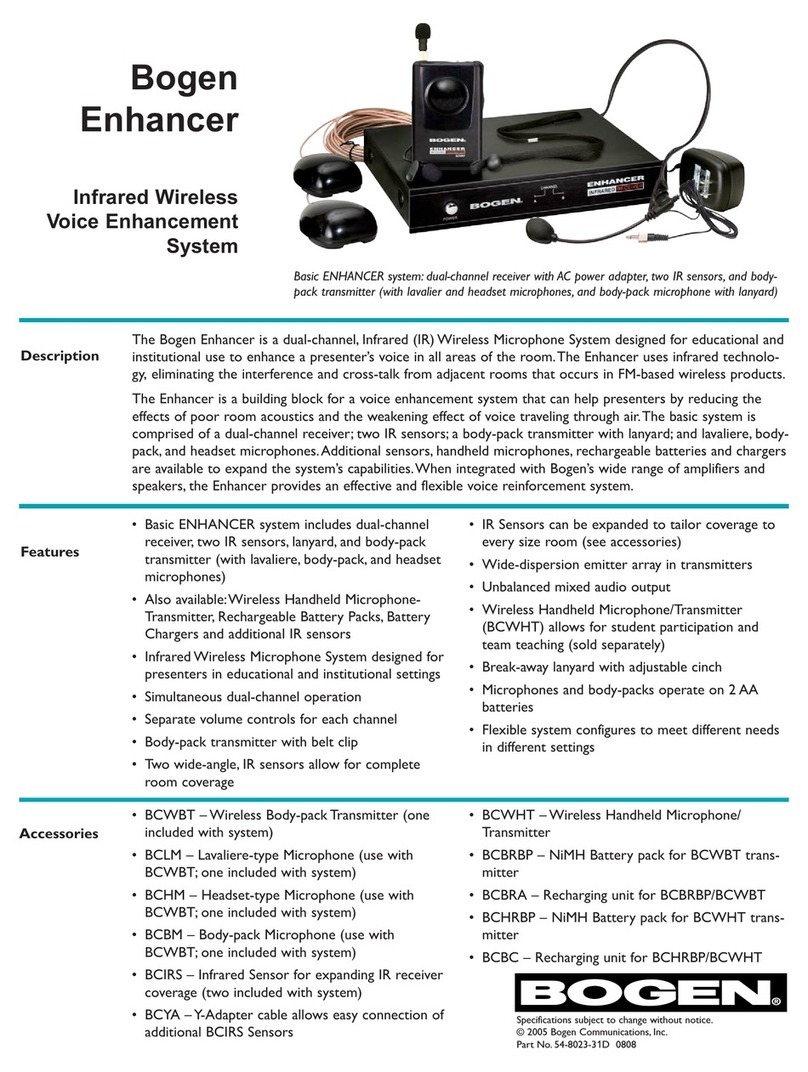
• BCWR Dual-Channel Infrared Receiver (1)
• BCWBT Body-Pack Transmitter (1)
• BCLM Clip-on Lavaliere Microphone (1)
• BCHM Headset Microphone (1)
• BCBM Body-Pack Microphone (1)
• BCIRS Infrared (IR) Sensors (2), each with Mounting Brackets and 35-foot Cable
• 6-Foot RCA Audio Cable (1)
• Adjustable Body-Pack Lanyard (1)
• AC Power Adapter (1)
• AA Alkaline Batteries (2)
• Instruction Manual (1)
Available Accessories
• BCWHT Handheld Microphone Transmitter
• BCHRBP Handheld Rechargeable NiMH Battery Pack
• BCBC Dual Handheld NiMH Battery Pack Charger
• BCBRBP Body-Pack Rechargeable NiMH Battery Pack
• BCBRA Body-Pack NiMH Battery Pack Charger
• BCWBT Body-Pack Transmitter (additional quantities, includes adjustable lanyard)
• BCHM Headset Microphone (additional quantities)
• BCLM Clip-on Lavaliere Microphone (additional quantities)
• BCIRS Infrared Sensor (additional quantity, includes BCYA Adapter)
• BCYA Multiple Sensor Adapter (additional quantity, part of BCIRS)
3
System Features
BCWR Dual-Channel Wireless Microphone Receiver
• Dual Receiver, Simultaneous 2-Channel Operation for 2 Transmitters (Ch.A, Ch. B)
• Infrared (IR) Signal Reception LED Indicators
• Channel A/B Mixed Audio Output RCA-type Connector
• Separate Channel A and Channel B Volume Controls
• Two IR Sensor Coaxial-type Inputs
BCWBT Body-Pack Transmitter
• Multiple Emitter Array of High-Efficiency Infrared Emission LEDs for Optimum IR Transmission
• "Power On" LED
• Channel A/B Selector Switch
• 3.5mm Locking Jack for Connection of Body-Pack, Lapel, or Headset Microphones
• Microphone Input Volume Control
• Belt Clip and Adjustable, Neck-Worn Lanyard
• Requires 2 NiMH AA Rechargeable Batteries (BCBRBP, optional) or 2 Alkaline AA Batteries (included)
BCIRS Infrared Sensor
• Multiple Array of Wide-Angle Infrared Sensitive LEDs
• 35-foot Connecting Cable with Coaxial-type Connector
• Includes Mounting Brackets
BCHM Headset
Microphone
• Ultra-light, adjustable boom arm
• Close-miked vocal pick-up
• Hands-free operation
• Cardioid polar pattern
BCWHT Handheld Microphone/Transmitter
(Optional accessory, sold separately)
• Multiple Emitter Array of High-Efficiency Infrared Emission LEDs for Optimum IR Transmission
• "Power On" LED
• Powerful Uni-Directional Dynamic Capsule for Optimum Audio, Minimum Handling Noise, and Maximum
Feedback Rejection
• Rugged Steel Mesh Ballscreen with Anti-Roll Ring
• Requires NiMH Rechargeable Batteries (BCHRBP, optional) or 2 Alkaline AA Batteries (included)
4
BCLM Lavaliere
Microphone
• Weighs less than one ounce
• Close-miked vocal pick-up
• Hands-free operation
• Omni-directional pattern
BCBM Body-Pack
Microphone
• Weighs less than one ounce
• Mounts directly to BCWBT
• Hands-free operation
• Omni-directional pattern
BCWR Receiver
POWER INPUT
16V AC
Connecting the Audio Output
The BCWR Receiver provides an unbalanced, line-level mixed output to the RCA Jack (3).This can be
connected to a mixer or a P.A. system using the supplied RCA to RCA audio cable.The audio of both
Channels A and B are mixed together at this output.The Channel A and B mix is dependent on the sepa-
rate Channel A and Channel B Volume Control (4) settings located on the back panel of the receiver.
Always make sure the mixer/P.A. volume is turned to minimum before plugging the audio cable into the
receiver or before turning the receiver ON/OFF (if the audio cable is already connected) to avoid possible
sound system damage.
Connecting the BCIRS IR Sensors
Connect the BCIRS Infrared Sensors to the BCWR Receiver by plugging both sensor coaxial-type plugs
into the Infrared Sensor Inputs (5). Each sensor input will receive both Channels A and B.
Powering the Receiver
Using the AC Power Adapter, connect the AC Power Input (6) to an AC outlet (11 0-120V AC).Turn
ON the BCWR Receiver using the Power Switch (1).The IR Reception LED Indicators (2) will now
light either green or red, depending on whether the corresponding transmitters are ON or OFF.
5
Front
Rear
12
34 5 6
BCIRS Infrared (IR) Sensors
Operation
The IR Sensors act as "antennae" for your infrared
wireless microphone system.A multiple array of
wide-angle IR-sensitive LEDs (behind the front
panel receptors) receive the infrared signal emitted
by your IR Transmitter. Connect each BCIRS Sensor
to the rear jacks on the BCWR (labeled IR In),
then turn the BCWR Receiver ON.The Sensor
Power LED (1)will light to indicate that the sen-
sor is properly connected to the BCWR Receiver.
The Channel A and B IR LED indicators will light
green when an infrared signal on the corresponding
channel is detected.
Installation
The BCIRS Sensors can be mounted on any surface
using any of the Mounting Brackets (2) and
screws, included.To ensure proper operation, observe the following installation rules:
a. Position the IR Sensors with their front panel receptors facing the entire area of transmitter operation.
If this is a wide area, angle the receptors to cover the maximum area range.
Note:The IR sensors will need to be positioned differently for each environment. During installation, power up the
Bogen Enhancer System and have one person walk around the desired location, with the transmitters on, while
another person positions the IR Sensors for greatest range of mobility.
b. Since the unit utilizes infrared light reflected off of room surfaces, do not mount the sensors near a
black ceiling, wall, or heavy curtains as they may limit the range by eliminating such reflections.
c. Although the unit can be used in most brightly lit rooms, it works best if bright lights do not shine
directly on the sensors. (Note: System is not designed for use in high ambient light conditions such as out-
doors in sunlight or on stage with strong stage lighting.)
d. Never cover the IR Sensors as this will disrupt normal operation. If they become dirty, clean with a soft
cloth. Make sure the sensors are not obstructed and always have a clear line of sight to the transmitters.
e. Position sensors and wires away from Plasma TVs and other equipment that may produce high levels of
electrical and RF interference.
Note:Additional BCIRS IR Sensors can be added using the BCYA Multiple Sensor Adapter which allows multiple sen-
sors to be connected to each input.
6
1
2
2
1
2
2
Transmitter Setup
Slide down the Battery Compartment Cover (1), as shown,
exposing the battery compartment. Insert 2 fresh AA alkaline batter-
ies or the optional BCBRBP Battery Pack NiMH rechargeable batter-
ies while observing the correct polarity as marked. Set the Channel
Selector Switch (2) to the desired channel of operation and slide
the cover back into position on the unit. (Note: Make sure the trans-
mitter is OFF when changing the batteries.)
Operation
a.The BCWBT is provided with a 3.5mm Locking Jack (3) for con-
necting a microphone. Plug in the microphone and secure the con-
nection by turning the metal slip ring on the plug clockwise to
thread it on the jack.To unplug, reverse the process. Clip the
transmitter to your clothes/belt or, for best results, hang the trans-
mitter around your neck using the supplied lanyard. Make sure the
BCWBT Emitter (4) has a clear line-of-sight with the BCIRS IR
Sensors. (See pages 8 and 9 for operation information on micro-
phones.) Attach lanyard to the BCWBT by feeding the strap up and
underneath the belt clasp on the rear of the unit. Connect the lanyard strap by snapping the interlock-
ing clasps together. Place the lanyard loop over the head and neck and position the break-away clasps
at the back of the neck.Adjust the length of the lanyard by moving the cinching ball up or down until
the BCWBT is at a comfortable length.
b.Adjust the BCWBT’s Volume Control (5) to minimum and slide the Power Switch (6) to the ON
position.The two-color Power ON/LOW Battery LED Indicator (7) will light green, indicating that
the transmitter is ON. In the case of low power batteries, the indicator will light red, indicating that
the alkaline batteries should be replaced with fresh ones or the NiMH batteries should be recharged.
(Note:The Rechargeable Battery Pack should only be charged with the Battery Charger listed. Never attempt to
recharge alkaline batteries.) The optional BCBRA Recharging Adapter can be plugged directly into the
BCWBT DC Input Charge Jack (8) from an AC power outlet for easy charging of NiMH batteries.
When the recharging adapter is plugged in, the recharger’s LED Indicator will light red. The LED
Indicator will light green when the batteries are charged. (Note: Always remove batteries from the BCWBT
Transmitter when not in use.)
c.The BCWR Receiver's IR LED Indicator of the corresponding channel should now be lit green.While
wearing the microphone and speaking, slowly increase the BCWBT’s Volume Control (5) and adjust
the volume control on the receiver, and also on the Mixer/P.A. to the desired level while taking care to
avoid acoustic feedback.The microphone is now ready to use. For optimum performance and range,
make sure that the IR Emitter (4) is not covered by the body or clothing and has an unobstructed
line-of-sight with the IR Sensor.
Note: Observe care in selecting volume, transmitter location, and speaker placement so that acoustic feedback
(howling and screeching) will be avoided.
BCWBT Body-Pack Transmitter

1
2
3
5
6
7
8
9
.
.
7
1
2
3
4
5
6
7
8
8
BCHM Headset Microphone
Operation
a.The BCHM is provided with a 3.5mm Locking
Connector (1)for connecting the microphone to the
BCWBT Transmitter. Plug in the microphone’s connec-
tor and secure the connection by turning the metal
slip ring clockwise to thread it on the jack.To unplug,
reverse the process.
b.Wear Headset (2) so that it wraps around the back
of the head.The curved Earpieces (3) will fit over
the ears.
c.While wearing the Headset, adjust the Boom Arm (4)
so that the Microphone (5) is about two inches from
your mouth. Do not place the microphone too close
to the mouth.
4
32
1
Note: Microphones that are farther from the sound source, such as lavaliere mics, require more acoustic gain and
thus are also more prone to feedback than close-source mics such as handheld and headset mics that are used
closer to the mouth.
Operation
a.The BCBM (1)is provided with a 3.5mm Locking
Connector (2) for connecting the microphone to the
BCWBT Transmitter. Plug in the microphone’s connec-
tor and secure the connection by turning the metal slip
ring clockwise to thread it on the jack.To unplug,
reverse the process.
b.The body-pack must be used with the Lanyard (3) in
order to optimize the BCBM.When the lanyard is
around the user’s neck, use the Cinch (4) to adjust
lanyard length until the BCBM is about six inches from
the user’s mouth.
Operation
a.The BCLM is provided with a 3.5mm Locking
Connector (1) for connecting the microphone to the
BCWBT Transmitter. Plug in the microphone’s connec-
tor and secure the connection by turning the metal slip
ring clockwise to thread it on the jack.To unplug,
reverse the process.
b.Wear the microphone by attaching the Clip (2) to shirt
front or jacket lapel.The Microphone (3) should point
toward the user’s mouth.
BCBM Body-Pack Microphone
BCLM Lavaliere Microphone
1
2
3
1
2
3
4
5
Transmitter Setup
Unscrew and remove the Battery Compartment
Cover (1)by sliding it down off the microphone to
expose the battery holder. Insert 2 fresh AA alkaline
batteries or the optional BCHRBP Battery Pack NiMH
rechargeable batteries, while observing the correct
polarity as marked, and screw the cover back on the
battery compartment. (Note: Make sure the transmitter is
OFF when changing the batteries.)
Operation
Slide the Power Switch (2) to the ON position.The
Power LED Indicator (3) will light green, indicating that
the transmitter is ON. In the case of dead batteries, the
indicator will be off, indicating that the alkaline batteries
should be replaced with fresh ones or that the BCHRBP
Battery Pack should be recharged. (Note:The optional
Battery Pack should only be charged with the BCBC Charger
listed. Never attempt to recharge alkaline batteries.) The BCBC can also be used to recharge two BCWHT
Handheld Microphones simultaneously.When the microphone is placed in the recharging adapter, the
recharger’s LED Indicator will light bright red.The LED Indicator will light green when the batteries are
charged. (Note: Always remove batteries from the BCWHT microphone when not in use.)
The microphone is now ready to use.The BCWR receiver IR LED Indicator of the corresponding channel
should now be lit green. While speaking into the microphone, adjust the corresponding Volume Control
on the receiver and also on your Mixer/P.A. to the desired level. For optimum performance and range,
make sure that the IR emitter at the base of the transmitter is not covered by the hand and has an unob-
structed line-of-sight with the IR sensor.
Note: Observe care in selecting volume, transmitter location and speaker placement so that acoustic feedback
(howling and screeching) will be avoided.
BCWHT Handheld Microphone Transmitter
1
2
3
9
1
2
3
Specifications
BCWR Receiver:
Mode Infrared Frequency Modulated
Receiving Channels Dual-Channels A & B
Carrier Frequency Ch.A: 2.0 MHz; Ch. B: 2.6 MHz
Audio Frequency Response 60 Hz-12 kHz
S/N Ratio > 90 dB
Audio Mix Output 400 mV
Range (line-of-sight) Up to 30 ft.
Controls Power ON/OFF (front); Ch.A and B Volume (rear)
Connectors IR Sensor Coaxial-type Jacks, Ch.A/B (rear);
AC Power input jack (rear);
Audio Mixed output RCA-type Jack (rear)
Power Requirements 16V AC, 600mA (via AC adapter)
Power Consumption 8W
Dimensions (W x H x D) 10.6" x 2" x 7.4"
Weight 4 lb.
BCWBT Body-Pack Transmitter:
Carrier Frequency Ch.A: 2.0 MHz; or Ch. B: 2.6 MHz
Audio Input BCBM Body-Pack Omni-directional Condenser
BCLM Lavaliere-type Omni-directional Condenser
BCHM Headset-type Uni-directional Condenser
Controls ON/OFF Switch,Volume Control, Ch.A/B Select
Switch
Connectors 3.5 mm Locking Jack (MIC connection); DC Input
Charge Jack
Power Requirements 2 AA Batteries (2.4V DC)
Optional Rechargeable Battery Pack BCBRBP*
Optional Battery Charger BCBRA*
Dimensions (W x H x D) 2.6" x 3.9" x 1.7"
Weight (Transmitter) 3.6 oz.
Weight (Headset) 1.1oz.
BCWHT Handheld Microphone Transmitter:
Carrier Frequency Ch. B: 2.6 MHz
Audio Input Uni-directional Dynamic Cartridge
Controls ON\OFF Switch
Power Requirements 2 AA Batteries (2.4 V DC)
Optional Rechargeable Battery Pack BCHRBP*
Optional Battery Charger BCBC*
Dimensions (D x Dia.) 10.2" x 2.2"
Weight 14 oz.
* The Rechargeable Battery Packs should only be used with the Battery Chargers listed. Never attempt to
recharge alkaline batteries.
10