CDA SK900 Quick start guide

www.cda.eu
SK900
Single Oven
Installation, use and maintenance

2
Contents:
4 Important information
6 Important safety notes
7 First use of the oven
8 Oven controls
9 Functions
10 Rapid preheating
11 Pyrolytic cleaning function
12 Preset programmes
13 Additional settings
13 Changing the language
14 Adjustable lighting settings
15 Service and factory reset
16 Electronic programmer/timer
16 Minute minder
17 Semi-automatic cooking
18 Automatic cooking
20 Using the temperature probe
22 Safety key lock
22 Eco mode
23 Interior lighting
23 Active pause
24 Cleaning and maintenance
24 Cleaning the oven exterior
24 Cleaning the oven interior
25 Removing the appliance door
26 Replacing the appliance door
26/27 Removing the inner door glass

3
Contents:
28 Glass guides
29 - 30 Removing shelf supports, runners and liners
32 - 34 Changing the oven light bulb
34 Adjusting the oven door
34 Mains electrical connection
36 Troubleshooting
37 Energy Eciency Information
IMPORTANT: Please read the user instructions carefully before
using the appliance for the first time and before installing it.
Failure to install the oven as per the user manual could invalidate
the warranty.

4
Important
This appliance must only be used for the purpose for which it is
intended, i.e. domestic cooking. Any other use could be dangerous
and may lead to premature failure of the appliance.
The CDA Group Ltd cannot be held responsible for injuries or losses
caused by incorrect use or installation of this product. Please note that
CDA reserve the right to invalidate the guarantee supplied with this
product following incorrect installation or misuse of the appliance.
Under no circumstances should any external covers be removed for
servicing or maintenance except by suitably qualified personnel.
User information:
• Ovens become hot during and immediately after use.
•The oven door can become very hot during operation.
•After use, please ensure that the oven is o.
•Keep children away from the appliance when in use, and
immediately after use.
•Do not allow children to play with or on the appliance.
•Keep the oven door closed whilst grilling.
Appliance information:
Please enter the details from the appliance rating plate on to the
following page for reference, to assist CDA Customer Care in the
event of a fault with your appliance and to register your appliance for
guarantee purposes.

5
Appliance Model
Serial Number
EU Declarations of Conformity:
This oven has been designed, constructed and marketed in
compliance with safety requirements of EU Directive 2014/35/EU (Low
voltage) and requirements of EU Directive 2014/30/EU.
This appliance has been manufactured to the strictest standards and
complies with all applicable legislation, including Electrical safety (LVD)
and Electromagnetic interference compatibility (EMC). Parts intended
to come into contact with food conform to 1935/2004/EC.
IMPORTANT INFORMATION FOR CORRECT DISPOSAL OF THE
PRODUCT IN ACCORDANCE WITH EC DIRECTIVE 2012/19/EU.
At the end of its working life, the product must not be disposed
of as urban waste. It must be taken to a special local authority
dierentiated waste collection centre or to a dealer providing this
service.
Disposing of a household appliance separately avoids possible
negative consequences for the environment and health deriving from
inappropriate disposal and enables the constituent materials to be
recovered to obtain significant savings in energy and resources. As a
reminder of the need to dispose of household appliances separately,
the product is marked with a crossed-out wheeled dustbin.

6
Important
•Read the user instructions carefully before using the oven
for the first time.
•Follow the instructions for first use of the oven.
•Clean the oven regularly.
•Remove spills as soon as they occur.
•Always use oven gloves when removing shelves and trays
from the ovens.
•Do not allow children near the oven when in use.
•Do not allow fat or oils to build up on the oven shelves, grill
pan or oven base.
•Do not place any cooking utensils or plates directly on the
oven base.
•Always grill with the oven door closed.
•Do not grill food containing fat without using the grill pan
grid.
•Do not cover the trays or the oven walls with aluminium
foil.
•Do not perform maintenance or cleaning of the oven
without first switching o the electricity supply. If the oven
has recently been used, allow to cool.
•Do not place hot enamel parts in water. Leave them to
cool first.
•Do not allow vinegar, coee, milk, saltwater, lemon or
tomato juice to remain in contact with enamel parts.
•Do not use abrasive cleaners or powders that will scratch
the surface of the enamel.
•Do not attempt to repair the internal workings of your
oven.

7
First use of the oven
The metal casing of this appliance has been coated with a
preservative to protect it during transport and storage. This should be
removed during installation by using a non-abrasive stainless steel
cleaner. Always follow the instructions given with the cleaner being
used. Remove all protective film from the oven accessories.
Before using the oven for the first time we recommend that you
remove all packaging materials and then clean the oven with soapy
water and rinse carefully. Set the current time on the programmer
as per page 16. Heat on each of the below programmes at maximum
temperature for the specified time. A slightly unpleasant smell may be
produced, caused by grease remaining on the oven elements from
the production process.
15 minutes full grill 30 minutes fan oven
Please note:
•This oven has been fitted with a cooling fan to achieve maximum
eciency and to maintain low surface temperatures. The cooling
fan will switch on automatically when the oven switches on. It is
normal for the cooling fan to run for an hour or more after use.
•This oven oers 18 dierent language options. These are; English,
German, Polish, Russian, Czech, Serbian, Lithuanian, Estonian,
Latvian, French, Spanish, Turkish, Swedish, Norwegian, Finnish,
Danish, Italian and Dutch. When switching the appliance on for the
first time, ‘Select language’ is displayed. Use the and sensors
to choose the desired language and then press .
•Use the back sensor for any incorrect entry at any point.
8
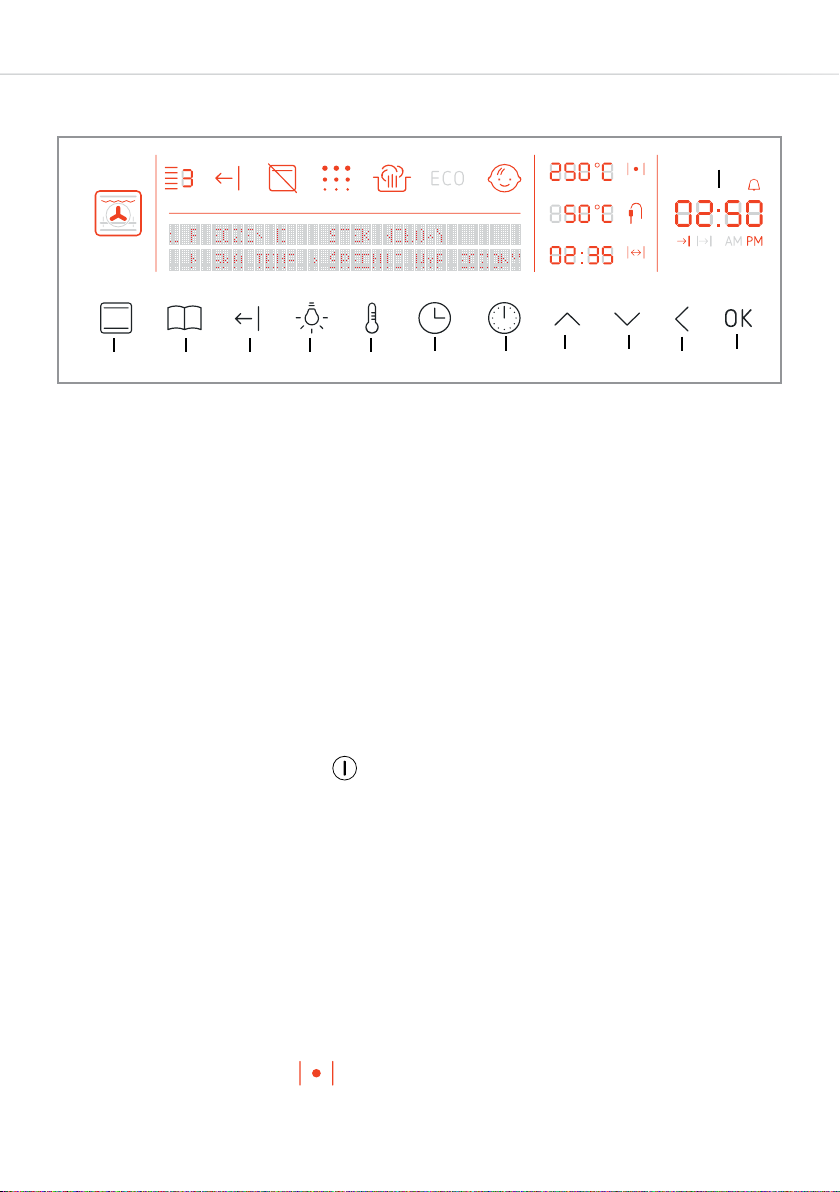
Oven controls
A - Function sensor G - Timer sensor
B - Programme sensor H - Plus setting sensor
C - Rapid preheating sensor J - Minus setting sensor
D - Oven light sensor K - Back sensor
E - Temperature sensor L - Confirm sensor
F - Clock sensor M - Time display
IMPORTANT:
• You must set the current time on the oven programmer, as per
page 16, for the oven to operate properly.
• Use the power sensor to switch the oven on & o (standby).
Fig. 1 A
M
B C D E F G H J K L
Please note: The display backlight brightness changes according to
the time of day. During the hours of 05:00 - 22:00 the brightness is
set to high. During the hours of 22:00 - 05:00 the brightness is set
to low. The state of use of the oven also determines the brightness;
when it is o/on standby the backlight brightness is low. When it is in
use the backlight brightness is high.
The display next to the symbol can show the target temperature,
temperature adjustment and also the current temperature.

9
Display indication Oven functions and (Name) Default setting
FAN + CIRCULAR ELEMENT 170°C
Level 3
FAN + BOTTOM ELEMENT 220°C
Level 2
BOTTOM ELEMENT
(WARMING OVEN)
200°C
BOTTOM ELEMENT
+ TOP ELEMENT 180°C
Level 3
BOTTOM ELEMENT
+ TOP ELEMENT + FAN 170°C
Level 3
GRILL + FAN
TOP ELEMENT 280°C
Level 4
GRILL +
TOP ELEMENT 200°C
Level 2
HALF GRILL 280°C
Level 4
PYROLYTIC CLEANING 480°C
TOP ELEMENT
(BROWNING)
170°C
Level 3
FAN OVEN WITH ECO*
*ECO Fan heater is an optimised heating function designed to save
energy when preparing food.
(FULL GRILL)
(FANNED FULL GRILL)
(FAN OVEN)
(FAN OVEN ECO)
(FAN ASSISTED OVEN)
(FAN OVEN + LOWER HEAT)
(PYROLYTIC FUNCTION)
180°C
(CONVENTIONAL)
(DEFROST) --°C
Functions
Each of the oven functions uses dierent elements within the oven
to oer you the best choice of cooking every time. These are
explained on the quick reference table below. The levels referenced
in the ‘Default setting’ column are the recommended shelf positions
(numbers are on the oven cavity sides, behind the door, to aid you).
The minimum
adjustable
temperature
for all functions
is 30°C. The
maximum for
all functions is
280°C, except
for browning and
roasting, which
oer 240°C as a
maximum.

10
Setting a function and adjusting a temperature
•If not already so, switch the oven on using the power sensor .
Press the function sensor and use the and sensors to
select the desired function as per the table opposite (these are not
in order). Press .
•Use the and sensors to set the required temperature and
then press the sensor.
•The temperature can be adjusted at any time during a function
except for when the safety key lock is active. To do this, press the
temperature sensor once to see the current oven termperature
and then once more to activate temperature adjustment.
Temperature adjustment is active when the temperature is
flashing.
Activating rapid preheating
Most functions allow for the rapid preheating feature to be used
(it is also an automatic feature with some preset programmes). To
activate this feature, simply select a function and temperature as
per the above and then press the rapid preheating sensor . The
corresponding symbol should illuminate on the display panel. The
oven will now reach the set temperature significantly faster than if the
feature were inactive. Once the temperature has been reached, the
symbol on the display panel will flash and an alarm will sound. Press
the rapid preheating sensor to cancel both notifications.
Cancelling rapid preheating
To cancel the rapid preheating feature at any time, simply touch and
hold the rapid preheating sensor for approximately 5 seconds.
The corresponding symbol on the display panel should go out.
Table of contents
Other CDA Oven manuals
CDA
CDA sk400 Safety guide

CDA
CDA SK800 Installation and operating instructions
CDA
CDA DV 710 Guide
CDA
CDA SV 150L Series Instructions for use
CDA
CDA SG121SS Quick start guide
CDA
CDA dk750 Series Safety guide
CDA
CDA DV 980 Series Guide
CDA
CDA SC309 Series Reference manual
CDA
CDA SC309 Series Reference manual
CDA
CDA SVA 150 Series Reference manual