manuals.online logo
Brands
  1. Home
  2. •
  3. Brands
  4. •
  5. Chatsworth Products
  6. •
  7. Door Lock
  8. •
  9. Chatsworth Products ELS1000 User manual

Chatsworth Products ELS1000 User manual

This manual suits for next models

1

Other Chatsworth Products Door Lock manuals

Chatsworth Products ELS1500 User manual

Chatsworth Products

Chatsworth Products ELS1500 User manual

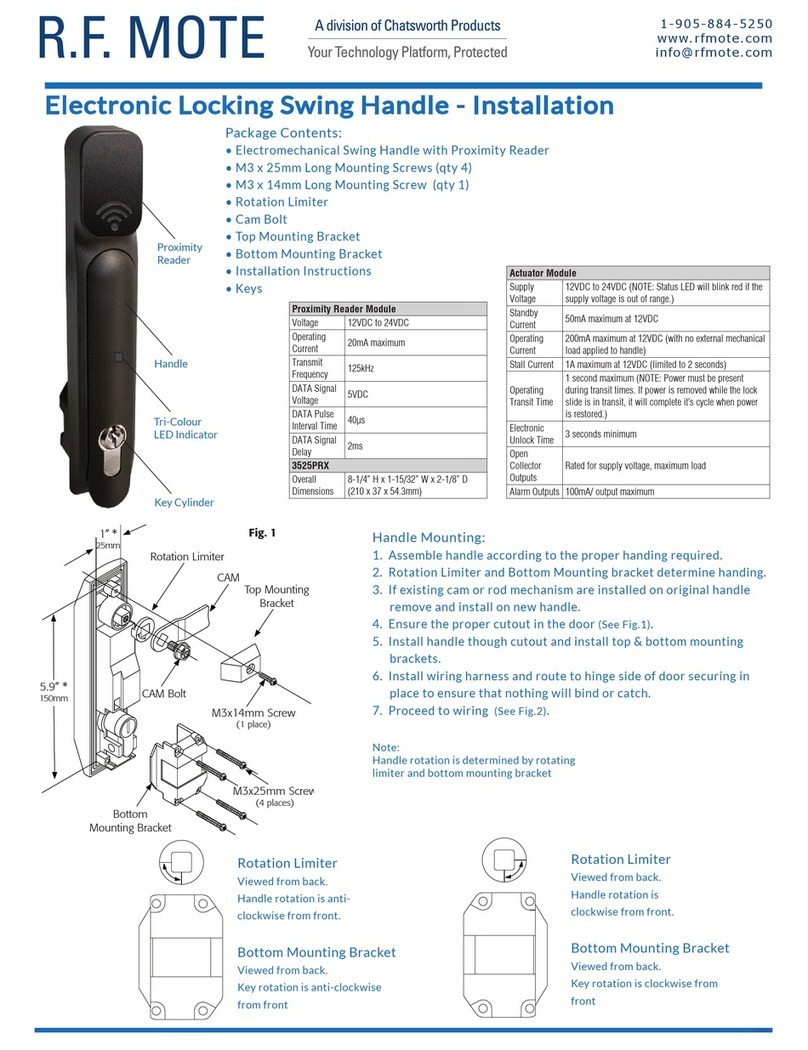
Chatsworth Products R.F. Mote Electronic Locking Swing Handle User manual

Chatsworth Products

Chatsworth Products R.F. Mote Electronic Locking Swing Handle User manual

Popular Door Lock manuals by other brands

Assa Abloy effeff 827A-IP Mounting instructions

Assa Abloy

Assa Abloy effeff 827A-IP Mounting instructions

Iseo MA1A installation guide

Iseo

Iseo MA1A installation guide

ID Lock 150 user manual

ID Lock

ID Lock 150 user manual

Lockly ACCESS TOUCH PRO user manual

Lockly

Lockly ACCESS TOUCH PRO user manual

iLoq G50S user guide

iLoq

iLoq G50S user guide

SDC Z7835 installation instructions

SDC

SDC Z7835 installation instructions

ilco 452 Installation

ilco

ilco 452 Installation

Samsung shs-h705 user guide

Samsung

Samsung shs-h705 user guide

TRU-BOLT 08102017 user manual

TRU-BOLT

TRU-BOLT 08102017 user manual

CDVI 500-LADJ quick start guide

CDVI

CDVI 500-LADJ quick start guide

Igloohome Deadbolt 2S Metal Grey Installer/user guide

Igloohome

Igloohome Deadbolt 2S Metal Grey Installer/user guide

eSSL FL-300 user manual

eSSL

eSSL FL-300 user manual

Dorma MUNDUS PREMIUM GK 50 Mounting instruction

Dorma

Dorma MUNDUS PREMIUM GK 50 Mounting instruction

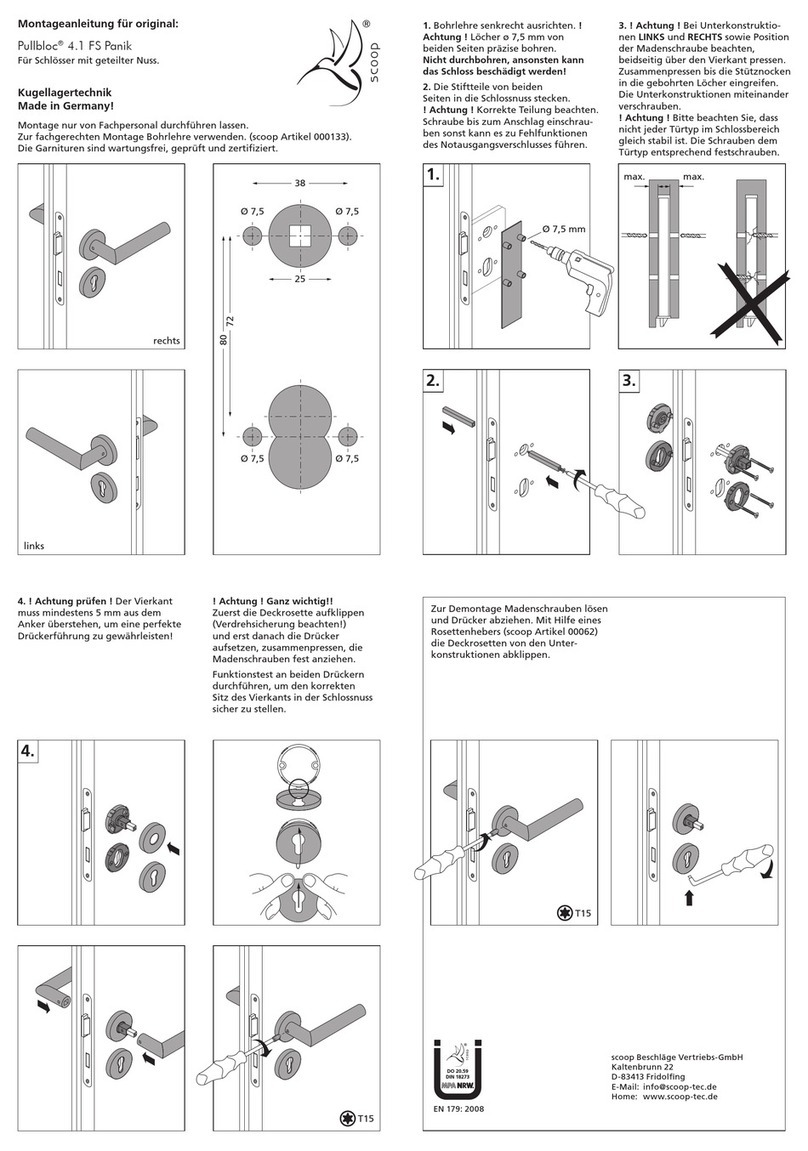
SCOOP Pullbloc 4.1 FS Panik Assembly instruction

SCOOP

SCOOP Pullbloc 4.1 FS Panik Assembly instruction

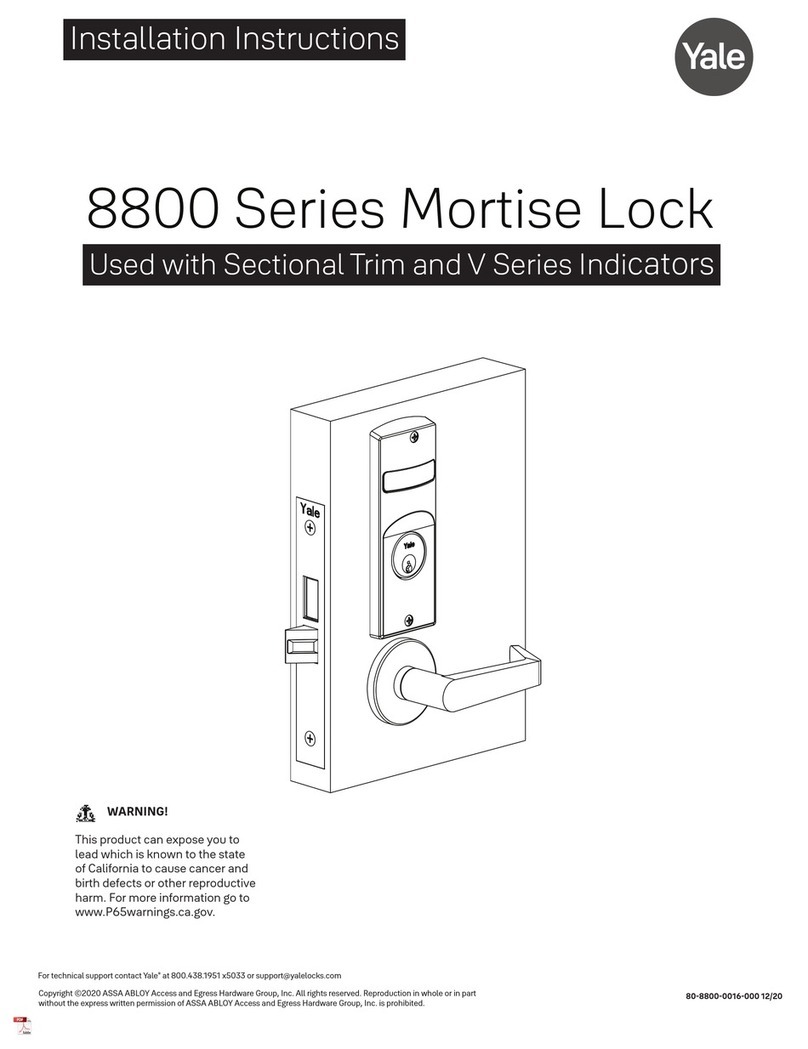
Yale MORTISE 8800 SERIES installation instructions

Yale

Yale MORTISE 8800 SERIES installation instructions

Siegenia KFV AS3500 Assembly instructions

Siegenia

Siegenia KFV AS3500 Assembly instructions

Saflok Quantum ädesē RFID installation instructions

Saflok

Saflok Quantum ädesē RFID installation instructions

ArrowVision Shepherd 210 installation manual

ArrowVision

ArrowVision Shepherd 210 installation manual

manuals.online logo
manuals.online logoBrands
  • About & Mission
  • Contact us
  • Privacy Policy
  • Terms and Conditions

Copyright 2025 Manuals.Online. All Rights Reserved.

DOUBLE DOOR THREE-POINT ELS1000/ELS1500 LOCK
IIS-739225, 11/22/13, Rev. 1, CPI/
800-834-4969 (USA & Canada) • www.chatsworth.com • [email protected]
For international phone numbers, see our website or contact CPI Tech Support.
This drawing contains proprietary and confidential information and is protected by U.S. and international law. Unauthorized reproduction, disclosure or use of the drawing
or the information therein is expressly forbidden except as agreed to in writing by Chatsworth Products, Inc.
Page 1 of 4
Installation Instructions
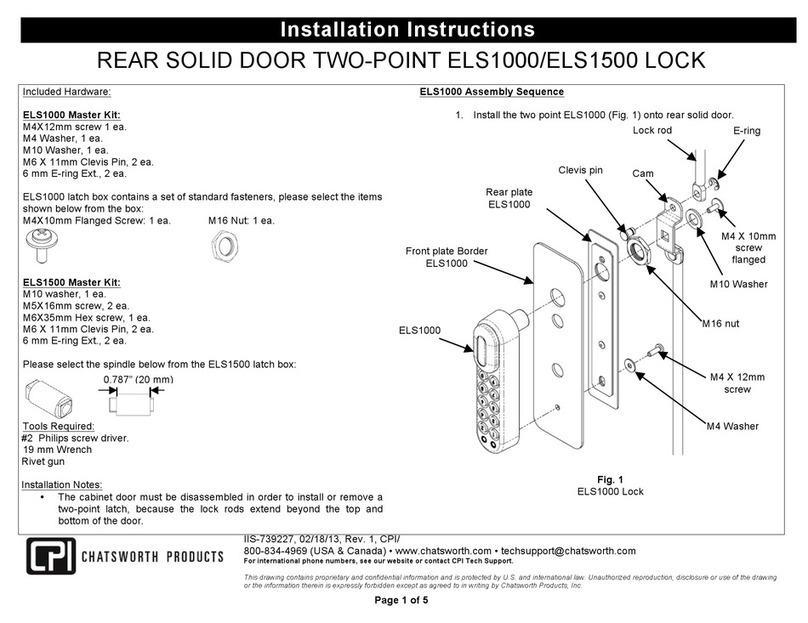
Included Hardware:
ELS1000 Master Kit:
M4 Washer, 1 ea.
M4X12mm screw 1 ea.
M10 Washer, 1 ea.
M6 X11mm Clevis Pin, 2 ea.
6 mm E-ring Ext., 2 ea.
ELS1000 latch box contains a set of standard fasteners, please select the items
below from the box:
M4X10mm Flanged Screw: 1 ea. M16 Nut: 1 ea.
ELS1500 Master Kit:
M10 washer, 1 ea.
M5 X 16mm screw, 2 ea.
M6 X 35mm Hex screw, 1 ea.
M6 X 11mm Clevis Pin, 2 ea.
6 mm E-ring Ext., 2 ea.
Please select the spindle shown below from the ELS1500 latch box:
Tools Required:
#2 Phillips screw driver
19 mm Wrench
10 mm wrench
ELS1000/1500 Lock Preparation:
Locate the batteries from the lock box and install in the latch before assembly.
Please refer to the following Instruction documents for configuring the locks:
IIS-739226 (ELS1000), ISS-739228 (ELS1500).
Installation Notes:
•The cabinet door must be disassembled in order to install or remove a
two-point latch, because the lock rods extend beyond the top and
bottom of the door.
ELS1000 Assembly Sequence:
1. Install the Three point ELS1000 (Fig. 1) onto double door.

E-ring
Front plate Border
ELS1000
ELS1000
lock
Rear plate
ELS1000
Lock rod
M4 X 12mm
screw
Clevis
pin
Cam
M16 nut
Fig. 1
ELS1000 Lock
M4 X 10mm
screw
M10 Washer
M4 Washer
0.787” (20 mm)
DOUBLE DOOR THREE-POINT ELS1000/ELS1500 LOCK
Page 2 of 4
Installation Instructions
2. Place the ELS1000 with the Front plate border on the double door with
spindle orientation up (Fig. 2)
3. Position the Rear plate from inside the double door over the latch cut-out
and fasten to the lock with M4X12mm screw & M4 washer for ELS1000
lock (Fig. 2).
4. Place the M16 Nut over the lock Spindle (Fig. 2).
5. Install the 3 point cam into the Lock Spindle with M4X10mm flanged
screw & M10 washer on ELS1000 spindle (Fig. 3).
6. Insert the lock rods through the guides, with the short rod at top and the
long rod at bottom of the door (Fig. 3).
7. Insert the cam assembly pins through the short rod (on top) and the long
rod (on bottom), then through the other half of the cam assembly (Fig. 3)
and lock with e-ring.
Door back side
Fig. 2
ELS1000 lock Installation
ELS1000 LOCK
Front plate border
ELS1000
M4 X 12mm
Screw
M16Nut
M4 washer
Rear plate
M10 washer
Guide
bracket
Door back side
Lock rod
E-ring
M4 X 10mm
flanged screw
Cam
Clevis pin
Fig. 3
ELS1000 Cam and
Lock rod installation
DOUBLE DOOR THREE-POINT ELS1000/ELS1500 LOCK
Page 3 of 4
Installation Instructions
ELS1500 Assembly Sequence:
1. Install the Three point ELS1000 (Fig. 4) onto double door.

2. Place the ELS1500 with the Front plate border on the double door with
spindle orientation up (Fig. 5)
3. Position the Rear plate inside the double door over the latch cut-out and
fasten to the lock with M5X16mm screw (Fig. 5).
Fig. 4
ELS1500 Lock
Front plate Border
ELS1500
ELS1500
lock
Rear plate
ELS1500
Cam
Lock rod
Clevis pin
M6 X 35mm
Hex screw
M5 X 16mm
screw
E-ring
M10 washer
M5 X 16mm
screw
Rear plate
Front plate
border ELS 1500
ELS 1500
Lock
Fig. 5
ELS1500 lock installation
DOUBLE DOOR THREE-POINT ELS1000/ELS1500 LOCK
Page 4 of 4
Installation Instructions
4. Insert the lock rods through the guides, with the short rod at the top and the
long rod at the bottom of the door (Fig. 6).
5. Install the 3 point cam into the Lock Spindle with M6 X 35mm Hex screw &
M10 washer on ELS1500 spindle (Fig. 7).
6. Insert the cam assembly pins through the short rod (on top) and the long
rod (on bottom), then through the other half of the cam assembly (Fig. 7)
and lock with e-ring.
Guide
bracket
Lock rod
Fig. 6
ELS1500 Lock Rod
installation
Lock rod
Cam
M10 washer
E- Ring
M6X35mm
Hex Screw
Clevis pin
Fig. 7
ELS1500 Lock