manuals.online logo
Brands
  1. Home
  2. •
  3. Brands
  4. •
  5. Chiayo
  6. •
  7. Amplifier
  8. •
  9. Chiayo Italk User manual

Chiayo Italk User manual

Other Chiayo Amplifier manuals

Chiayo APEX PRO User manual

Chiayo

Chiayo APEX PRO User manual

Chiayo Focus 500 series User manual

Chiayo

Chiayo Focus 500 series User manual

Chiayo Stage pro User manual

Chiayo

Chiayo Stage pro User manual

Chiayo APEX PRO User manual

Chiayo

Chiayo APEX PRO User manual

Chiayo IWA-200 User manual

Chiayo

Chiayo IWA-200 User manual

Chiayo VICTORY 2000 User manual

Chiayo

Chiayo VICTORY 2000 User manual

Chiayo Coach 400 Series User manual

Chiayo

Chiayo Coach 400 Series User manual

Chiayo EZtalk User manual

Chiayo

Chiayo EZtalk User manual

Chiayo EZ-TALK User manual

Chiayo

Chiayo EZ-TALK User manual

Chiayo APEX EVO User manual

Chiayo

Chiayo APEX EVO User manual

Chiayo MMA-3000 User manual

Chiayo

Chiayo MMA-3000 User manual

Chiayo IRX2 User manual

Chiayo

Chiayo IRX2 User manual

Chiayo iTour User manual

Chiayo

Chiayo iTour User manual

Chiayo Focus 500 series User manual

Chiayo

Chiayo Focus 500 series User manual

Chiayo Stage pro User manual

Chiayo

Chiayo Stage pro User manual

Chiayo AMP-500 User manual

Chiayo

Chiayo AMP-500 User manual

Chiayo iTour User manual

Chiayo

Chiayo iTour User manual

Chiayo IWM-202 User manual

Chiayo

Chiayo IWM-202 User manual

Chiayo Adventure 800 SM-50'16 User manual

Chiayo

Chiayo Adventure 800 SM-50'16 User manual

Chiayo italk User manual

Chiayo

Chiayo italk User manual

Chiayo Challenger 1000 User manual

Chiayo

Chiayo Challenger 1000 User manual

Chiayo EZtalK User manual

Chiayo

Chiayo EZtalK User manual

Chiayo Coach 400 Series User manual

Chiayo

Chiayo Coach 400 Series User manual

Chiayo FOCUS 515 User manual

Chiayo

Chiayo FOCUS 515 User manual

Popular Amplifier manuals by other brands

ASTRO HVO V40 P operating manual

ASTRO

ASTRO HVO V40 P operating manual

Marantz SUPERSCOPE BLA-545 Service data

Marantz

Marantz SUPERSCOPE BLA-545 Service data

NAD CI980 Quick setup guide

NAD

NAD CI980 Quick setup guide

Technics SE-CH770 Service manual

Technics

Technics SE-CH770 Service manual

Harman Kardon HK6300 instruction manual

Harman Kardon

Harman Kardon HK6300 instruction manual

NAD T975 owner's manual

NAD

NAD T975 owner's manual

McIntosh MA6850 Brochure & specs

McIntosh

McIntosh MA6850 Brochure & specs

Electro-Harmonix ENGLISH MUFF’N manual

Electro-Harmonix

Electro-Harmonix ENGLISH MUFF’N manual

Viatron Autrix Technical manual

Viatron

Viatron Autrix Technical manual

GME GA9800 instruction manual

GME

GME GA9800 instruction manual

Atlas CP700 Specification sheet

Atlas

Atlas CP700 Specification sheet

Roland KC-1000 owner's manual

Roland

Roland KC-1000 owner's manual

Pyle PFMRA350BW user manual

Pyle

Pyle PFMRA350BW user manual

Advantage S-250 manual

Advantage

Advantage S-250 manual

IRT Electronics DVA-3007 manual

IRT Electronics

IRT Electronics DVA-3007 manual

Dimavery BA-100 Series user manual

Dimavery

Dimavery BA-100 Series user manual

Sony XM-S400D operating instructions

Sony

Sony XM-S400D operating instructions

Schertler ROY X quick guide

Schertler

Schertler ROY X quick guide

manuals.online logo
manuals.online logoBrands
  • About & Mission
  • Contact us
  • Privacy Policy
  • Terms and Conditions

Copyright 2025 Manuals.Online. All Rights Reserved.

OPERATION MANUAL
OPERATION MANUAL
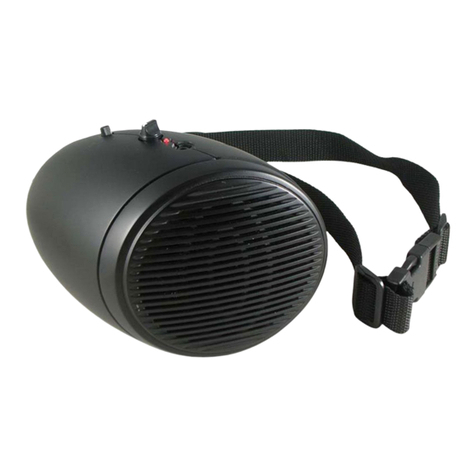
Personal Beltpack Amplifier
12I1156
12I1156
Printed in Taiwan, November, 2008
Battery charging
1. After switchon, the Power/bettery low indicator LED will glow GREEN to
indicate enough power and ready for operation. If this LED glows RED, it
means the power is too low and battery recharge is necessary. (only for
NiMH type)
2. This product applies intellectual charging circuit. The charging indicator
LED glows RED during charging process. It turns GREEN when batteries
are fully charged and the charging process will automatically stop to prevent
overcharge to batteries.
3. When the charging indicator LED flashes RED, it means abnormal charging.
Causes include that the rechargeable batteries have reached life span or
batteries are not chargeable type.
4. This product can be operated even during charging process.
Cautions
1. This product uses 4 pieces of AA size battery. Alkaline or NiMH types are
recommended.
2. It is advised not to pull and plug in the microphone contact frequently to
prevent loose contact.
3. When battery operating hour shortens tremendously or can not be charged,
it means their life span has arrived and a new set of batteries is necessary.
When changing the batteries, please replace all of them at the same time.
Please do not mix and use new and old batteries together.
Do not attempt to recharge non-NiMH batteries in this product. Consequences
caused by incorrect charging will not be compensated by CHIAYO.
Battery charging
1. After switchon, the Power/bettery low indicator LED will glow GREEN to
indicate enough power and ready for operation. If this LED glows RED, it
means the power is too low and battery recharge is necessary. (only for
NiMH type)
2. This product applies intellectual charging circuit. The charging indicator
LED glows RED during charging process. It turns GREEN when batteries
are fully charged and the charging process will automatically stop to prevent
overcharge to batteries.
3. When the charging indicator LED flashes RED, it means abnormal charging.
Causes include that the rechargeable batteries have reached life span or
batteries are not chargeable type.
4. This product can be operated even during charging process.
Cautions
1. This product uses 4 pieces of AA size battery. Alkaline or NiMH types are
recommended.
2. It is advised not to pull and plug in the microphone contact frequently to
prevent loose contact.
3. When battery operating hour shortens tremendously or can not be charged,
it means their life span has arrived and a new set of batteries is necessary.
When changing the batteries, please replace all of them at the same time.
Please do not mix and use new and old batteries together.
Do not attempt to recharge non-NiMH batteries in this product. Consequences
caused by incorrect charging will not be compensated by CHIAYO.
Personal Beltpack Amplifier
1. Mic in socket for headset/lavalier/wired microphone
2. Power/bettery low indicator LED
3. Power/volume control
4. Tone control
5. Charging indicator LED
6. Charging port
1. Mic in socket for headset/lavalier/wired microphone
2. Power/bettery low indicator LED
3. Power/volume control
4. Tone control
5. Charging indicator LED
6. Charging port
Standard Configuration
1. Beltpack amplifier
2. 6V DC/500mA charging adaptor
3. Φ3.5mm signal cable(100cm)
4. Waist Belt
5. Speaker pouch
6. Operation manual
Standard Configuration
1. Beltpack amplifier
2. 6V DC/500mA charging adaptor
3. Φ3.5mm signal cable(100cm)
4. Waist Belt
5. Speaker pouch
6. Operation manual
Personal Beltpack Amplifier
4
4
6
6
5
5
Optional Items
1. NiMH battery (1.2V / 2600 mAH)
2. Headset microphone
3. Lavalier microphone
4. Mini wired microphone (3.5mm phone jack + 120cm cable)
Optional Items
1. NiMH battery (1.2V / 2600 mAH)
2. Headset microphone
3. Lavalier microphone
4. Mini wired microphone (3.5mm phone jack + 120cm cable)
Parts and Controls
Parts and Controls
1
1
2
2
3
3
Input microphone selections
1. Headset microphone
Operating Instructions
1. Please beware of battery polarity when installing the rechargeable batteries.
The spring end being the negative contact. For first use, please charge the
batteries for at least 6 hours. Thereafter 6 to 8 hours of charging is
necessary when batteries become weak.
2. This unit is delivered with adjustable waist belt. It can be belt-packed or
shoulder-strapped.
3. Turn Volume and Tone controls to minimum before switch on. After turning
this unit on, adjust volume and tone controls gradually till maximum gain
before feedback.
4. Insert the microphone plug completely into the MIC IN socket to get the full
contact, otherwise contact noise may occur due to loose contact. Adjust the
microphone to as near the mouth as possible to get the best voice pickup.
5. Microphone and speaker should always maintain a certain distance to
prevent the unpleasant feedback effect.
Battery installation
iTalk uses 4 AA-sized batteries to operate. To install the batteries, please
open the cover of its rear battery compartment, then place them in
accordance with its indicated polarity.
Input microphone selections
1. Headset microphone
Operating Instructions
1. Please beware of battery polarity when installing the rechargeable batteries.
The spring end being the negative contact. For first use, please charge the
batteries for at least 6 hours. Thereafter 6 to 8 hours of charging is
necessary when batteries become weak.
2. This unit is delivered with adjustable waist belt. It can be belt-packed or
shoulder-strapped.
3. Turn Volume and Tone controls to minimum before switch on. After turning
this unit on, adjust volume and tone controls gradually till maximum gain
before feedback.
4. Insert the microphone plug completely into the MIC IN socket to get the full
contact, otherwise contact noise may occur due to loose contact. Adjust the
microphone to as near the mouth as possible to get the best voice pickup.
5. Microphone and speaker should always maintain a certain distance to
prevent the unpleasant feedback effect.
Battery installation
iTalk uses 4 AA-sized batteries to operate. To install the batteries, please
open the cover of its rear battery compartment, then place them in
accordance with its indicated polarity.
Personal Beltpack Amplifier
2. lavalier microphone 3. Mini wired microphone