SR17C-E-0716.doc SIZE: 140x75mm SCALE 2:1 2003/10/4
-E5-
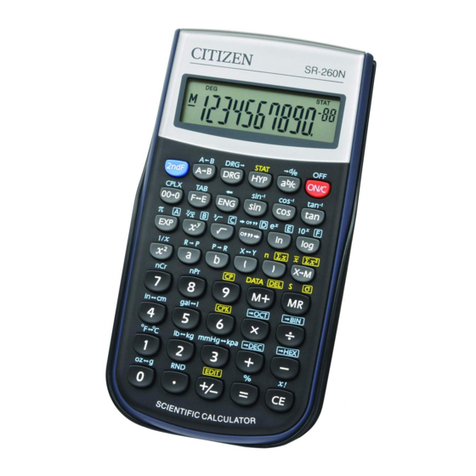
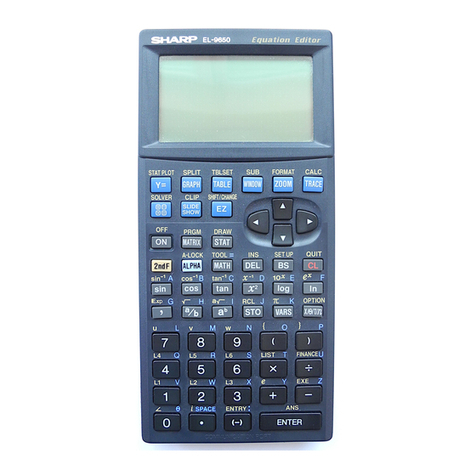
[ 2ndF ] [ sin –1 ], [ 2ndF ] [ cos–1 ], [ 2ndF ] [ tan–1 ] Inverse Sine,
Inverse Cosine, Inverse Tangent Keys
Calculate the inverse trigonometric functions of the displayed value.
[ 2ndF ] [ HYP ] [ sin ], [ 2ndF ] [ HYP ] [ cos ], [ 2ndF ] [ HYP ]
[ tan ] Hyperbolic Keys
Calculate the hyperbolic functions of the displayed value.
[ 2ndF ] [ HYP ] [ 2ndF ] [ sin–1 ], [ 2ndF ] [ HYP ] [ 2ndF ]
[ cos–1 ], [ 2ndF ] [ HYP ] [ 2ndF ] [ tan–1 ] Inverse Hyperbolic Keys
Calculate inverse hyperbolic functions of the displayed value.
[ Log ], [ 2ndF ] [ 10
x
] Common Logarithm And Common
Antilogarithm Keys
Calculate the common logarithm of the displayed value. To calculate
the common antilogarithm of the displayed value, press [ 2ndF ] [ 10 x].
[ ln ], [ 2ndF ] [ ex] Natural Logarithm And Natural Antilogarithm
Keys
To calculate the neutral logarithm of the displayed value, press [ ln ].
To calculate the natural antilogarithm of the displayed value, press
[ 2ndF ] [ e
x
].
[Ѕ], [ x 2] Square Root And Square Keys
Press [ Ѕ] to find the square root of the displayed value. To square
the displayed value, press [ x 2].
[ 2ndF ] [ 3Ѕ] Cubic Root Key
Press [ 2ndF ] [ 3Ѕ] to find the cubic root of the displayed value.
[ 2ndF ] [ 1/x ] Reciprocal Key
Press [ 2ndF ] [ 1/x ] to calculate the reciprocal of the displayed value.
[ 2ndF ] [ n! ] Factorial Key
To find the factorial of the displayed value, press [ 2ndF ] [ n! ]
[ x y] Power Key
Press any number [ x ],[ x y], any number [ y ], and [ = ] raise x to the y
power.
[ 2ndF ] [ yx ] Root Key
Press any number [ x ] [ 2ndF ] [ yx ], any number [ y ], and [ = ] to
display the yth root of x.
[c
b
a], [ 2ndF ] [ e
d
→] Fraction key
Pressing by [ c
b
a] can enter a fraction or convert a fraction to a
decimal number. Pressing by [ 2ndF ] [ e
d
→] can convert a mixed
number to an improper fraction and vice versa.
[ CONST ] Physics Constant Key
This calculator enables you to perform calculations with 15 built–in