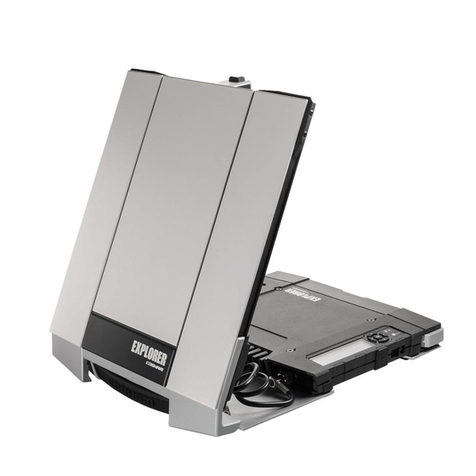
COBHAM Explorer 710 User manual

EXPLORER 710
User manual

98-140012-D ii
Document number: 98-140012-D
Release date: 4 December 2014
Disclaimer
Any responsibility or liability for loss or damage in connection with the use of this product and the
accompanying documentation is disclaimed by Thrane & Thrane A/S. The information in this manual is
provided for information purposes only, is subject to change without notice and may contain errors or
inaccuracies. Manuals issued by Thrane & Thrane A/S are periodically revised and updated. Anyone
relying on this information should acquire the most current version e.g. from www.cobham.com/satcom,
Service and support, or from the distributor.Thrane & Thrane A/S is not responsible for the content or
accuracy of any translations or reproductions, in whole or in part, of this manual from any other source.
In the event of any discrepancies, the English version shall be the governing text.
Thrane & Thrane A/S is trading as Cobham SATCOM.
Copyright
© 2014 Thrane & Thrane A/S. All rights reserved.
Trademark acknowledgements
•Inmarsat is a registered trademark of the International Maritime Satellite Organisation (IMSO) and
is licensed by IMSO to Inmarsat Limited and Inmarsat Ventures plc.
• Other product and company names mentioned in this manual may be trademarks or trade names of
their respective owners.

98-140012-D iii
Safety summary 1
The following general safety precautions must be observed during all phases of operation, service
and repair of this equipment. Failure to comply with these precautions or with specific warnings
elsewhere in this manual violates safety standards of design, manufacture and intended use of the
equipment. Cobham SATCOM assumes no liability for the customer's failure to comply with these
requirements.
Do not operate in an explosive atmosphere
Do not operate the equipment in the presence of flammable gases or fumes. Operation of any
electrical equipment in such an environment constitutes a definite safety hazard.
Keep away from live circuits
Operating personnel must not remove equipment covers. Component replacement and internal
adjustment must be made by qualified maintenance personnel. Do not replace components with
the power cable connected. Under certain conditions, dangerous voltages may exist even with the
power cable removed. To avoid injuries, always disconnect power and discharge circuits before
touching them.
Do not service alone
Do not attempt internal service or adjustments unless another person, capable of rendering first aid
resuscitation, is present.
Do not substitute parts or modify equipment
Because of the danger of introducing additional hazards, do not substitute parts or perform any
unauthorized modification to the equipment.
Keep away from antenna front
This device emits radio frequency energy when switched on. To avoid
injury, keep a minimum safety distance of 1 m from the antenna front
when the EXPLORER 710 is on.
For information on the safety distance from the transceiver (WLAN), see
the FCC/IC Radiation Exposure statement on the next page.
Garder à l'écart de l'avant de l'antenne
Le présent appareil émet des radiofréquences lors de son utilisation. Afin d'éviter tout risque pour la
santé, une distance minimale de 1 m est nécessaire entre l'utilisateur et l'avant de l'EXPLORER 710.
Pour plus d'informations à propos de la distance de sécurité avec l'appareil (WLAN), veuillez
consulter Déclaration de l’IC sur l'exposition aux radiations sur la page suivante.
Only use approved batteries from Cobham SATCOM
Use of non approved batteries may result in explosion, fire, electrical shock or injury.
Observe marked areas
Under extreme heat conditions do not touch areas of the EXPLORER 710
that are marked with this symbol, as it may result in injury.
The terminal has been designed for full usability meaning that there are
no restrictions to which interfaces can be used simultaneously. This
means that you can use all the interfaces at once at any temperature

98-140012-D iv
within -25 to 55 °C. Be aware that the terminal will get very hot when it is operated at 55 °C with all
interfaces active and it is therefore marked with a heating label.
FCC/IC Radiation Exposure statement
WLAN: Transceiver Unit (when separated from the Antenna Unit):
This equipment complies with FCC and IC radiation exposure limits for an uncontrolled environment. This
equipment should be installed and operated at a distance greater than 20 centimeters (8 inches) between
the transceiver unit and yourself or any bystander to comply with the Radiation Exposure Requirements.
Déclaration de l’IC sur l'exposition aux radiations
WLAN: L'émetteur-récepteur (quand séparé de l'antenne) :
Le présent appareil est conforme aux limites de l’IC sur l'exposition aux rayonnements établies pour un
environnement non-contrôlé. Le présent appareil doit être installé et utilisé à une distance minimum de
20 centimètres (8 pouces) entre l'émetteur-récepteur et l'utilisateur ou tout autre individu pour être
conforme à la réglementation en matière d'exposition radiologique.
Safety note from battery supplier
Korean text:
전지
경고 : 발열 , 화재 , 폭발등의 위험을 수반할 수 있으니 다음 사항을 지켜주시기 바랍니다 .
• 화기에 가까이 하지 말 것
• 분해 , 압착 , 관통 등의 행위를 하지 말 것
• 높은 곳에서 떨어뜨리는 등 비정상적 충격을 주지 말 것
• 전지 단자에 목걸이 , 동전 , 열쇠 , 시계 등 금속 제품이 닿지 않도록 주의할 것 ( 휴대컴퓨
터용 전지가 아닌 경우 생략 가능 )
• 60°C 이상의 고온에 노출하지 말 것
휴대 기기 , 제조업체가 보증한 리튬 2 차전지 사용할 것
English translation:
Battery
Warning: Hazards such as high temperature, fire or explosion can happen. To avoid such hazards, observe
the following directions and recommendations.
• Keep away from fire.
• Do not disassemble, break or penetrate the battery.
• Do not drop the battery.
• Do not touch the terminals of the battery with conductive materials such as coins, keys, watches etc.
• Do not expose the battery to temperatures above 60 C.
• Only use Li-Ion batteries that are approved by the manufacturer.

Antenna safety instructions
98-140012-D v
Antenna safety instructions 2
Use only manufacturer supplied antennas.
Antenna minimum safe distance: 1 m
Antenna gain
Directional, with maximum gain of 14.6 dB with reference to isotropic.
The Federal Communications Commission has adopted a safety standard for human
exposure to RF (Radio Frequency) energy which is below the OSHA (Occupational Safety
and Health Act) limits.
Antenna mounting
The antenna supplied by the manufacturer must be located such that during radio
transmission, no person or persons can come closer than the above indicated minimum
safe distance to the front face of the antenna, i.e. 1 m.
L'antenne fournie par le fabricant doit être placée de telle sorte que, durant les
transmissions radio, personne ni aucun groupe de personnes ne puisse s'approcher à une
distance inférieur à la distance de sécurité minimal indiquée ci-dessus, c.-à-d., 1 m.
To comply with current FCC RF Exposure limits, the antenna must be installed at or
exceeding the minimum safe distance shown above, and in accordance with the
requirements of the antenna manufacturer or supplier.
Antenna substitution
Do not use any other antenna than the models supplied or recommended by the
manufacturer. You may be exposing people to excess radio frequency radiation. You
may contact the manufacturer for further instructions.
Radiation warning
You, as the qualified end-user of this radio device, must control the exposure conditions
of bystanders to ensure the minimum separation distance (above) is maintained
between the antenna and nearby persons, for satisfying RF Exposure compliance. The
operation of this transmitter must satisfy the requirements of General Population/
Uncontrolled Environment. Only use the terminal when persons are at least the
minimum distance from the front face of the antenna.
WARNING! Maintain a separation distance of at least 1 m from the front
face of the antenna to a person.
About this manual
98-140012-D vi
About this manual 3
Intended readers
This manual is a user manual for the EXPLORER 710. The manual is intended for anyone
who is using or intends to use the EXPLORER 710. No specific skills are required to
operate the EXPLORER 710. However, it is important that you observe all safety
requirements listed in the Safety summary in the beginning of this manual, and
operate the EXPLORER 710 according to the guidelines in this manual.
Related documents
The following documents are related to this manual and to the EXPLORER 710 system.
Typography
In this manual, typography is used as indicated below:
Bold is used for the following purposes:
•Toemphasizewords.
Example: “Do not touch the antenna front during pointing”.
• To indicate what the user should select in the user interface.
Example: “Select Control panel > LAN and click Enable”.
Italic is used to emphasize the paragraph title in cross-references.
Example: “For further information, see Connecting Cables on page...”.
Title and description Document
number
EXPLORER 710 Getting Started, English 98-139653
EXPLORER 710 Getting Started, Deutsch (German) 98-140216
EXPLORER 710 Getting Started, Français (French) 98-140217
EXPLORER 710 Getting Started, Español (Spanish) 98-140218
EXPLORER 710 Getting Started, Русский (Russian) 98-140219
EXPLORER 710 Getting Started, 中文 (Chinese) 98-140220
EXPLORER 710 Getting Started, 日本語 (Japanese) 98-140221

98-140012-D vii
Table of Contents
Chapter 1 Introduction to EXPLORER 710
General description .................................................................................................................. 1
Features and interfaces of the EXPLORER 710 ............................................. 2
Your EXPLORER 710 terminal ......................................................................................... 4
Chapter 2 To get started
To unpack and assemble the EXPLORER 710 .................................................. 8
Cable connections ...................................................................................................................13
To start up the EXPLORER 710 ....................................................................................15
To connect to the WLAN interface .........................................................................19
To connect to the LAN interface ..............................................................................20
To connect your phone to the EXPLORER 710 ............................................21
To make the first call or data session ..................................................................25
Fixed antenna installation ...............................................................................................28
Chapter 3 To use the EXPLORER 710
User interfaces ............................................................................................................................29
Data connection with computer, smartphone or tablet ....................31
Phone connection ....................................................................................................................38
To charge your smartphone or tablet ..................................................................40
To see alerts ..................................................................................................................................41
Terminal settings in display ...........................................................................................41
To see properties of the EXPLORER 710 in the display ......................42
Tracking .............................................................................................................................................42
Chapter 4 To use the web interface
The EXPLORER Connect app ..........................................................................................44
The web interface ....................................................................................................................44
To enter the SIM PIN in the web interface ...................................................47
To point the antenna (BGAN) .......................................................................................48
To control data connections from web interface .....................................49

Table of Contents
98-140012-D viii
Status information ..................................................................................................................51
The Control panel ....................................................................................................................51
To use the logs ............................................................................................................................52
Battery status information .............................................................................................53
To set up the interfaces ....................................................................................................54
To manage IP handsets or smartphones ...........................................................58
Support features .......................................................................................................................59
Terminal settings ......................................................................................................................62
To set up your data connection packages .......................................................67
Multiple data connections ..............................................................................................69
To set up tracking ....................................................................................................................74
Advanced settings ...................................................................................................................76
Chapter 5 Maintenance and troubleshooting
To get support .............................................................................................................................89
Software update ........................................................................................................................90
Maintenance .................................................................................................................................92
Troubleshooting ........................................................................................................................95
Log files ...........................................................................................................................................106
App. A Technical specifications
General specifications ......................................................................................................107
Battery specifications .......................................................................................................108
Interfaces specifications ...............................................................................................109
Detachable BGAN antenna specifications ....................................................114
Satellite coverage .................................................................................................................115
App. B Conformity
General .............................................................................................................................................116
CE (R&TTE) ...................................................................................................................................116
IC ..........................................................................................................................................................116
FCC ......................................................................................................................................................117

Table of Contents
98-140012-D ix
Glossary ...................................................................................................................................................................119
Index ...................................................................................................................................................................123

98-140012-D General description 1
Chapter 1
Introduction to EXPLORER 710 1
General description
The EXPLORER 710 is a handy portable terminal supporting simultaneous voice and data
communication over BGAN. It provides versatility and high speed access with multiple
interfaces for countless applications. Just connect your phone, laptop, smartphone or tablet,
point the antenna towards the BGAN satellite - and you are online.
The EXPLORER 710 provides access to the highest bandwidth available on the BGAN network.
With BGAN HDR (High Data Rate) you get a portfolio of four channel streaming rates including
symmetric and asymmetric options so you only pay for the data you need. The system offers
multi-user as well as single-user functionality, making it a flexible solution for a variety of
applications, such as:
• Broadcasting
• Internet browsing
•E-mail
•Phoneservices
• Large file transfers
Other manuals for Explorer 710
5
Table of contents
Other COBHAM IP Phone manuals