To attach the Sidecar, first you have to clear the way: unplug
the mouse, and remove the cap that covers the Amiga expansion
port. There’s a little slot beneath the cap, where you put your
fingertip to pry the cap off. Apply gentle pressure and the cap
will come loose. Save this cap in case you ever want to detach
the Sidecar from your Amiga. Next, place the Sidecar to the
right of the Amiga and line up the Sidecar’s plugs with the
Amiga’s connectors. The face of the Sidecar should be flush
with the face of the Amiga. When all the Sidecar plugs are
lined up with Amiga connectors, slide the Sidecar gently but
firmly into the Amiga sockets.
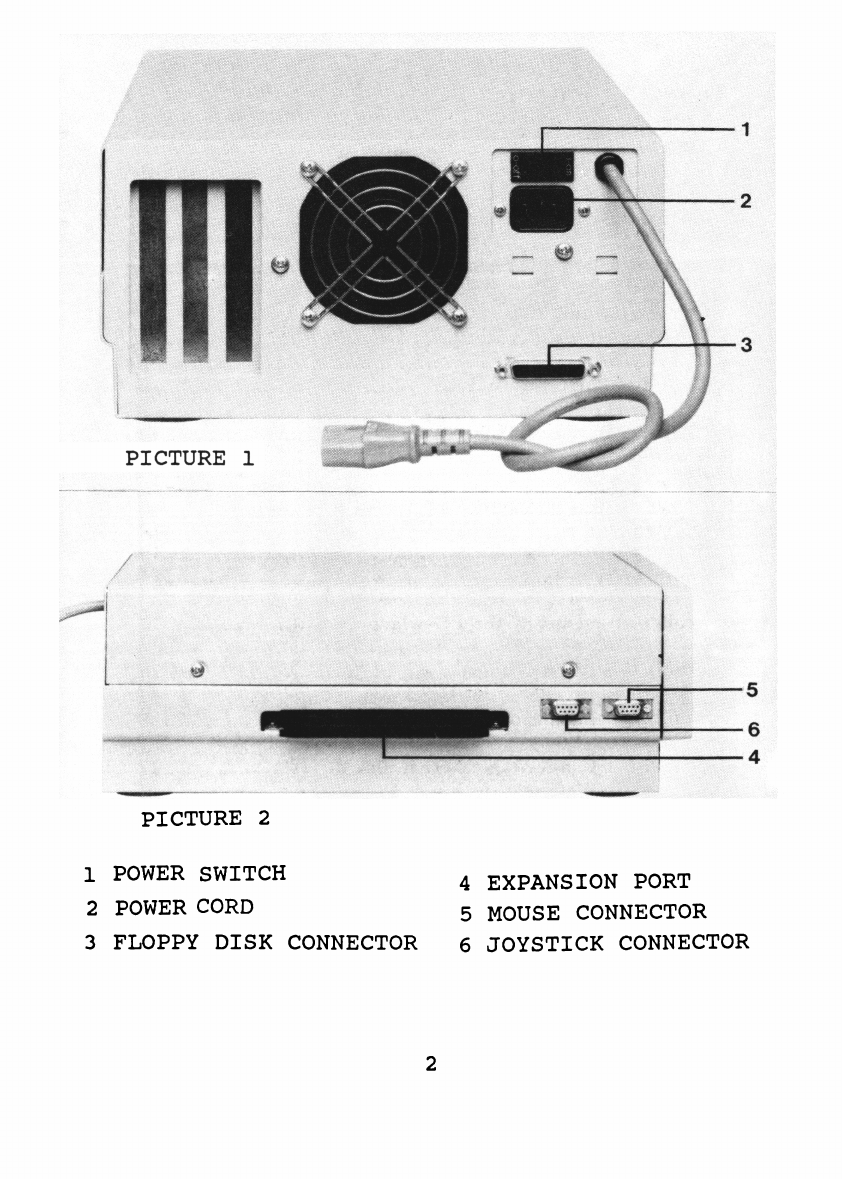
You do not have to run a new power cable to the Sidecar,
because the Sidecar has a convenient power-cord extender.
Notice that a cable comes out of the back of the Sidecar. This is
the power-cord extender. Find the cable that runs from the
power outlet to your Amiga, unplug this cable from the Amiga
and plug it into the Sidecar. Then plug the Sidecar’s power-cord
extender into the Amiga, in the socket where the power cable
had been attached to the Amiga. Electricity flows into the
Sidecar, and then through the extender to the Amiga.
On the front of the Sidecar cabinet are the connectors for the
mouse and other controllers. Plug the mouse into the left
connector.
Now you can turn on the power for both the Sidecar and the
Amiga. The power switch for the Amiga is on the left side of
the Amiga, and the power switch for the Sidecar is on the back
of the Sidecar. Turn on the power switch for the Amiga.
Because the Amiga gets its power through the Sidecar, the
Amiga won’t power up until you turn on the power to the
Sidecar. Now turn on the power switch for the Sidecar.
4