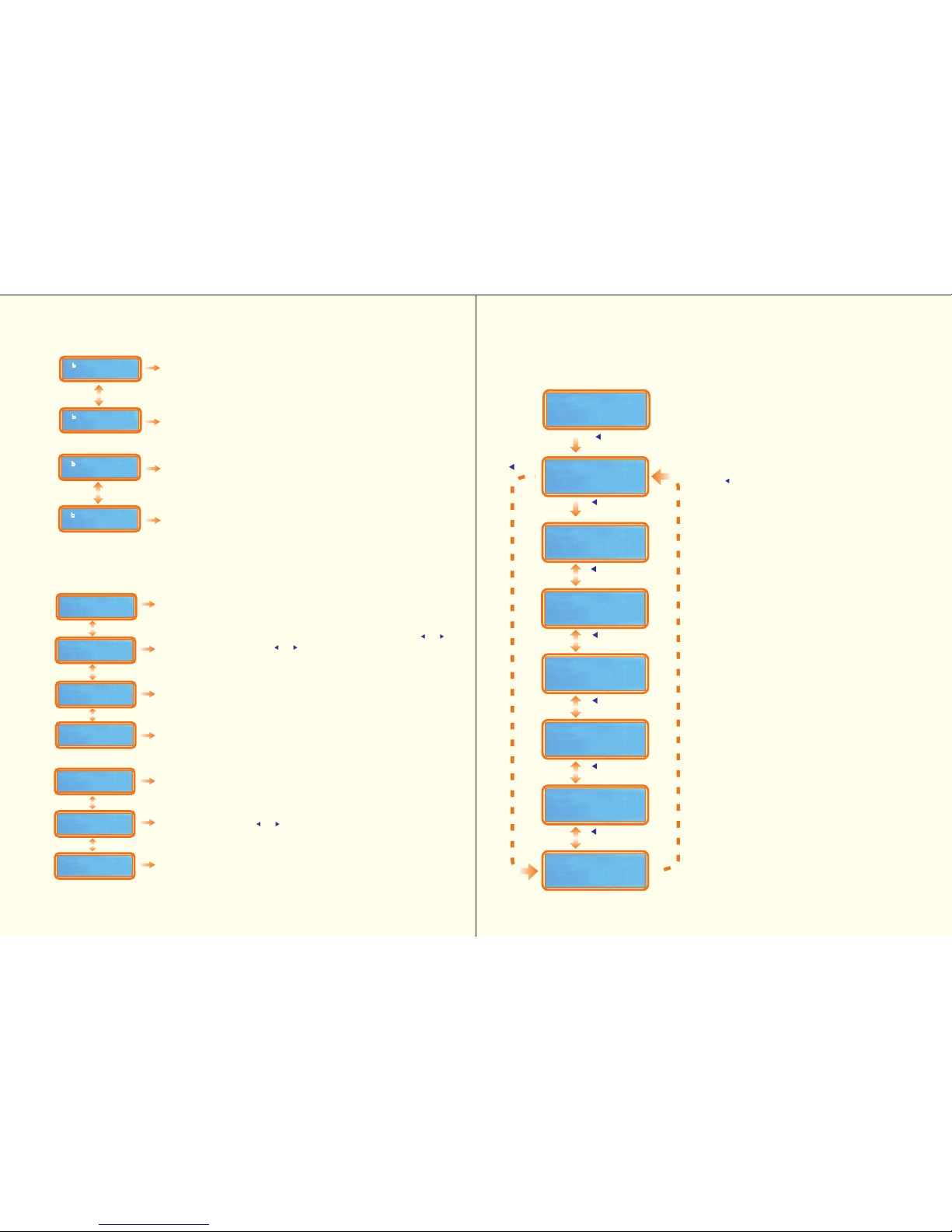
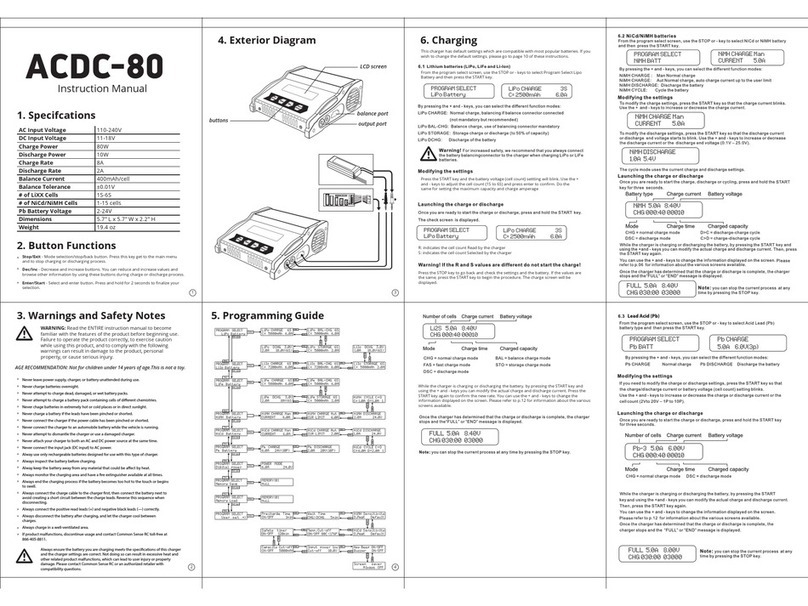
P r e s s ke y to the sc reen on the le ft, the n press
key to into the submenu. You can switched at the same
level menu to select the mode by Key. please refer
the etailed flow chart on the left. When you are willing to al te r
the parameter value in the program, press key to make
it blink, then change the value with key. the value
will be stored by pressing key once . then press key
for more than 2 seconds to start the process。Since the menu
of NiMH are the same as NiCd, there is an example of NiMH only.
5.4 NiMH/NiCd battery program
DISCHARGE
mode th e discharg e curre nt range s fro m 0.1A
to 5.0A and the final voltage ranges from 0.1 to 25. 0V,the
operating method is similar as Lithium battery. The final
voltage of NiMH battery is 1.0V/cell, and the NiCd is 0.85V/cell,
please refer the recommend by the battery of manufacturer.
""
C Y C L E mo de thi s charger c an p erform 1 -5 c ycle s o f
DC HG > CHG or CHG >DCH G con tin uall y.You can s e le ct
i t fo r th e n e w N I* * b a tt er y o r th e l o n g -term p la ce m e n t
N I* * b a t t e r y .
To set the parameter please follow the previous
charge/discharge menu
" "
ple as e s et u p c a r e fu ll y,o r it w ill d a m a g e
th e bat tery!
5.4.1 After check all the mode,to start the process press key for
more than 2 seconds
5.5 Pb battery program
T his is pr o g r a mmed fo r c h a rgin g P b b a tt e r y w it h n o m in a l v o l ta g e fr o m 2 t o 2 4 V,
Pb b at t e r y c a n n o t b e c h a rg e d r a p id ly .t h e y c a n o n ly d e li v e r r e la t iv ely lo w e r c u r r e n t
compa r e to th e ir c apaci t y.the op tima l c h arge cu r r e n t wi ll be 1/10 of the capacity.please
al ways follo w t he inst ruct i on supplied by the ma n u f actu r er of b a t t er y.
9
Enter
Start
Enter
Start
Enter
Start
Enter
Start
Dec. / Inc.
Enter
Start
Mode
Esc
Dec. / Inc.
Dec. / Inc.
Enter
Start
The screen displays the present state of process.
To stop it press key;D e s cript i o n:①:the
ty p e of batte r y,② :operating mode: CHG=charge、
DSC=discharge、 DCHG> C H GorCHG>DCHG=the
cyc lem o de;③ :ela psed tim e, ④ :charge/discharge
current of the battery,⑤:voltag e of the battery
pack,⑥:capacity of charge/discharge
Y ou c a n inquire the temperatur e an d △V
continua lly by pre ss k e y
Mode
Esc
Dec. / Inc.
"C HARG E" m ode th e defa ul t mode is "A UT " . In "AU T"mode,
you need to set the upper limit of charge current to avoid from
higher feeding current that may damage the battery. Because
some batteries of low impedance and small capacity can lead
to the higher charge current by the processor at automatic
charge mode. But in "Man" mode, it will charge the battery with
the charge current you set at the display. Each mode can
be switched by pressing start/enter key, when the current field
is blinking, press Key for more than 1 second.
Dec.
Inc.
Enter
Mode/Esc
Dec.
PROGRAM SELECT
NiMH BATT
NiMH CHARGE Aut
CUR LIMIT 5.0A
NiMH DISCHARGE
1.0A 11.5V
NiMH CYCLE
DCHG CHG 3
Dec.
Inc.
Inc.
/Start
Mode / Esc
En ter >2S
Star t
NiMH CHARGE Aut
CUR LINIT 5.0A
NiMH CYCLE
DCHG CHG 3
① ② ③④ ⑤ ⑥
NiMH 2.0A 7.42V
CHG 022 45 00890
NiMH DISCHARGE
1.0A 11.5V
:
5.2 Initial parameter set up
Tips: please set up correctly in the
"user set" menu before into the job for
the first time you use it
Press key to the first screen
on the left, then press key to enter the
into parameter setting menu.
When you are willing to alter the
parameter value in the program,press
key to makeit blink,then cha n g e
the value with key. the value will
be stored by press key once.
T his charg er c a n a c c e p t th r e e
types of Lithium batterie s: L i P o / LiIo
/ LiFe ;
(Please refer
the table A)
This charger can recognise the cell
count of Lithium battery automatically
at the beginning of charge or discharge
process to avoid from erroneous setting
by user. But deeply discharged b a ttery
can b e p e r c e iv ed incorrectly. To
prevent the error, you can set the
time term to verify the cell count by the
processor. (see the screen )
Normally, 10 min ut es a r e e no ug h
to perceive it correctly. For the battery
of larger capacity, you may extend
the time term.and for the battery of
smaller capacity, you may reducethe
term or use withthe default value
you ha v e to check the battery
carefully a n d s et it u p c o rr e c t l y , o r
i t w i l l c a u s e a ex plode!
A0
En te r
St ar t
Mode
Esc
Dec. / Inc.
Dec. / Inc.
En te r
St ar t
En te r
St ar t
You can switched at the same level
menu by key. please refer the
detailed flow chart on the left
Dec.
Inc.
Dec.
Inc.
Dec.
Inc.
Dec.
Inc.
Dec.
Inc.
Dec.
Inc.
Mode/Esc
Enter
Dec.
Inc.
A7
Dec.
Inc.
Dec.
Inc.
USER SET
PROGRAM
Lipo
V.TYPE 3.7V
LiIo
V.TYPE 3.6V
Lif
V.TYPE 3.3V
LiPo/Lilo/LiF
CHK Tim 10 min
NiMH S nsitivity
D.P ak D ault
NiCd S nsitivity
D.P ak D ault
USB/T mp S l ct
T mp Cut-o 80C
USB Ena l
Wast Tim
CHG DCHG 5min
Capacity Cut-o
ON 500mAh
K y B p ON
Bu r ON
Input Pow r Low
Cut-o 10.5V
A8
A9
A6
A5
A4A3
A2
A1
A0
d
USB/T mp S l ct
zz
Sa ty Tim r
ON 120min
Inc.
Dec.
Dec.
Inc.
Dec.
Inc.
Back-light
100
NiMH NiCd P
Trickl 100mA
d
oo
A10
A11
4