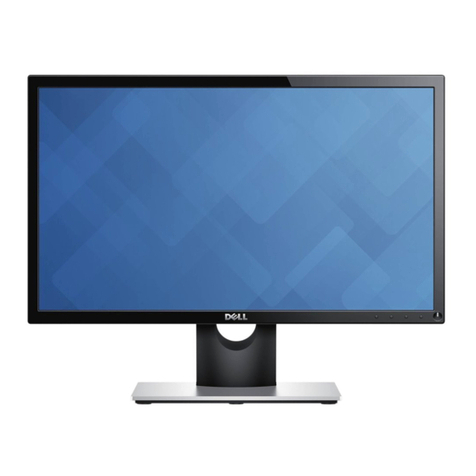
Dell P1914S User manual

User‘s Guide
Dell P1914S
Model No.: P1914S
Regulatory model: P1914Sf

NOTE: A NOTE indicates important information that helps you make
better use of your monitor.
CAUTION: A CAUTION indicates potential damage to hardware or
loss of data if instructions are not followed.
WARNING: A WARNING indicates a potential for property damage,
personal injury, or death.
© 2013 Dell Inc. All rights reserved.
Information in this document is subject to change without notice.
Reproduction of these materials in any manner whatsoever without the
written permission of Dell Inc. is strictly forbidden.
Trademarks used in this text: Dell and the DELL logo are trademarks
of Dell Inc. Microsoft and Windows are either registered trademarks
or trademarks of Microsoft Corporation in the United States and/ or
other countries. ENERGY STAR is a registered trademark of the U.S.
Environmental Protection Agency. As an ENERGY STAR partner, Dell Inc.
has determined that this product meets the ENERGY STAR guidelines for
energy efficiency.
Other trademarks and trade names may be used in this document to refer
to either the entities claiming the marks and names or their products.
Dell Inc. disclaims any proprietary interest in trademarks and trade names
other than its own.
2013 – 09 Rev. A00

3
Contents
Dell Display Manager User's Guide ................6
Overview . . . . . . . . . . . . . . . . . . . . . . . . . . . . . . 6
Using the Quick Settings Dialog . . . . . . . . . . . . . . . . 6
Setting Basic Display Functions . . . . . . . . . . . . . . . . 7
Assigning Preset Modes to Applications . . . . . . . . . . . 7
Applying Energy-Conservation Features ...........9
About Your Monitor ............................10
Package Contents . . . . . . . . . . . . . . . . . . . . . . . 10
Product Features .........................11
Identifying Parts and Controls . . . . . . . . . . . . . . . . 12
Monitor Specifications ..................... 14
Power Management Modes . . . . . . . . . . . . . . . . . . . . . . . 14
Pin Assignments . . . . . . . . . . . . . . . . . . . . . . . . . . . . . . 16
Plug and Play Capability ....................20
Flat-Panel Specifications .........................21
Resolution Specifications . . . . . . . . . . . . . . . . . . . . . . . . 22
Electrical Specifications . . . . . . . . . . . . . . . . . . . . . . . . . 22
Preset Display Modes . . . . . . . . . . . . . . . . . . . . . . . . . . . 23
Physical Characteristics . . . . . . . . . . . . . . . . . . . . . . . . . 23
Environmental Characteristics . . . . . . . . . . . . . . . . . . . . . 24
LCD Monitor Quality & Pixel Policy . . . . . . . . . . . . . 25
Maintenance Guidelines .................... 25
Caring for Your Monitor . . . . . . . . . . . . . . . . . . . . . . . . . 25

4
Setting Up the Monitor..........................26
Attaching the Monitor . . . . . . . . . . . . . . . . . . . . . 26
Connecting Your Monitor ................... 27
Connecting the blue VGA Cable . . . . . . . . . . . . . . . . . . . . 27
Connecting the white DVI Cable . . . . . . . . . . . . . . . . . . . . 27
Connecting the black DisplayPort cable . . . . . . . . . . . . . . . 28
Connecting the USB cable ........................28
Organizing Your Cables . . . . . . . . . . . . . . . . . . . . 29
Attaching the Cable Cover . . . . . . . . . . . . . . . . . . 29
Removing the Monitor Stand ................. 30
Wall Mounting (Optional) . . . . . . . . . . . . . . . . . . . 31
Operating the Monitor ..........................32
Power On the Monitor ..................... 32
Using the Front-Panel Controls . . . . . . . . . . . . . . . 32
Front-Panel Keys..............................33
Using the On-Screen Display (OSD) Menu . . . . . . . . . 34
Accessing the Menu System .......................34
OSD Messages ..........................44
Setting the Maximum Resolution . . . . . . . . . . . . . . 47
Using the Tilt, Swivel, and Vertical Extension . . . . . . . 48
Rotating the Monitor...................... 50
Adjusting the Rotation Display Settings of Your System.51
Troubleshooting ...............................52
Self-Test . . . . . . . . . . . . . . . . . . . . . . . . . . . . . 52
Built-in Diagnostics....................... 53

5
Common Problems ....................... 54
Product-Specific Problems . . . . . . . . . . . . . . . . . . 56
Universal Serial Bus (USB) Specific Problems . . . . . . . 57
Appendix ......................................58
FCC Notices (U.S. Only) and
Other Regulatory Information . . . . . . . . . . . . . . . . 58
Contact Dell . . . . . . . . . . . . . . . . . . . . . . . . . . . 58
Setting Up Your Monitor ........................59
Setting the display resolution to 1280 x 1024 (Maximum)59
If you have a Dell desktop or a Dell portable computer with
Internet access . . . . . . . . . . . . . . . . . . . . . . . . . 60
If you have a non Dell desktop, portable computer, or
graphics card . . . . . . . . . . . . . . . . . . . . . . . . . . 60
Procedures for setting up dual monitors in Windows
Vista® , Windows® 7 or Windows® 8............ 61
For Windows Vista® . . . . . . . . . . . . . . . . . . . . . . . . . . . 61
For Windows® 7 . . . . . . . . . . . . . . . . . . . . . . . . . . . . . . 63
For Windows® 8 ..............................65
Setting Display Styles For Multiple Monitor . . . . . . . . . . . . . 67

6 Dell Display Manager User's Guide
Dell Display Manager User's Guide
Overview
Dell Display Manager is a Windows application used to manage a monitor
or a group of monitors. It allows manual adjustment of the displayed
image, assignment of automatic settings, energy management, image
rotation and other features on select Dell models. Once installed, Dell
Display Manager will run each time the system starts and will place its
icon in the notification tray. Information about monitors connected to the
system is always available when hovering over the notification tray icon.
Using the Quick Settings Dialog
Clicking Dell Display Manager’s notification tray icon opens the Quick
Settings dialog box. When more than one supported Dell model is
connected to the system, a specific target monitor can be selected using
the menu provided. The Quick Settings dialog box allows convenient
adjustment of the monitor’s Brightness and Contrast levels, Preset Modes
can be manually selected or set to Auto Mode, and the screen resolution
can be changed.
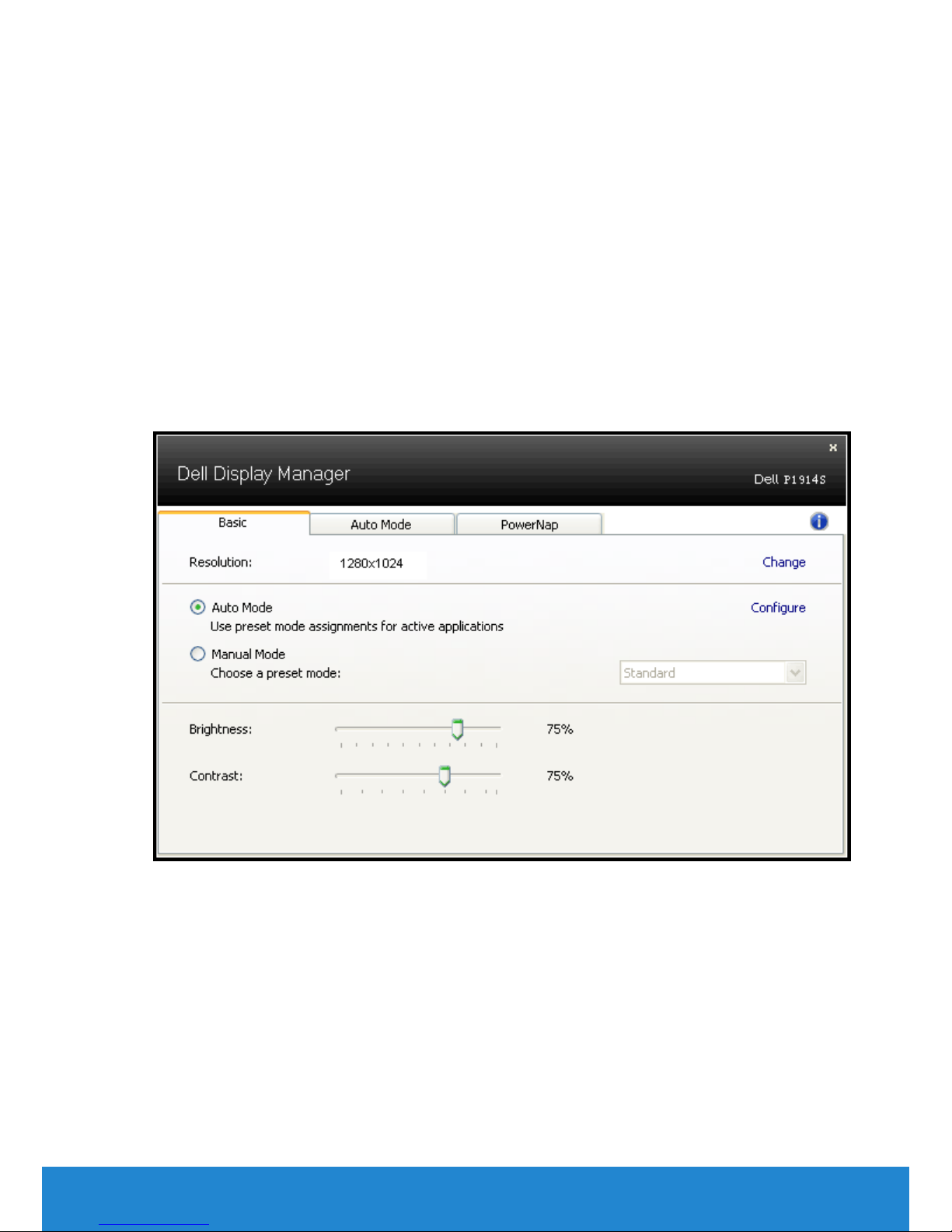
The Quick Settings dialog box also provides access to Dell Display
Manager’s advanced user interface which is used to adjust Basic
functions, configure Auto Mode and access other features.
Setting Basic Display Functions
A Preset Mode for the selected monitor can be manually applied using
the menu on the Basic tab. Alternatively, Auto Mode can be enabled. Auto
Mode causes your preferred Preset Mode to be applied automatically
when specific applications are active. An onscreen message momentarily
displays the current Preset Mode whenever it changes.
The selected monitor’s Brightness and Contrast can also be directly
adjusted from the Basic tab.
Assigning Preset Modes to Applications
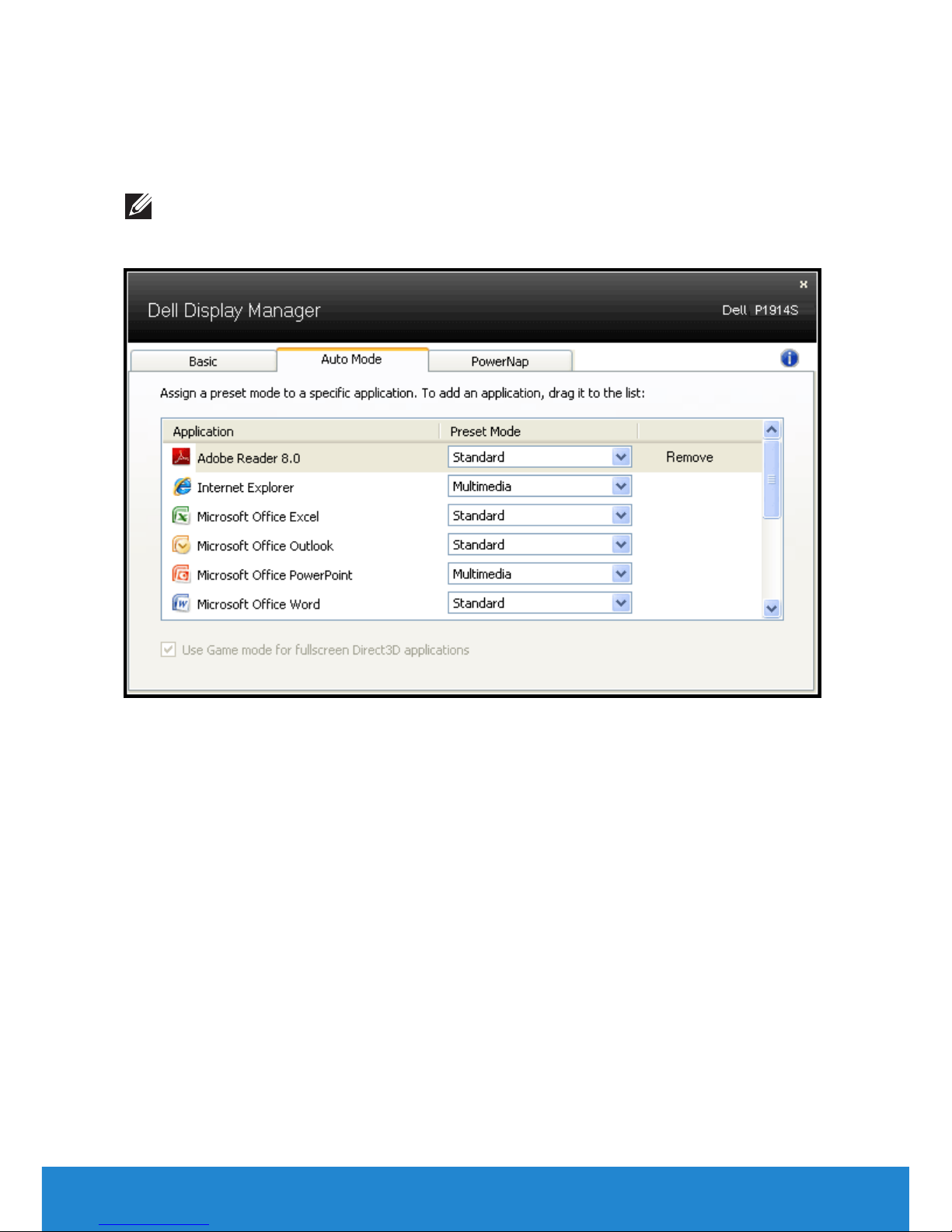
The Auto Mode tab allows you to associate a specific Preset Mode
with a specific application, and apply it automatically. When Auto
Mode is enabled, Dell Display Manager will automatically switch to the
corresponding Preset Mode whenever the associated application is
activated. The Preset Mode assigned to a particular application may be
the same on each connected monitor, or it can vary from one monitor to
the next.
Dell Display Manager User's Guide 7
8 Dell Display Manager User's Guide
Dell Display Manager is pre-configured for many popular applications. To
add a new application to the assignment list, simply drag the application
from the desktop, Windows Start Menu or elsewhere, and drop it onto the
current list.
NOTE: Preset Mode assignments targeting batch files, scripts, and
loaders, as well as non-executable files such as zip archives or packed
files, are not supported and will be ineective.

Applying Energy-Conservation Features
On supported Dell models, the PowerNap tab will be available to provide
energy conservation options. When the screensaver activates, the
monitor’s Brightness can automatically be set to minimum level or the
monitor can be put to sleep in order to save additional power.
Dell Display Manager User's Guide 9
10 About Your Monitor
About Your Monitor
Package Contents
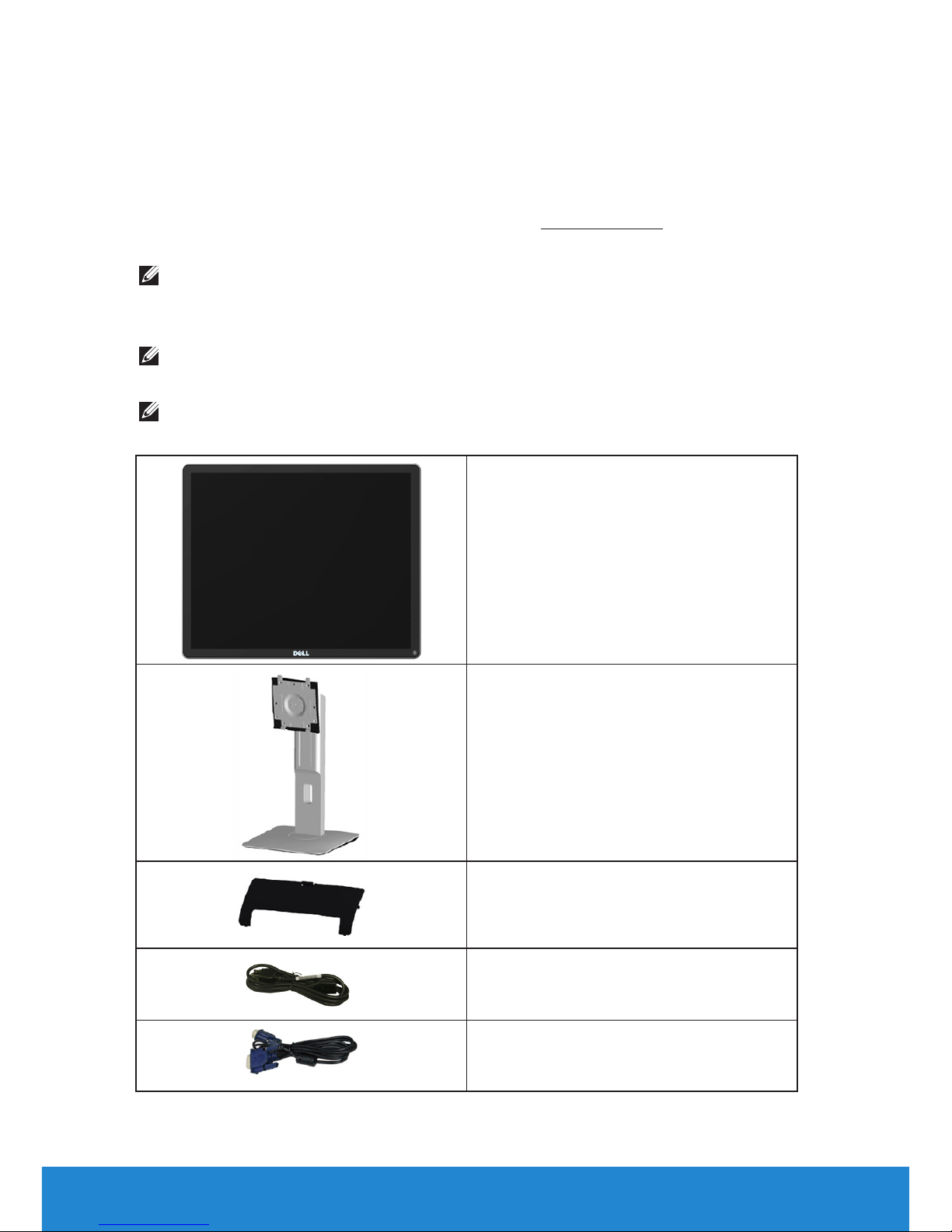
Your monitor ships with all the components shown below. Ensure that
you have received all the components and Contact Dell if anything is
missing.
NOTE: Some items may be optional and may not ship with your
monitor. Some features or media may not be available in certain
countries.
NOTE: To set up with any other stand, please refer to the respective
stand setup guide for setup instructions.
NOTE: P1914S monitor is BFR/PVC-free (Halogen-free) excluding
external cables.
•Monitor
•Stand
•Cable Cover
•Power Cable (varies with countries)
•VGA Cable
Other manuals for P1914S
1
Table of contents
Other Dell Monitor manuals
Dell
Dell G3223D User manual
Dell
Dell U3011 Guide
Dell
Dell Precision 5770 Instruction Manual
Dell
Dell SE2216Hf User manual
Dell
Dell S3423DWC User manual
Dell
Dell E178FPC User manual
Dell
Dell UltraSharp 1505FP User instructions

Dell
Dell P1914S User manual

Dell
Dell S2718H User manual
Dell
Dell P2421D User manual

Dell
Dell U4924DWB User manual
Dell
Dell E248WFP - 24" LCD Monitor User manual

Dell
Dell S2319HS User manual

Dell
Dell P3222QE User manual
Dell
Dell UltraScan P780 User manual

Dell
Dell S2421HS User manual
Dell
Dell E2016 User manual
Dell
Dell M991 - 19" CRT Display User manual
Dell
Dell M570 User manual
Dell
Dell P2720DC User manual