3User's Manual | EC700-AL
Table of Contents
Chapter 1 - Introduction................................................................................................................6
Specifications ......................................................................................................................... 6
Chapter 2 - Hardware Installation................................................................................................7
Overview.................................................................................................................................. 7
Front Panel (4 x LAN, 2 x USB) ......................................................................................7
Rear Panel (4 x LAN, 2 x USB)........................................................................................7
Front Panel (2 x LAN, 4 x USB) ......................................................................................7
Rear Panel (2 x LAN, 4 x USB)........................................................................................7
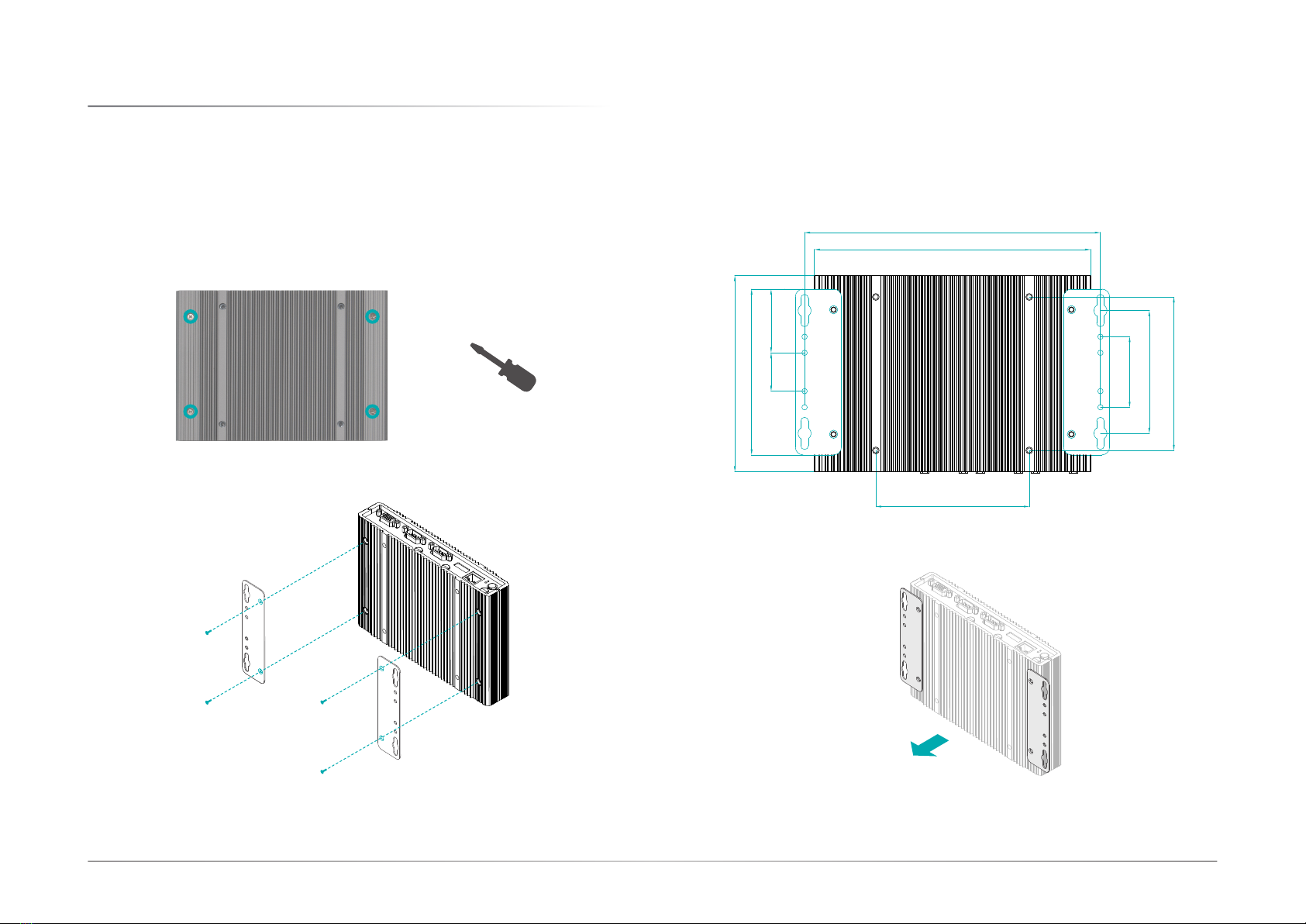
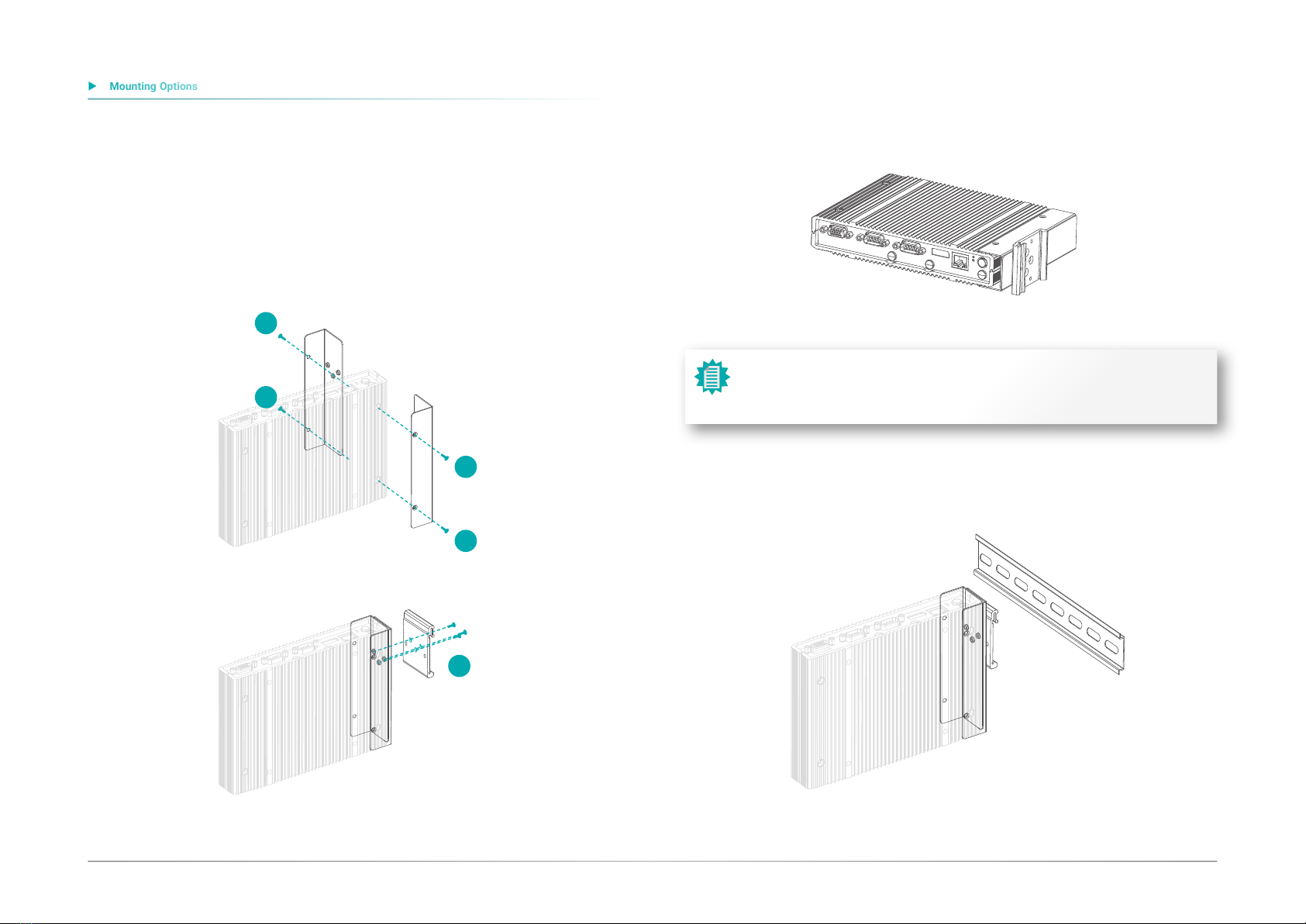
Mounting Options................................................................................................................... 8
Wall Mount ....................................................................................................................... 8
VESA Mount..................................................................................................................... 9
DIN Rail Mount...............................................................................................................10
Assembly ..............................................................................................................................11
Overview.........................................................................................................................11
Bottom Cover.................................................................................................................11
Top Cover .......................................................................................................................11
Front and Rear Panels...................................................................................................12
Antenna ..........................................................................................................................12
SSD Tray .........................................................................................................................13
Board Layout.........................................................................................................................14
System Board.................................................................................................................14
LEDs ......................................................................................................................................14
System Memory ...................................................................................................................15
Installing the SO-DIMM Module ...................................................................................15
Jumper Settings ...................................................................................................................16
Power On Select (JP7)..................................................................................................16
Front Panel (JP1)...........................................................................................................17
COM Serial / DIO Switch (JP8/JP9) ............................................................................17
SW4.................................................................................................................................18
I/O Ports................................................................................................................................19
Graphics Display............................................................................................................19
USB Ports .......................................................................................................................19
(4 x LAN, 2 x USB).........................................................................................................19
(2 x LAN, 4 x USB).........................................................................................................19
RJ45 LAN Ports .............................................................................................................20
COM (Serial) / DIO Port (DB9)......................................................................................20
9~36V DC-In...................................................................................................................21
SATA (Serial ATA) Connectors......................................................................................21
Battery ............................................................................................................................22
Chassis Intrusion...........................................................................................................22
Expansion Slots .............................................................................................................23
Installing the Mini PCIe Module ...................................................................................23
Installing SIM Card ........................................................................................................24
Chapter 3 - BIOS Settings...........................................................................................................25
Overview ...............................................................................................................................25
Main.......................................................................................................................................26
Advanced .............................................................................................................................26
ACPI Configuration........................................................................................................27
Audio Configuration.......................................................................................................28
SATA Configuration .......................................................................................................28
PCI Express Configuration............................................................................................29
Console Redirection ......................................................................................................29
SIO NUVOTON6116D.....................................................................................................30
NCT6116D HW Monitor ................................................................................................31
LAN Configuration .........................................................................................................32
Security .................................................................................................................................32
Trusted Computing........................................................................................................33
Boot .......................................................................................................................................33
Save & Exit ............................................................................................................................34
Updating the BIOS................................................................................................................34
Notice: BIOS SPI ROM..........................................................................................................34