3510004- 4 -
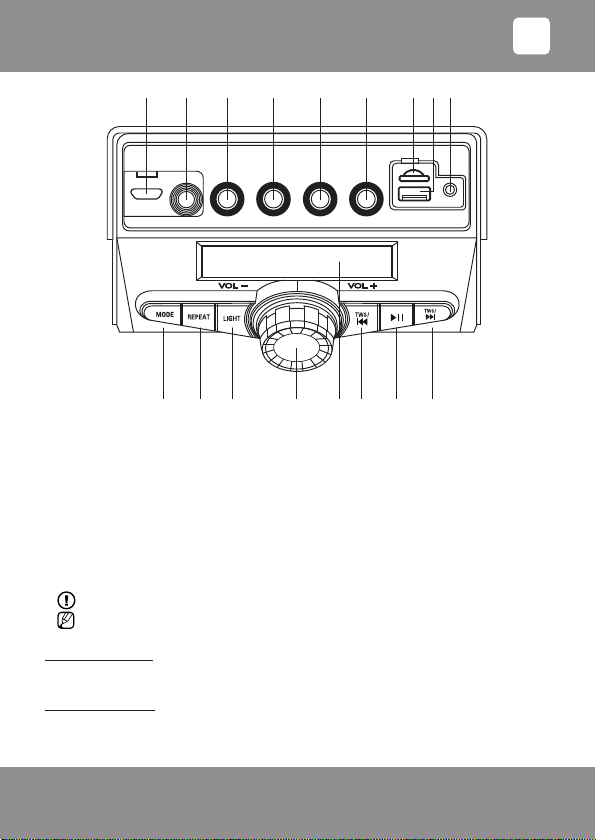
b) MIC.VOL (12) controls the volume of the microphone.
Tone adjustment:
By turning the button BASS (14), you can change bass reproduction level.
By turning the button TREBLE (13), you can change treble reproduction level.
Playback of the digital recordings:
1. Insert the USB ash memory stick or microSD memory card with digital records in the
corresponding socket (16/15).
If the USB ash memory stick/microSD card will be inserted or removed from switched on
sound system, damage to the data and/or device may occur!
2. In order to switch on the sound system, turn the main volume control VOL-/VOL+ (8)
clockwise. The playback of digital recording will start.
- If you have previously used another mode (FM, AUH, bLUE), then press the key MODE (1) to
select the playback mode for the digital recordings (display shows "Lod", followed by "USB TF").
- Switch on or cancel the playback pause mode with the key [ ] (5).
- Selection of the next or previous track:
"Fast forward" by temporarily pressing the key TWS/ (6).
"Rewind" by temporarily pressing the key TWS/ (4).
3. After listening to the records, press key [ ] (5).
4. By turning the main volume control VOL-/VOL+ (8) counter-clockwise, switch off the sound
system.
Choosing repetition/recording mode
By pressing the key REPEAT (2) you can select one of the following modes:
"ONE": repeats one composition.
"ALL": plays all compositions.
Playback of analogous signal from external source:
1. Insert the cable jack in the socket AUX IN (17), insert the second jack of the cable into the
audio output or headphone socket of audio source (e. g., smartphone, tablet, MP3/MP4 player,
etc.).
2. Switch on the sound system and select mode "AUH" with the key MODE (1).
3. Adjust the volume.
Bluetooth wireless connection:
• Bluetooth is a technology that use wireless radio-wave connection to connect devices.
Effective wireless operational distance is approximately up to 10 meters.
• Full functionality may not be guaranteed taking into account the variety of device
manufacturers, models and software versions.
Manual pairing of devices
a. By turning the main volume control VOL-/VOL+ (8) clockwise, switch on the sound
system. By pressing the key MODE (1), select "bLUE" mode.
b. Make sure that Bluetooth function has been activated in your Bluetooth device (for
example, smartphone). In order to do this, read your Bluetooth device user's manual.
EN