76
• Terminati i collegamenti potete
accendere il mixer tramite il tasto
(14).
• Accendete le vostre sorgenti sonore,
siano esse microfoni, lettori CD o
altro.
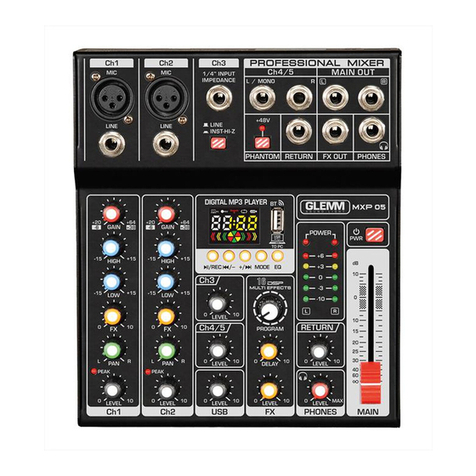
• Posizionate il comando main (16) in
posizione centrale quindi regolate i
volumi di ogni canale a piacimento.
Abbiate cura che il livello,
rappresentato dai leds (15) non
raggiunga costantemente il valore
massimo o otterrete distorsioni
e possibili danneggiamenti degli
apparecchi. In questo caso agite
sui comandi di guadagno GAIN (23)
(canali 1 e 2) e LEVEL (22) (canali 3,
4 e 5) per rientrare nei valori corretti.
• I canali 1 e 2 dispongono di vari
cursori (9) per regolare l’incidenza
delle tonalità alte, medie e basse, il
guadagno segnale, il bilanciamento
(PAN) sui canali destro e sinistro,
l’incidenza dell’eetto applicato e
ovviamente il volume del canale
stesso. I canali 3, 4 e 5 dispongono
del solo comando di volume (17).
• La presa FX OUT (11) invia il
segnale ad un secondo mixer o
amplicatore, la presa RETURN
(12) accetta segnali di linea esterni.
Se utilizzate in combinazione, le
prese FX OUT (11) e RETURN (12)
possono inviare la miscelazione ad
un processore esterno e farla poi
rientrare modicata tramite la presa
RETURN (12). Regolate il volume
dell’ingresso tramite il comando
rotante (24).
Il livello del segnale inviato tramite
la presa FX OUT (11) è regolabile,
anche in modo indipendente sui
canali 1 e 2, tramite il comando
rotante FX (19).
• Once the connections are
completed you can switch on the
mixer through the button (14).
• Turn on your audio sources
(microphones, CD players or other
xtures).
• Place the main control (16) in mid
position, than adjust the volumes
of each channel as you wish. Be
careful that the level, indicated by
the leds (15) doesn’t reach costantly
the peak value or you will obtain
distorsions and risk to damage the
devices. In this case act on GAIN
(23) (channels 1 and 2) and LEVEL
(22) controls (channels 3,4 and 5)
to reset the correct values.
• Channels 1 and 2 have several
sliders (9) to adjust the incidence
of bass, mide and treble, the signal
gain, the balance (PAN) on the left
and right channels, the incidence
of the eects and of course the
volume of the channel itself.
Channels 3, 4 and 5 have only the
volume control (17).
• The FX OUT (11) jack sends the
signal to a further mixer or amplier,
the RETURN socket (12) accepts
external line signals. When used
together, the FX OUT (11) and
RETURN (12) sockets can send
mixing to an external processor and
then get it back with modications
through the RETURN jack (12).
Adjust the input volume through the
rotating knob (24).
The level of the signal sent via the
FX OUT (11) socket is adjustable,
also independently, on channels 1
and 2, through the rotating knob FX
(19).